
소개
The Redmi Buds 8 Lite are advanced wireless earbuds designed to deliver an immersive audio experience with hybrid active noise cancellation, powerful sound, and extended battery life. This manual provides essential information for setting up, operating, and maintaining your earbuds.
상자 안에 무엇이 들어있나요?
- 레드미 버즈 8 라이트 이어버드 (좌우 세트)
- 충전 케이스
- USB Type-C 충전 케이블
- 실리콘 이어팁(다양한 사이즈)
- 사용자 설명서

Image: Redmi Buds 8 Lite earbuds in their open charging case, showcasin세련된 검은색 디자인.
설정
1. 이어버드와 케이스 충전
Before first use, fully charge the earbuds and the charging case. Place the earbuds into the charging case and connect the USB Type-C cable to the charging port on the case and a power source. The indicator light on the case will show charging status.
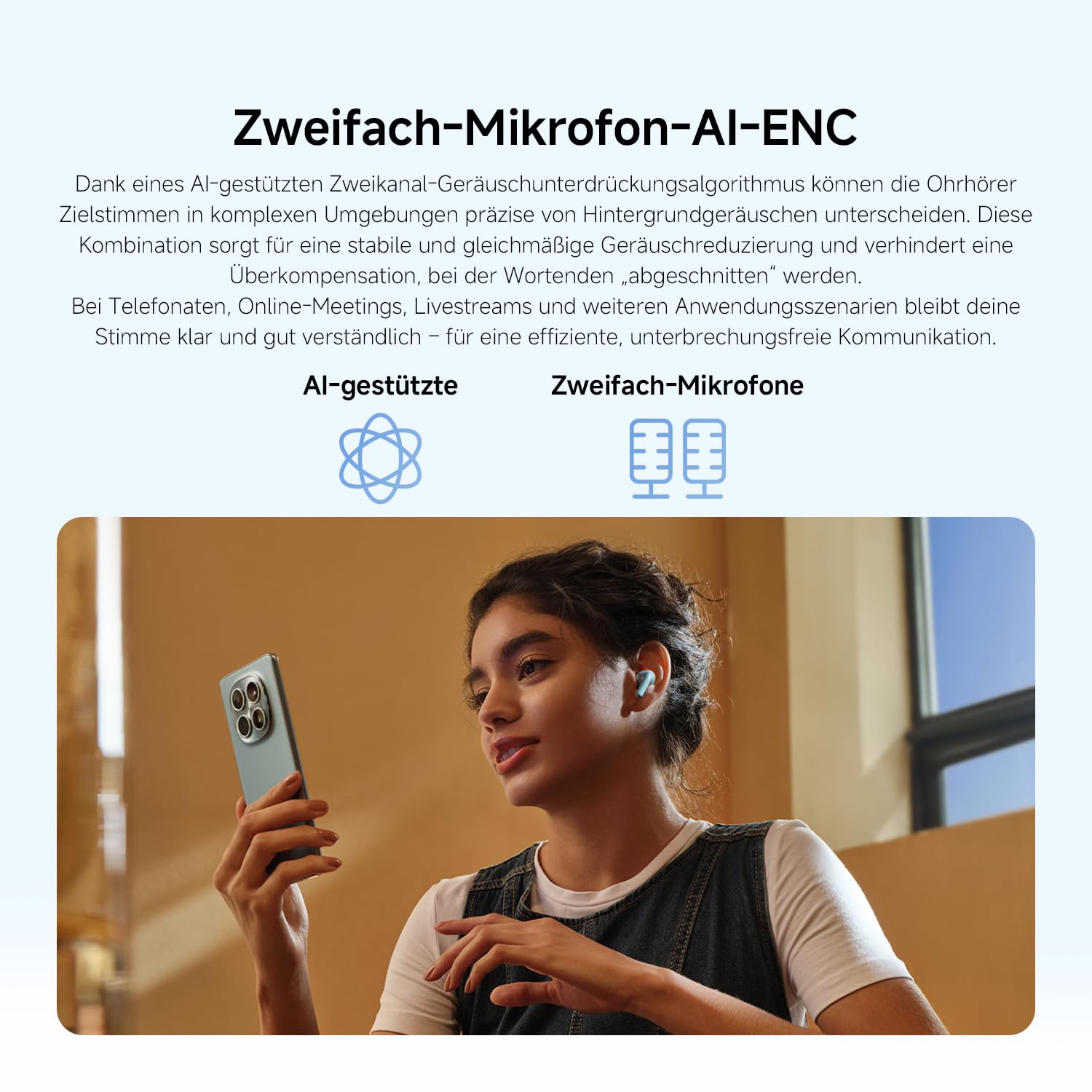
Image: The Redmi Buds 8 Lite charging case with earbuds, illustrating the extended battery life of up to 36 hours with the case.
2. 초기 페어링
- 충전 케이스를 여세요. 이어버드가 자동으로 페어링 모드로 진입합니다.
- 기기(스마트폰, 태블릿 등)에서 Bluetooth를 활성화하세요.
- 검색 "Redmi Buds 8 Lite" in the list of available Bluetooth devices and select it to connect.
- For Android devices, Google Fast Pair will simplify the connection process by displaying a pop-up notification.
이어버드 작동하기
터치 컨트롤
The Redmi Buds 8 Lite feature intuitive touch controls on each earbud. The functions can be customized via the Xiaomi Earbuds app.
- 재생/일시 중지: 양쪽 이어버드를 한 번 탭하세요.
- 다음 트랙: 오른쪽 이어버드를 두 번 탭하세요.
- 이전 트랙 : 왼쪽 이어버드를 두 번 탭하세요.
- 전화 받기/종료: 양쪽 이어버드를 한 번 탭하세요.
- 전화 거부: 한쪽 이어버드를 길게 누르세요.
- Voice Assistant 활성화 : 양쪽 이어버드를 세 번 탭하세요.
- ANC/투명 모드 전환: 한쪽 이어버드를 길게 누릅니다(사용자 정의 가능).
능동 잡음 제거 (ANC)
The earbuds feature 42dB Hybrid Active Noise Cancellation to reduce ambient noise, allowing for a more focused listening experience. You can switch between ANC, Transparency, and Standard modes using the touch controls or the Xiaomi Earbuds app.
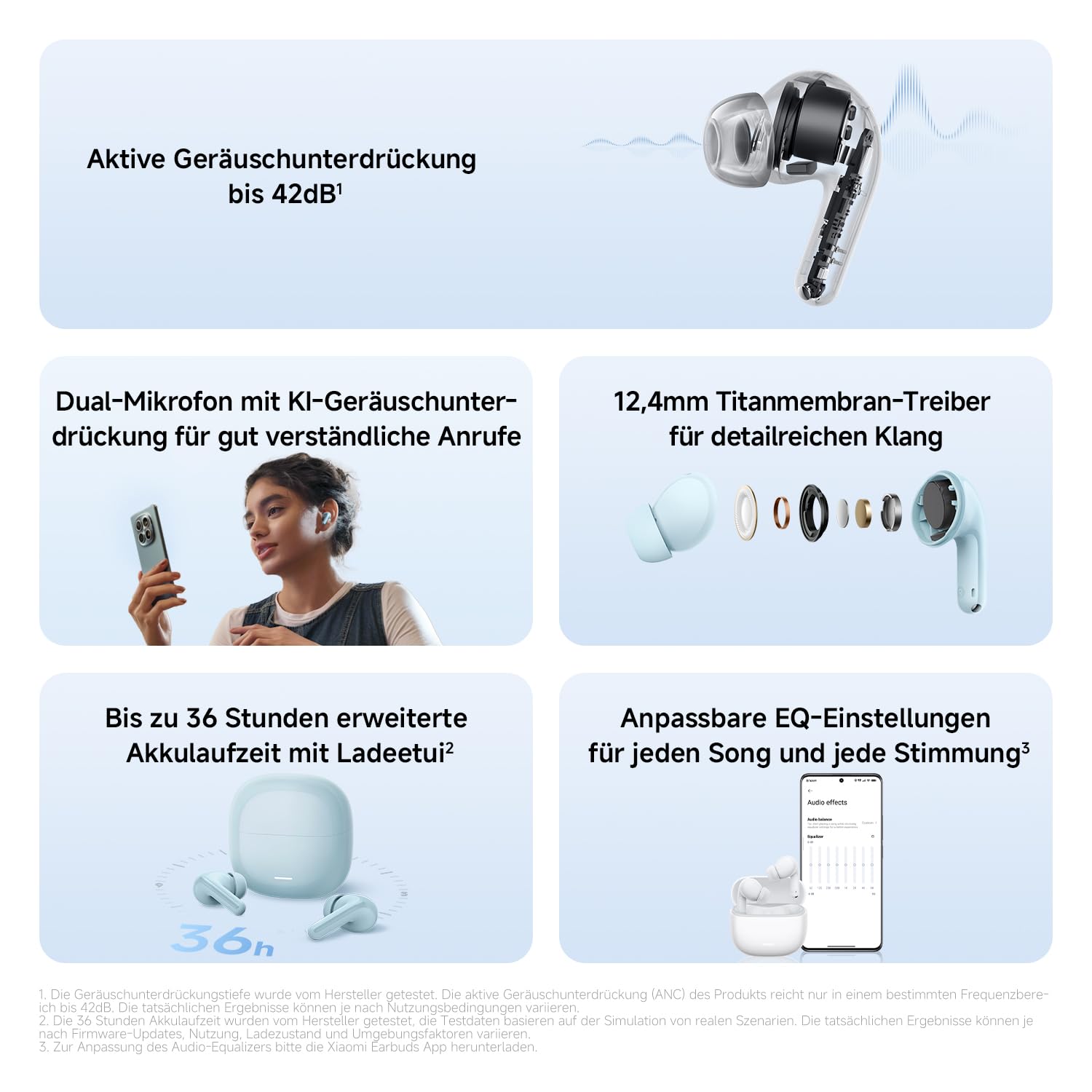
이미지: 자세한 view of the Redmi Buds 8 Lite earbud highlighting its active noise cancellation capability of up to 42dB.
Crystal-Clear Calls with AI Dual-Microphone
Equipped with an AI dual-microphone system, the earbuds effectively reduce background noise and wind interference during calls, ensuring your voice is transmitted clearly.
Image: A user wearing Redmi Buds 8 Lite earbuds while on a call, demonstrating the effectiveness of the AI dual-microphone system for clear communication.
샤오미 이어폰 앱
Download the Xiaomi Earbuds app to unlock full customization options, including personalized EQ settings, firmware updates, and touch control adjustments.
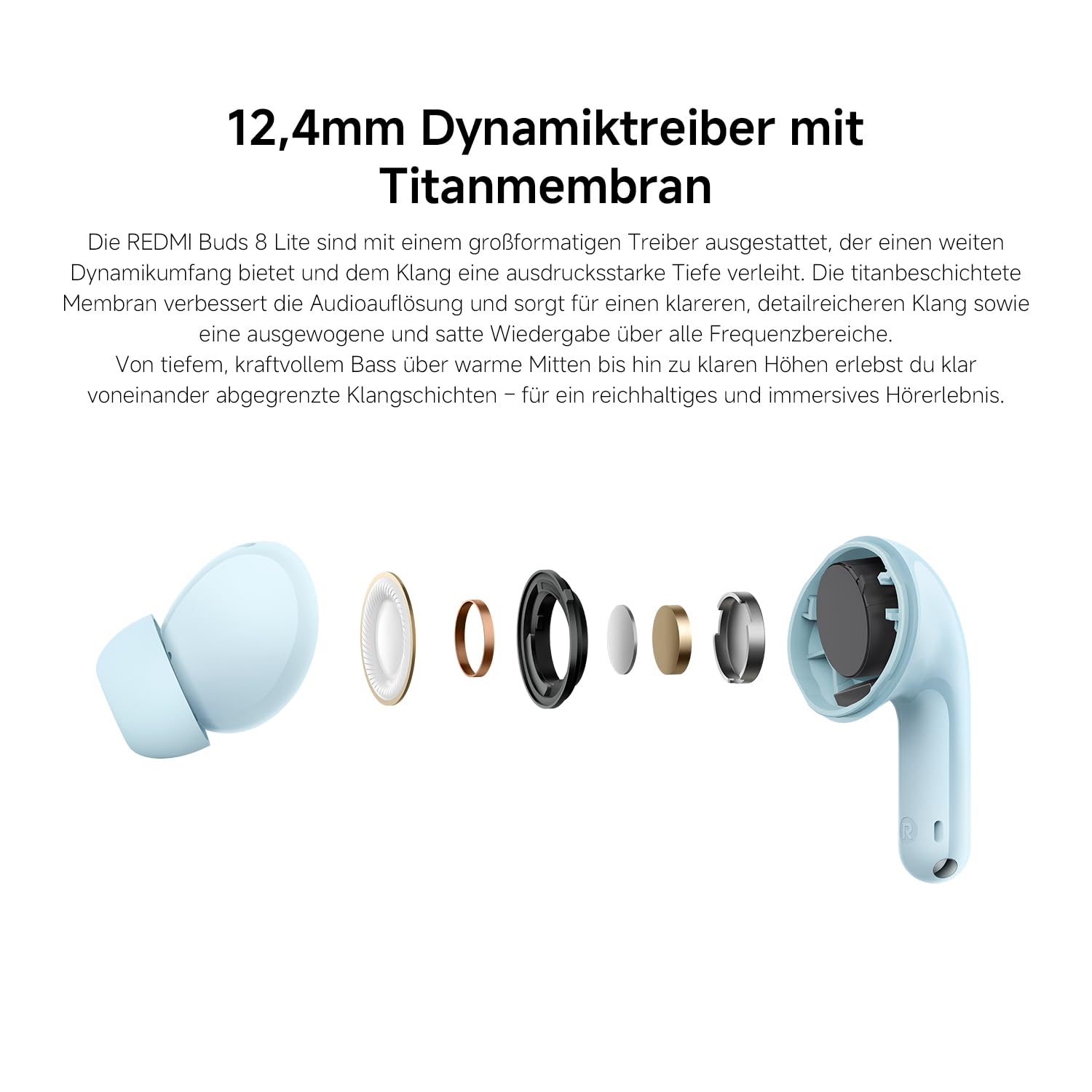
Image: A smartphone screen displaying the Xiaomi Earbuds app interface with various customizable EQ settings for audio personalization.
주요 특징
- 42dB 하이브리드 액티브 노이즈 캔슬링: Provides deep quiet by blocking out ambient noise for immersive sound.
- Powerful 12.4mm Dynamic Driver: Delivers rich, detailed sound with strong bass and clear treble.
- AI Dual-Microphone System: Ensures crystal-clear calls by reducing background noise and wind interference.
- 8/36-Hour Ultra-Long Battery: 한 번 충전으로 최대 8시간, 충전 케이스를 사용하면 총 36시간 사용 가능합니다.
- 초고속 충전: Get 2 hours of music from just a 10-minute charge.
- 맞춤형 사운드: Fine-tune audio via the Xiaomi Earbuds app with EQ settings.
- 블루투스 5.4 연결: 안정적이고 효율적인 무선 연결을 제공합니다.
- IP54 방수 기능: Protects against splashes and sweat, suitable for workouts and outdoor activities.
- 구글 빠른 페어링: Enables quick and seamless pairing with Android devices.
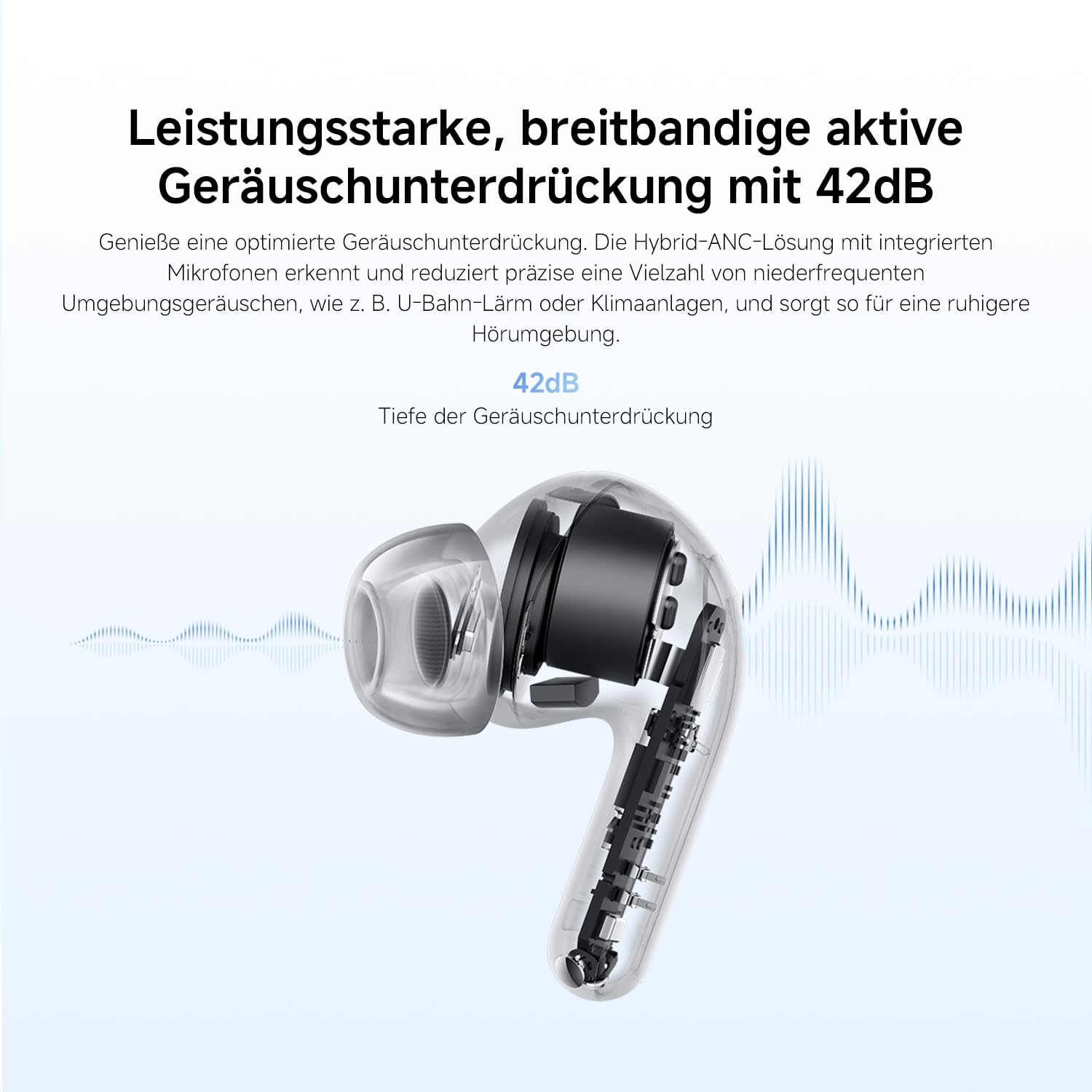
Image: An exploded diagram of the Redmi Buds 8 Lite earbud, highlighting its 12.4mm dynamic driver for detailed audio.
유지
To ensure the longevity and optimal performance of your Redmi Buds 8 Lite, follow these maintenance guidelines:
- 청소: 부드럽고 마른 보풀 없는 천으로 이어버드와 충전 케이스를 정기적으로 닦으세요. 강한 화학 물질이나 연마재는 사용하지 마세요.
- 귀 팁: 실리콘 이어팁은 주기적으로 분리하여 물과 순한 비누로 세척하십시오. 다시 부착하기 전에 완전히 건조되었는지 확인하십시오.
- 방수 기능: The earbuds are IP54 water-resistant, meaning they are protected against splashes and sweat. Do not submerge them in water or expose them to heavy rain. Dry them thoroughly if they get wet.
- 저장: 사용하지 않을 때는 이어버드를 충전 케이스에 보관하여 먼지와 손상으로부터 보호하세요.
문제 해결
If you encounter any issues with your Redmi Buds 8 Lite, refer to the following common solutions:
- 이어버드가 페어링되지 않음: 두 이어버드가 모두 충전 케이스에 있는지 확인한 후, 케이스 뚜껑을 열어 페어링 모드를 시작하세요. 기기의 Bluetooth 설정을 확인하고 다시 연결해 보세요.
- 한쪽 이어버드에서 소리가 나지 않습니다. Place both earbuds back into the case, close the lid, wait a few seconds, then open it again. This often re-syncs them.
- 충전 문제: 충전 케이블이 케이스와 전원에 단단히 연결되어 있는지 확인하세요. 이어버드와 케이스 내부의 충전 접점을 깨끗이 닦으세요.
- 음질이 좋지 않음: Ensure the ear tips provide a snug fit to your ear canal. Try different sized ear tips for better seal. Check for any debris blocking the earbud speakers.
- 터치 컨트롤이 반응하지 않음: Ensure your fingers are clean and dry. A firmware update via the Xiaomi Earbuds app might resolve the issue.
- 공장 초기화 : If problems persist, perform a factory reset (refer to the Xiaomi Earbuds app or official support for specific instructions).
명세서
| 특징 | 사양 |
|---|---|
| 상표 | 샤오미 |
| 모델명 | redmi buds 8 lite |
| 모델 번호 | BHR08OMGL |
| 색상 | 검은색 |
| 귀 위치 | 귀에 |
| 폼 팩터 | 귀에 |
| 임피던스 | 32옴 |
| 연결 기술 | 무선 전화 |
| 무선 기술 | 블루투스 |
| 블루투스 버전 | 5.4 |
| 블루투스 범위 | 10 미터 |
| 제어 유형 | 터치 컨트롤 |
| 제어 방법 | 앱 |
| 배터리 평균 수명 | 38시간(충전 케이스 포함) |
| 배터리 충전 시간 | 1시간 |
| 소음 제어 | Hybrid Noise Cancellation (42 dB) |
| 주파수 범위 | 20Hz - 20,000Hz |
| 오디오 드라이버 유형 | 다이내믹 드라이버(12.4mm) |
| 방수 레벨 | 방수(IP54) |
| 품목 무게 | 39그램 |
보증 및 지원
The Redmi Buds 8 Lite are covered by a 1년 제조사 보증 구매일로부터. 본 보증은 정상적인 사용 상태에서 발생하는 재료 및 제조상의 결함에 적용됩니다. 오용, 사고, 무단 개조 또는 정상적인 마모로 인한 손상에는 적용되지 않습니다.
For warranty claims, technical support, or further assistance, please visit the official XIAOMI support web사이트를 방문하거나 고객 서비스에 문의하세요. 보증 확인을 위해 구매 증빙 자료를 보관하세요.
샤오미 공식 지원: https://www.mi.com/global/support