
소개
This manual provides detailed instructions for the installation, operation, and maintenance of your Reobiux 2K Outdoor WiFi Surveillance Camera, Model K6Q-1P. Please read this manual thoroughly before using the product to ensure proper functionality and safety.
패키지 내용
아래 나열된 모든 품목이 패키지에 포함되어 있는지 확인하세요. 품목이 누락되었거나 손상된 경우 고객 지원팀에 문의하세요.
- 1 x Surveillance Camera
- 1 x 전원 어댑터
- 1 x 장착 나사 세트
- 1 x Waterproof Cover Kit
- 1 x 사용자 설명서
제품 끝view
The Reobiux 2K Outdoor WiFi Surveillance Camera (Model K6Q-1P) is an advanced security solution featuring a dual-lens design for comprehensive monitoring. It offers 2K resolution, color night vision, motion detection, two-way audio, and compatibility with Amazon Alexa.
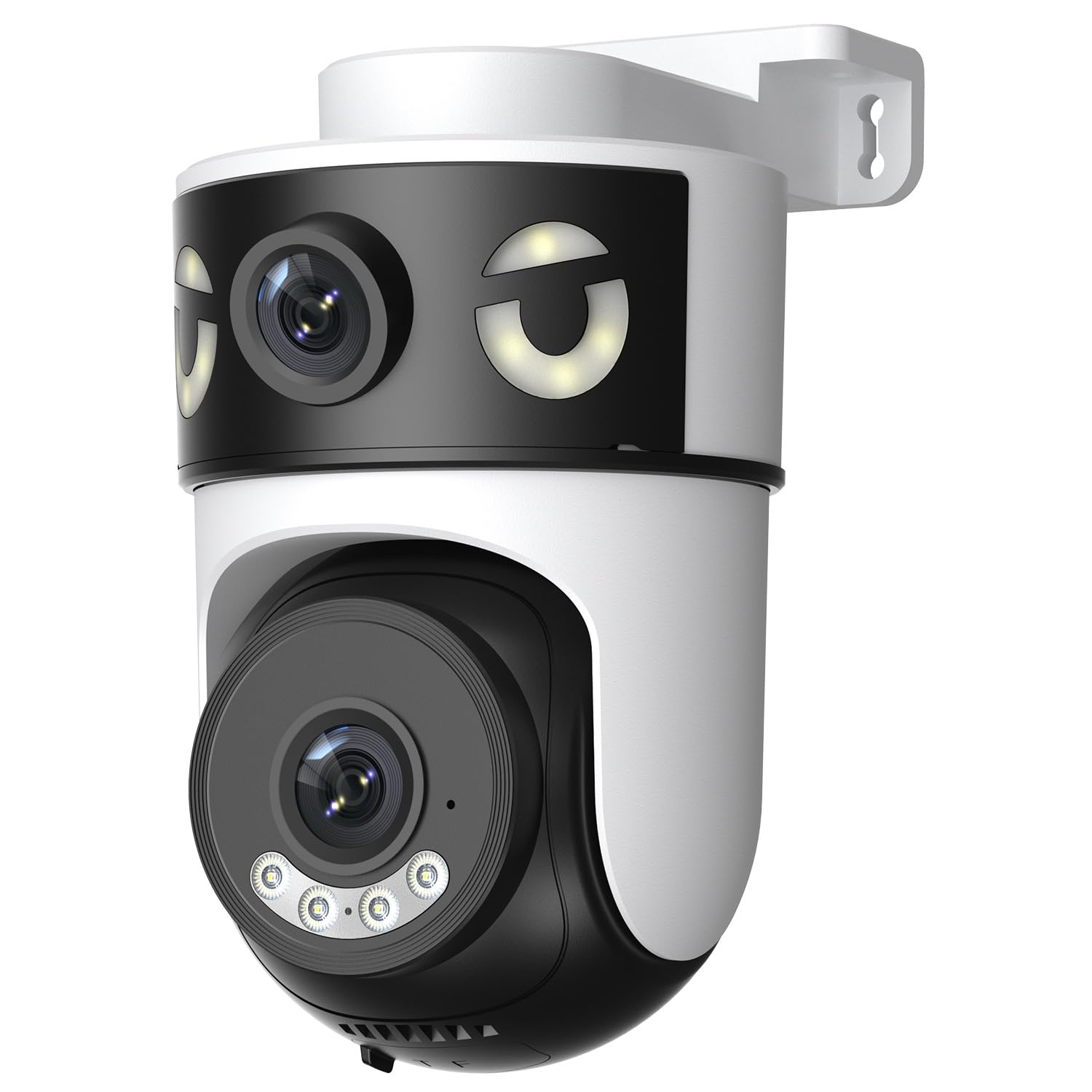
Image: Reobiux 2K Outdoor WiFi Surveillance Camera, Model K6Q-1P. This image shows the camera unit with its dual lenses, two external antennas, and a wall-mount bracket.
주요 특징
- Dual Lens & 355° View: Unique 2-in-1 design supporting fixed area surveillance and mobile full-view monitoring. Features two high-resolution lenses; one fixed and one rotatable for wide panoramic views.
- 2K 해상도 및 컬러 야간 투시 기능: Delivers clear and detailed images and videos. Offers three night vision modes: Infrared, Color, and Smart Night Vision for reliable 24-hour surveillance.
- Motion Detection & Alarm Siren: Advanced motion detection sends real-time alarm notifications to your mobile device upon detecting movement.
- Two-Way Audio & Multi-User Access: Built-in microphone and speaker allow for remote communication. Supports sharing camera access with multiple users.
- SD Card/Cloud Storage & Alexa Compatibility: Supports 24-hour continuous recording to a Micro SD card (max 128GB) or cloud server. Compatible with Amazon Alexa for voice control.
설치 가이드
1. 카메라 장착
The camera is designed for wall mounting. Choose a suitable location that provides the desired surveillance coverage and is within range of your Wi-Fi network and a power outlet.
- 카메라 받침대를 본떠서 벽에 드릴로 뚫을 위치를 표시하세요.
- 필요한 경우 구멍을 뚫고 벽 플러그를 삽입하십시오.
- Secure the camera to the wall using the provided mounting screws.
- Ensure the camera is firmly attached and the waterproof cover kit is properly installed to protect connections.
2. 전원 켜기
Connect the provided power adapter to the camera's power input and then plug it into a standard electrical outlet. The camera will power on and initiate its startup sequence.
3. 네트워크 연결(Wi-Fi)
The camera connects via 2.4GHz Wi-Fi. Follow these steps to connect your camera to your home network:
- 다운로드 O-kam Pro application from the App Store (iOS) or Google Play Store (Android) on your smartphone or tablet.
- 새 계정을 등록하거나 이미 계정이 있는 경우 로그인하세요.
- 앱 내 안내에 따라 새 카메라를 추가하세요. 일반적으로 카메라의 QR 코드를 스캔하거나 카메라 ID를 수동으로 입력하는 과정이 포함됩니다.
- 2.4GHz Wi-Fi 네트워크를 선택하고 메시지가 나타나면 비밀번호를 입력하세요.
- Wait for the camera to connect to the network. A voice prompt or indicator light will confirm a successful connection.

Image: Reobiux camera with a smartphone displaying the O-kam Pro app interface, demonstrating remote control and live view 능력.
작동 지침
살다 View 및 팬/틸트 제어
Once connected, open the O-kam Pro app to access the live feed from your camera. The dual-lens system provides both a fixed wide view and a movable PTZ (Pan-Tilt-Zoom) view.
- 앱에서 카메라를 탭하세요 view 라이브 스트림.
- Use the on-screen controls to pan (horizontal rotation up to 355°) and tilt (vertical movement) the movable lens to adjust the view잉 각도.
- Switch between the fixed and movable lens views within the app interface.
야간 투시경 모드
카메라는 3가지 야간 시야 모드를 제공합니다.
- 적외선 나이트 비전: Provides black and white images in low-light conditions using infrared LEDs.
- 컬러 나이트 비전: 내장된 스포트라이트를 이용하여 야간에도 선명한 컬러 이미지를 제공합니다.
- 스마트 나이트 비전: 감지된 움직임이나 조명 조건에 따라 적외선과 컬러 야간 투시경을 자동으로 전환합니다.
- You can select your preferred night vision mode in the O-kam Pro app settings.
동작 감지 및 알림
Configure motion detection settings and receive alerts on your mobile device:
- Navigate to the camera settings in the O-kam Pro app.
- 동작 감지를 활성화하고 필요에 따라 감도 수준을 조정합니다.
- Set up alert notifications to be sent to your smartphone.
- You can also enable the alarm siren to deter intruders.
양방향 오디오
Use the two-way audio feature to communicate through the camera:
- 라이브에서 view interface of the O-kam Pro app, tap the microphone icon to speak. Your voice will be transmitted through the camera's speaker.
- 카메라 주변의 소리를 들으려면 스피커 아이콘을 탭하세요.
비디오 녹화 및 저장
The camera supports continuous 24-hour recording. You have two storage options:
- 마이크로 SD 카드 : Insert a Micro SD card (up to 128GB, not included) into the designated slot on the camera. The camera will automatically begin recording to the card.
- 클라우드 스토리지: Subscribe to a cloud storage plan through the O-kam Pro app for secure off-site video storage.
- 기록된 foo에 액세스tage via the O-kam Pro app.
아마존 알렉사 통합
Integrate your Reobiux camera with Amazon Alexa for voice control:
- 모바일 장치에서 Amazon Alexa 앱을 엽니 다.
- Go to "Skills & Games" and search for the "O-kam Pro" skill.
- Enable the skill and link your O-kam Pro account.
- Discover devices. You can now use voice commands like "Alexa, show me the front door camera" to view the live feed on compatible Alexa devices.
유지
- 청소: 카메라 렌즈와 바디는 부드러운 천으로 정기적으로 닦아주세요.amp 천으로 먼지와 때를 제거하세요. 강한 화학 물질이나 연마성 세제는 사용하지 마세요.
- 날씨 보호: The camera is waterproof, but ensure all connections are sealed properly, especially the power cable and any SD card slots, to maintain its weather resistance.
- 펌웨어 업데이트: Check the O-kam Pro app periodically for firmware updates to ensure optimal performance and security.
문제 해결
- 카메라 전원이 켜지지 않음:
- Ensure the power adapter is securely connected to both the camera and a working electrical outlet. Verify the outlet has power.
- Wi-Fi에 연결할 수 없습니다.
- Ensure your Wi-Fi network is 2.4GHz. Check your Wi-Fi password for accuracy. Move the camera closer to your Wi-Fi router to improve signal strength. Restart your router and the camera.
- 라이브 없음 view or recording:
- Check your internet connection. Ensure the camera is connected to Wi-Fi. Verify that the Micro SD card is inserted correctly and not full, or that your cloud storage subscription is active.
- 동작 감지 알림을 받지 못했습니다:
- Check app notification settings on your phone and within the O-kam Pro app. Ensure motion detection is enabled and sensitivity is set appropriately. Verify your phone has an active internet connection.
- 양방향 오디오가 작동하지 않습니다.
- Ensure your phone's microphone and speaker are enabled for the O-kam Pro app. Check the volume settings on your phone and within the app. Ensure there are no obstructions blocking the camera's microphone or speaker.
명세서
| 특징 | 사양 |
|---|---|
| 상표 | 레오비우 |
| 모델명 | K6Q-1P |
| 모델 번호 | REO-K6Q-1P |
| 장착 유형 | 벽걸이형 |
| 비디오 녹화 해상도 | 2K |
| 항목 수 | 1 |
| 무선 통신 기술 | 와이파이(2.4GHz) |
| View잉 각도 | 355도 (팬) |
| 설치 유형 | 스크류 인 |
| 재료 | 플라스틱 |
| 권tage | 5볼트(DC) |
| 힘 | 5 와트 |
| 방수 레벨 | 방수복 |
| 특별 기능 | Two-Way Audio, Local Recording, HD Resolution, PTZ Technology |
| 권장 사용 | 야외 보안 |
| 호환 장치 | 노트북, 스마트폰, 태블릿, 텔레비전 |
| 전원 | 전기 케이블 |
| 연결 프로토콜 | 한국어: |
| 컨트롤러 유형 | O-kam Pro App |
보증 및 지원
For warranty information and technical support, please refer to the official Reobiux website or contact Reobiux customer service directly. Keep your purchase receipt as proof of purchase for warranty claims.
Manufacturer: Reobiux