
1. 서론
Thank you for choosing the Haloview Byte Tango BT10 Wireless Rear View Mirror Dashcam Backup Camera System. This system provides comprehensive front and rear vehicle coverage with a 10-inch 1080P monitor, a built-in dashcam, and a wireless backup camera. This manual will guide you through the installation, operation, and maintenance of your new system to ensure optimal performance and safety.
2. 제품 오버view
2.1 패키지 내용
헤일로view Byte Tango BT10 system includes the following components:
- 1 x BT10 Monitor (10-inch, 1280x320 resolution)
- 1 x Rear Camera BTC128W (with WDR Technology)
- 1 x 개스킷
- 고무 스트랩
- Micro-SD / TF Card
- Type-C to DC Power Cable
- 카메라 변환 케이블
- Power Adapter for Pre-wired RV
- 페어링 케이블
- 담배 라이터 전원 어댑터
- 벨크로 스트랩
- 사용자 설명서

Figure 2.1: Included components of the Haloview BT10 system.
2.2 주요 특징
- 10-inch IPS Touchscreen Monitor: Provides a clear and intuitive interface for viewing and controlling the system.
- Built-in 1080P Dashcam: Captures forward-facing video with a 140° wide-angle lens.
- Wireless 1080P Backup Camera (BTC128W): Offers a 135° rear view, eliminating blind spots and aiding in safe reversing.
- Wide Dynamic Range (WDR) Technology: Improves image quality by balancing light and dark contrasts, especially useful in challenging lighting conditions.
- IP69K 방수 카메라: 다양한 기상 조건에서 내구성과 안정적인 성능을 보장합니다.
- 유연한 전원 옵션: Can be powered via cigarette lighter socket or Type-C port (PD protocol required).
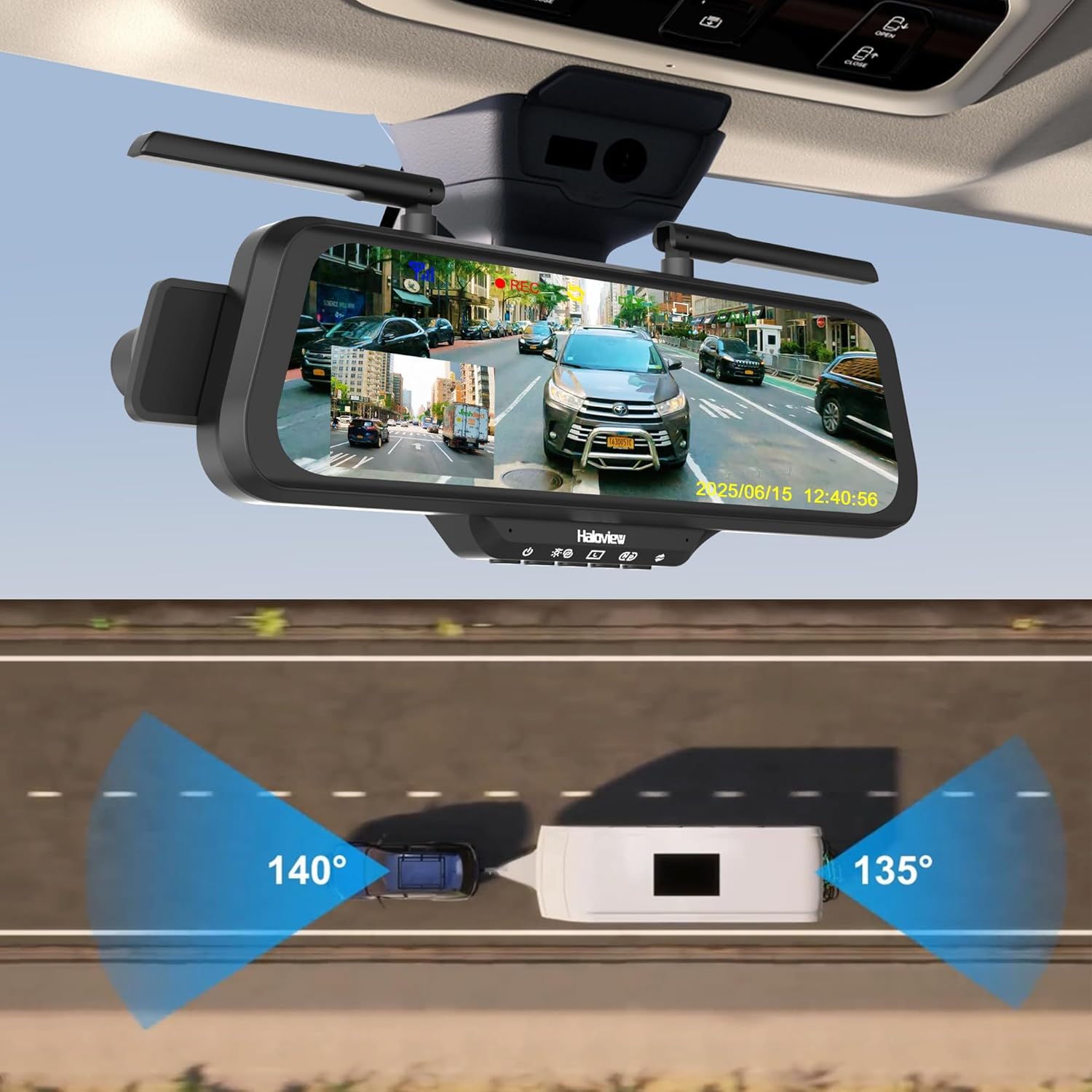
Figure 2.2: Haloview BT10 system with wide-angle views.
3. 설정 및 설치
3.1 설치 전 확인
Before installing the system, please ensure the stability of your vehicle's rearview mirror. If the rearview mirror or its bracket is loose, it is recommended to replace or tighten it first. An unstable mirror may cause the streaming display to shake or fail to stay in position while driving.
3.2 모니터 설치
- Attach the BT10 monitor to your existing rearview mirror using the provided rubber straps. Ensure it is securely fastened and centered for optimal view주고받음.
- Adjust the monitor's angle to provide a clear view of the road ahead and the display.

Figure 3.1: Monitor and dashcam installation.
3.3 Wireless Rear Camera Installation (BTC128W)
- Choose a suitable location at the rear of your vehicle for the BTC128W camera, ensuring a clear line of sight and optimal view잉 각도.
- 제공된 하드웨어를 사용하여 카메라를 안전하게 장착하십시오.
- Connect the camera to a power source (e.g., reverse light power for automatic activation when reversing, or constant power for continuous monitoring).

Figure 3.2: Wireless rear camera installation on an RV.
3.4 전원 연결
The BT10 monitor offers flexible power options:
- 시가 라이터 소켓: Use the provided cigarette lighter power adapter to plug into your vehicle's 12V accessory socket.
- C 형 포트 : Connect a Type-C cable to the monitor's Type-C port. Note that a Power Delivery (PD) protocol compatible power source is required for this option.

Figure 3.3: Flexible power options for the monitor.
4. 사용 설명서
4.1 기본 작업
- 전원 켜기/끄기: The system will typically power on automatically when the vehicle starts and power off when the vehicle is turned off. A manual power button may also be available on the monitor.
- 터치스크린 인터페이스: Navigate through menus and settings by tapping and swiping on the 10-inch IPS touchscreen.
- 디스플레이 모드 : The monitor can display the front dashcam view, 후방 카메라 view또는 화면 분할 view of both. Switch between modes via the touchscreen interface.
4.2 Dashcam Features
- 연속 녹화 : The built-in 1080P dashcam continuously records footage of the road ahead (140° wide-angle). Footage is stored on the Micro-SD card.
- 루프 녹음: When the Micro-SD card is full, the oldest files는 자동으로 덮어쓰여집니다.
- 긴급 녹음: In the event of a sudden impact or collision, the G-sensor will trigger emergency recording, locking the current footag덮어쓰기를 방지합니다.
- 빠른 캡처 : Tap the "REC" icon on the screen to manually capture a snapshot or start/stop recording.

Figure 4.1: Quick capture function on the monitor.
4.3 Backup Camera Features
- 자동 활성화 : If wired to the reverse lights, the rear camera view will automatically display when the vehicle is put into reverse.
- 넓은 동적 범위(WDR): The BTC128W camera features WDR technology, which enhances image clarity in high-contrast lighting conditions, such as bright sunlight and deep shadows, or at night.
- Full-Color Dim-Light Night Vision: Provides clear, full-color images even in low-light environments.

Figure 4.2: Wide Dynamic Range (WDR) technology comparison.
4.4 Parking Line Adjustment
The parking guidelines displayed on the monitor can be adjusted to match your vehicle's dimensions and preferences:
- 수평 조정: Slide left/right on the touchscreen to adjust the parking lines horizontally.
- 수직 조정: Slide up/down on the touchscreen to adjust the parking lines vertically.

Figure 4.3: Adjusting parking lines on the display.
5. 유지관리
- 모니터 청소: Use a soft, dry cloth to clean the monitor screen. For stubborn smudges, lightly damp천에 물이나 화면에 안전한 세척제를 묻혀 닦아주세요. 강한 화학 물질은 피하세요.
- 카메라 렌즈 청소하기: Gently wipe the camera lens with a soft, lint-free cloth to ensure clear image quality.
- 마이크로 SD 카드 관리: Regularly format the Micro-SD card (at least once a month) to maintain optimal recording performance and prevent data corruption. Back up important footag서식을 적용하기 전에 e를 입력하세요.
- 펌웨어 업데이트: Check the Haloview 공식적인 website periodically for any available firmware updates for your BT10 system. Follow the instructions provided with the update carefully.
6. 문제 해결
6.1 일반적인 문제 및 해결 방법
- 모니터링할 전원이 없습니다:
- Check if the power cable is securely connected to both the monitor and the power source (cigarette lighter or Type-C port).
- 차량의 전원 콘센트가 제대로 작동하는지 확인하십시오.
- If using Type-C, confirm the power source supports Power Delivery (PD) protocol.
- No Signal from Rear Camera:
- Verify the rear camera is receiving power.
- Ensure the camera and monitor are paired. Refer to the pairing instructions in the full user manual if re-pairing is needed.
- Check for any obstructions between the camera and monitor that might interfere with the wireless signal.
- 이미지 품질이 좋지 않음:
- 카메라 렌즈와 모니터 화면을 닦으세요.
- 카메라가 단단히 장착되었고 진동하지 않는지 확인하세요.
- Check for strong electromagnetic interference sources near the camera or monitor.
- Dashcam Not Recording:
- Ensure a Micro-SD card is inserted correctly.
- 마이크로 SD 카드를 포맷하세요.
- Check if the recording function is enabled in the monitor's settings.
7. 사양
| 특징 | 사양 |
|---|---|
| 상표 | 후광view |
| 모델 | BT10 |
| 화면 크기 | 10 인치 |
| 제품 치수 | 11인치 길이 x 9인치 너비 x 5인치 높이 |
| 호환 장치 | BTC128W/BTC126/BTC125W |
| 설치 유형 | 표면 실장 |
| 렌즈 유형 | 와이드 앵글 |
| 실제 각도 View (Dashcam) | 140도 |
| 분야의 View (백업 카메라) | 135도 |
| 커넥터 유형 | 무선 전화 |
| 비디오 캡처 해상도 | 1080p |
| 내장 미디어 | Monitor and camera |
8. 보증 정보
헤일로view Byte Tango BT10 system comes with a 1년 제조사 보증. This warranty covers defects in materials and workmanship under normal use. Please retain your proof of purchase for warranty claims. For specific terms and conditions, refer to the warranty card included in your package or visit the official Haloview web대지.
9. 지원 및 연락처 정보
If you encounter any issues or have questions regarding your Haloview Byte Tango BT10 system that are not covered in this manual, please contact Haloview customer support. You can typically find contact information (email, phone, or support portal) on the official Haloview web웹사이트 또는 제품 포장에 표시되어 있습니다.
최신 지원 리소스를 보려면 다음 사이트를 방문하세요. www.haloview.com