
소개
The Peplink MAX BR1 Pro 5G (HW3) is a rugged, enterprise-grade 5G router designed to provide high-speed, reliable internet connectivity in various environments. Featuring an X65 5G modem, Wi-Fi 6, and advanced networking capabilities like SpeedFusion, this device ensures consistent performance for business-critical applications, vehicles, and remote sites. This manual provides essential information for setting up, operating, and maintaining your router.
패키지 내용
아래 나열된 모든 품목이 패키지에 포함되어 있는지 확인하세요.
- 1x BR1 Pro 5G (HW3) Router
- 4x LTE/5G 안테나
- 2x Dual Band Wi-Fi Antennas
- 1x GPS Active Antenna
- 1x 12V 2A 4 Pin DC Power Supply

제품 끝view
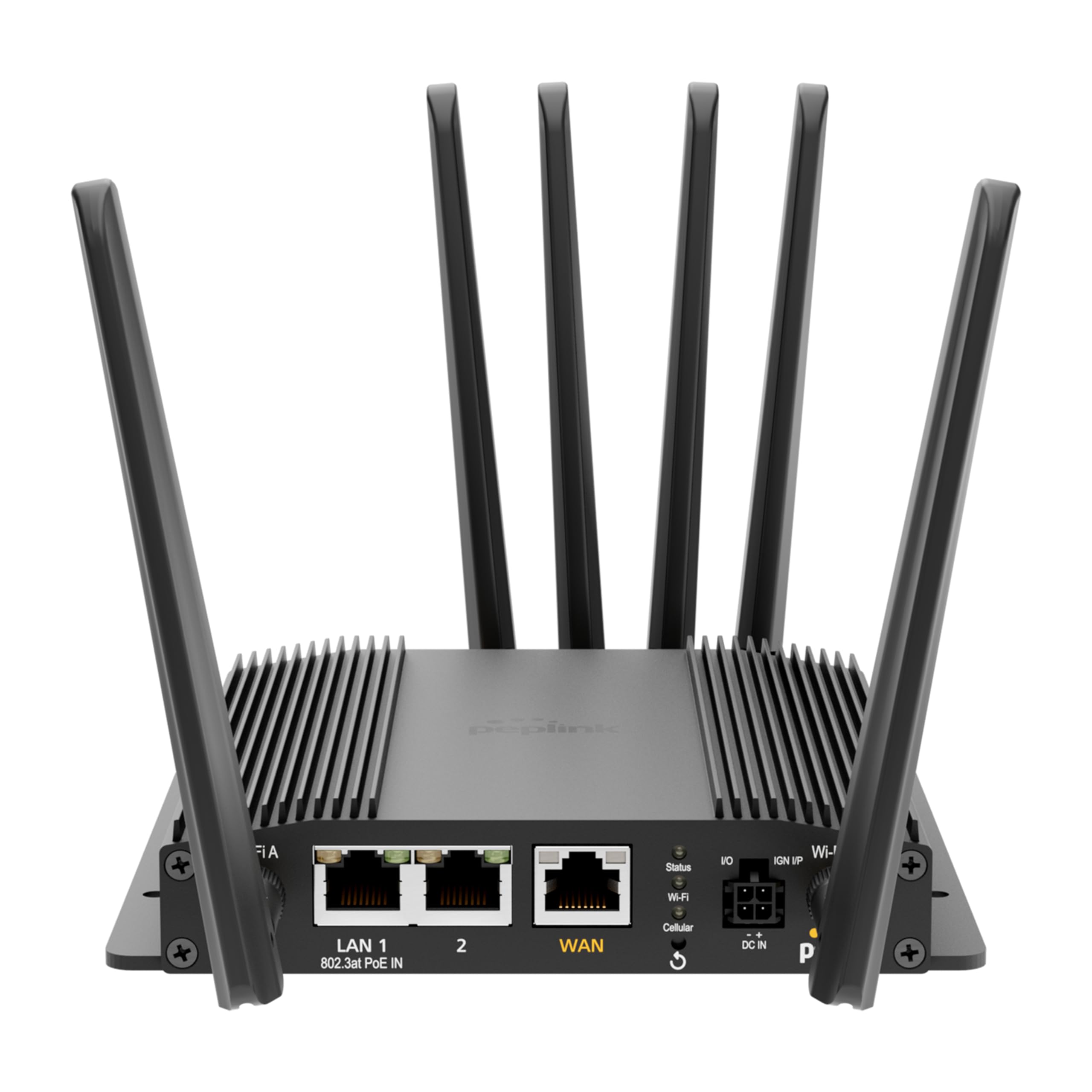
The Peplink MAX BR1 Pro 5G (HW3) features a robust design with multiple connectivity options and indicators.
전면 패널

- LAN 1 (802.3at PoE IN): Gigabit Ethernet port with Power over Ethernet input capability.
- 랜 2: 기가비트 이더넷 포트.
- WAN : Gigabit Ethernet port for primary internet connection.
- Wi-Fi Antenna A & B: Connectors for dual-band Wi-Fi antennas.
- 상태 LED : 기기의 작동 상태를 나타냅니다.
- 와이파이 LED: Wi-Fi 활동을 나타냅니다.
- 셀룰러 LED: Indicates cellular signal strength and connection status.
- I/O & IGN I/P: Input/Output and Ignition Input ports for specialized applications.
- DC 입력 : 전원 입력 포트.
후면 패널
- Cellular A, B, C, D: Connectors for LTE/5G cellular antennas.
- GPS: Connector for the GPS active antenna.
- Cellular SIM: Redundant SIM slots for 5G/LTE connectivity.
설정
1. SIM 카드 설치
- 라우터의 전원이 꺼져 있는지 확인하십시오.
- Locate the Cellular SIM slots on the rear panel.
- Insert your activated Nano-SIM cards into the designated slots until they click into place. The router supports redundant SIM slots for failover.
2. 안테나 연결
- Connect the 4 LTE/5G antennas to the Cellular A, B, C, and D ports on the rear panel.
- Attach the 2 Dual Band Wi-Fi antennas to the Wi-Fi Antenna A and B ports on the front panel.
- Connect the GPS Active Antenna to the GPS port on the rear panel.
- Ensure all antenna connections are finger-tight.
3. 전원 연결
- Connect the 12V 2A 4 Pin DC Power Supply to the DC IN port on the front panel.
- Alternatively, if using Power over Ethernet, connect an 802.3at PoE-compliant power source to the LAN 1 port.
4. 초기 구성
- Power on the router. Wait for the Status LED to indicate readiness.
- Connect a computer to one of the LAN ports or connect to the default Wi-Fi network (SSID and password usually found on a label on the device).
- 열기 web 브라우저를 열고 라우터의 기본 IP 주소로 이동합니다(예: http://192.168.50.1).
- Follow the on-screen wizard to set up your administrative password, time zone, and initial WAN connections.
작동 지침
네트워크 연결성
- 5G/LTE Cellular: The router automatically detects and connects to available 5G or LTE networks via the installed SIM cards. It supports major US carriers (AT&T, Verizon, T-Mobile, FirstNet) and global bands.
- 와이파이 6: The built-in Wi-Fi 6 (802.11ax) supports 2x2 MU-MIMO technology, operating in both Wi-Fi WAN and/or AP Mode for fast wireless connections.
- 이더넷 WAN: Connect a wired internet source to the WAN port for primary or backup connectivity.
고급 기능
- SpeedFusion: Utilize Peplink's SpeedFusion bonding and Hot Failover technologies to ensure unbreakable connections and maintain uptime for critical applications.
- GPS & Fleet Ready: Integrated GPS with InControl 2 provides real-time location tracking and remote management capabilities, ideal for mobile deployments.
- 엣지 인텔리전스: Run lightweight applications and diagnostics directly on the router, leveraging its Docker support and 8GB storage.
- PoE-in Power: Supports Power over Ethernet input for flexible deployment in locations with limited power outlets.

유지
펌웨어 업데이트
라우터를 통해 펌웨어 업데이트를 정기적으로 확인하고 설치하세요. web administration interface. Firmware updates provide new features, security enhancements, and bug fixes. Refer to the Peplink official web최신 펌웨어 및 업데이트 지침은 사이트에서 확인하세요.
청소
Use a soft, dry cloth to clean the exterior of the router. Avoid using liquid cleaners or aerosols, which may damage the device. Ensure ventilation slots are clear of dust and debris to prevent overheating.
문제 해결
If you encounter issues with your Peplink MAX BR1 Pro 5G (HW3) router, consider the following:
- 인터넷에 연결되지 않음: Check the Cellular LED for signal strength. Ensure SIM cards are properly inserted and activated. Verify WAN cable connection if using Ethernet.
- 느린 속도: Check cellular signal strength. Ensure antennas are correctly positioned. Consider network congestion or data plan limits.
- 와이파이 문제: Verify Wi-Fi antennas are connected. Check Wi-Fi LED. Ensure devices are within range and connected to the correct SSID.
- 전원 문제: Ensure the power adapter is securely connected or PoE is active on LAN 1.
- 공장 초기화 : If problems persist, a factory reset may resolve configuration issues. Refer to the device's web interface or the official Peplink documentation for instructions on performing a factory reset.
명세서
| 특징 | 세부 사항 |
|---|---|
| 상표 | 펩링크 |
| 모델명 | MAX BR1 Pro 5G (HW3) |
| 연결 기술 | 5G, 이더넷, Wi-Fi |
| 무선 통신 표준 | 802.11ax(와이파이 6) |
| 주파수 대역 클래스 | 듀얼 밴드 |
| 데이터 전송 속도 | 1 Gigabits Per Second (LAN), up to 4.1 Gbps (5G downlink) |
| Maximum Upstream Data Transfer Rate | 초당 900메가비트 |
| 포트 수 | 3 (LAN 1, LAN 2, WAN) |
| PoE 입력 | 802.3at PoE IN on LAN 1 |
| SIM 슬롯 | Redundant Cellular SIM slots |
| GPS | Integrated GPS with Active Antenna support |
| 엣지 컴퓨팅 | Docker support, 8GB storage |
| 보안 프로토콜 | WPA2-Enterprise, WPA2-PSK, WPA3 |
| 품목 무게 | 0.43 킬로그램 |
| 품목 치수 L x W x H | 5.78인치 길이 x 5.68인치 너비 x 1.15인치 높이 |
보증 및 지원
The Peplink MAX BR1 Pro 5G (HW3) comes with a 1 Year PrimeCare Warranty. For detailed warranty terms, technical support, and additional resources, please visit the official Peplink web해당 사이트를 방문하거나 고객 서비스에 문의하세요. 보증 청구를 위해 구매 영수증을 보관하세요.
For further assistance, refer to the comprehensive documentation available on the Peplink Official Web대지.