
1. 서론
The Aoocci C7 is a 7-inch HD touchscreen navigation system designed for motorcycles, offering seamless integration with Apple CarPlay and Android Auto. This device provides GPS navigation, music playback, messaging, and hands-free calling capabilities, enhancing your riding experience. Its IP67 waterproof rating and extreme temperature resistance ensure durability in various weather conditions. This manual provides detailed instructions for setup, operation, and maintenance of your Aoocci C7 system.
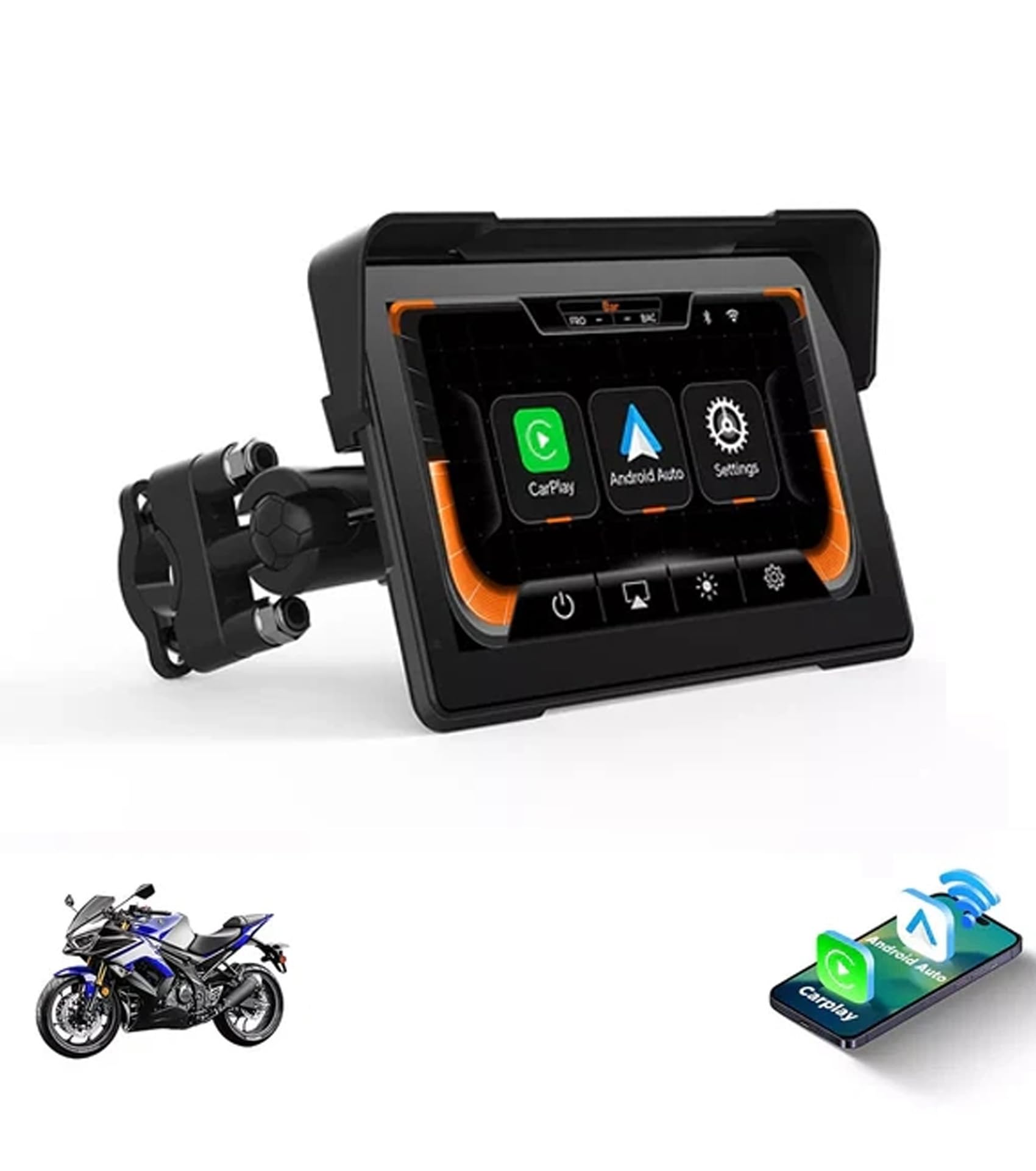
Image: Aoocci C7 7-inch Touchscreen Motorcycle Internet Navigation System. This image shows the device with a motorcycle in the background, highlighting its 7-inch touchscreen display.
2. 상자 안에 무엇이 들어있나요?
Upon opening your Aoocci C7 package, please verify that all the following components are included:
- 7 inch Motorcycle carplay screen
- 전원 케이블
- Mount & TPMS (Note: TPMS is optional and may not be included in all C7 models)
- 배선 마구
- 액세서리 및 도구

Image: Aoocci C7 Parts & Accessories. This image displays the main unit along with the power cable, mounting hardware, and other included tools.
Video: Unboxing, Installation & Usage of the New Packaging for C7. This video demonstrates the unboxing process, showing all included components and a brief overview of installation and usage.
3. 설정 지침
3.1 장치 장착
The Aoocci C7 features a universal butterfly clamp mount, designed to fit handlebars with diameters ranging from 11mm to 28mm. Follow these steps for secure installation:
- Use the provided wrench to install the bracket onto your motorcycle's handlebar. Ensure it is securely tightened.
- Install the connecting rod onto the bracket. The mount is 360° adjustable for optimal view각도를 나타냅니다.
- Install the CarPlay screen onto the mount and adjust it to the desired position. Tighten the adjustment ring to fix it in place.
- Ensure all connections are firm and the device is stable before riding.

Image: Aoocci C7 Installation Instruction. This graphic illustrates the step-by-step process of mounting the device to a motorcycle handlebar and connecting the power.
3.2 전원 연결
The device requires a 12V power connection. The low-power design (12V/0.8A) ensures hassle-free installation. Connect the red wire (ACC) to the motorcycle's positive power terminal and the black wire (GND) to the negative terminal.
Video: Unboxing, Installation & Usage of the New Packaging for C7. This video demonstrates the unboxing process, showing all included components and a brief overview of installation and usage.
4. 사용 설명서
4.1 무선 CarPlay 및 Android Auto 연결
The Aoocci C7 supports wireless Apple CarPlay and Android Auto, allowing you to connect your smartphone via Bluetooth and Wi-Fi for navigation, music, messaging, and hands-free calls.
- On the Aoocci C7 screen, select either 'CarPlay' or 'Android Auto'.
- On your smartphone, turn on Bluetooth and Wi-Fi.
- 검색 and select the device's Bluetooth name (e.g., 'CAR-BT-XXX') from your phone's Bluetooth settings to pair.
- Confirm the pairing request on both devices. Once connected, CarPlay or Android Auto will launch automatically.

Image: Aoocci C7 Apple CarPlay Connection Steps. This image illustrates the four steps to connect an iPhone to the Aoocci C7 for CarPlay functionality.

Image: Aoocci C7 CarPlay & Android Auto Interface. This image shows the device displaying navigation and media playback interfaces for both CarPlay and Android Auto.
4.2 Smartphone Mirror Link
The Aoocci C7 supports Mirror Link for most Apple and Android smartphones. This feature allows you to display your phone's screen directly on the CarPlay unit, enabling access to apps like YouTube, maps, and more.
4.3 GPS 내비게이션
Utilize your smartphone's GPS capabilities through CarPlay or Android Auto to find optimal routes. The 7-inch HD display provides clear and easy-to-read navigation instructions.
4.4 Dual Bluetooth Support
The device supports dual Bluetooth, allowing you to connect your phone to the C7 and then connect a Bluetooth helmet or headset to your phone. This setup enables audio output for music and calls directly to your helmet.

Image: Aoocci C7 Bluetooth Helmet Setup. This image illustrates the connection flow from the CarPlay unit to a phone, and then to a Bluetooth helmet or headset.
Video: Aoocci C7 Motorcycle Carplay Features and Usage. This video provides a comprehensive demonstration of the Aoocci C7's features and how to use them, including CarPlay, Android Auto, and navigation.
5. 유지관리
The Aoocci C7 is designed for all-weather durability with an IP67 waterproof rating, protecting it against rain, dust, and vibrations. It also withstands extreme temperatures from -20°C to 70°C (-4°F to 158°F).
- 청소: 부드러운 d를 사용하세요amp 화면과 외부를 닦을 때는 천을 사용하십시오. 강한 화학 약품이나 연마성 물질은 사용하지 마십시오.
- 저장: 장시간 사용하지 않을 경우, 직사광선을 피해 시원하고 건조한 곳에 보관하세요.
- 케이블 검사: Periodically check power cables and connections for any signs of wear or damage.

Image: Aoocci C7 IP67 Waterproof & Heat-Resistant Design. This image demonstrates the device's durability in various weather conditions, including rain, snow, and hot sun.
6. 문제 해결
If you encounter issues with your Aoocci C7, please refer to the following common troubleshooting steps:
- 장치가 켜지지 않음: Ensure the power cable is correctly connected to the motorcycle's 12V power source and the device. Check for any loose connections or blown fuses.
- CarPlay/Android Auto에 연결할 수 없습니다. Verify that Bluetooth and Wi-Fi are enabled on your smartphone and the Aoocci C7. Ensure your phone is discoverable and try re-pairing the devices. Clear previous connection history on the C7 if necessary.
- 오디오 없음: Check the volume settings on both the Aoocci C7 and your connected smartphone/helmet headset. Ensure your Bluetooth headset is properly paired and connected to your phone.
- 화면이 반응하지 않음: Try restarting the device by turning off and on your motorcycle's ignition. If the issue persists, perform a factory reset (refer to the settings menu).
- GPS 신호 문제: 장치에 명확한 내용이 있는지 확인하십시오. view of the sky. If using your phone's GPS, check your phone's location services settings.
7. 사양
| 특징 | 세부 사항 |
|---|---|
| 품목 무게 | 2.5파운드 |
| 제품 치수 | 9.05 x 7.28 x 4.6 인치 |
| 품목 모델 번호 | C7 |
| 디스플레이 크기 | 7 인치 |
| 음성 명령 | 터치스크린 |
| 차량 서비스 유형 | 오토바이 |
| 특징 | 방수복 |
| 연결 기술 | 블루투스 |
| 지도 유형 | 세계적인 |
| 운영 체제 | 기계적 인조 인간 |
8. 보증 정보
The Aoocci C7 comes with a 12개월 보증 from the date of purchase. This warranty covers manufacturing defects and malfunctions under normal use. Please retain your proof of purchase for warranty claims. For detailed warranty terms and conditions, refer to the official Aoocci web사이트를 방문하거나 고객 지원팀에 문의하세요.
9. 고객 지원
For further assistance, technical support, or inquiries regarding your Aoocci C7, please visit the official Aoocci Store or contact our customer service team.
Aoocci Store: https://www.amazon.com/stores/Aoocci/page/EF40CE3A-7630-4A18-93DC-75FE2EBDD718