
오하요 X10 맥스
OHAYO X10 Max Bluetooth Speaker Instruction Manual
Welcome to your new OHAYO X10 Max Portable Bluetooth Speaker.
1. 중요한 안전 정보
- 스피커를 극한의 온도나 직사광선에 장시간 노출시키지 마세요.
- 스피커를 열원, 날카로운 물체 및 부식성 물질로부터 멀리하십시오.
- 스피커를 직접 분해, 수리 또는 개조하지 마십시오. 필요한 경우 자격을 갖춘 서비스 담당자에게 문의하십시오.
- 스피커를 물 근처에서 사용할 때는 충전 포트 덮개가 단단히 닫혀 있는지 확인하여 IPX7 방수 등급을 유지하십시오.
- 충전 시에는 제공된 충전 케이블이나 인증된 USB-C 케이블만 사용하세요.
2. 패키지 내용
- 1 x OHAYO X10 Max Bluetooth Speaker (White)
- USB-C 충전 케이블 1개 (충전 플러그는 포함되지 않음)
- 1 x 3.5mm AUX 케이블
- 1 x 사용자 설명서
- 1 x 라니어드
3. 제품 오버view
The OHAYO X10 Max is a versatile portable Bluetooth speaker designed for high-quality audio and durability. It features a powerful 25W sound output with active bass, IPX7 waterproofing, and a long-lasting 24-hour battery. Enjoy dynamic sound with colorful RGB lighting effects, dual pairing for stereo sound, and multiple input modes.
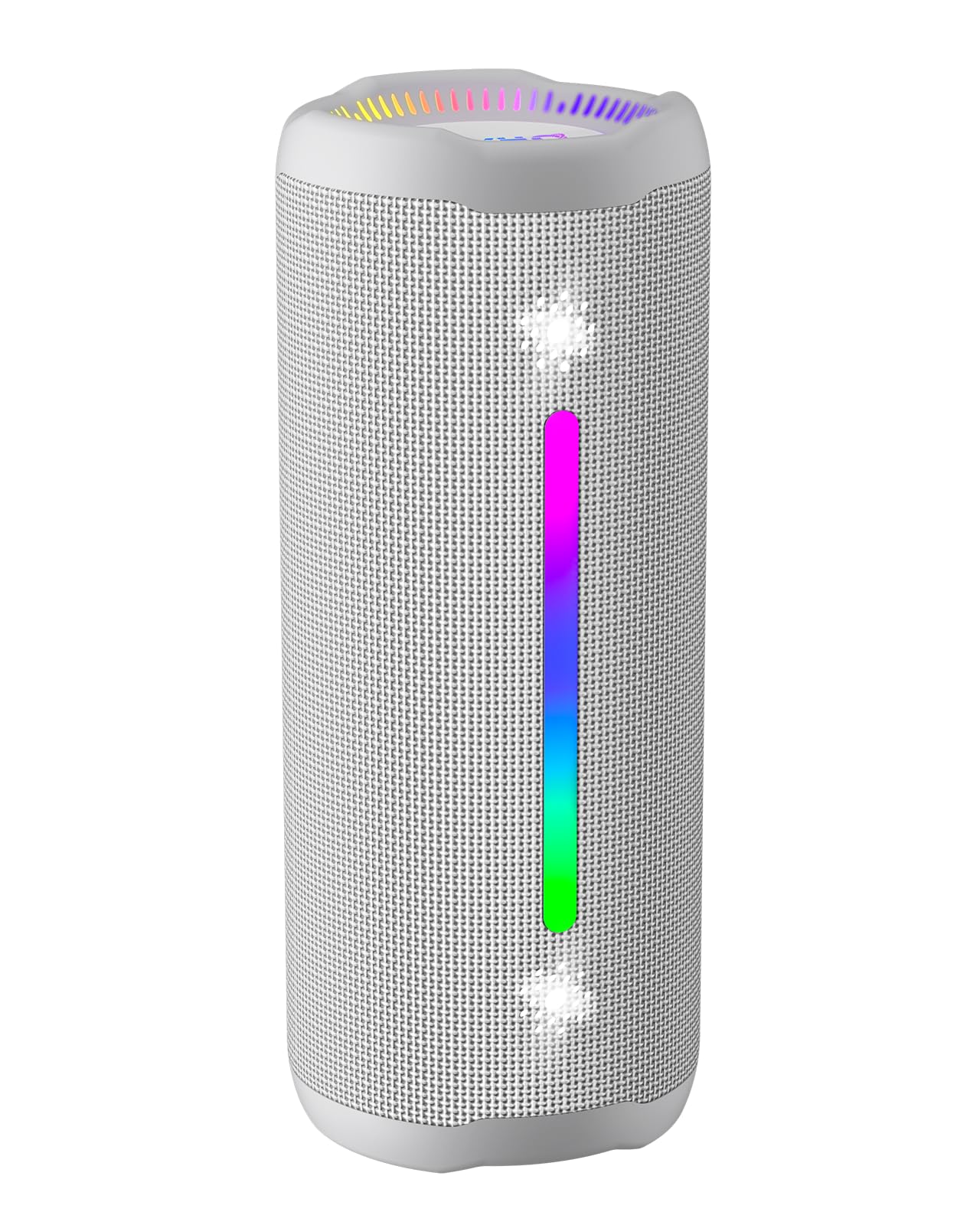
Figure 3.1: OHAYO X10 Max Bluetooth Speaker (White)

Figure 3.2: OHAYO X10 Max Bluetooth Speaker - Fully upgraded from appearance to performance.

Figure 3.3: 25W Deep Bass Sound - Independent channel design for accurate audio performance.

Figure 3.4: 6 Dazzling RGB Light Effects - Syncs with music for an immersive experience.

Figure 3.5: IPX7 Waterproof - Highly sealed design for use in various environments.

Figure 3.6: 24H Ultra-Long Battery Life - 6600mAh battery for extended playback.
4. 컨트롤 및 표시기
The OHAYO X10 Max features intuitive controls for easy operation.

그림 4.1: 제어판 및 포트
- 전원 버튼: Press and hold to power on/off. Short press to switch between input modes (Bluetooth, AUX, TF Card, USB-Audio).
- 볼륨 높이기 (+): 짧게 누르면 볼륨이 커지고, 길게 누르면 다음 트랙으로 넘어갑니다.
- 볼륨 낮추기(<): 짧게 누르면 볼륨이 감소합니다. 길게 누르면 이전 트랙으로 돌아갑니다.
- 베이스 버튼: Press to activate/deactivate Bass Boost mode.
- 재생/일시정지/통화 버튼: 짧게 누르면 음악을 재생/일시정지합니다. 짧게 누르면 전화를 받거나 끊습니다. 길게 누르면 전화를 거절합니다. 두 번 누르면 음성 비서를 활성화합니다.
- 배터리 표시 등: 4개의 LED 표시등으로 배터리 잔량을 확인할 수 있습니다.
- RGB 조명 스트립: Displays various colorful lighting effects.
- 충전 포트(USB-C): 스피커를 충전합니다.
- AUX-in 포트: 유선 오디오 연결용.
- TF 카드 슬롯 : MicroSD 카드에서 음악을 직접 재생하려면.
5. 설정
5.1 스피커 충전
Before first use, fully charge the speaker. Connect the provided USB-C charging cable to the speaker's charging port and the other end to a 5V/2A USB power adapter (not included). The battery indicator lights will blink during charging and remain steady when fully charged.
5.2 전원 켜기/끄기
Press and hold the Power button for approximately 3 seconds to turn the speaker on or off. A voice prompt will confirm the action.
5.3 블루투스 페어링
- Turn on the speaker. It will automatically enter Bluetooth pairing mode, indicated by a blinking blue LED.
- 기기(스마트폰, 태블릿 등)에서 Bluetooth를 활성화하세요.
- 검색 "X10 Max" in your device's Bluetooth list and select it to connect.
- 연결되면 음성 안내로 페어링이 성공적으로 완료되었음을 확인할 수 있습니다.
5.4 True Wireless Stereo(TWS) 페어링
To achieve a true wireless stereo experience, you can pair two OHAYO X10 Max speakers together.

그림 5.1: 진정한 무선 스테레오 페어링
- Ensure both X10 Max speakers are powered on and not connected to any other Bluetooth device.
- 스피커 한 대(기본 스피커)에서 전원 버튼을 두 번 누르세요. 그러면 TWS 페어링 모드로 진입합니다.
- 두 스피커가 자동으로 연결됩니다. 음성 안내를 통해 TWS 페어링이 성공적으로 완료되었음을 확인할 수 있습니다.
- 이제 5.3절에 설명된 대로 Bluetooth를 통해 기기를 기본 스피커에 연결하세요.
5.5 AUX를 통한 연결
블루투스 기능이 없는 기기에 스피커를 연결하려면 제공된 3.5mm AUX 케이블을 사용하십시오.
Figure 5.2: 4 Input Modes - Including AUX, TF, and USB-Audio.
- Connect one end of the AUX cable to the speaker's AUX-in port.
- 케이블의 다른 한쪽 끝을 기기의 오디오 출력 단자에 연결하세요.
- The speaker will automatically switch to AUX mode. If not, short press the Power button to cycle through modes until AUX mode is activated.
5.6 Using TF Card
Insert a MicroSD (TF) card with MP3/WAV/FLAC/WMA audio files into the TF card slot. The speaker will automatically switch to TF card mode and begin playback. Short press the Power button to cycle through modes if needed.
5.7 Using USB-Audio
Connect the speaker to a computer using the USB-C cable. The speaker can function as an external audio output device for your computer. Short press the Power button to cycle through modes if needed.
6. 사용 설명서
6.1 음악 재생
- 재생/일시 중지: 재생/일시정지/통화 버튼을 짧게 누르세요.
- 볼륨 조절: Short press the Volume Up (>) or Volume Down (<) buttons.
- 다음 트랙: Long press the Volume Up (>) button.
- 이전 트랙 : Long press the Volume Down (<) button.
6.2 베이스 부스트 기능
Press the 'BASS' button to activate or deactivate the enhanced bass mode. This feature provides deeper and richer low frequencies for a more impactful audio experience.
6.3가지 RGB 조명 모드
The speaker features dynamic RGB lighting. The lights will automatically sync with the music beat. To turn the lights on/off, refer to the specific control instructions in your quick start guide or experiment with the mode button if available.
6.4 핸즈프리 통화
스마트폰과 블루투스로 연결하면 스피커를 사용하여 핸즈프리 통화를 할 수 있습니다.

그림 6.1: 핸즈프리 통화 기능
- 전화 받기/종료: 재생/일시정지/통화 버튼을 짧게 누르세요.
- 전화 거부: 재생/일시정지/통화 버튼을 길게 누르세요.
- Voice Assistant 활성화 : Double press the Play/Pause/Call button.
7. 유지관리
- 청소: 부드러운 천으로 스피커를 닦고 damp 옷감. 강한 화학 물질이나 연마성 세제를 사용하지 마십시오.
- 저장: 장시간 사용하지 않을 때는 직사광선과 극한의 온도를 피해 서늘하고 건조한 곳에 보관하세요.
- 배터리 관리 : 배터리 수명을 연장하려면 스피커를 자주 사용하지 않을 경우 최소 3개월에 한 번씩 충전하십시오.
8. 문제 해결
| 문제 | 가능한 원인 | 해결책 |
|---|---|---|
| 스피커의 전원이 켜지지 않습니다. | 배터리가 부족합니다. | 스피커를 완전히 충전하세요. |
| 블루투스로 페어링할 수 없습니다. | 스피커가 페어링 모드가 아닙니다. 기기의 Bluetooth가 꺼져 있습니다. 기기와의 거리가 너무 멀습니다. | Ensure speaker is in pairing mode (blinking blue LED). Turn on device Bluetooth. Move device closer to speaker (within 10 meters). |
| 소리가 나지 않거나 볼륨이 작습니다. | 스피커 또는 기기의 볼륨이 너무 낮거나 입력 모드가 잘못되었습니다. | Increase volume on both speaker and device. Check if the correct input mode (Bluetooth, AUX, TF) is selected. |
| TWS 페어링에 실패했습니다. | 스피커 간의 간격이 너무 넓습니다. 한 스피커가 이미 다른 장치에 연결되어 있습니다. | Ensure speakers are close to each other. Disconnect any existing Bluetooth connections before TWS pairing. |
| 사운드 왜곡. | 볼륨이 너무 높습니다. 배터리가 부족합니다. | 볼륨을 줄이세요. 스피커를 충전하세요. |
9. 사양
| 특징 | 사양 |
|---|---|
| 모델명 | X10 최대 |
| 블루투스 버전 | 5.3 |
| 무선 통신 기술 | 블루투스 |
| 스피커 최대 출력 전력 | 35와트 (실효 출력 25와트) |
| 배터리 용량 | 6600mAh |
| 노는 시간 | 최대 24시간 (사용량 및 사용량에 따라 다름) |
| 방수 레벨 | IPX7(방수) |
| 입력 Voltage | 5볼트(DC) |
| 주파수 응답 | 20 kHz (XNUMX kHz) |
| 신호 대 잡음 비율 | 80데시벨 |
| 오디오 드라이버 유형 | 동적 드라이버 |
| 우퍼 직경 | 75 밀리미터 |
| 트위터 직경 | 26 밀리미터 |
| 제품 치수 | 2.95인치 깊이 x 2.95인치 너비 x 7.28인치 높이 |
| 품목 무게 | 450그램(15.9온스) |
| 재료 | 아크릴로니트릴 부타디엔 스티렌(ABS), 알루미늄 |
| 제어 방법 | 푸시 버튼 |
| 특별 기능 | Bass Boost, AUX, Hi-Res Audio, 24-Hour Playtime, IPX7 Waterproof, TF Card Port, Dual Passive Radiators, Hands-free, True Wireless Stereo Pairing, Shockproof |
10. 보증 및 지원
The OHAYO X10 Max Bluetooth Speaker comes with an extended warranty. For specific warranty details and to register your product, please refer to the information provided in your quick start guide or contact OHAYO customer support.
For technical support or customer service inquiries, please contact OHAYO Direct. Contact information may be found in your product packaging or on the official OHAYO web대지.
11. 공식 제품 영상
Video 11.1: Official OHAYO Portable Bluetooth Speaker overview by OHAYO Direct. This video highlights key features and design elements of the speaker.
Ask a question about this manual
Ask about setup, troubleshooting, compatibility, parts, safety, or missing instructions. Manuals+ will review the question and use this page’s manual context to help answer it.