
1. 서론
The Elektron Tonverk is a powerful polyphonic multisampler and audio processor designed for advanced music production. It features 16 tracks, subtracks, and an auto sampler, providing extensive capabilities for sound design, sequencing, and performance. This manual provides essential information for setting up, operating, and maintaining your Tonverk unit.
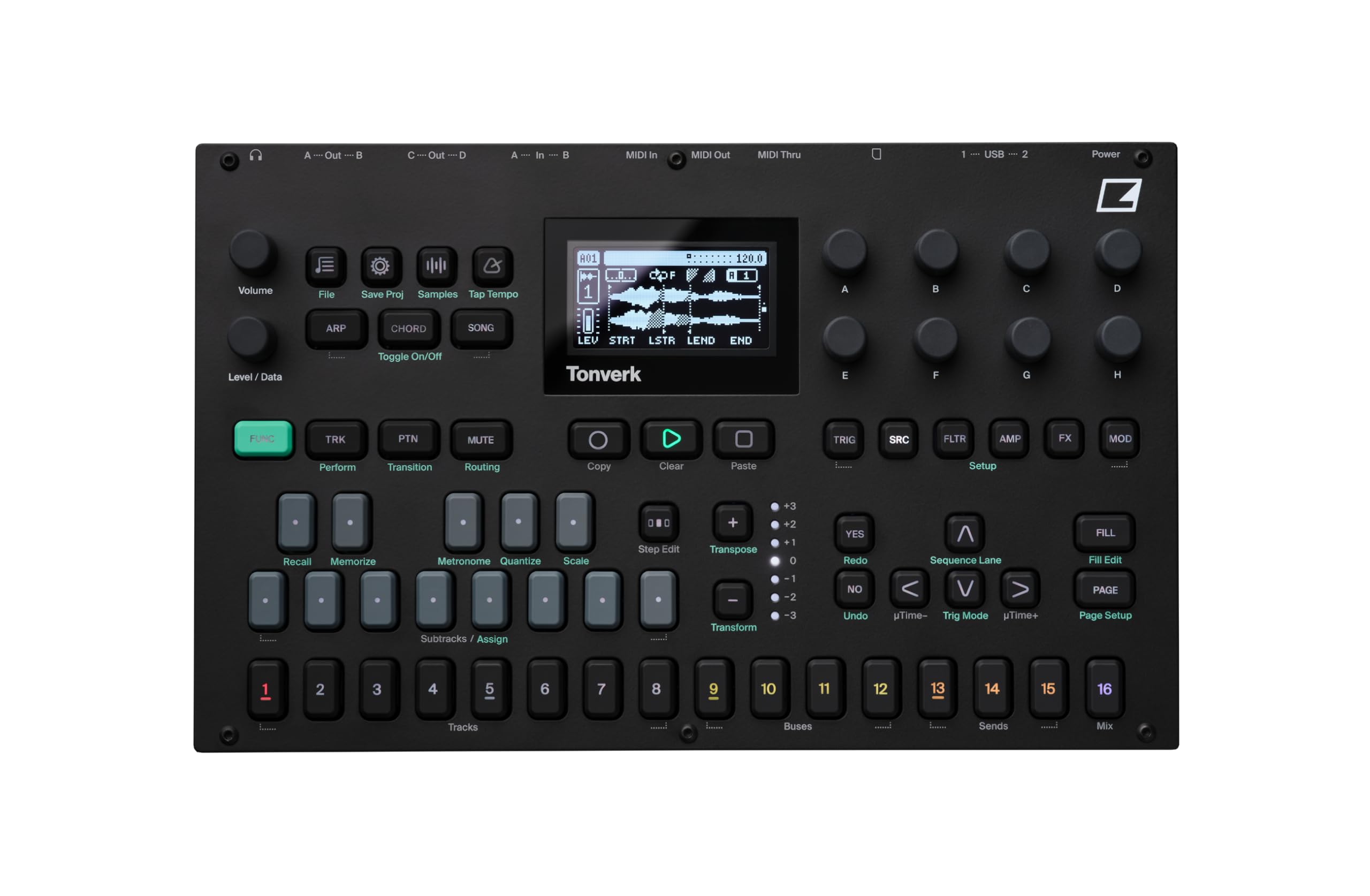
이미지: 상단 view of the Elektron Tonverk unit, showcasing its controls, screen, and layout.
2. 설정
2.1 풀기 및 검사
Carefully remove the Tonverk unit from its packaging. Inspect the unit for any signs of damage that may have occurred during transit. Ensure all included components are present.
2.2 포함된 구성 요소
- Elektron Tonverk unit
- 전원 공급 장치
2.3 전원 연결
Connect the provided power supply to the DC input on the rear panel of the Tonverk. Plug the power supply into a suitable electrical outlet. Ensure the power switch is in the OFF position before connecting power.
2.4 오디오 및 MIDI 연결
The Tonverk offers various audio and MIDI connectivity options:
- 오디오 출력 : Connect the A/Left, B/Right, C, and D audio outputs to your mixer, audio interface, or monitoring system.
- 오디오 입력 : Connect external audio sources to the In A and In B inputs for sampling or processing.
- MIDI 입력/출력/스루: Use standard 5-pin DIN MIDI cables to connect the Tonverk to other MIDI devices for synchronization and control.
- USB: Connect the USB 1 or USB 2 ports to a computer for MIDI over USB, audio streaming, and file 이전.
- SD 카드: Insert an SD card into the slot for storage of samples, projects, and system backups.

Image: Rear panel of the Elektron Tonverk, showing power input, USB ports, SD card slot, MIDI In/Out/Thru, and audio inputs/outputs.
3. 사용 설명서
3.1 전원 켜기/끄기
To power on the unit, ensure all connections are secure, then flip the power switch on the rear panel to the ON position. To power off, save your work, then flip the power switch to the OFF position.
3.2 기본 탐색
The Tonverk features a central display screen and a combination of buttons and rotary encoders for navigation and parameter adjustment. Use the 함수(Fn) button in combination with other buttons to access secondary functions.
3.3 Track Management
The Tonverk provides 16 tracks for sequencing and audio processing. These include 8 audio tracks, 4 bus tracks, 3 send tracks, and 1 mix track. Each track features its own 256-step sequencer.
- 오디오 트랙: For playing and manipulating samp레.
- Bus Tracks: For routing and processing groups of tracks.
- Send Tracks: For applying effects to multiple tracks via send/return.
- Mix Track: For overall mix control and master effects.
3.4 폴리포니
Each step in the sequencer supports 16-note polyphony, allowing for complex melodic and harmonic arrangements.
4. 주요 특징
4.1 Subtracks
Subtracks add 8 monophonic, multi-timbral subtracks to a single main track. This expands the sound design possibilities by allowing a single track to control multiple distinct sound elements.
4.2 자동Samp레어
더 오토 Sampler function allows you to automatically multi-sample external instruments via MIDI. This streamlines the process of creating playable instrument patches from your hardware synthesizers or other sound sources.

Image: The Tonverk's screen displaying the "AUTO SAMPLER" setup, indicating MIDI and audio input configuration.
4.3 레코더
The dedicated Recorder function provides straightforward audio sampling capabilities. Capture external audio directly into the Tonverk for immediate use in your projects.
4.4 Single Player
The Single Player allows you to play individual WAV files (mono or stereo) polyphonically. This is ideal for using one-shot samples or short loops as melodic or harmonic elements.

Image: The Tonverk's screen showing the "Source" menu with "SINGLE PLAYER" selected, indicating options for sound playback.
4.5 Multi Player
The Multi Player enables loading and playing multisampled instruments from the Tonverk's library polyphonically. This feature is crucial for working with complex, velocity-layered, or key-mapped instrument sounds.
4.6 Effects and Modulation
The Tonverk includes a massive list of effects and extensive modulation capabilities. These tools allow for detailed sound shaping and dynamic processing of your audio.

Image: The Tonverk's screen showing various effect parameters such as BR, OVER, SRR, DROP, LEV, RATE, DEP, FREZ, and F.TIM, indicating extensive sound manipulation options.
4.7 Routing Possibilities
The unit offers extensive routing possibilities, both internally within the device and externally with other gear. This flexibility allows for complex signal flows and integration into diverse studio setups.
5. 유지관리
5.1 청소
To clean the Tonverk, use a soft, dry, lint-free cloth. For stubborn dirt, slightly dampen the cloth with water. Avoid using abrasive cleaners, solvents, or alcohol, as these can damage the finish and components. Do not spray liquids directly onto the unit.
5.2 보관
When not in use for extended periods, store the Tonverk in a dry, dust-free environment away from direct sunlight and extreme temperatures. Disconnect the power supply.
5.3 펌웨어 업데이트
Periodically check the Elektron website for firmware updates. Firmware updates can introduce new features, improve performance, and fix bugs. Follow the instructions provided by Elektron carefully when performing updates.
6. 문제 해결
6.1 전원 없음
- Ensure the power supply is securely connected to both the Tonverk and a working electrical outlet.
- 후면 패널의 전원 스위치가 켜짐 위치에 있는지 확인하십시오.
- 다른 장치로 전기 콘센트를 테스트하여 제대로 작동하는지 확인하세요.
- Ensure you are using the original Elektron power supply.
6.2 사운드 출력 없음
- Check all audio cable connections from the Tonverk outputs to your mixer or audio interface.
- Verify the volume knob on the Tonverk is turned up.
- Ensure the master volume on your mixer/interface is not muted or set too low.
- Check individual track volumes and mute status within the Tonverk.
- Confirm that samples are loaded and assigned to tracks correctly.
6.3 MIDI Not Responding
- Check MIDI cable connections (MIDI In/Out/Thru).
- Verify MIDI settings on both the Tonverk and the connected device (MIDI channels, clock sync).
- Ensure the correct MIDI input/output ports are selected in your DAW or external sequencer.
6.4 Unit Freezes or Behaves Erratically
- Try restarting the unit by powering it off and then on again.
- Perform a factory reset if the issue persists (refer to the Elektron website for specific instructions, as this may erase user data).
- 펌웨어가 최신인지 확인하세요.
7. 사양
| 특징 | 세부 사항 |
|---|---|
| 모델명 | Tonverk |
| 상표 | 일렉트론 |
| 품목 모델 번호 | TONVERK |
| 제품 크기(L x W x H) | 11.25 x 6.92 x 2.48 인치 |
| 품목 무게 | 4.07파운드 |
| 색상 | 검은색 |
| 재료 유형 | 합금강 |
| 포함된 구성 요소 | 전원 공급 장치 |
| 트랙 | 16 (8 audio, 4 bus, 3 send, 1 mix) |
| Sequencer Steps | 256 per track |
| 다음 | 16 notes per step |
| Subtracks | 8 monophonic, multi-timbral per track |
| Samp링 | 자동 Sampler, Recorder |
| 재생 | Single Player (WAV), Multi Player (multisampled instruments) |
| 연결성 | MIDI In/Out/Thru, USB 1/2, Audio In (A/B), Audio Out (A/Left, B/Right, C, D), SD Card |
8. 보증 및 지원
8.1 제품 보증
Elektron products typically come with a limited manufacturer's warranty. For detailed information regarding the warranty period, coverage, and terms and conditions for your Tonverk unit, please refer to the warranty card included with your product or visit the official Elektron web대지.
8.2 기술 지원
If you encounter any issues or have questions not covered in this manual, please contact Elektron technical support. Support resources, including FAQs, knowledge bases, and contact information, are available on the official Elektron website. When contacting support, please have your product model (TONVERK) and serial number ready.
Official Elektron Web대지: www.elektron.se