
1. 서론
This manual provides essential instructions for the installation, operation, and maintenance of your Aninerel 3000W Hybrid Solar Inverter, model ANJ-3KW-LV-WIFI. This device is designed to convert 24V DC power to 110V AC pure sine wave power, suitable for various off-grid and backup power applications. Please read this manual thoroughly before installation and use to ensure safe and efficient operation.
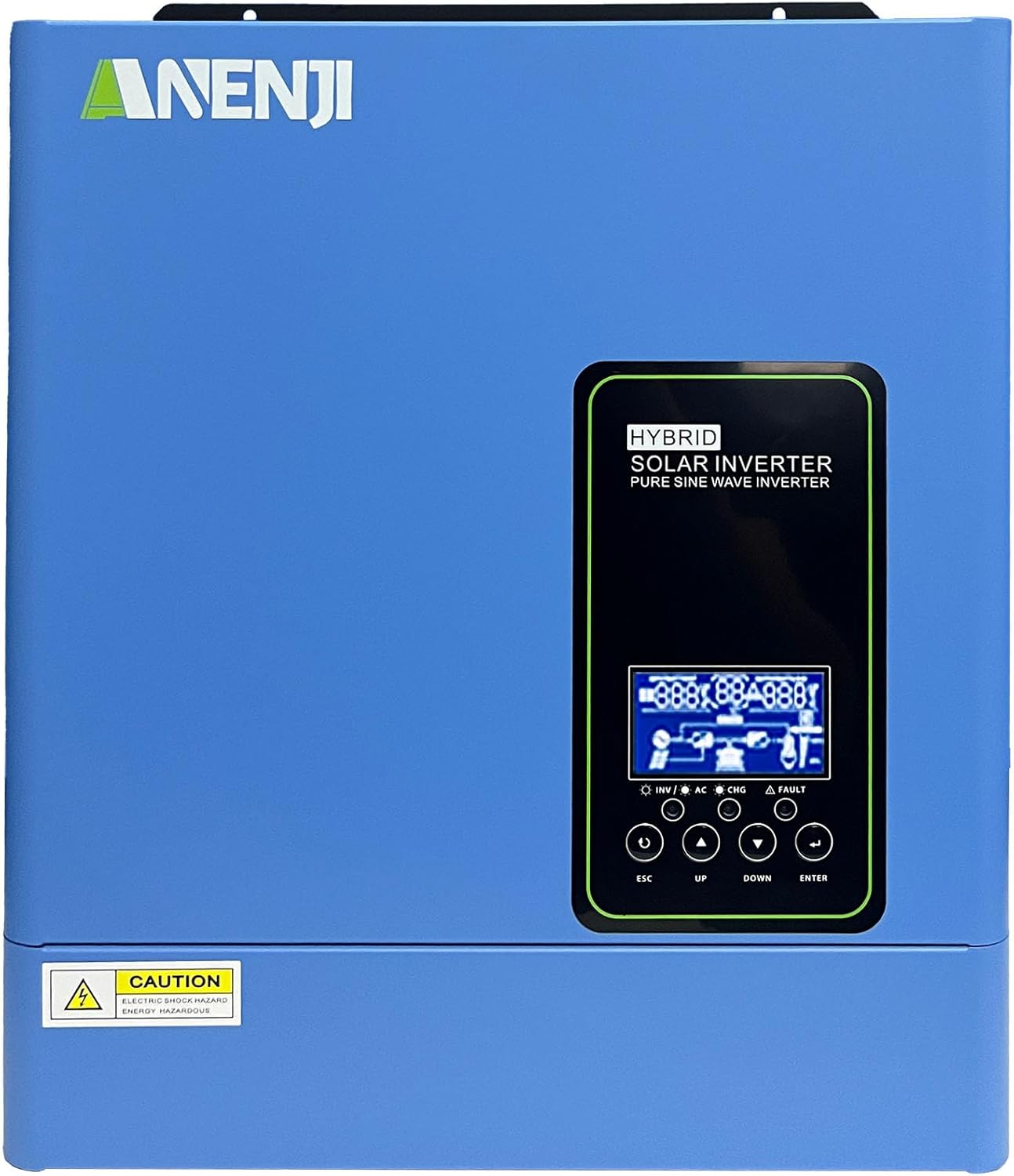
그림 1.1: 전면 view of the Aninerel 3000W Hybrid Solar Inverter. The inverter features a blue casing with the Aninerel logo and a central LCD display panel with control buttons.
2. 안전 지침
감전, 화재 또는 부상의 위험을 줄이려면 항상 다음 안전 예방 조치를 준수하세요.
- Read all instructions and cautionary markings on the unit and in this manual before installation or operation.
- Do not disassemble the inverter. Refer servicing to qualified personnel. Incorrect reassembly may result in electric shock or fire.
- 감전 위험을 줄이려면 유지관리나 청소를 시도하기 전에 모든 배선을 분리하세요.
- This inverter is designed for indoor or semi-outdoor use with an IP65 rating. Avoid direct exposure to rain or snow.
- 인버터 주변의 환기를 적절히 하여 과열을 방지하십시오. 환기구를 막지 마십시오.
- 설치 시 적절한 도구와 개인 보호 장비를 사용하십시오.
- Ensure all wiring connections are tight and secure to prevent loose connections that can cause overheating.
- Do not connect the inverter to a public utility grid without proper authorization and safety measures.
3. 제품 오버view
The Aninerel 3000W Hybrid Solar Inverter integrates a pure sine wave inverter, an MPPT solar charge controller, and a battery charger into one compact unit. It is designed to provide uninterrupted power support.
3.1 주요 특징
- 3000W Pure Sine Wave Output: Converts 24V DC to 110V AC, providing stable power for sensitive electronics.
- Integrated 100A MPPT Solar Charge Controller: Maximizes solar energy harvesting with up to 500VDC PV input.
- Flexible Charging and Output Modes: Offers multiple modes (Solar Only, AC Priority, Hybrid Charging; Mains Priority, PV Priority, Hybrid Output) for diverse power management.
- 폭넓은 배터리 호환성: Supports AGM, GEL, Lead-acid, Li-ion, and LiFePO4 24V batteries.
- 스마트 LCD 디스플레이: Provides real-time monitoring and allows for easy configuration of system settings.
- 내장 Wi-Fi: Enables remote monitoring of the inverter status (registration required).
- 견고한 디자인: IP65-rated enclosure for durability in various environments, with intelligent cooling.
- 포괄적인 보호 조치: 과대 포함tag전자, 언더볼tage, reverse polarity, and short circuit protection.

그림 3.1: 전면 및 후면 패널view. This diagram labels the LCD display, indicators, function buttons, RS485 communication port, grounding terminal, battery input, dry contact port, built-in Wi-Fi, AC input, AC output, PV input, and power on/off switch.
3.2 전면 패널 및 표시기
- LCD 디스플레이: Shows system status, operational data, and configuration settings.
- 충전 표시기: Illuminates to indicate battery charging status.
- 상태 표시기: Provides general operational status of the inverter.
- 오류 표시기: Lights up to signal system errors or warnings.
- Function Buttons (ESC, UP, DOWN, ENTER): LCD 화면에서 메뉴를 탐색하고 설정을 조정하는 데 사용됩니다.
3.3 후면 패널 연결
- RS485 통신 포트: 외부 소통 및 모니터링을 위해.
- 접지 단자: 안전 접지에 필수적입니다.
- 배터리 입력: Connects to the 24V battery bank.
- 건식 접촉 포트: 외부 제어 또는 신호 전달용.
- Built-in Wi-Fi Module: 무선 모니터링용입니다.
- AC 입력: Connects to grid utility or generator AC power.
- AC 출력: 가정용 전력선에 연결됩니다.
- PV 입력: Connects to solar panel arrays.
- 전원 켜기/끄기 스위치: Controls the main power to the inverter.
4. 설치 및 설정
Proper installation is crucial for the safe and efficient operation of your hybrid solar inverter. Ensure all connections are made by a qualified electrician and adhere to local electrical codes.
4.1 인버터 장착
- 건조하고 통풍이 잘 되며 직사광선과 습기를 피할 수 있는 적절한 장소를 선택하십시오.
- 인버터 주변에 충분한 공간을 확보하여 적절한 공기 흐름과 냉각이 이루어지도록 하십시오.
- Mount the inverter vertically on a sturdy surface using appropriate fasteners.
4.2 배선 연결
Follow the wiring diagram carefully. All wiring should be performed with the inverter and all power sources disconnected.
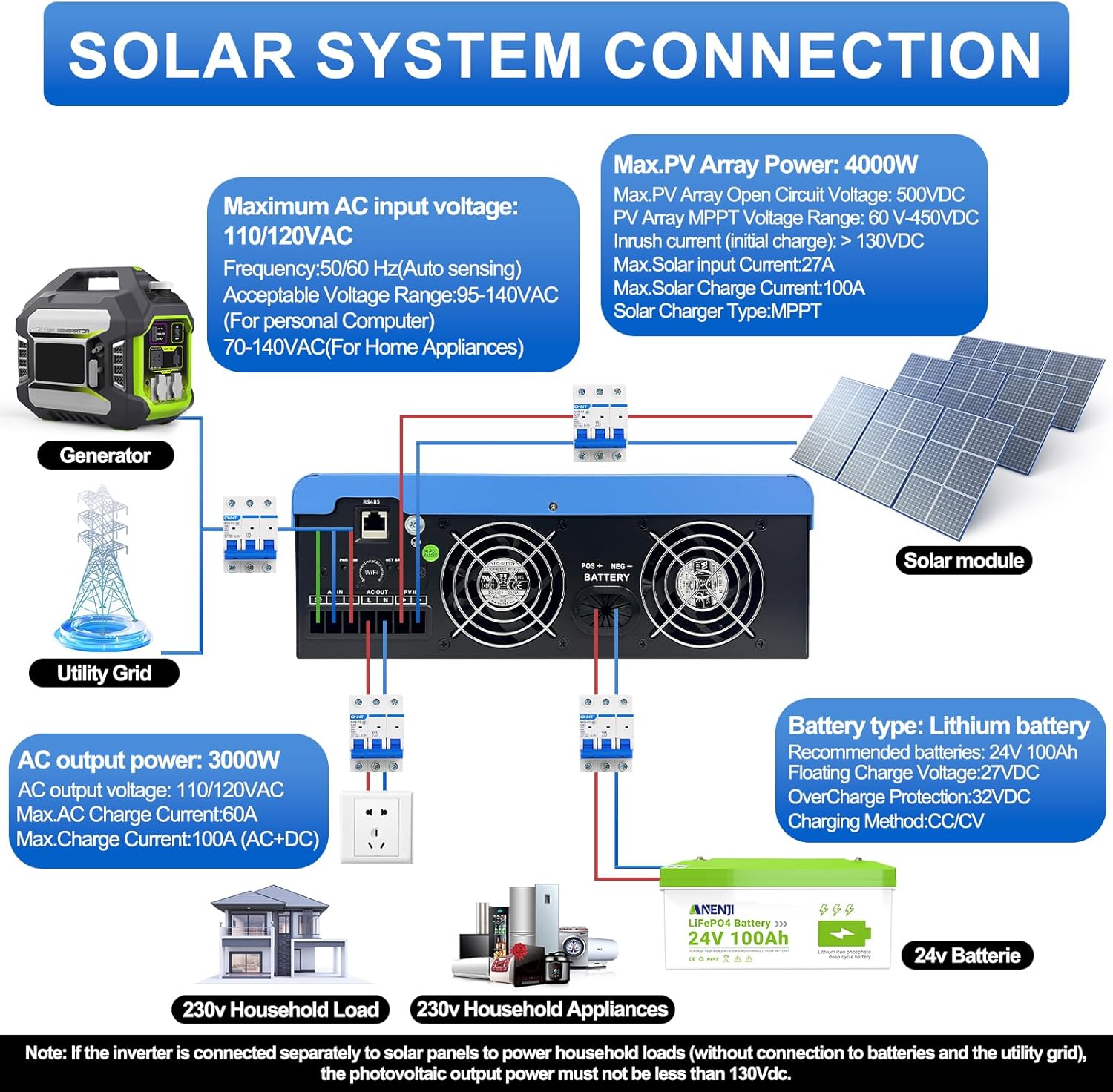
Figure 4.1: Solar System Connection Diagram. This diagram illustrates the connections for solar panels, generator, utility grid, 24V battery, and household loads to the inverter. It shows the PV input, battery input, AC input, and AC output terminals.
4.2.1 배터리 연결
- Connect the 24V battery bank to the battery input terminals on the inverter. Ensure correct polarity (+ to + and - to -).
- Use appropriate cable gauges for the battery connections to handle the expected current.
- The ANJ-3KW-LV-WIFI model supports a 24-volt DC system and is recommended for use with batteries of at least 100 ampere-hours capacity.

Figure 4.2: Inverter Battery Connection. This diagram shows wiring configurations for both 12-volt and 24-volt battery systems, emphasizing correct series/parallel connections for the desired voltage.
4.2.2 PV (Solar Panel) Connection
- Connect the solar panel array to the PV input terminals. Observe correct polarity.
- 총 개방 회로 전압을 확인하십시오tag태양광 발전 어레이의 전압(e)은 500VDC를 초과하지 않습니다.
- MPPT voltage range is 60-450VDC. Ensure your PV array voltage falls within this range for optimal charging.
4.2.3 AC 입력 연결
- Connect the utility grid or generator AC power to the AC input terminals.
- The inverter supports 110/120VAC input with auto-sensing frequency (50/60Hz).
4.2.4 AC 출력 연결
- Connect your household loads or appliances to the AC output terminals.
- The inverter provides 3000W continuous AC output at 110/120VAC.
4.3 초기 전원 켜기
- 모든 연결이 안전하게 이루어졌으면 먼저 배터리 차단기를 켜십시오.
- 그런 다음, 태양광 발전 시스템 차단기(해당되는 경우)를 켜십시오.
- Finally, switch on the AC input breaker (if applicable) and the inverter's main power switch.
- Observe the LCD display for initial boot-up and status indicators.
5. 운영
The inverter offers various configurable settings to optimize power management based on your specific needs.
5.1 LCD 디스플레이 및 설정
The LCD display provides real-time information and allows you to configure operational parameters using the function buttons.
- 사용하세요 UP 그리고 아래에 메뉴 옵션을 탐색하는 버튼입니다.
- 누르다 입력하다 옵션을 선택하거나 설정을 확인하려면.
- 누르다 키보드 to exit a menu or cancel an action.
5.2 Charging Priority Modes
These settings determine how the battery bank is charged from available power sources.

Figure 5.1: Charger Source Priority. This diagram illustrates three charging priority options: Solar First (solar panels charge first, AC input only if solar is unavailable), Solar and AC Input Simultaneously (both solar and utility charge at the same time), and Solar Only (solar energy is the exclusive charging source).
- 솔라 퍼스트: Prioritizes solar power for charging. AC input will only charge the battery when solar power is insufficient or unavailable.
- AC Priority (Utility Priority): Prioritizes AC input (utility or generator) for charging. Solar power will supplement or take over if AC input is unavailable.
- 태양광 전용: The inverter will only charge the battery bank from solar power. AC input will not be used for charging.
5.3 출력 우선 모드
These settings determine the power source for your connected loads.

Figure 5.2: Output Source Priority. This diagram shows three output priority options: Solar First (power from solar first, AC input supplements if solar is insufficient), AC First (redirects AC input to power loads, uses solar/batteries when AC is unavailable), and DC Priority (prioritizes solar first, then battery, then AC input only when voltage drops to a programmable value).
- 태양광 우선 (태양광 발전 우선): Prioritizes solar power to supply loads. If solar power is insufficient, the battery bank will supplement, and then AC input will be used.
- AC First (Mains Priority): Prioritizes AC input (utility or generator) to power loads. If AC input is unavailable, the inverter will switch to battery power.
- DC Priority (Battery Priority): Prioritizes solar power first, then battery power. AC input will only engage when the battery voltage drops below a programmable threshold.
5.4 Wi-Fi 모니터링
The built-in Wi-Fi module allows for remote monitoring of your inverter's performance and status via a dedicated application. Registration may be required to access this feature.

Figure 5.3: Wi-Fi Monitoring. This image depicts a user monitoring the hybrid inverter's status wirelessly via a smartphone application, highlighting the convenience of the built-in Wi-Fi feature.
6. 유지관리
Regular maintenance helps ensure the longevity and optimal performance of your Aninerel Hybrid Solar Inverter.
- 청소: 인버터 외부를 주기적으로 마른 천으로 닦아주십시오. 통풍구에 먼지와 이물질이 없는지 확인하십시오.
- 사이: Annually check all electrical connections (battery, PV, AC input/output) for tightness and corrosion. Tighten any loose connections.
- 환경: 설치 환경이 지정된 온도 및 습도 범위 내에 유지되도록 하십시오.
- 펌웨어: 제조사 확인해보세요 web성능 향상이나 새로운 기능을 위한 펌웨어 업데이트가 있는지 확인하려면 해당 사이트를 방문하십시오.
7. 문제 해결
이 섹션에서는 발생할 수 있는 일반적인 문제에 대한 해결책을 제공합니다. 문제가 지속되면 고객 지원에 문의하세요.
| 문제 | 가능한 원인 | 해결책 |
|---|---|---|
| 인버터가 켜지지 않습니다 | 배터리가 연결되지 않았거나 배터리 전압이 낮습니다.tage; Power switch off; Loose wiring. | 배터리 연결 및 용량 확인tage; Ensure power switch is ON; Verify all wiring is secure. |
| AC 출력 없음 | Overload; Short circuit on output; Inverter in fault mode; Output priority setting. | Reduce load; Check for short circuits; Refer to LCD fault codes; Adjust output priority settings. |
| 태양광으로 배터리가 충전되지 않습니다 | 낮은 PV 볼륨tage; Incorrect PV connection; Solar charging disabled; Faulty solar panels. | PV 어레이 볼륨을 확인하세요tage (must be >60VDC); Verify PV polarity; Check charging priority settings; Inspect solar panels. |
| 과열 경고 | Insufficient ventilation; Excessive ambient temperature; Overload. | Ensure clear airflow around inverter; Relocate to cooler area; Reduce connected load. |
| 와이파이 모니터링이 작동하지 않습니다 | No Wi-Fi signal; Incorrect app configuration; Registration issue. | Check Wi-Fi signal strength; Reconfigure app settings; Contact support for registration issues. |
8. 사양
Technical specifications for the Aninerel 3000W Hybrid Solar Inverter ANJ-3KW-LV-WIFI:
| 특징 | 사양 |
|---|---|
| 모델 번호 | ANJ-3KW-LV-WIFI |
| 연속 전력 출력 | 3000와트 |
| 피크 전력 출력 | 6000와트 |
| DC 입력 볼륨tage | 24V |
| AC 출력 볼륨tage | 110V 교류 |
| 출력파형 | 순수한 사인 웨이브 |
| 최대 PV 입력 전력 | 4000와트 |
| MPPT 컨트롤러 전류 | 100A |
| 최대 PV 개방 회로 Voltage | 500VDC |
| PV 어레이 MPPT Voltag및 범위 | 60-450VDC |
| 최대 AC 입력 전류 | 60A |
| 출력 주파수 | 50/60Hz(자동 감지) |
| 배터리 호환성 | AGM, GEL, Lead-acid, Li-ion, LiFePO4 (24V) |
| 보호 등급 | IP65 |
| 제품 치수 | 15 x 6.98 x 18 인치 |
| 품목 무게 | 16.5파운드 |
9. 보증 및 지원
For warranty information, please refer to the warranty card included with your product or visit the official Aninerel website. For technical support, troubleshooting assistance, or service inquiries, please contact Aninerel customer service through their official channels.
Manufacturer: Shenzhen Anenji Energy Technology Co.,Ltd