
소개
This user manual provides detailed instructions for the installation, operation, maintenance, and troubleshooting of your LongPlus 8MP 4K UHD PoE Wired Security Camera Outdoor, Model LP8MEF8. This camera is designed to deliver high-quality surveillance with advanced features for enhanced security. Please read this manual thoroughly before using the product to ensure proper setup and functionality.
상자 안에 무엇이 들어있나요?
Carefully unpack the box and ensure all items are present and in good condition. If any items are missing or damaged, please contact LongPlus customer support.
- 1 x LongPlus Dome Camera
- 1 x 색상 상자
- 경고 스티커 1개
- 1 x Positioning Sticker
- 1 x Foam Bag/1 x Protective Film
제품 끝view
주요 특징
- 4K UHD 해상도: Captures video at 3840x2160 pixels with a 132° wide viewing angle and HDR for clear, detailed footage.
- AI 동작 감지: Advanced object detection for humans and vehicles, with customizable activity zones and privacy masks to reduce false alerts.
- Triple Night Vision Modes: Offers IR Night Vision, Color Night Vision, and Smart Night Vision for clear visibility up to 100ft (30m) in various lighting conditions.
- Two-Way Audio & Strobe Light Alarm: Communicate with visitors or deter intruders using the built-in speaker and microphone, complemented by an automatic strobe light and siren alarm.
- 내구성 있는 디자인: IP67 weatherproof metal housing ensures reliable operation in extreme weather conditions (-30°C to 60°C / -22°F to 140°F).
- 원격 접속: 실시간 foo 모니터링tage and recordings via the Longvision app, compatible with iOS, Mac, Windows, and Android devices. Supports up to 32 users.
- 효율적인 보관: Utilizes H.265 High Efficiency Video Coding to optimize storage space. Supports local storage (via NVR, up to 10TB expandable) and cloud storage options.
- PoE 연결: Power over Ethernet (PoE) simplifies installation by delivering power, audio, and video through a single Ethernet cable.
카메라 부품
The LongPlus LP8MEF8 camera features a robust dome design with integrated LED spotlights for color night vision, an infrared sensor for IR night vision, a lens, and a microphone/speaker for two-way audio. The durable metal housing provides protection against environmental elements.

Image: The LongPlus LP8MEF8 camera highlighting its IP67 weatherproof rating for all-season security and durable metal housing for efficient heat dissipation.

Image: Illustration of the camera's 132-degree wide field of view, capturing a broad area in 4K UHD resolution.
설정
1. Planning Installation Location
Choose a suitable location for your camera, considering the desired viewing area, proximity to an NVR or PoE switch, and protection from direct impact. The camera is IP67 weatherproof, making it suitable for outdoor use in various conditions.
2. 카메라 장착
- Use the provided positioning sticker to mark the drill holes on the mounting surface.
- Drill holes according to the marks. Insert wall anchors if mounting on masonry.
- 카메라 받침대를 나사를 사용하여 장착 표면에 고정하십시오.
- 원하는 영역을 촬영할 수 있도록 카메라 각도를 조정하세요.
3. 카메라 연결
The LP8MEF8 camera uses Power over Ethernet (PoE) for simplified connectivity.
- 이더넷 케이블의 한쪽 끝을 카메라의 PoE 포트에 연결하십시오.
- 이더넷 케이블의 다른 쪽 끝을 PoE(Power over Ethernet) 기능이 있는 NVR(네트워크 비디오 레코더) 또는 PoE 스위치에 연결하십시오.
- Ensure the NVR/PoE switch is powered on. The camera will receive power and transmit data through this single cable.

Image: Diagram showing the easy plug-and-play PoE connection between the LongPlus camera and an NVR, supporting distances up to 660ft.
4. Initial Configuration (via NVR or App)
Refer to your NVR's manual for specific camera addition procedures. Generally, the NVR will automatically detect PoE cameras. For app-based setup:
- 다운로드 Longvision App Store(iOS) 또는 Google Play Store(Android)에서 앱을 다운로드하세요.
- 계정을 등록하고 로그인합니다.
- 앱 내 안내에 따라 카메라를 추가하세요. 일반적으로 카메라의 QR 코드를 스캔하거나 기기 ID를 직접 입력하는 방식입니다.
- 추가한 후에는 다음을 수행할 수 있습니다. view 라이브 푸tage를 클릭하고 설정을 구성하세요.
작동 지침
1. 라이브 View 및 재생
- Open the Longvision app or access your NVR interface.
- 원하는 카메라를 선택하세요 view 라이브 푸tage.
- 재생 기능을 사용하여 다시view 녹화된 영상.
2. 야간 투시 모드
이 카메라는 세 가지 야간 투시 모드를 지원합니다.
- IR 나이트 비전 : Provides black and white video using infrared LEDs in low-light conditions.
- 컬러 나이트 비전: Utilizes built-in spotlights to provide full-color video in low light.
- 스마트 나이트 비전: Automatically switches between IR and color modes based on detected motion or light conditions.
You can switch between these modes via the Longvision app or NVR settings.

Image: Visual representation of the three night vision modes (Full-Color, AI, IR) available on the LongPlus camera, adapting to various lighting scenarios.
3. AI 동작 감지 및 알림
- 감지 활성화: In the app/NVR settings, enable AI motion detection for humans and/or vehicles.
- 활동 구역: 카메라 내의 특정 영역을 정의합니다. view where motion detection should be active. This helps filter out irrelevant alerts.
- 프라이버시 마스크: Configure privacy zones to block out sensitive areas from being recorded.
- 알림: Set up push notifications to receive real-time alerts on your mobile device when motion is detected.

Image: The camera's smart AI motion detection feature, capable of distinguishing between persons and vehicles to provide more accurate alerts.
4. Two-Way Audio and Alarm Functions
- 양방향 오디오 : Use the microphone and speaker in the Longvision app to communicate with individuals near the camera.
- Strobe Light & Siren Alarm: When motion is detected, the camera can automatically trigger a strobe light and siren to deter intruders. This can also be manually activated via the app.

Image: A scenario depicting the camera's two-way audio and strobe light alarm features, allowing interaction and deterrence.
5. 녹음 모드
The camera supports various recording options when connected to a compatible NVR:
- 모션 트리거 녹화: Records only when motion is detected (default).
- Scheduled recording: Records during specific times of the day.
- 24/7 continuous recording: Records continuously.
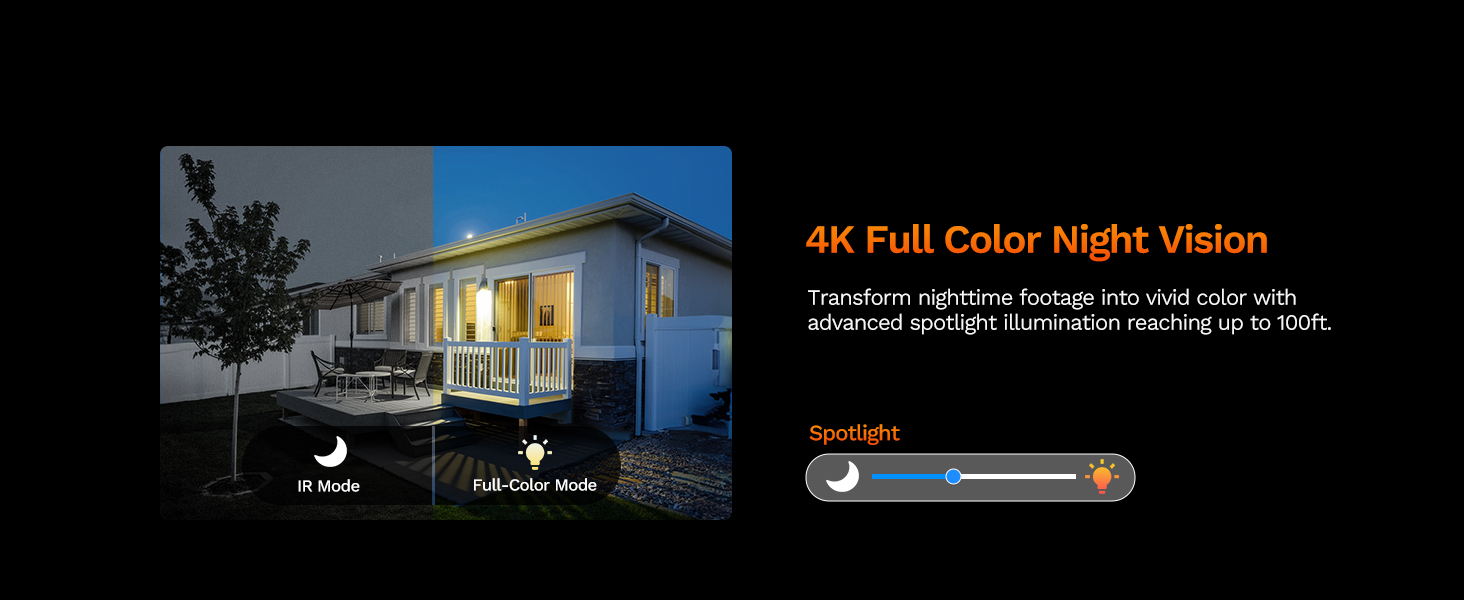
Image: The LongPlus NVR illustrating the benefits of H.265 (HEVC) video compression for saving storage space while maintaining video quality.
유지
- 청소: 카메라 렌즈와 하우징을 부드러운 천으로 정기적으로 닦아주세요.amp 천으로 닦아주세요. 렌즈에 흠집을 낼 수 있는 연마성 세척제는 사용하지 마세요.
- 펌웨어 업데이트: Check the Longvision app or LongPlus website periodically for firmware updates. Keeping your camera's firmware updated ensures optimal performance and security.
- 케이블 검사: Periodically inspect the Ethernet cable for any signs of wear or damage, especially in outdoor installations. Ensure connections are secure.
- 환경 점검: 카메라를 가리는 장애물이 없는지 확인하십시오. view or interfering with its sensors.
문제 해결
If you encounter issues with your LongPlus camera, refer to the following common problems and solutions:
| 문제 | 가능한 원인 | 해결책 |
|---|---|---|
| 비디오 피드 없음 | 전원이 들어오지 않음; 케이블 연결이 느슨함; 네트워크 문제. | Check PoE connection to NVR/switch. Ensure NVR/switch is powered on. Verify Ethernet cable integrity. |
| 화질이 나쁘다 | 렌즈 오염; 조명 부족; 네트워크 대역폭 문제. | Clean the camera lens. Ensure adequate lighting for color night vision or switch to IR mode. Check network speed. |
| 동작 감지가 작동하지 않음 | Detection disabled; Incorrect sensitivity; Activity zone not set correctly. | Enable motion detection in app/NVR settings. Adjust sensitivity. Verify activity zone configuration. |
| 앱에 연결할 수 없습니다. | Incorrect network settings; App issues; Camera not online. | Ensure camera is connected to the network. Restart camera and router. Re-add camera to the app. Check app permissions. |
| 양방향 오디오가 작동하지 않음 | Microphone/speaker disabled; Volume too low; Network latency. | Check audio settings in the app. Adjust volume levels. Ensure stable network connection. |
If the problem persists after trying these solutions, please contact LongPlus customer support for further assistance.
명세서
| 특징 | 설명 |
|---|---|
| 상표 | 롱플러스 |
| 모델 번호 | LP8MEF8 |
| 연결 기술 | Wired (Power over Ethernet - PoE) |
| 비디오 캡처 해상도 | 4K UHD(3840x2160) |
| 광센서 기술 | CMOS |
| 렌즈 유형 | 결정된 |
| View잉 각도 | 132도 |
| 나이트 비전 | Yes, up to 100 Feet (30m) range (IR, Color, Smart modes) |
| 프레임 속도 | 30fps |
| 녹화 모드 | Motion-triggered, Scheduled, 24/7 (via NVR) |
| 특별 기능 | H.265 Video Coding, Siren Alarm, Strobe Light Alarm, Two-Way Audio, Vehicle/Person Detection, Activity Zones, Privacy Mask, IP67 Waterproof |
| 전원 | 유선 전원(PoE) |
| 작동 온도 | -30°C ~ 60°C (-22°F ~ 140°F) |
| 호환 장치 | Cameras, Laptops, Personal Computers, Smartphones |
| 운영 체제 지원 | 안드로이드, 맥 OS, 윈도우, iOS |
| 품목 치수 | 3.3 x 3.3 x 3.5 인치 |
| 색상 | 하얀색 |
보증 및 지원
보증 정보
LongPlus provides a 2년 보증 for this product from the date of purchase. This warranty covers manufacturing defects and ensures the product meets its specified performance standards under normal use.
기술 지원
LongPlus offers 평생 기술 지원 for its customers. If you have any questions, require assistance with setup, operation, or troubleshooting, or encounter any issues not covered in this manual, please do not hesitate to contact our professional technical team. We are committed to responding to your inquiries within 24 hours.
For support, please visit the official LongPlus web자세한 내용은 해당 사이트를 참조하거나 제품 포장과 함께 제공된 연락처 정보를 참조하세요.