
소개
This manual provides detailed instructions for the WESEARY WG1 Wireless Gaming Headset. Please read this guide thoroughly to ensure proper setup, operation, and maintenance of your device. The WG1 headset offers dual wireless connectivity (2.4GHz USB/Type-C and Bluetooth), 3D stereo sound, and an omnidirectional noise-canceling microphone for an enhanced gaming experience across multiple platforms.
상자 안에 무엇이 들어있나요?
패키지에 모든 품목이 들어 있는지 확인하세요.
- 무선 게이밍 헤드셋 (1개)
- 충전 케이블 (1개)
- 2.4GHz USB & Type-C Dongle (1 unit)
- 사용 설명서(본 문서)
제품 특징
오디오 품질
The WG1 headset is equipped with 50mm dynamic drivers designed to deliver rich, spatial audio. This allows for precise sound localization, enabling users to identify in-game audio cues such as footsteps and gunshots with clarity. The drivers produce profound bass and clear high frequencies for an immersive auditory experience.

Image: The WESEARY WG1 headset illustrating its 3D Stereo Surround Sound feature, showing sound waves emanating from the headset to enhance gaming immersion.
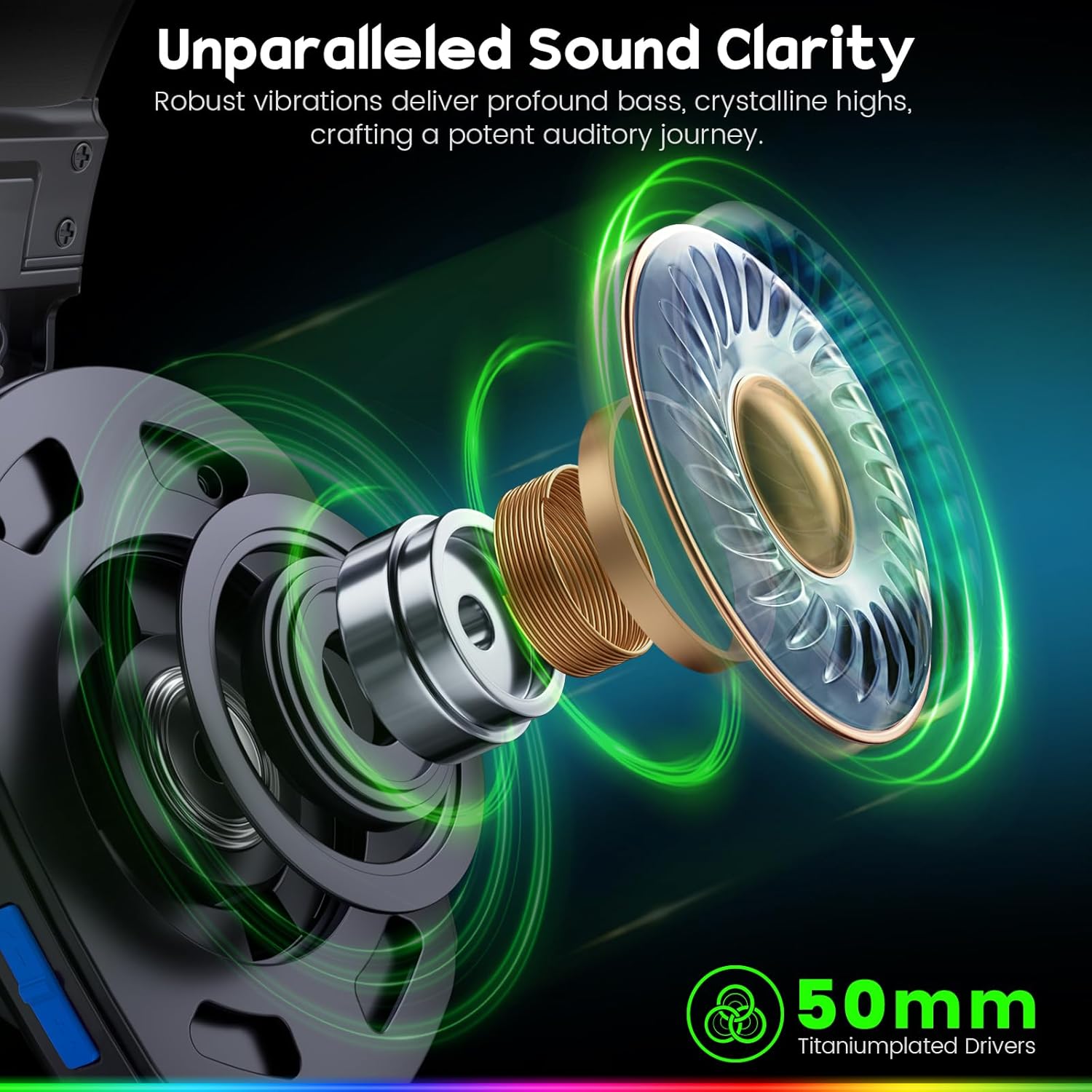
Image: An exploded diagram of the WESEARY WG1 headset's earcup, highlighting the 50mm titanium-plated drivers responsible for sound clarity and powerful bass.
듀얼 모드 연결
The headset supports two wireless modes: 2.4GHz and Bluetooth. The 2.4GHz mode is compatible with PS5, PS4, PC, Phone, Laptop, and Switch (audio only). The Bluetooth mode is compatible with PC, Mac, Switch (audio only), Mobile, Laptops, and Tablets. Note that the 2.4GHz USB and Type-C dongles must be used together for PS5/PS4/PC/Laptop/Mac. Neither mode is compatible with Xbox consoles. The microphone is not compatible with Nintendo Switch, and Bluetooth mode is not compatible with PS5/PS4.

Image: The WESEARY WG1 headset highlighting its dual wireless capabilities, featuring both USB-A and Type-C dongles for broad device compatibility.
초저 지연 시간
For competitive gaming, the 2.4GHz dongle mode provides an audio latency of ≤20ms, ensuring real-time audio synchronization. Bluetooth mode maintains a latency of less than 48ms, offering smooth and responsive audio for general use.

Image: A close-up of the WESEARY WG1 headset and its 2.4GHz dongle, emphasizing the ultra-low latency feature (≤20ms) for swift connectivity.
편안함과 디자인
The headset is designed for extended wear with soft, breathable earcups and an adjustable headband. This ergonomic design aims to provide a pressure-free fit for various head sizes, ensuring comfort during long gaming sessions.

Image: The WESEARY WG1 headset in a cosmic setting, highlighting its lightweight, breathable earcups and adjustable headband for comfortable wear.
배터리 수명
The WG1 features a 1200mAh battery, providing up to 50 hours of playtime without LED lighting, or up to 35 hours with dynamic LED lighting activated. A full charge via USB-C takes approximately 2.5 hours.
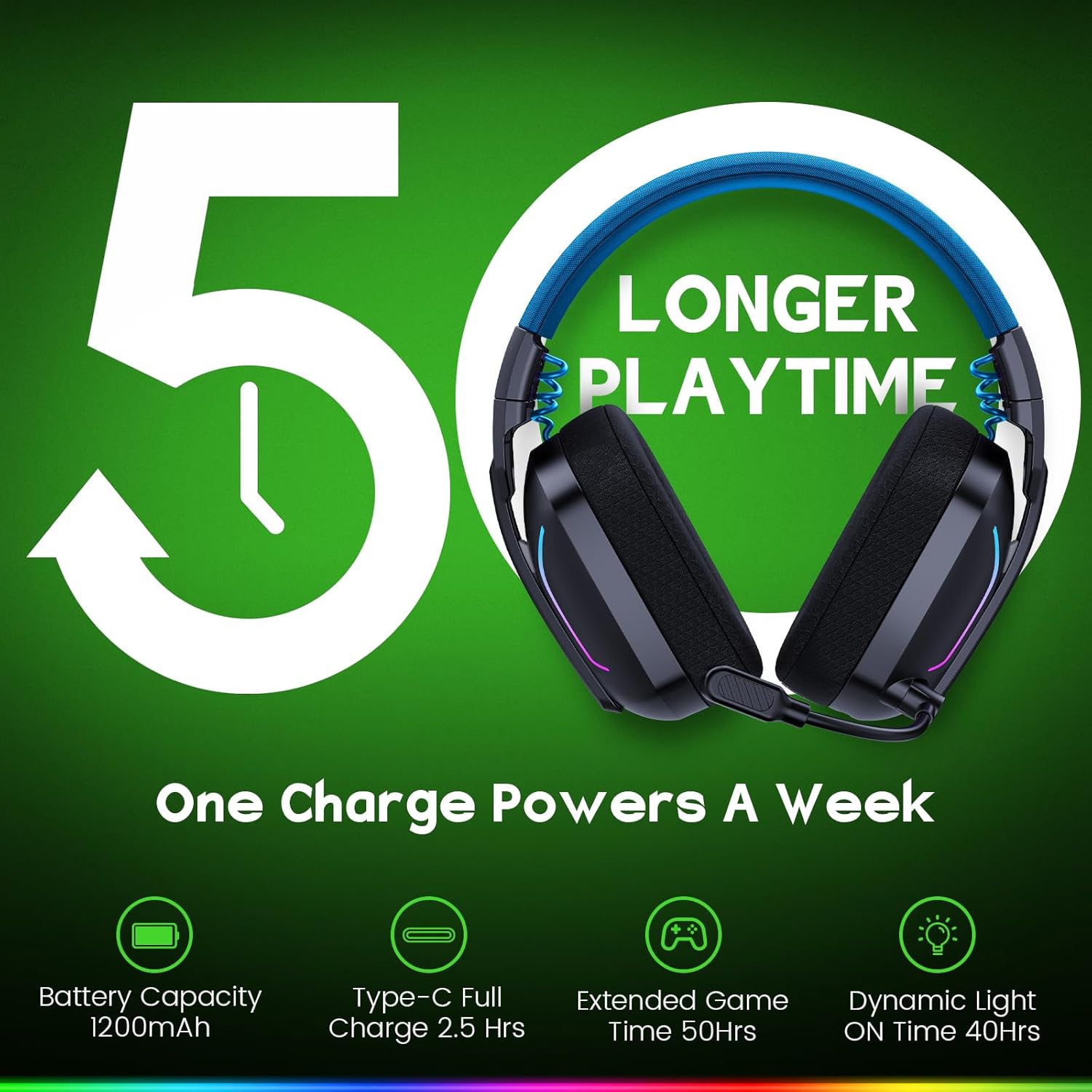
Image: The WESEARY WG1 headset with an overlay indicating its 1200mAh battery capacity and up to 50 hours of extended playtime on a single charge.
다이내믹 LED 조명
The headset includes dynamic, color-shifting LED lights that can be activated with a single button press. This feature allows users to customize their gaming setup's aesthetic.
Omnidirectional Microphone with ENC
The integrated 360° omnidirectional microphone is designed for clear communication. Advanced Environmental Noise Cancellation (ENC) technology suppresses up to 95% of background noise, ensuring your voice is heard clearly by teammates. The microphone can be muted with a single click.

Image: The WESEARY WG1 headset's microphone, demonstrating its crystal-clear voice call capability with 95% background noise suppression. A note indicates microphone incompatibility with Nintendo Switch.
설정
헤드셋 충전하기
Before first use, fully charge the headset. Connect the provided USB-C charging cable to the headset's charging port and to a compatible USB power source. The LED indicator will show charging status. A full charge takes approximately 2.5 hours.
2.4GHz Wireless Connection (for PS5, PS4, PC, Laptop, Mac)
- Insert the 2.4GHz USB dongle into an available USB-A port on your device.
- If your device only has Type-C ports, use the provided Type-C adapter with the USB dongle.
- 헤드셋의 전원 버튼을 3초 동안 길게 눌러 전원을 켜세요.
- The headset will automatically connect to the dongle. The LED indicator on the headset will show a stable light once connected.
- On your device's audio settings, ensure the WESEARY WG1 headset is selected as the input and output audio device.
Bluetooth Connection (for PC, Mac, Mobile, Laptops, Tablets)
- 헤드셋의 전원이 꺼져 있는지 확인하십시오.
- Long-press the power button for 3 seconds to turn on the headset.
- Long-press the microphone button for 2 seconds to toggle to Bluetooth mode. The LED indicator will flash, indicating pairing mode.
- 기기에서 Bluetooth 설정으로 이동하여 사용 가능한 기기를 검색하세요.
- Select "WESEARY WG1" from the list to pair. The LED indicator on the headset will show a stable light once connected.
중요 호환성 참고 사항:
- Both 2.4GHz and Bluetooth modes are NOT compatible with Xbox consoles.
- The microphone is NOT compatible with Nintendo Switch in either mode.
- Bluetooth mode is NOT compatible with PS5 or PS4 consoles.
작동 지침

이미지: 자세한 view of the WESEARY WG1 headset's left earcup, illustrating the location and function of its various control buttons and ports.
Power and Playback Controls (Button 1)
- 켜기/끄기: 3초간 길게 누르세요.
- 재생 / 일시 정지: Single click.
- 전화 받기: Single click.
- 전화 끊기: Single click.
- 전화 거부: 2초간 길게 누르세요.
- Traceback (Redial last number): 더블 클릭.
Volume Down / Previous Track (Button 2)
- 볼륨 낮추기 : Single click.
- 이전 트랙: 2초간 길게 누르세요.
Volume Up / Next Track (Button 3)
- 볼륨 업: Single click.
- 다음 트랙: 2초간 길게 누르세요.
- Clear all devices (Reset pairing): Press Volume Up and Volume Down together for 6 seconds.
Microphone and Mode Toggle (Button 4)
- Mic on / off: Single click.
- Bluetooth mode ↔ Dongle mode: Long press for 2 seconds to switch between 2.4GHz and Bluetooth modes.
LED Control and Game/Music Mode (Button 5)
- LED Turn on / off: Single click.
- 게임 모드/음악 모드: 더블 클릭.
- 재페어링(블루투스 모드): Long press for 3 seconds (when in Bluetooth mode).
유지
- 헤드셋은 부드럽고 마른 천으로 정기적으로 닦아주세요. 강한 화학 약품이나 연마성 재질은 사용하지 마십시오.
- 헤드셋을 극한의 온도, 습도 또는 직사광선에 노출시키지 마십시오.
- 사용하지 않을 때는 헤드셋을 시원하고 건조한 곳에 보관하세요.
- 헤드셋을 떨어뜨리거나 강한 충격을 주지 마십시오.
문제 해결
소리가 나지 않음 / 낮은 볼륨
- 헤드셋의 전원이 켜져 있고 완전히 충전되어 있는지 확인하세요.
- 헤드셋과 연결된 기기의 볼륨 레벨을 확인하세요.
- Verify that the headset is correctly connected via 2.4GHz dongle or Bluetooth.
- For 2.4GHz, ensure the dongle is properly inserted and recognized by the device.
- 블루투스를 사용하는 경우, 헤드셋이 기기 설정에서 페어링되어 오디오 출력 장치로 선택되어 있는지 확인하십시오.
- Try clearing all paired devices (Volume Up + Volume Down for 6 seconds) and re-pairing.
마이크가 작동하지 않음
- Ensure the microphone is not muted (single click on Button 4).
- Check the microphone input settings on your connected device to ensure the WESEARY WG1 is selected.
- Confirm compatibility: The microphone is NOT compatible with Nintendo Switch.
- Ensure the headset is in the correct mode (2.4GHz for PS5/PS4/PC/Laptop/Mac, Bluetooth for PC/Mac/Mobile/Laptops/Tablets).
연결 문제
- Ensure the headset is within the operating range of your device.
- 다른 무선 장치의 간섭을 최소화하세요.
- 헤드셋을 기기와 다시 페어링하세요.
- For 2.4GHz, ensure both USB and Type-C dongles are used if required by your device (e.g., PS5/PS4/PC/Laptop/Mac).
명세서
| 특징 | 세부 사항 |
|---|---|
| 모델명 | WG1 |
| 연결 기술 | 무선(2.4GHz, 블루투스) |
| 무선 통신 기술 | 2.4GHz 무선, 블루투스 |
| 오디오 드라이버 유형 | 다이내믹 드라이버(50mm) |
| 소음 제어 | Sound Isolation, Noise Cancellation (ENC Mic) |
| 배터리 수명 | Up to 50 Hours (without LED), Up to 35 Hours (with LED) |
| 배터리 용량 | 1200mAh |
| 충전 시간 | 2.5시간(USB-C) |
| 재료 | Composite, Plastic |
| 품목 무게 | 11.7 온스 |
| 호환 장치 | PC, Mac, Laptop, Mobile, Nintendo Switch (Audio only, Mic invalid). Not compatible with Xbox series. Bluetooth mode not compatible with PS5/PS4. |
공식 제품 영상
영상: 공식 발표view of the WESEARY WG1 Wireless Gaming Headset, showcasin주요 특징과 디자인을 살펴보겠습니다.
보증 및 지원
For warranty information and technical support, please refer to the contact details provided on the product packaging or visit the official WESEARY web사이트. 보증 청구에 대비해 구매 증빙 자료로 구매 영수증을 보관하세요.