
1. 서론
Thank you for choosing the MERCUSYS MC510 2K 3MP Outdoor WiFi Camera. This manual provides detailed instructions for the installation, operation, and maintenance of your security camera. Please read this manual carefully before use to ensure proper functionality and safety. The MC510 offers 2K 3MP resolution, 360-degree panoramic view, color night vision, two-way audio, smart motion detection, and IP65 weather resistance for reliable outdoor surveillance.

Image: MERCUSYS MC510 2K Pan/Tilt Wi-Fi Camera mounted on a wall, highlighting its 2K resolution and IP65 weather resistance.
2. 안전 정보
- Ensure the power adapter is suitable for your local power supply.
- 카메라를 극한의 온도, 습도 또는 부식성 환경에 노출시키지 마십시오.
- 카메라를 강한 전자기장 근처에 두지 마십시오.
- 카메라와 액세서리를 어린이의 손이 닿지 않는 곳에 보관하세요.
- 제조업체가 지정한 액세서리만 사용하세요.
- 청소나 유지관리를 하기 전에 전원을 분리하세요.
- The camera is IP65 rated for outdoor use, but avoid submerging it in water.
3. 패키지 내용
패키지에 모든 품목이 들어 있는지 확인하세요.
- MC510 Camera × 1
- 전원 어댑터 × 1
- Mounting Sticker × 1
- 장착 브래킷 × 1
- Mounting Screws × 4 + Bracket Screws × 2
- 장착 앵커 × 4
- Waterproof Gasket × 1
- 빠른 시작 가이드
4. 제품 오버view
The MERCUSYS MC510 is a versatile outdoor security camera designed to provide comprehensive surveillance with advanced features.
주요 특징:
- 2K QHD with 360° View: Provides clear 2K 3MP video and full 360° horizontal coverage to see every corner and detail.
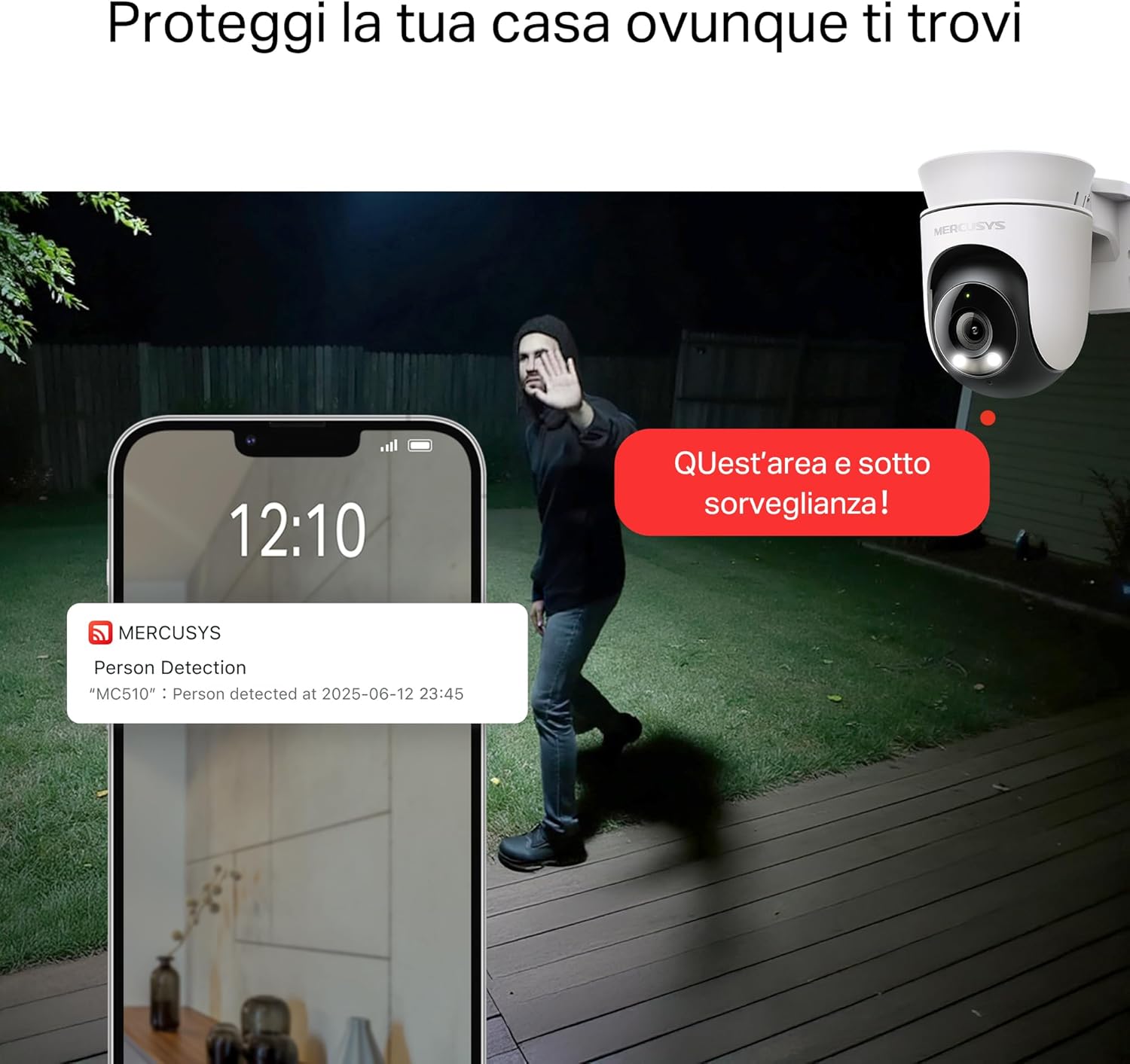
- Smart Motion Detection and Person Tracking: Automatically detects and tracks motion or people, ensuring key activities remain in focus.
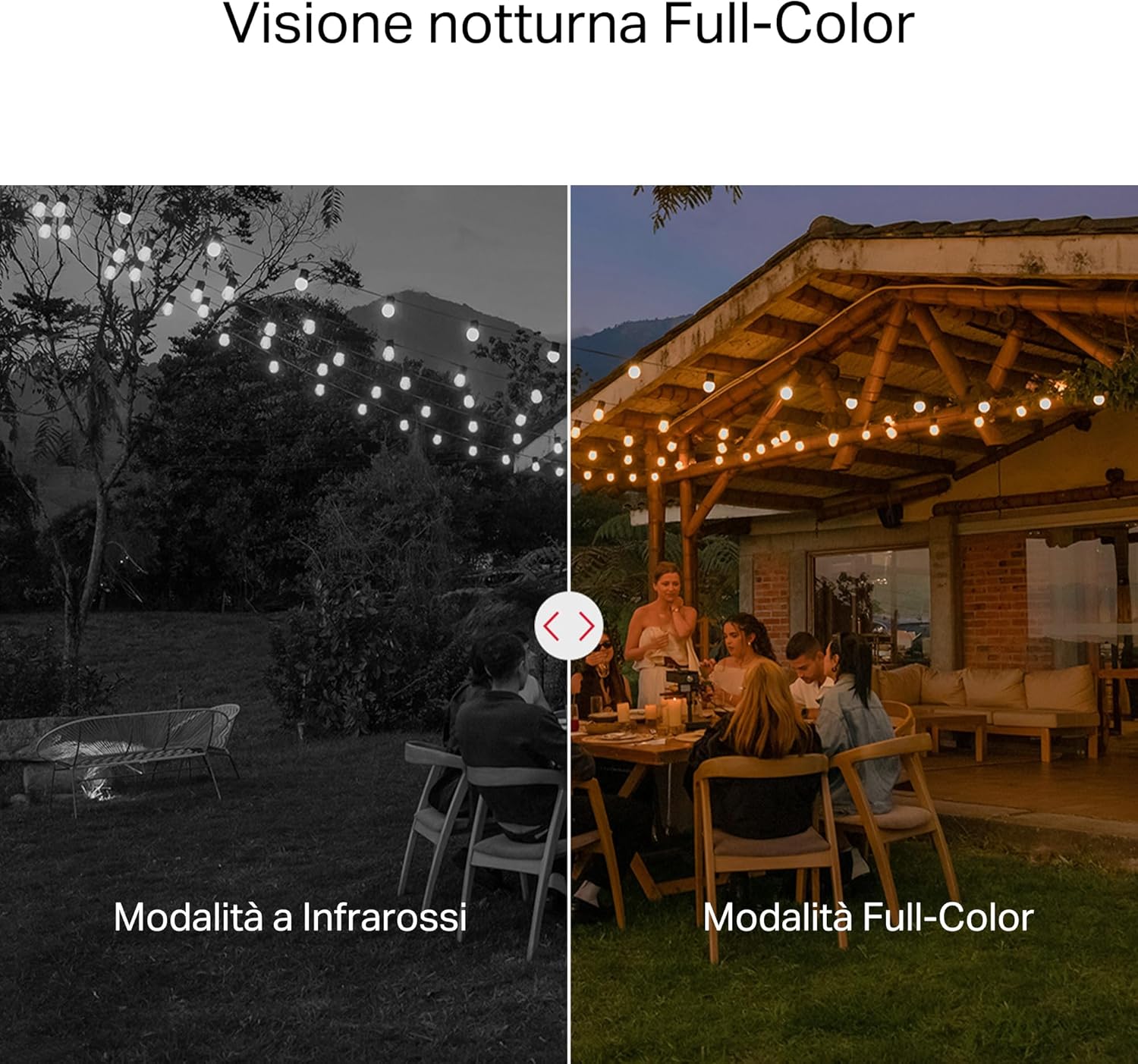
- 컬러 나이트 비전: Provides vivid and detailed images even at night for 24/7 protection.
- 사용자 지정 가능한 활동 영역: Helps filter out irrelevant events and sends alerts only when necessary.
- 로컬 및 클라우드 저장소: Supports microSD cards up to 512GB and cloud storage for secure and flexible video backup.
- 야외 사용을 위한 방수 기능: IP65 certified for reliable performance in rain, dust, or snow. Easily mounts on walls, ceilings, or poles.
- Privacy Protection with Lens Shield: Activate the physical lens cover when surveillance is not needed for greater peace of mind at home.
- 양방향 오디오 : 카메라를 통해 직접 소통하세요.
시각적 특징:

High-resolution 2K 3MP video capture.
360-degree panoramic rotation for full coverage.
Full-Color Night Vision for clear images in low light.

Physical lens shield for enhanced privacy.
5. 설정
5.1 물리적 설치
The MC510 camera is designed for outdoor use and can be mounted on walls, ceilings, or poles. Its IP65 rating ensures protection against dust and water jets.
- 위치를 선택하세요: 원하는 조건을 충족하는 적절한 야외 장소를 선택하세요. view각도 조절이 가능하고 Wi-Fi 신호도 안정적입니다.
- 설치: Use the provided mounting sticker to mark drill holes. Drill holes, insert anchors, and secure the mounting bracket with screws. Attach the camera to the bracket.
- 전원 연결: Connect the power adapter to the camera and plug it into a power outlet. Ensure the waterproof gasket is properly installed for outdoor power connections.

Image: The camera is shown mounted outdoors, demonstrating its weather-resistant design.
5.2 앱 설치 및 연결
The MC510 connects exclusively via Wi-Fi. An Ethernet port is not available.
- 앱 다운로드: Download the official MERCUSYS app from your smartphone's app store (iOS or Android).
- 계정 생성: 앱을 열고 새 계정을 생성하거나 이미 계정이 있는 경우 로그인하세요.
- 카메라 추가: Follow the in-app instructions to add your MC510 camera. This typically involves scanning a QR code on the camera and connecting it to your home Wi-Fi network.
5.3 MicroSD 카드 설치
For local storage, install a microSD card (up to 512GB, not included).
- 전원 끄기 : Disconnect the camera from power before inserting or removing the microSD card.
- 슬롯 찾기: Refer to the camera's physical design to locate the microSD card slot, often protected by a cover.
- 카드 삽입: 딸깍 소리가 날 때까지 microSD 카드를 슬롯에 조심스럽게 삽입합니다.
- 포맷 카드 : After powering on the camera and connecting it to the app, navigate to the camera settings to format the microSD card.

Image: Close-up of the camera showing the microSD card slot, indicating flexible storage options.
6. 사용 설명서
6.1 라이브 View & 재생
- 살다 View: Open the MERCUSYS app and select your MC510 camera to view 라이브 피드.
- 팬/틸트 제어: Use the controls in the app to remotely rotate the camera horizontally (pan) and vertically (tilt) to adjust the view잉 각도.
- 재생: 기록된 foo에 액세스tage from the app's playback section. You can filter by date and event.

Image: Illustration of 360-degree rotation with motion tracking.
6.2 동작 감지 및 추적
- 감지 활성화: In the app settings, enable motion detection and person tracking.
- Customize Activity Zones: 카메라 내의 특정 영역을 정의합니다. view where you want motion to be detected. This helps reduce false alarms.
- 알림 수신: The camera will send notifications to your smartphone when motion or a person is detected in the monitored zones.

Image: A person running in a yard, with detection boxes, demonstrating motion detection and tracking.
6.3 양방향 오디오
내장 마이크와 스피커를 통해 양방향 통신이 가능합니다.
- 오디오 활성화: 라이브에서 view 앱 인터페이스에서 마이크 아이콘을 탭하면 카메라를 통해 말할 수 있습니다.
- 듣다: The speaker icon allows you to hear audio from the camera's vicinity.

Image: A person detected by the camera, with a phone notification and an on-screen alert, demonstrating customizable alarms and two-way audio.
6.4 컬러 나이트 비전
The MC510 provides full-color night vision for enhanced clarity in low-light conditions.
- 자동 활성화 : Color night vision activates automatically in low-light conditions.
- 적외선 모드 : The camera also supports traditional infrared night vision (black and white) if preferred or in extremely dark environments.

Image: Comparison of infrared (monochrome) and full-color night vision modes.
6.5 Privacy Zone & Lens Shield
Protect your privacy by defining privacy zones or activating the physical lens shield.
- 개인 정보 보호 구역: In the app, you can set up specific areas within the camera's view to be excluded from recording.
- Lens Shield: For complete privacy, use the app to activate the physical lens shield, which covers the camera lens.
7. 유지관리
7.1 청소
- 청소하기 전에 카메라의 전원이 꺼져 있는지 확인하세요.
- 부드럽고 마른 천으로 카메라 본체를 닦으세요.
- For the lens, use a lens cleaning cloth to avoid scratches. Do not use harsh chemicals or abrasive cleaners.
7.2 펌웨어 업데이트
Regularly check for firmware updates through the MERCUSYS app. Updates provide new features, performance improvements, and security enhancements. Follow the in-app instructions to perform updates.
8. 문제 해결
If you encounter issues with your MERCUSYS MC510 camera, refer to the following common problems and solutions:
| 문제 | 가능한 해결책 |
|---|---|
| 카메라가 Wi-Fi에 연결되지 않음 | Ensure the camera is within range of your Wi-Fi router. Check Wi-Fi password. Restart the camera and router. The MC510 only supports Wi-Fi connection, no Ethernet. |
| 비디오 품질이 좋지 않음 | Check your Wi-Fi signal strength. Ensure the camera lens is clean. Adjust camera placement to avoid glare or obstructions. |
| 동작 감지 문제 | Verify motion detection is enabled in the app. Adjust sensitivity settings. Ensure activity zones are correctly configured. |
| MicroSD card not working | Ensure the card is inserted correctly. Format the microSD card via the app. Try a different compatible microSD card. Power cycle the camera after inserting the card. |
| 양방향 오디오 없음 | 앱에서 마이크와 스피커 설정을 확인하세요. 휴대전화 볼륨이 충분히 큰지 확인하세요. |
9. 사양
| 특징 | 세부 사항 |
|---|---|
| 상표 | 머큐 시스 |
| 모델명 | MC510 |
| 실내/실외 사용 | 집 밖의 |
| 연결 프로토콜 | 와이파이 |
| 장착 유형 | 천장, 기둥, 벽 |
| 정지 이미지 해상도 | 3 MP |
| 국제 보호 등급 | IP65 |
| 무선 기술 | 와이파이 |
| 필요한 배터리 | 아니요 |
| 비디오 캡처 해상도 | 2K 3MP |
| 비디오 캡처 형식 | MPEG-4 |
| 항목 수 | 1 |
| 포함된 구성 요소 | MC510 Camera, Power Adapter, Mounting Sticker, Mounting Bracket, Mounting Screws, Mounting Anchors, Waterproof Gasket, Quick Start Guide |
| 원산지 | 중국 |
| 제조업체 | 티피링크 |
| 품목 치수 | 14.1 x 9.3 x 12.2cm |
10. 보증 및 지원
보증 정보 및 기술 지원에 대해서는 MERCUSYS 공식 웹사이트를 참조하십시오. website or contact their customer service. Details can typically be found in the Quick Start Guide included with your product or on the manufacturer's web대지.
온라인 지원: 방문하다 www.mercusys.com for FAQs, user manuals, and support resources.