
1. 서론
This manual provides detailed instructions for the ANRAN Q04 5MP Solar Security Camera and the ANRAN F2M3 Solar Light Security Camera. It covers essential information regarding product setup, operation, maintenance, and troubleshooting to ensure optimal performance and longevity of your devices. Please read this manual thoroughly before installation and use.
2. 제품 오버view
2.1 ANRAN Q04 5MP Solar Security Camera
The ANRAN Q04 is a 5-megapixel wireless outdoor security camera featuring an integrated solar panel for continuous power. It offers pan and tilt capabilities for wide area surveillance.

Image: Two ANRAN Q04 solar security cameras, showcasing their design with integrated solar panels and dual antennas.

Image: An ANRAN Q04 camera illustrating its 355-degree pan and 90-degree tilt capabilities, with a smartphone displaying the live view.
2.2 ANRAN F2M3 Solar Light Security Camera
The ANRAN F2M3 combines a security camera with a motion-activated light, powered by a separate solar panel and a 5000 mAh battery. It includes features like two-way audio, a siren, and multiple night vision modes.

Image: Two ANRAN F2M3 solar light security cameras shown alongside their separate solar panels.

Image: An ANRAN F2M3 camera mounted on a wall, emphasizing its dual function as a wall light and camera, powered by a 3W solar panel and a 5000 mAh battery.

Image: An ANRAN F2M3 camera demonstrating its PIR detection and motion-activated light, along with icons for notification, 2-way audio, 70db siren, and 200-lumen brightness.
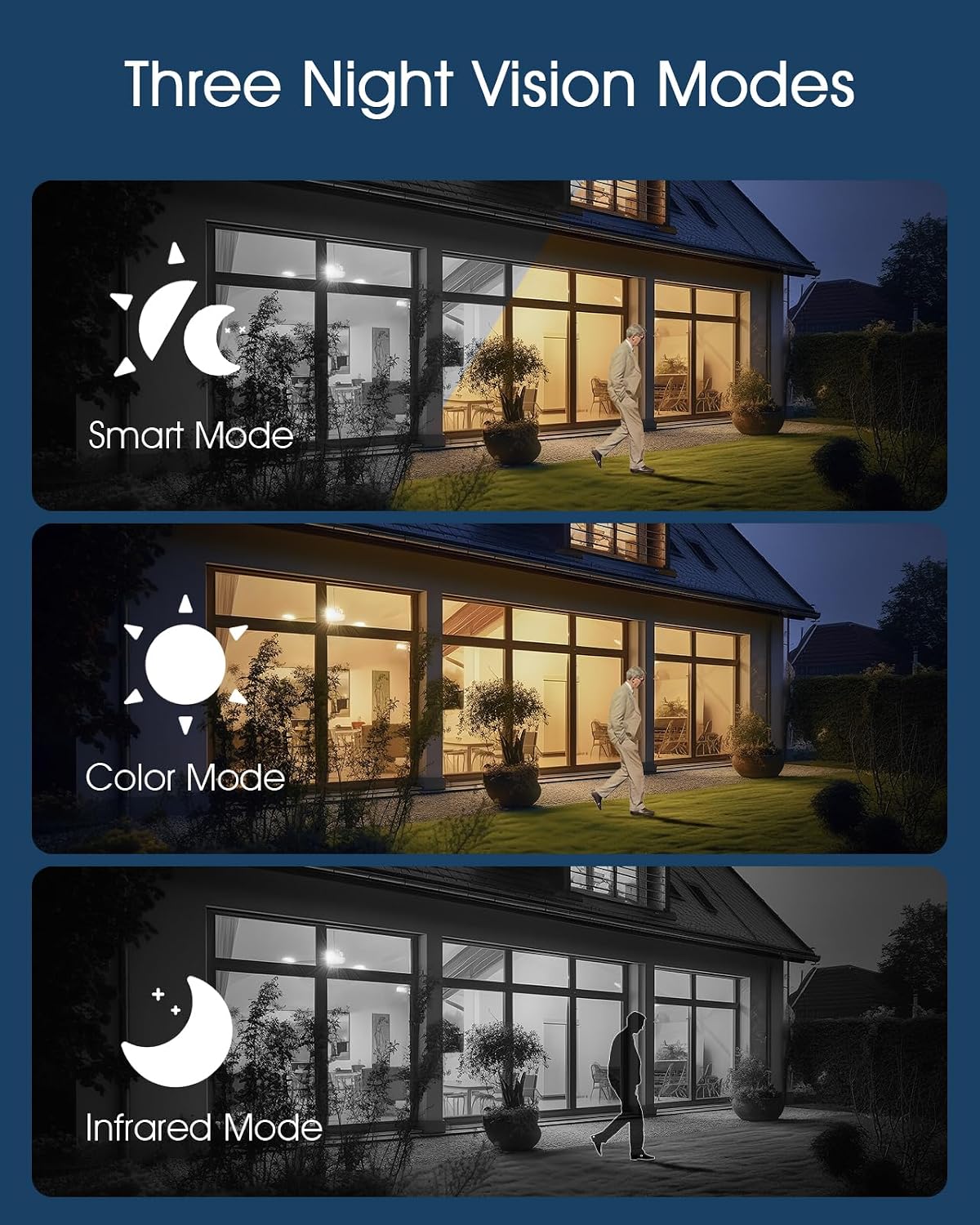
Image: Illustrations of the three night vision modes available for the F2M3 camera: Smart Mode, Color Mode, and Infrared Mode.
3. 설정
3.1 언박싱 및 초기 충전
Carefully unpack all components. Before installation, ensure the camera's battery is fully charged. Connect the camera to a power source using the provided USB cable for several hours.
3.2 설치
Select an optimal location for your camera, ensuring good Wi-Fi signal strength and direct sunlight exposure for the solar panel. Mount the camera securely using the provided screws and mounting bracket.
ANRAN Q04 Installation
The Q04 camera features an integrated solar panel. Mount it in a location that receives amp충전 효율을 극대화하기 위해 하루 종일 직사광선을 쬐어주세요.

Image: A woman installing an ANRAN Q04 camera on a wall, demonstrating the simple installation process without the need for a separate solar panel.
ANRAN F2M3 Installation
The F2M3 camera uses a separate solar panel. Mount the camera at the desired surveillance point and position the solar panel in a location with maximum sun exposure, connecting it to the camera with the provided cable.

Image: A man installing an ANRAN F2M3 camera on an exterior wall, highlighting its easy installation and instant connection to 2.4GHz WiFi.
3.3 앱 연결
- Download the official ANRAN app from your smartphone's app store.
- 계정을 만들고 로그인합니다.
- Follow the in-app instructions to add your camera. Ensure your Wi-Fi network is 2.4GHz, as the cameras do not support 5GHz Wi-Fi.
- Scan the QR code on the camera or manually enter the device ID to pair.
4. 사용 설명서
4.1 라이브 View 그리고 녹음
Once connected, open the ANRAN app to access the live video feed from your camera. You can initiate manual recordings or capture screenshots directly from the live view 인터페이스.
4.2 동작 감지 및 알림
Configure motion detection sensitivity and alert settings within the app. The cameras will send notifications to your smartphone when motion is detected. For the F2M3, motion detection also activates the integrated light and can trigger the siren.
4.3 Two-Way Audio (F2M3)
The F2M3 camera supports two-way audio communication. Use the microphone and speaker icons in the app to speak through the camera and hear audio from its vicinity.
4.4 Night Vision Modes (F2M3)
The F2M3 offers three night vision modes:
- 스마트 모드 : 움직임 감지에 따라 적외선 야간 투시 모드와 컬러 야간 투시 모드 사이를 자동으로 전환합니다.
- 색상 모드: Utilizes the integrated light to provide full-color video at night.
- 적외선 모드 : Provides black and white video using infrared LEDs for discreet surveillance.
4.5 Pan & Tilt Control (Q04)
For the Q04 camera, use the directional controls within the app to remotely adjust the camera's viewing angle (355° horizontal pan and 90° vertical tilt).
5. 유지관리
5.1 청소
Regularly clean the camera lens and solar panel surfaces with a soft, damp 깨끗한 이미지 품질과 효율적인 태양광 충전을 위해 천을 사용하십시오. 연마성 세척제 사용은 피하십시오.
5.2 배터리 관리
To prolong battery life, ensure the solar panel receives adequate sunlight. In prolonged periods of low light, consider temporarily charging the camera via USB if accessible.
5.3 펌웨어 업데이트
Check the ANRAN app periodically for available firmware updates. Keeping your camera's firmware up-to-date ensures optimal performance, security, and access to new features.
6. 문제 해결
6.1 카메라 전원이 켜지지 않음
- Ensure the battery is fully charged. Connect to a USB power source for several hours.
- Verify the solar panel connection (F2M3) or ensure the integrated panel (Q04) is receiving sunlight.
6.2 Wi-Fi에 연결할 수 없습니다
- Confirm your Wi-Fi network is 2.4GHz. These cameras do not support 5GHz Wi-Fi.
- 카메라가 Wi-Fi 라우터 범위 내에 있는지 확인하세요.
- 라우터와 카메라를 다시 시작하세요.
- Reset the camera to factory settings (refer to app for specific instructions) and attempt pairing again.
6.3 이미지 품질이 좋지 않음
- 카메라 렌즈를 청소하세요.
- 카메라 시야에 방해물이 없는지 확인하십시오. view.
- Wi-Fi 신호 강도를 확인하세요. 신호가 약하면 스트리밍 품질에 영향을 줄 수 있습니다.
6.4 동작 감지 기능이 작동하지 않음
- 앱에서 동작 감지 설정이 활성화되어 있는지 확인하세요.
- 감도 수준을 조정합니다.
- Ensure the camera's PIR sensor (F2M3) or motion detection area (Q04) is clear of obstructions.
7. 사양
| 특징 | 안란 Q04 | ANRAN F2M3 |
|---|---|---|
| 해결 | 5메가픽셀 | Not specified (typically 1080p/2K for light cameras) |
| 전원 | Integrated Solar Panel, Rechargeable Battery | Separate 3W Solar Panel, 5000 mAh Battery |
| 연결성 | 2.4GHz Wi-Fi (IEEE 802.11b/g/n) | |
| 팬/틸트 | 355° 팬, 90° 틸트 | 아니요 |
| 나이트 비전 | 적외선 야간 투시경 | 스마트 모드, 컬러 모드, 적외선 모드 |
| 오디오 | One-Way Audio (Listening) | 양방향 오디오 |
| 광 출력 | 아니요 | 200-Lumen Motion-Activated Light |
| 사이렌 | 아니요 | 70db Siren |
| 발각 | 동작 감지 | PIR Detection, Motion Detection |
| 실외 등급 | Weatherproof (specific IP rating not provided, but designed for outdoor use) | |
8. 보증 및 지원
ANRAN products typically come with a limited warranty. Please refer to the warranty card included with your product or visit the official ANRAN web자세한 보증 약관은 해당 사이트에서 확인하세요.
For technical support, troubleshooting assistance, or any product-related inquiries, please contact ANRAN customer service through the contact information provided on their official website or within the ANRAN app.