
소개
This manual provides essential information for the setup, operation, maintenance, and troubleshooting of your AWOW Mini PC, Model BA7. Please read these instructions carefully before using the device.

이미지: 이상view of the AWOW BA7 Mini PC, highlighting its compact design and key features.
패키지 내용
패키지에 모든 품목이 들어 있는지 확인하세요.
- AWOW BA7 Mini PC
- 전원 어댑터
- 장착 나사
- VESA 마운트 브라켓
- HDMI 케이블
- 사용 설명서 (본 문서)

Image: Illustration of the AWOW BA7 Mini PC and its included accessories: power adapter, screws, VESA mount, HDMI cable, and user manual.
설치 지침
- 주변기기 연결: 키보드, 마우스 및 모니터를 미니 PC의 해당 포트에 연결하십시오.
이미지: 앞면 view of the Mini PC showing the Power Button, Type-C port, USB 3.2 ports, and 3.5mm Audio Jack.

이미지: 후면 view of the Mini PC showing the DC IN, DP1.2, HDMI2.0, USB 2.0 ports, and RJ45 LAN port.
- 전원 연결: 전원 어댑터를 미니 PC의 DC IN 포트에 연결한 다음 어댑터를 전원 콘센트에 꽂으십시오.
- 전원 켜기: 미니 PC 전면에 있는 전원 버튼을 누르세요. 시스템이 부팅됩니다.
- 초기 설정 : 화면의 지시에 따라 언어, 지역, 네트워크 연결, 사용자 계정 생성을 포함한 Windows 11 Pro 초기 설정을 완료합니다.
- 네트워크 연결 :
- 열광한: Connect an Ethernet cable to the RJ45 LAN port for a stable wired connection.
- 무선 전화: During Windows setup or via Windows settings, connect to your Wi-Fi network using the built-in WiFi 6.
작동 지침
기본 동작
- 전원 켜기/끄기: Press the power button to turn on the PC. To shut down, use the Windows Start menu options (Shut down, Restart, Sleep). A short press on the power button can put the PC to sleep. A long press (approx. 5 seconds) will force a shutdown.
- 디스플레이 출력: The Mini PC supports up to three 4K displays simultaneously via DP, HDMI, and USB-C. Connect your monitors and configure display settings in Windows.

Image: A user working with a triple monitor setup, demonstrating the Mini PC's multi-display capability.
- USB 연결: Utilize the USB 2.0 and USB 3.0 ports for connecting external devices such as external hard drives, USB flash drives, printers, and other peripherals. The Type-C port also supports data transfer and display output.
- 오디오: 헤드폰이나 스피커를 3.5mm 오디오 잭에 연결합니다.
고급 사용
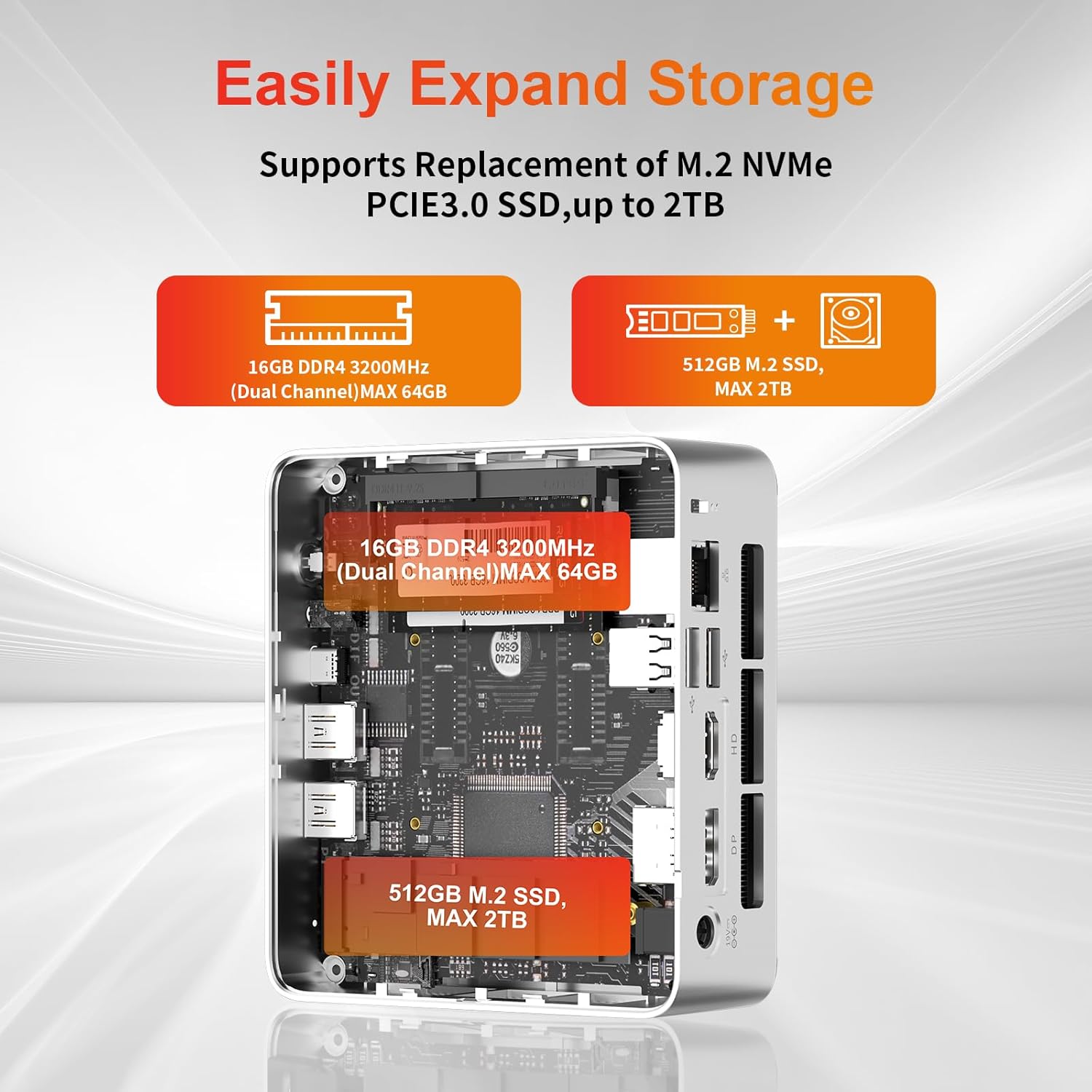
- 스토리지 확장: The Mini PC supports replacement of the M.2 NVMe PCIe 3.0 SSD up to 2TB. It also supports memory expansion up to 64GB DDR4.

Image: Diagram illustrating the internal components and options for expanding storage (M.2 SSD up to 2TB) and RAM (DDR4 up to 64GB).
- VESA 장착: Use the included VESA mount bracket to attach the Mini PC to the back of a compatible monitor or to a wall mount, saving desk space.
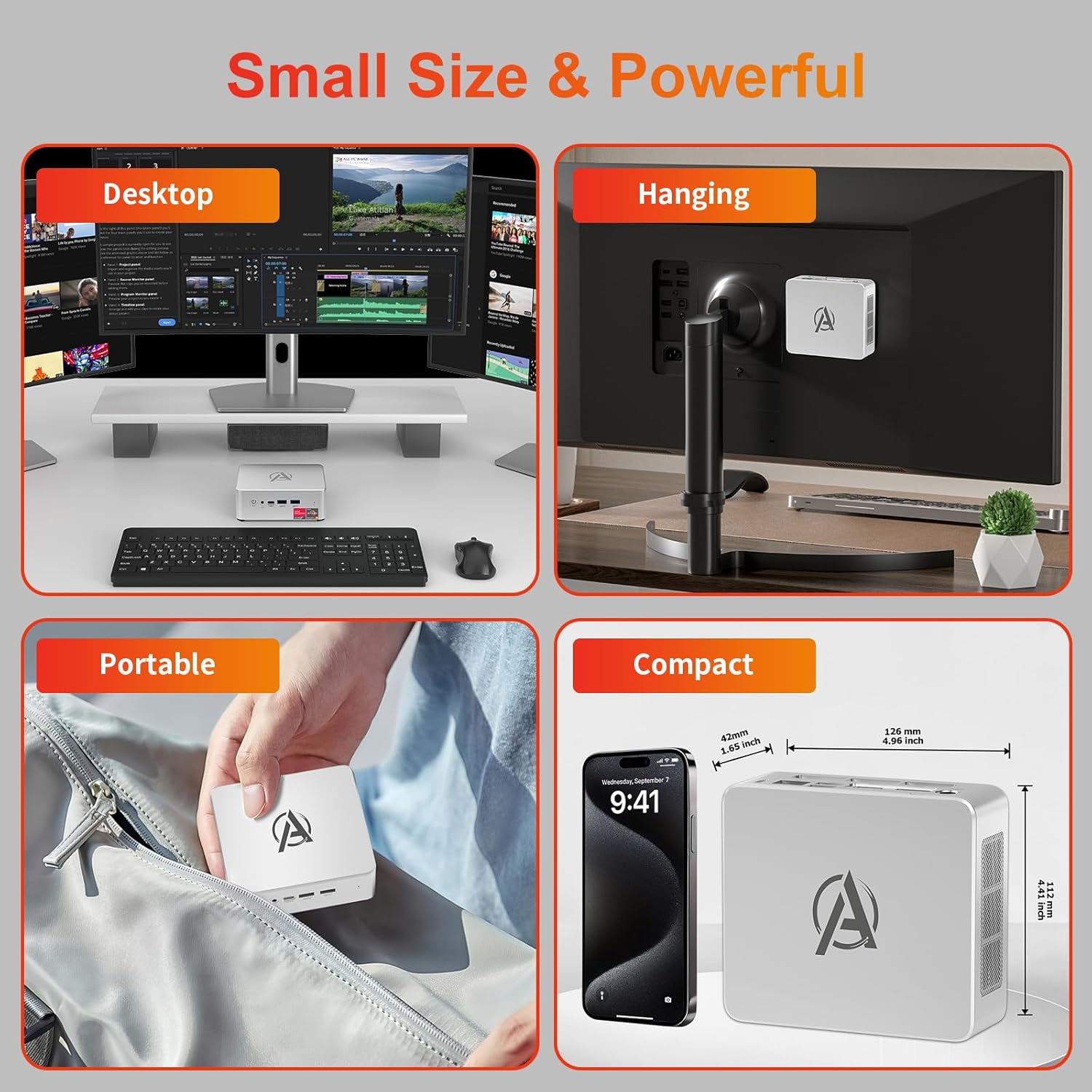
Image: Various usage scenarios for the Mini PC, including desktop, VESA-mounted behind a monitor, portable, and compact size comparison.
유지
- 청소: Use a soft, dry cloth to clean the exterior of the Mini PC. Do not use liquid cleaners or aerosols. Ensure ventilation openings are free from dust.
- 소프트웨어 업데이트: 최적의 성능과 보안을 보장하려면 Windows 업데이트와 드라이버 업데이트를 정기적으로 확인하고 설치하세요.
- 열 관리: Ensure the Mini PC is placed in a well-ventilated area. Avoid blocking the air vents. The intelligent cooling system is designed for low noise and efficient heat dissipation.

Image: Diagram illustrating the internal cooling fan and heat sink, showing airflow for efficient heat dissipation.
- 스토리지 관리: 주기적으로 불필요한 것들을 정리하세요 file시스템 성능을 유지하기 위한 소프트웨어 및 애플리케이션.
문제 해결
- 전원 없음:
- 전원 어댑터가 미니 PC와 전원 콘센트에 제대로 연결되어 있는지 확인하십시오.
- 전원 콘센트가 작동하는지 확인하세요.
- 다른 전원 콘센트를 사용해 보세요.
- 디스플레이 없음:
- Verify that the HDMI/DP/USB-C cable is securely connected to both the Mini PC and the monitor.
- 모니터의 전원이 켜져 있고 올바른 입력 소스로 설정되어 있는지 확인하세요.
- 가능하다면 다른 디스플레이 케이블이나 모니터를 사용해 보세요.
- 느린 성능:
- 백그라운드에서 실행 중인 불필요한 애플리케이션을 닫으세요.
- 보류 중인 Windows 업데이트 또는 드라이버 업데이트가 있는지 확인하고 설치하십시오.
- SSD에 충분한 여유 공간이 있는지 확인하십시오.
- 작업 관리자에서 CPU 및 RAM 사용량을 모니터링하여 리소스를 많이 사용하는 프로세스를 파악하십시오.
- 네트워크 연결 문제:
- For wired connections, ensure the Ethernet cable is properly connected and the router is working.
- For Wi-Fi, check if the Wi-Fi adapter is enabled and connected to the correct network. Restart your router/modem.
- 시스템 멈춤/충돌:
- 미니 PC를 다시 시작합니다.
- Ensure the system is not overheating (check ventilation).
- Run a system diagnostic or check Windows Event Viewer for error messages.
명세서
| 모델 | AWOW BA7 Mini PC |
| 프로세서 | AMD 라이젠 5 7430U (6코어, 12스레드, 최대 4.3GHz) |
| 제도법 | 통합 AMD Radeon 그래픽 |
| 숫양 | 16GB DDR4(최대 64GB까지 확장 가능) |
| 저장 | 512GB PCIe 3.0 M.2 SSD (Expandable up to 2TB) |
| 운영 체제 | 윈도우 11 프로 |
| 비디오 출력 | DP1.2 (4K@60Hz), HDMI2.0 (4K@60Hz), USB-C (4K@60Hz) - Supports Triple Display |
| 연결성 | WiFi 6, Bluetooth 5.2, 1000Mbps RJ45 LAN |
| 포트 | 2x USB 3.2, 2x USB 2.0, 1x Type-C (Full Function), 1x DP1.2, 1x HDMI2.0, 1x RJ45 LAN, 1x 3.5mm Audio Jack, 1x DC IN |
| 치수 | 126mm x 112mm x 42mm(약 4.96 x 4.41 x 1.65인치) |
| 무게 | 398g(기기만) Image: The Mini PC with its dimensions (126mm x 112mm x 42mm) and weight (398g) labeled. |
보증 및 지원
AWOW provides comprehensive support for its products.
- 보증: This product includes a 12-month service period from the date of purchase, covering manufacturing defects.
- 기술 지원: Lifetime technical support is available for all AWOW products.
- 연락하다: For technical assistance, warranty claims, or any product-related inquiries, please visit the official AWOW web사이트를 방문하거나 고객 서비스에 문의하세요.

Image: AWOW brand message emphasizing fulfillment, lifetime technical support, and 12-month service.