
1. 서론
The Gawfolk 27-inch 4K 160Hz IPS Gaming Monitor (Model GF270J) is designed to provide an exceptional visual experience for gaming, professional work, and multimedia consumption. Featuring a stunning 4K UHD resolution, a high refresh rate, and an IPS panel, this monitor delivers vibrant colors and smooth performance. This manual provides essential information for setting up, operating, and maintaining your monitor.
2. 패키지 내용
포장 내용물을 꼼꼼히 확인해 주세요. 누락되었거나 손상된 품목이 있는 경우 고객 지원팀에 문의하세요.
- Gawfolk 27-inch Monitor
- Monitor Stand (Base and Support)
- DP 케이블
- Power Adapter and Screws
- 사용자 설명서
3. 설정 지침
3.1. 스탠드 조립
- 모니터와 스탠드 구성품을 포장에서 조심스럽게 꺼내세요.
- Attach the stand support to the monitor panel using the provided screws.
- Connect the stand base to the support, securing it with the designated screw.
3.2. 케이블 연결하기
필요한 케이블을 모니터와 컴퓨터 또는 다른 장치에 연결합니다.
- 전원 케이블 : Connect the power adapter to the monitor's DC input port, then plug the adapter into a power outlet.
- 디스플레이포트(DP) 케이블: For optimal performance (up to 4K @ 160Hz), connect the included DP cable from your computer's graphics card to one of the monitor's DP 1.4 ports.
- HDMI 케이블 : Alternatively, connect an HDMI cable from your device to one of the monitor's HDMI 2.1 ports (supports up to 4K @ 160Hz).
- 오디오 출력: Connect external speakers or headphones to the Audio Out port if desired.

이 이미지는 명확한 개요를 제공합니다.view of the monitor's physical dimensions and its comprehensive set of input/output ports. It shows the location of the DC power input, two HDMI 2.1 ports, two DisplayPort 1.4 ports, and an Audio Out jack, facilitating various connectivity options.
3.3. VESA Wall Mounting
The monitor supports VESA 75mm x 75mm mounting for alternative installation options, such as wall mounts or monitor arms. Ensure the VESA mount is compatible and can support the monitor's weight.

This image demonstrates the monitor's ergonomic flexibility, featuring tilt adjustment from -7° to 17° for optimal viewing comfort. It also highlights VESA wall-mount compatibility (75x75mm) for space-saving setups and includes a built-in cable organizer for a tidy workspace.
4. 사용 설명서
4.1. 전원 켜기/끄기
모니터를 켜거나 끄려면 일반적으로 모니터 뒷면이나 아래쪽에 있는 전원 버튼을 누르십시오.
4.2. 입력 소스 선택
Use the monitor's On-Screen Display (OSD) menu or dedicated input button to select the desired input source (e.g., HDMI 1, HDMI 2, DP 1, DP 2).
4.3. OSD 메뉴 탐색
The OSD menu allows you to adjust various display settings. Navigate the menu using the buttons on the monitor. Common settings include brightness, contrast, color temperature, and gaming modes.
4.4. 기울기 조정
모니터 스탠드는 -7°에서 17°까지 기울기 조절이 가능합니다. 모니터 패널을 원하는 각도로 부드럽게 조절하세요. view잉 각도.
5. 주요 특징
5.1. 4K UHD Resolution
Experience stunning clarity with a 3840 x 2160 pixel resolution on a 27-inch display, offering four times the detail of Full HD.

This image illustrates the difference between Full HD (1920x1080) and 4K Ultra HD (3840x2160) resolutions. The 4K display on the right shows a much sharper and more detailed image of a racing game scene compared to the Full HD display on the left.
5.2. 160Hz Refresh Rate & 1ms Response Time
Enjoy fluid motion and reduced input lag with a high 160Hz refresh rate and a rapid 1ms response time, crucial for fast-paced gaming.

This image shows the monitor displaying a dynamic motorcycle racing game, highlighting its 160Hz refresh rate. This high refresh rate ensures smooth motion and reduced input lag for an immersive gaming experience.
5.3. IPS Panel & Color Performance
The IPS (In-Plane Switching) panel ensures consistent color accuracy and sharp image quality across wide 178° viewing angles. With 85% NTSC color gamut, 1.07 billion colors (8-bit + Hi-FRC), 300 nits brightness, and a 1000:1 contrast ratio, visuals are vibrant and lifelike.
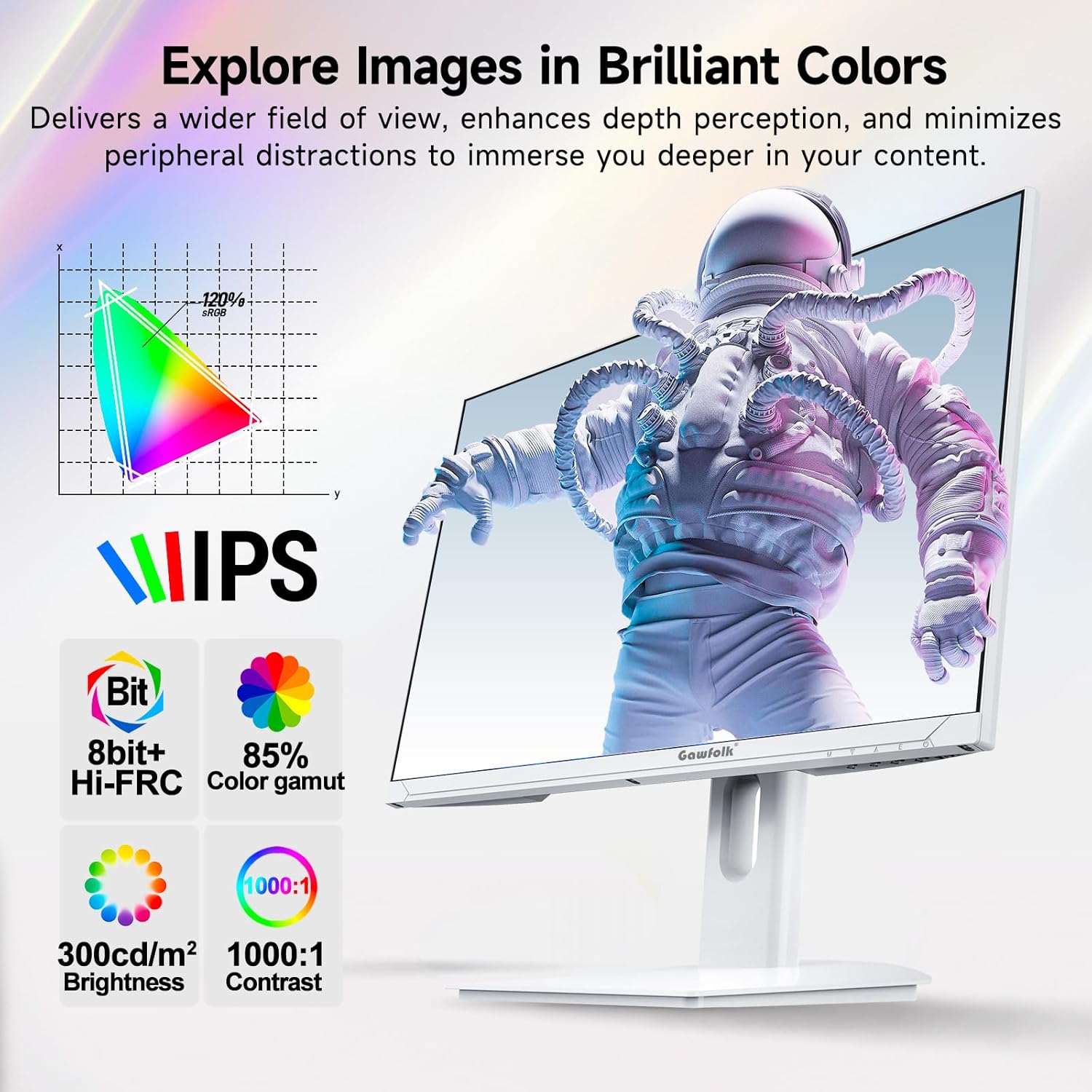
This image showcases the monitor's IPS panel technology, which provides consistent and accurate colors across wide viewing angles. Accompanying icons detail its color capabilities (8-bit + Hi-FRC, 85% NTSC color gamut), brightness (300 cd/m²), and contrast ratio (1000:1), all contributing to vivid and clear visuals.
5.4. 어댑티브 싱크(FreeSync)
Supported FreeSync technology helps eliminate screen tearing and stuttering, providing a smoother gaming experience.
5.5. 눈 건강 관리 기능
The monitor incorporates flicker-free technology to reduce eye strain during extended use.
5.6. Gaming Enhancements
Integrated customizable reticle overlays assist with precise aiming in games.
6. 유지관리
6.1. 화면 청소
부드럽고 보풀이 없는 천으로 화면을 부드럽게 닦으세요. 잘 지워지지 않는 얼룩은 가볍게 닦아주세요.amp천에 물이나 특수 화면 세척제를 묻혀 닦아주세요. 강한 화학 물질, 알코올 또는 연마재는 사용하지 마세요.
6.2. C 청소asing
부드럽고 마른 천을 사용하여 모니터의 c를 청소하십시오.asing. Do not spray cleaning liquids directly onto the monitor.
7. 문제 해결
If you encounter issues with your monitor, refer to the following troubleshooting tips:
- 전원 없음: 전원 어댑터가 모니터와 작동하는 전원 콘센트에 제대로 연결되어 있는지 확인하십시오.
- 신호 없음: Verify that the display cable (DP or HDMI) is firmly connected to both the monitor and your computer. Select the correct input source via the OSD menu.
- 잘못된 해상도/새로 고침 빈도: Ensure your graphics card drivers are up to date. Check your computer's display settings to set the resolution to 3840x2160 and the refresh rate to 160Hz.
- Optimal Performance Requirements: To achieve 4K @ 160Hz, your PC must be equipped with a dedicated GPU. It is recommended to use a GPU equivalent to or above an NVIDIA GTX 1650. Ensure you are using HDMI 2.1 or DisplayPort 1.4 cables.
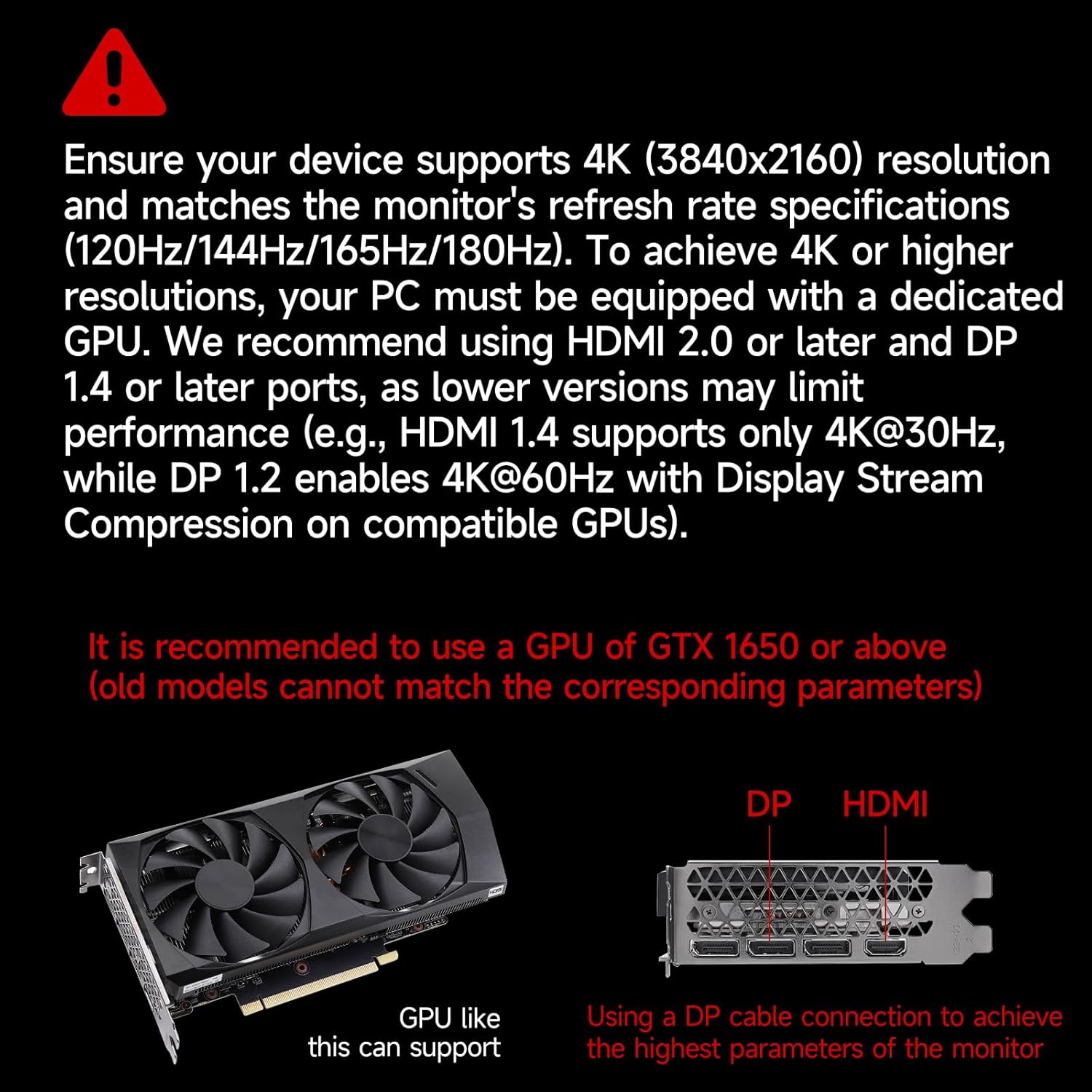
This image provides crucial information regarding system requirements, recommending a graphics processing unit (GPU) equivalent to or better than an NVIDIA GTX 1650 to fully utilize the monitor's 4K resolution and high refresh rate capabilities. It also highlights the importance of using DP or HDMI ports for optimal performance.
8. 사양
| 특징 | 사양 |
|---|---|
| 상표 | 가우포크 |
| 모델 번호 | GF270J |
| 화면 크기 | 27 인치 |
| 해결 | 3840 x 2160 픽셀(4K UHD) |
| 새로 고침 빈도 | 160Hz |
| 응답 시간 | 1밀리초(MPRT) |
| 디스플레이 기술 | IPS |
| 디스플레이 유형 | 주도의 |
| 종횡비 | 16시 9분 |
| Screen Finish | 매트 |
| 명도 | 300칸델라/제곱미터 |
| 대비율 | 1000시 1분 |
| View잉 각도 | 178도 |
| 색상 범위 값 | 85% NTSC |
| 연결 기술 | 디스플레이포트, HDMI |
| 하드웨어 연결 | HDMI 2.1 2개, DisplayPort 1.4 2개, 오디오 출력 1개 |
| 적응형 동기화 | 프리싱크 |
| 특별 기능 | Tilt Adjustment, Frameless, Flicker-Free, Eye Care, Adaptive Sync |
| VESA 마운트 유형 | 75 x 75 mm (Wall Mount) |
| 호환 장치 | Gaming Console, Computer, Laptop |
| 품목 치수(D x W x H) | 20 x 61.4 x 46.3 센티미터 |
| 품목 무게 | 5.1 킬로그램 |
| 색상 | 하얀색 |
9. 보증 및 지원
9.1. 보증 정보
Gawfolk provides a 12-month worry-free warranty for this monitor. This warranty covers manufacturing defects and malfunctions under normal use.
9.2. 고객 지원
If you encounter any issues such as damage, malfunction, or missing accessories, please contact Gawfolk customer service for assistance. Refer to the contact information provided with your purchase or on the official Gawfolk web대지.