
1. 서론
구매해주셔서 감사합니다asing the BOOMPODS Smart Tag Car Charger. This innovative 2-in-1 device combines the functionality of a powerful car charger with the advanced tracking capabilities of an Apple Find My compatible smart tag. Designed for convenience and peace of mind, it helps you keep track of your vehicle while ensuring your devices stay charged on the go.
주요 특징은 다음과 같습니다.
- Integrated Tracking: Seamlessly works with Apple's "Find My" network for vehicle location tracking.
- 내장 배터리: Provides up to 2 months of tracking functionality even when the car engine is off, eliminating the need for constant power.
- 듀얼 고속 충전 포트: Equipped with USB Type-A and Type-C ports, supporting up to 33W total output for rapid charging of multiple devices simultaneously.
- 간편한 설정: Simple pairing with your iPhone's "Find My" app, requiring no additional dedicated applications or monthly subscription fees.
2. 안전 정보
본 제품을 사용하기 전에 모든 안전 지침을 읽고 이해하십시오. 지침을 따르지 않을 경우 감전, 화재 또는 심각한 부상이 발생할 수 있습니다.
- 장치를 분해, 개조 또는 수리하지 마십시오.
- 장치를 물, 습기 및 극한의 온도로부터 멀리 두십시오.
- 장시간 직사광선에 기기를 노출시키지 마십시오.
- 기기가 차량의 시가잭 소켓에 제대로 꽂혀 있는지 확인하십시오.
- Use only compatible charging cables with the device.
- 어린이의 손이 닿지 않는 곳에 보관하세요.
3. 패키지 내용
패키지에 모든 품목이 들어 있는지 확인하세요.
- BOOMPODS Smart Tag 자동차 충전기
- USB 케이블
- 내장 배터리 (사전 설치됨)
- 사용 설명서(본 문서)
4. 제품 오버view
The BOOMPODS Smart Tag Car Charger is designed to be compact and integrate seamlessly into your vehicle's interior. It features multiple charging ports and an indicator light.

Image: The BOOMPODS Smart Tag Car Charger plugged into a car's cigarette lighter socket, with a smartphone displaying the car's location on a map, demonstrating its tracking capability.

Image: A visual representation highlighting the key specifications of the device, such as its maximum 33W fast charging capability, compatibility with 12-24V vehicles, and the extended 2-month battery life for tracking.
구성 요소:
- 담배 라이터 플러그: Inserts into your vehicle's 12V/24V power socket.
- USB Type-A 포트: For standard USB charging (Max 30W).
- USB 타입-C 포트: For fast charging compatible devices (Max 33W with PPS, Max 30W without).
- LED 표시등: Displays power status and connection activity.
- 내장 배터리: Powers the tracking function when the vehicle is off.
5. 설정 지침
Setting up your BOOMPODS Smart Tag Car Charger is quick and easy, utilizing your iPhone's native "Find My" application.
5.1 초기 연결
- Insert the BOOMPODS Smart Tag Car Charger firmly into your vehicle's cigarette lighter socket. The LED indicator should light up.
- Ensure your iPhone is nearby and has Bluetooth enabled.
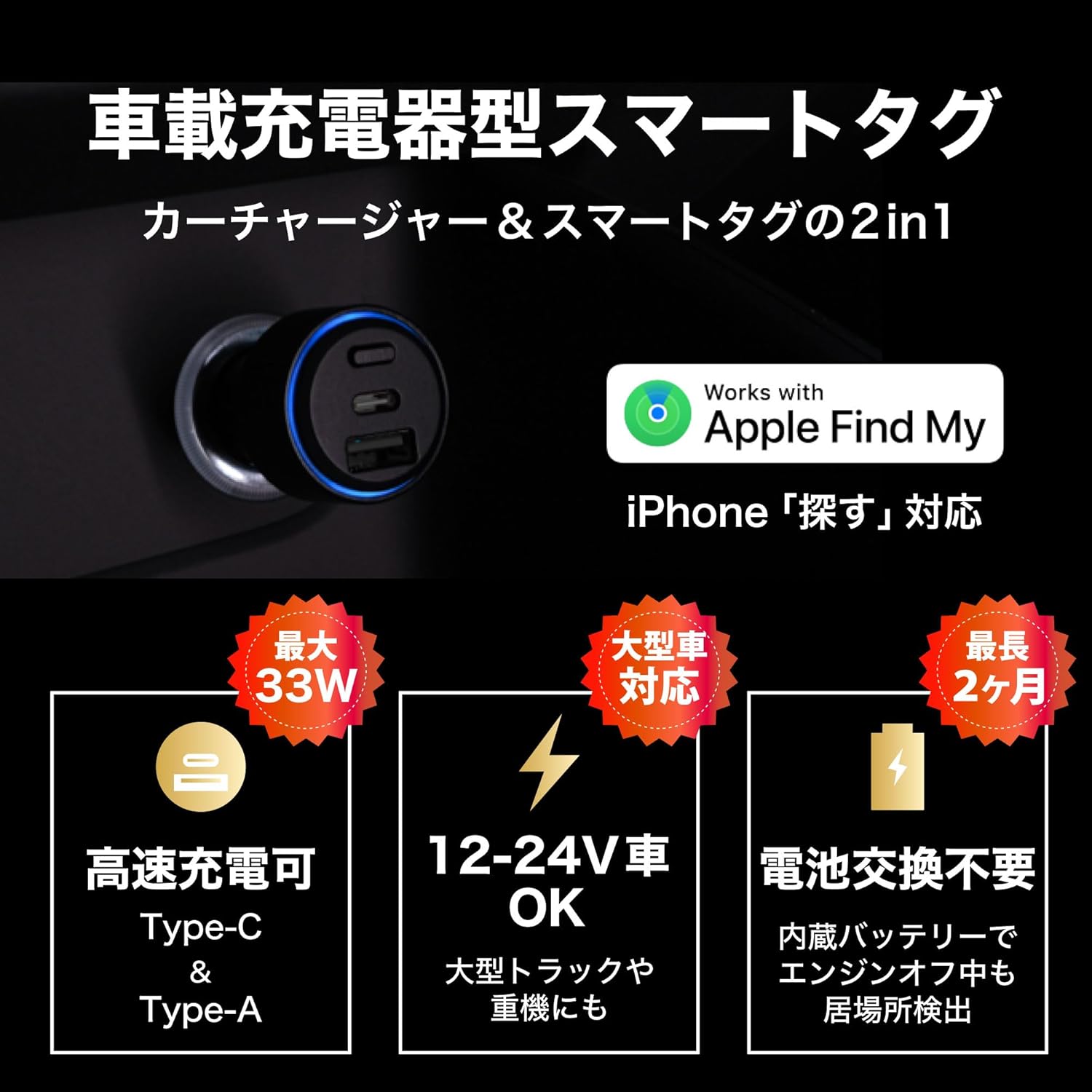
Image: The BOOMPODS Smart Tag Car Charger correctly inserted into a vehicle's power outlet, ready for use.
5.2 Apple Find My와 페어링
- iPhone에서 "내 찾기" 앱을 엽니다.
- 화면 하단의 "항목" 탭을 탭하세요.
- "+" 아이콘을 탭하고 "다른 항목 추가"를 선택하세요.
- The app will search for nearby compatible items. Select "BOOMTAG smart tracker" when it appears.
- Follow the on-screen prompts to name your item and register it to your Apple ID.

이미지: 자세한 view of the charger's USB-A and USB-C ports, along with the blue LED indicator, confirming power and readiness for pairing.
Note: No dedicated app or monthly subscription is required for the tracking function, as it leverages the Apple Find My network.
6. 사용 설명서
6.1 차량 추적
- To locate your vehicle, open the "Find My" app on your iPhone.
- Navigate to the "Items" tab and select your named BOOMPODS Smart Tag.
- The app will display the current or last known location of your vehicle on a map.
- You can also play a sound from the device to help locate it when nearby.

Image: This visual demonstrates how the built-in battery overcomes the limitation of traditional cigarette lighter smart tags, allowing continuous location detection even when the vehicle's engine is off.
The built-in battery ensures that the tracking function remains active for up to 2 months even if the car's engine is turned off. The battery recharges automatically when the car's engine is running.
6.2 기기 충전
- Connect your device (smartphone, tablet, etc.) to either the USB Type-A or USB Type-C port using a compatible charging cable.
- 충전기가 자동으로 기기를 감지하고 충전을 시작합니다.
- For optimal fast charging, use the USB Type-C port with a Power Delivery (PD) compatible cable and device.

Image: A detailed diagram highlighting the fast charging specifications for each port: USB Type-C (Max 33W with PPS, Max 30W without) and USB Type-A (Max 30W), with a combined output of Max 15W when both are used.
비디오: 제품 종료view 및 설정
This video demonstrates the installation of the BOOMPODS Smart Tag Car Charger into a vehicle's cigarette lighter socket and its initial power-up sequence, including the audible confirmation and LED indicator. It also shows the process of pairing the device with the Apple Find My app on an iPhone, highlighting the ease of setup and the device's dual functionality as both a tracker and a charger.
7. 유지관리
To ensure the longevity and optimal performance of your BOOMPODS Smart Tag Car Charger, follow these simple maintenance guidelines:
- 청소: 부드럽고 마른 천으로 기기를 닦으십시오. 액체 세척제나 스프레이형 세척제는 사용하지 마십시오.
- 저장: 장시간 사용하지 않을 경우, 직사광선을 피해 시원하고 건조한 곳에 보관하세요.
- 배터리 관리 : The built-in battery is designed for long life. Avoid completely draining the battery frequently. Regular use in the car will keep it charged.
- 점검: Periodically check the device and its ports for any signs of damage or wear.
8. 문제 해결
If you encounter issues with your BOOMPODS Smart Tag Car Charger, refer to the following common problems and solutions:
| 문제 | 가능한 원인 | 해결책 |
|---|---|---|
| Device not powering on/LED not lit | Not properly inserted into socket; Vehicle's cigarette lighter socket is faulty; Vehicle's power is off. | Ensure the device is fully inserted. Check the vehicle's fuse for the cigarette lighter. Turn on the vehicle's ignition. |
| Cannot find device in "Find My" app | Bluetooth is off on iPhone; Device battery is completely drained; Device is out of range of Apple devices. | Ensure iPhone Bluetooth is on. Drive the car to charge the device's internal battery. Move to an area with more Apple devices nearby. |
| 충전이 느리거나 충전이 안됨 | Incompatible charging cable; Device requires more power than supplied; Cable or device is faulty. | Use a high-quality, compatible charging cable. Ensure your device supports the charger's output. Try a different cable or device. |
| Location updates are infrequent or inaccurate | Limited Apple devices in the vicinity; Device is in an area with poor signal. | The accuracy depends on the density of Apple devices in the area. This is normal for Find My network devices. |
이러한 해결 방법을 시도한 후에도 문제가 지속되면 고객 지원팀에 문의하세요.
9. 사양
| 특징 | 세부 사항 |
|---|---|
| 상표 | 붐포드 |
| 모델 | B0FPPRM2J7 |
| Tracking Compatibility | Apple "Find My" network (iOS only) |
| 전원 입력 | 12V-24V DC (Vehicle Cigarette Lighter Socket) |
| USB Type-C 출력 | Max 33W (with PPS), Max 30W (without PPS) |
| USB Type-A 출력 | 최대 30W |
| 결합된 출력 | 최대 15W |
| Built-in Battery Life (Tracking) | Up to 2 months (when vehicle is off) |
| 포함된 구성 요소 | USB Cable, Built-in Battery |
| 제조업체 | BOOMPODS (HK) LIMITED |
| 원산지 | 중국 |
10. 보증 및 지원
10.1 보증 정보
This BOOMPODS Smart Tag Car Charger comes with a 6-month agent warranty 구매일로부터 적용됩니다. 이 보증은 정상적인 사용 조건에서 발생하는 제조상의 결함 및 오작동에 적용됩니다. 단, 오용, 사고, 무단 개조 또는 자연재해로 인한 손상은 보증 대상에서 제외됩니다.
보증 청구를 위해 구매 증명서를 보관하십시오.
10.2 고객 지원
For technical assistance, troubleshooting, or warranty inquiries, please contact your local retailer or the BOOMPODS customer support team through their official website. Ensure you have your product model number (B0FPPRM2J7) and proof of purchase ready when contacting support.