
hygger Aquarium LED Light HG160-18W Instruction Manual
Model: HG160-18W
제품 끝view
This manual provides detailed instructions for the hygger Aquarium LED Light, model HG160-18W. This full-spectrum LED light is designed for aquariums, offering various lighting modes, adjustable colors, and brightness levels to create an optimal environment for aquatic plants and fish. It features an external controller for easy customization and a durable, waterproof design.

Image: hygger Aquarium LED Light with external controller.
안전 지침
Please read and understand all safety instructions before installing or operating this product. Failure to follow these instructions may result in injury or damage to the product.
- 담그지 마십시오: This light is rated IP65 for splash protection, but it is 잠수 불가. Do not immerse the light fixture or controller in water.
- 전원 차단: 설치, 유지보수 또는 청소를 하기 전에 항상 전원 공급 장치를 차단하십시오.
- 어린이와 애완동물: 제품과 구성품은 어린이와 반려동물의 손이 닿지 않는 곳에 보관하십시오.
- 손상 검사: Do not operate the light if any part of the fixture, power cord, or adapter is damaged. Contact customer support for assistance.
- 올바른 어댑터: Use only the power adapter supplied with this product. Using an incorrect adapter may cause damage or fire.
- 실내에서만 사용 가능: This product is designed for indoor aquarium use only. Do not use outdoors.
- 통풍: 조명기구 주변에 적절한 환기가 이루어지도록 하여 과열을 방지하십시오.
패키지 내용
패키지에 모든 품목이 들어 있는지 확인하세요.
- hygger Aquarium LED Light (HG160-18W)
- 전원 어댑터(DC 12V/1.5A)
- Extendable Metal Brackets
제품 특징
- Adjustable Color and Brightness: Offers 8 customizable colors (Red, Green, Orange, Yellow, Cyan, Purple, Blue, Full Spectrum White) and 10 adjustable brightness levels (10% to 100%).
- 다양한 작업 모드: Features 5 functional modes: Day Mode, Night Mode, Day + Night Mode, 24/7 Natural Mode, and DIY Mode to suit various aquarium needs.
- 24/7 Natural Mode: Automatically simulates natural sunrise, daylight, sunset, and moonlight cycles, creating a realistic environment for aquatic life.
- DIY 모드: Allows users to program custom lighting schedules with adjustable time, color, and brightness across 5 distinct stag에스.
- 전체 스펙트럼 조명: Equipped with high-quality 5050 and 2835 LED chips, providing a high PAR value and optimal wavelengths (blue and red light) to promote photosynthesis in aquatic plants.
- 내구성과 방수성이 뛰어난 디자인: Constructed with an aluminum shell for efficient heat dissipation and an IP65 waterproof rating, protecting against splashes and moisture. Each LED bead is individually sealed.

Image: Full spectrum light details with LED types and spectral distribution.
- Extendable and Detachable Brackets: Stable and robust metal brackets allow for easy installation and adjustment on various aquarium sizes (30-45 cm for the 18W model), including rimmed and rimless tanks.
설치 지침
- 구성 요소 풀기: Carefully remove the LED light fixture, power adapter, and extendable metal brackets from the packaging.
- 브래킷 부착: Slide the extendable metal brackets onto both ends of the LED light fixture. Ensure they are securely inserted into the designated slots.

Image: Illustration of the extendable and detachable brackets for tank mounting.
- Position Light on Aquarium: Place the light fixture on top of your aquarium. Adjust the extendable brackets to fit the length of your tank (e.g., 30-45 cm for the 18W model). Ensure the light is centered and stable on the tank edges.
- 전원 연결: Connect the power adapter's DC plug to the input port on the light fixture's controller cable. Then, plug the power adapter into a standard electrical outlet.
- 컨트롤러 배치: Position the external controller in a dry, easily accessible location, away from direct water splashes.
작동 지침
컨트롤러 오버view
The external smart LCD display controller allows for easy management of all light functions. Familiarize yourself with the buttons and display:

이미지: 상세 view of the external controller, showing the LCD screen and control buttons.
- LCD 디스플레이: Shows current mode, local time, start/end times, brightness level, and color.
- 색상 버튼: Cycles through 8 available colors.
- 설정 버튼: Used to confirm settings or move to the next parameter during programming.
- UP / DOWN 버튼: Adjust values (time, brightness, color options).
- 24/7 버튼: Activates the 24/7 Natural Mode. Long press for 3 seconds to set local time.
- DIY/OK Button: Enters DIY Mode. Also acts as an 'OK' button to confirm and save settings in DIY mode.
- 켜기/끄기 버튼: Short press to turn the light on after plugging in. Long press to turn off.
현지 시간 설정
- 길게 누르세요 24/7 button for 3 seconds until the time display flashes.
- 사용하세요 UP 그리고 아래에 버튼으로 시간을 조정합니다.
- 를 누르세요 세트 분 설정으로 이동하려면 버튼을 클릭하세요.
- 사용하세요 UP 그리고 아래에 버튼을 사용하여 분을 조정합니다.
- 누르다 DIY/OK 시간 설정을 확인하고 종료합니다.
작동 모드
The light offers 5 distinct operating modes:

Image: Visual representation of Day Mode, Night Mode, and Day + Night Mode.
- 주간 모드: Provides a bright, full-spectrum white light. In this mode, the color is not adjustable, but the brightness can be set to one of 10 levels. Timer settings are optional.
- 야간 모드: Offers adjustable color (8 options) and brightness (10 levels). This mode is ideal for creating a calming nighttime ambiance. Timer settings are optional.
- Day + Night Mode: Features fixed full-spectrum white light during the day and fixed blue light during the moon time. Brightness is adjustable.
- 24/7 Natural Mode: This mode automatically simulates a natural light cycle:
- Sunrise (soft orange glow)
- Daylight (full spectrum white glow)
- Sunset (soft orange glow)
- Moonlight (blue light)

Image: Diagram of the 24/7 Natural Mode light cycle and examples of DIY mode stag에스.
- DIY 모드: This mode allows for complete customization of your lighting schedule. You can set 5 different stages (L1-L5) with specific times, colors (8 options), and brightness levels (10 options).
- 를 누르세요 DIY/OK button to enter DIY mode.
- 사용하세요 세트 button to cycle through the parameters for each stage (time, color, brightness).
- 사용하세요 UP 그리고 아래에 buttons to adjust the desired values for each parameter.
- After setting all 5 stages, press DIY/OK to confirm and save your custom program.
색상 및 밝기 조정
In modes where color and brightness are adjustable (e.g., Night Mode, DIY Mode):

Image: Visual guide to adjustable colors and brightness levels.
- 색상 조정: 를 누르세요 색상 button repeatedly to cycle through the 8 available color options.
- 밝기 조정: 사용하세요 UP 그리고 아래에 buttons to increase or decrease the light intensity across 10 levels (10% to 100%).
타이머 설정
The light offers options for timed operation:
- No Timed Setting: To disable the timer, press the `MODE` button for 1 second, then press the `SET` button for 3 seconds.
- Timed Setting: To enable and set a timer, press the `MODE` button for 3 seconds, then press the `SET` button for 3 seconds. You can then set the desired start and end times for the light to operate.
- DIY Mode Timer: In DIY mode, the timer is integrated into each of the 5 stages, allowing for precise scheduling of light changes.
유지
Regular maintenance ensures the longevity and optimal performance of your hygger Aquarium LED Light.
- 조명기구 청소: With the power disconnected, gently wipe the light fixture with a soft, damp cloth to remove dust, water spots, and algae buildup. Do not use harsh chemicals or abrasive materials, as these can damage the light's surface or waterproof seal.
- 컨트롤러 관리: Keep the external controller dry and clean. Avoid exposing it to water or high humidity.
- 전원 코드 및 어댑터: Periodically inspect the power cord and adapter for any signs of wear, cuts, or damage. If damage is found, discontinue use immediately and contact customer support.
- 통풍: Ensure that the aluminum housing remains clear of obstructions to allow for proper heat dissipation.
문제 해결
If you encounter issues with your hygger Aquarium LED Light, refer to the following table for common problems and solutions.
| 문제 | 가능한 원인 | 해결책 |
|---|---|---|
| 조명이 켜지지 않습니다. |
|
|
| 예상치 못하게 불빛이 깜빡이거나 어두워집니다. |
|
|
| Controller display is blank or unresponsive. |
|
|
| Cannot change color or brightness. |
|
|
| 24/7 mode not working as expected. |
|
|
Specifications (Model HG160-18W)
Detailed technical specifications for the hygger Aquarium LED Light 18W model:

Image: Product size and specification chart for various wattag전자 모델.
| 사양 | 값 |
|---|---|
| 모델 | HG160 |
| 왓tage | 18 와트 |
| 입력 Voltage | 교류 100-240V |
| 출력 볼륨tage | 직류 12V/1.5A |
| 가벼운 크기(브래킷 제외) | 27.5 x 11 x 1.3cm (10.8 x 4.3 x 0.5 인치) |
| Application Tank Length | 30~45cm |
| LED 수량 | 60 PCS (40 White, 2 Red, 4 Blue, 2 Green, 12 RGB) |
| 루멘스 | 591 lm |
| 렌더링 인덱스 | > 90 |
| 색온도 | 16568K |
| 전원 코드 길이 | 150cm + 60cm |
| 재료 | 알류미늄 |
| 방수 등급 | IP65(방말) |
| 품목 무게 | 630그램 |
| 에너지 효율 등급 | E |
For more detailed product information and energy label, please refer to the official EPREL database:

Image: Product Information Sheet with EPREL data.
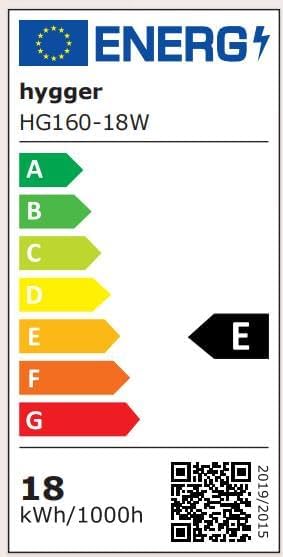
Image: Energy Label for hygger HG160-18W.
보증 및 지원
This hygger product comes with a standard manufacturer's warranty. For specific warranty terms, duration, and conditions, please refer to the warranty card included with your purchase or contact hygger customer support directly.
If you require technical assistance, have questions about product operation, or need to report a defect, please contact hygger customer service through their official web사이트 또는 제품 포장에 제공된 연락처 정보를 참조하세요.