
1. 서론
Thank you for choosing the Oilsky M1 MP3 Player. This device is designed to provide a portable and versatile music experience. It features Bluetooth 5.4 for wireless audio, a 2.4-inch full touch screen for easy navigation, and 128GB of internal storage, expandable via MicroSD card. Beyond music playback, it includes functions such as FM radio, voice recording, e-book reading, and picture viewing. Please read this manual thoroughly to understand the player's features and ensure optimal performance.
2. 상자 안에 무엇이 들어있나요?
Oilsky M1 MP3 플레이어의 포장을 조심스럽게 풀고 다음 항목들이 있는지 확인하십시오.
- 오일스카이 M1 뮤직 플레이어 1대
- 1x 이어폰
- USB 케이블 1개 (충전 및 데이터 전송용)
- 1x 보호 케이스
- 1x 사용자 설명서

Image: All items included in the Oilsky M1 MP3 Player package.
3. 제품 오버view
The Oilsky M1 MP3 Player features a compact design with a full touch screen interface. Familiarize yourself with the device's physical components:
- 2.4인치 풀 터치스크린: Main interface for navigation and control.
- 전원 버튼: 측면에 위치하며, 기기를 켜고 끄거나 화면을 잠금/잠금 해제하는 데 사용됩니다.
- 볼륨 버튼: 오디오 출력 레벨을 조정합니다.
- USB-C 포트: For charging and connecting to a computer for data transfer.
- 3.5mm 헤드폰 잭 : For wired earphone connection.
- MicroSD 카드 슬롯: For expanding storage capacity (card not included).
- 내장 스피커: 헤드폰 없이도 오디오 재생이 가능합니다.
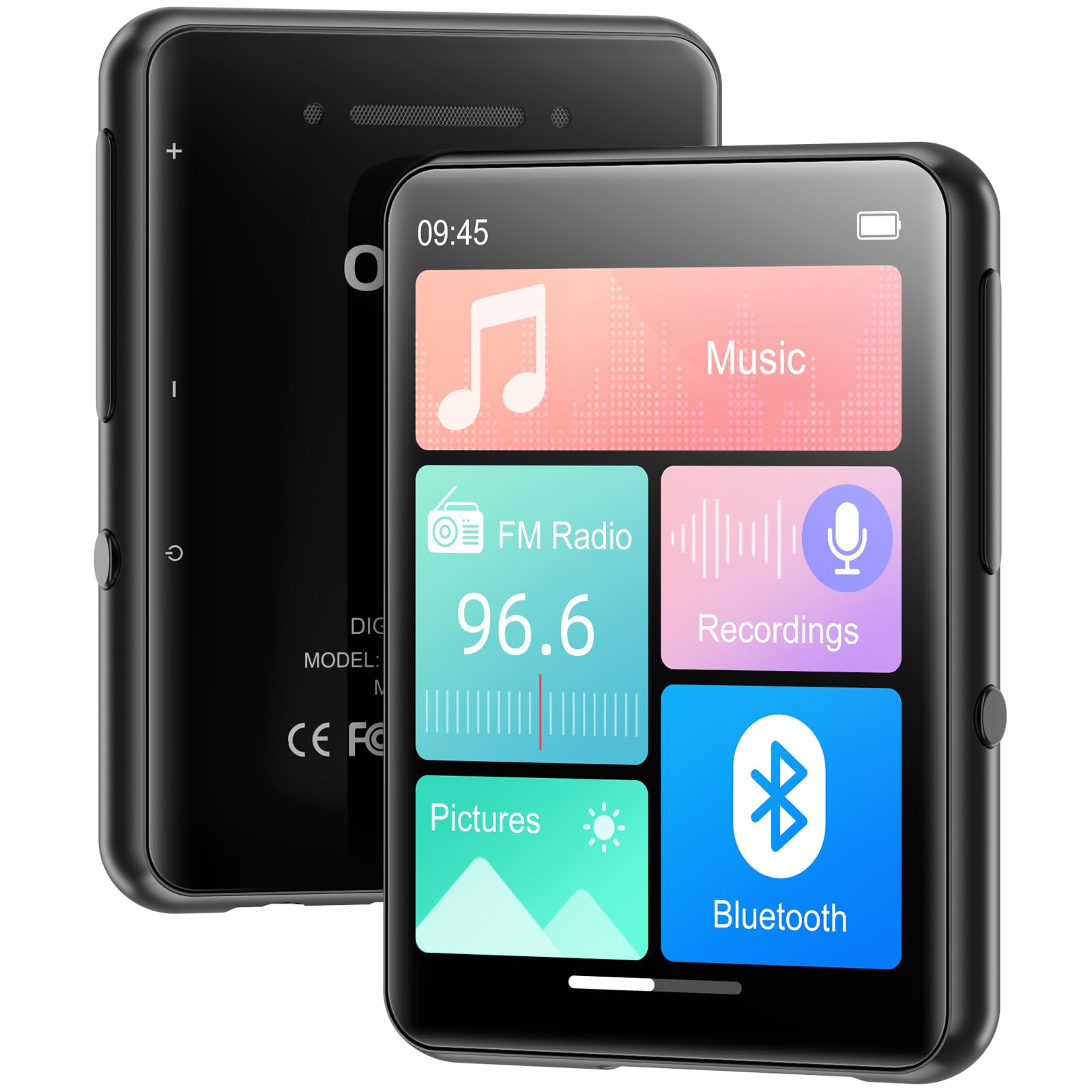
이미지: 앞면 view of the MP3 player displaying its main screen.
4. 설정
4.1 장치 충전
Before first use, fully charge the MP3 player. Connect the provided USB cable to the device's USB-C port and the other end to a USB power adapter (not included) or a computer's USB port. The battery indicator on the screen will show charging status.
4.2 전원 켜기/끄기
- 전원을 켜려면: 화면이 켜질 때까지 전원 버튼을 길게 누릅니다.
- 전원을 끄려면: 전원 버튼을 길게 누른 다음 화면에서 '전원 끄기'를 선택하세요.
- 화면 잠금/잠금 해제: Briefly press the Power button to lock or unlock the screen during use.
4.3 언어 설정
Upon first power-on, you may be prompted to select your preferred language. If not, navigate to 설정 > 언어 to choose from the available options.
4.4 음악 전송 및 Files
The Oilsky M1 MP3 Player has 128GB of internal storage and supports MicroSD cards up to 128GB (not included).
- USB 케이블을 사용하여 MP3 플레이어를 컴퓨터에 연결하세요.
- 해당 플레이어는 컴퓨터에서 이동식 디스크 드라이브로 나타납니다.
- 음악을 드래그 앤 드롭 files (MP3, WMA, APE, FLAC, WAV, AAC), pictures (JPEG, BMP), or e-books (TXT) into the appropriate folders on the player or MicroSD card.
- USB 케이블을 분리하기 전에 컴퓨터에서 장치를 안전하게 꺼내십시오.

Image: Visual representation of the 128GB internal storage and MicroSD card expansion capability.
5. 사용 설명서
5.1 음악 재생
From the main menu, tap the 'Music' icon to access your music library. You can browse by artist, album, genre, or all songs. Tap a song to begin playback. Use the on-screen controls for play/pause, skip tracks, and adjust volume. The player supports MP3, WMA, APE, FLAC, WAV, and AAC audio formats.

Image: User interacting with the touch screen for music playback.
5.2 블루투스 페어링
The Oilsky M1 features Bluetooth 5.4 for connecting to wireless headphones or speakers. 메모: This device cannot pair with mobile phones or personal computers via Bluetooth.
- 이동하다 설정 > 블루투스 or tap the 'Bluetooth' icon from the main menu.
- 블루투스를 '켜기'로 설정하세요.
- 블루투스 헤드폰이나 스피커가 페어링 모드인지 확인하세요.
- MP3 플레이어가 사용 가능한 기기를 검색합니다. 목록에서 기기를 선택하여 페어링하세요.
- Once paired, audio will be routed to your Bluetooth device.

Image: MP3 player demonstrating Bluetooth connectivity with headphones.
5.3 FM 라디오
To use the FM Radio, connect wired earphones to the 3.5mm jack, as they act as the antenna. Tap the 'FM Radio' icon from the main menu. You can manually tune to stations or use the auto-scan feature to find available frequencies.
5.4 음성 녹음기
Tap the 'Recordings' icon to access the voice recorder. The built-in microphone allows you to capture audio. Start, pause, and save recordings using the on-screen controls. Recorded files are saved in the 'Recordings' folder.
5.5 기타 기능
The Oilsky M1 MP3 Player includes several other useful applications:
- 영화: View stored image files (JPEG, BMP).
- 전자 책 : 텍스트 읽기 files (TXT 형식).
- 알람 시계: Set alarms with your favorite music.
- 달력: View 현재 날짜.

Image: Main menu showing various functions of the MP3 player.
비디오: 오버view of the Oilsky MP3 Player's features and interface, demonstrating its functionality.
6. 유지관리
- 기기를 건조한 곳에 보관하세요. 습기나 액체에 노출되지 않도록 하세요.
- 부드럽고 마른 천으로 화면과 본체를 닦으십시오. 연마성 세척제를 사용하지 마십시오.
- 극한의 온도를 피하세요.
- 장치를 떨어뜨리거나 강한 충격을 가하지 마십시오.
- Store the device in the provided protective case when not in use.
7. 문제 해결
| 문제 | 가능한 해결책 |
|---|---|
| 장치의 전원이 켜지지 않습니다. | 배터리가 충전되어 있는지 확인하세요. 전원에 연결한 후 다시 시도해 보세요. |
| Bluetooth 장치에 연결할 수 없습니다. | Ensure the Bluetooth device is in pairing mode and within range. Confirm the MP3 player's Bluetooth is enabled. Remember, it cannot pair with phones or PCs. |
| 헤드폰에서 소리가 나지 않습니다. | 헤드폰 연결 상태를 확인하세요. 볼륨이 음소거되어 있거나 너무 작지 않은지 확인하세요. 다른 헤드폰으로 테스트해 보세요. |
| 음악 file나타나지 않습니다. | 확인하다 files are in supported formats (MP3, WMA, APE, FLAC, WAV, AAC). Ensure files are transferred to the correct folders. Refresh the music library if available in settings. |
| 화면이 응답하지 않습니다. | Restart the device by holding the power button. If unresponsive, allow the battery to drain completely and then recharge. |
8. 사양
| 특징 | 세부 사항 |
|---|---|
| 모델명 | M1 |
| 상표 | 오일스카이 |
| 연결 기술 | 블루투스 5.4, USB |
| 메모리 저장 용량 | 128 GB (Internal), supports up to 128 GB Micro SD |
| 화면 크기 | 2.4 인치 |
| 특별 기능 | FM Radio, Touch Screen, Built-in Speaker, Voice Recorder, E-book, Picture Viewer, Alarm Clock, Calendar |
| 호환 장치 | 헤드폰, 블루투스 스피커 |
| 지원되는 용지 종류 | 마이크로SD |
| 지원되는 오디오 형식 | MP3, WMA, APE, FLAC, WAV, AAC |
| 품목 무게 | 5.9 온스(약 167그램) |
| 패키지 크기 | 5.87 x 5.83 x 0.75 인치 |
| 배터리 | 1개의 리튬 이온 배터리(포함) |
9. 보증 및 지원
The Oilsky M1 MP3 Player comes with a standard manufacturer's warranty. Please refer to the warranty card included in your package for specific terms and conditions. For technical support, troubleshooting assistance, or warranty claims, please contact Oilsky customer service through the retailer where the product was purchased.