
소개
구매해주셔서 감사합니다asing the Anker Soundcore P31i True Wireless Earbuds. This manual provides detailed instructions on how to set up, operate, and maintain your earbuds to ensure optimal performance and longevity. Please read this manual carefully before use and retain it for future reference.
무엇이 포함됩니까?
Your Soundcore P31i package includes the following items:
- Soundcore P31i Earbuds (Left and Right)
- 충전 케이스
- Ear Tips (XS, S, M, L - M size pre-installed)
- USB-C to USB-A 충전 케이블
- 빠른 시작 가이드
- 안전 매뉴얼
제품 끝view
The Soundcore P31i earbuds are designed for comfort and high-quality audio. Each earbud features a touch control area and an indicator light. The charging case protects the earbuds and provides additional battery life.
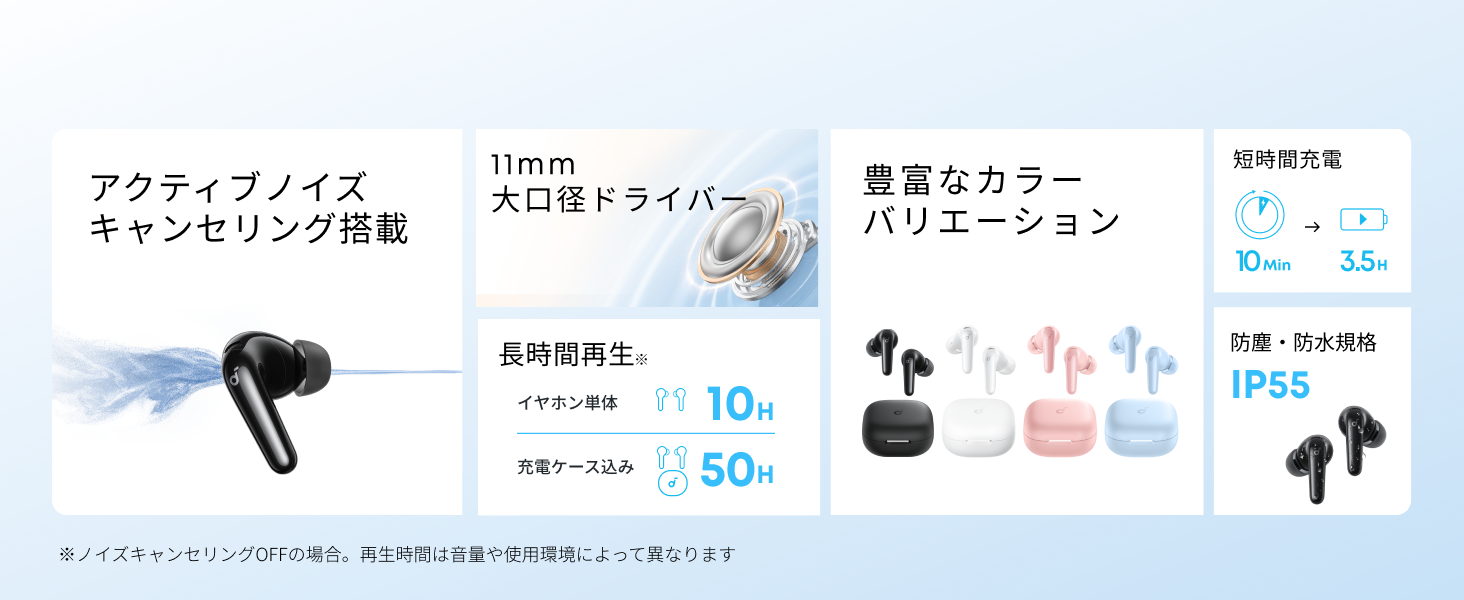
Diagram showing the Soundcore P31i earbuds and charging case with key components labeled.
이어 버드 : Each earbud is equipped with an 11mm dynamic driver for powerful bass and clear sound. They feature active noise cancellation and AI noise reduction for calls. The ergonomic design ensures a secure and comfortable fit.
충전 케이스: The compact charging case not only stores and protects your earbuds but also recharges them on the go. It has a USB-C charging port and a strap hole for portability.
이어버드 및 케이스 충전
처음 사용하기 전에 이어버드와 충전 케이스를 모두 완전히 충전하세요.
- 이어버드 충전: Place the earbuds into the charging case. The indicator lights on the earbuds will show charging status.
- 케이스 충전: Connect the charging case to a power source using the provided USB-C to USB-A cable. A full charge for the case and earbuds takes approximately 3 hours.
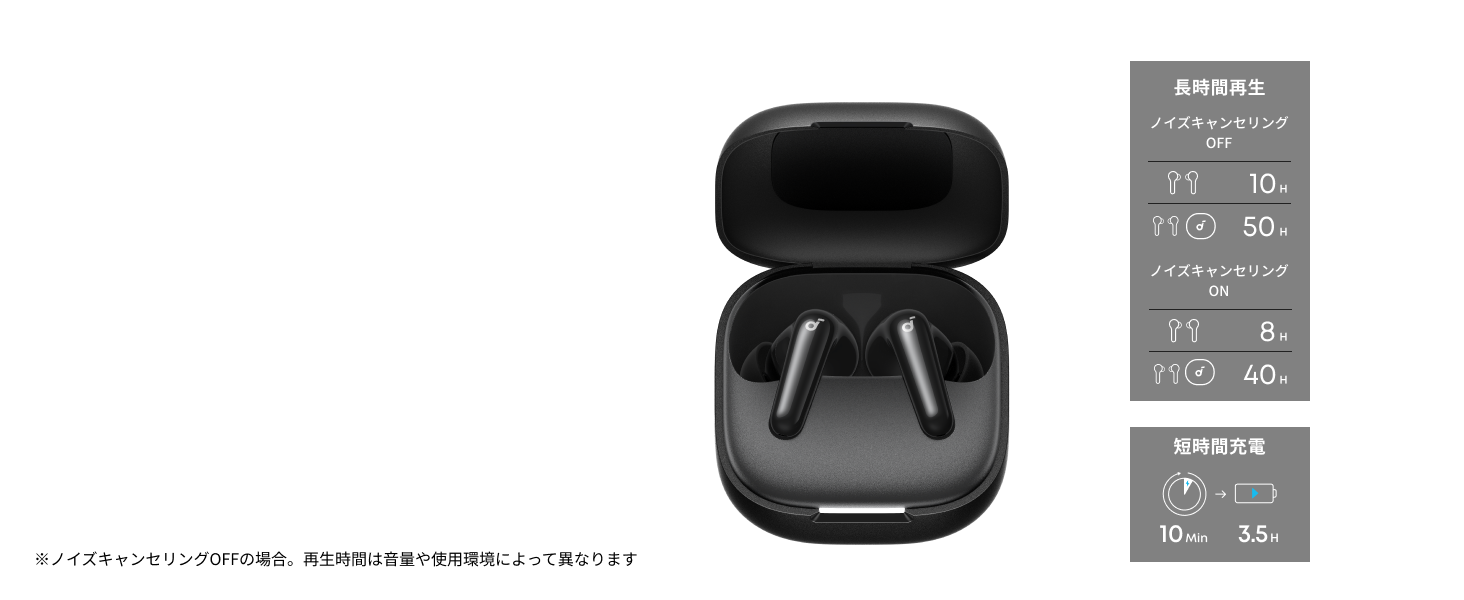
Diagram illustrating charging times and playback duration for Soundcore P31i earbuds.
배터리 수명:
- Up to 10 hours of playback on a single charge (earbuds only).
- 충전 케이스를 사용하면 최대 50시간 동안 재생할 수 있습니다.
- A quick 10-minute charge provides up to 3.5 hours of listening time.
Note: Playback time varies depending on volume level and audio content.
이어버드 착용
For optimal sound quality and comfort, it is important to wear your earbuds correctly.
- 올바른 이어팁을 선택하세요: Select the ear tips that provide the best seal and comfort for your ears. Experiment with different sizes (XS, S, M, L) to find the perfect fit.
- 이어버드 삽입: 이어폰을 귀의 귀에 조심스럽게 넣으세요.
- 돌려서 고정하세요: Twist the earbuds slightly until they fit snugly and securely in your ears.

Image showing a person wearing the Soundcore P31i earbuds correctly.
블루투스 페어링
Follow these steps to pair your Soundcore P31i earbuds with your device:
- 최초 페어링:
- Open the charging case. The earbuds will automatically enter Bluetooth pairing mode. The indicator lights on the earbuds will flash white.
- 기기(스마트폰, 태블릿 등)에서 Bluetooth 설정으로 이동하세요.
- Select "Soundcore P31i" from the list of available devices.
- Once connected, the indicator lights on the earbuds will turn solid white for 1 second and then turn off.
- 다른 장치와 페어링:
- 이어버드를 충전 케이스에 넣고 뚜껑을 열어 두세요.
- Press and hold the button on the charging case for 3 seconds until the earbud indicator lights flash white rapidly.
- Repeat steps 2 and 3 from "First-Time Pairing" on your new device.
통제 수단
The Soundcore P31i earbuds feature touch controls for managing playback, calls, and other functions. Specific control configurations can often be customized via the Soundcore app.
General Touch Controls (Default):
- 재생/일시 중지: 양쪽 이어버드를 한 번 탭합니다.
- 다음 트랙: 오른쪽 이어버드를 두 번 탭합니다.
- 이전 트랙 : 왼쪽 이어버드를 두 번 탭합니다.
- 전화 받기/종료: 양쪽 이어버드를 한 번 탭합니다.
- 전화 거부: 양쪽 이어버드를 2초 동안 길게 누릅니다.
- Voice Assistant 활성화 : Triple-tap either earbud (may vary).
- ANC/투명 모드 전환: Press and hold the right earbud for 2 seconds (may vary).
For detailed and customizable controls, please refer to the Soundcore app or the included Quick Start Guide.
능동 소음 제거(ANC)
The Soundcore P31i earbuds feature Active Noise Cancelling technology to minimize ambient noise, allowing for an immersive listening experience.

Illustration demonstrating the active noise cancelling feature of the Soundcore P31i earbuds.
ANC detects and reduces various types of noise, such as engine hum on trains or buses, and chatter in cafes. This allows you to enjoy your music or podcasts with greater clarity and fewer distractions.
To switch between ANC, Normal, and Transparency modes, use the touch controls on the earbuds or adjust settings within the Soundcore app.
음질
The Soundcore P31i earbuds are engineered to deliver a rich audio experience.

Diagram illustrating the 11mm dynamic driver responsible for the audio output.
- 11mm 동적 드라이버: Equipped with large 11mm drivers, these earbuds produce a wide frequency range and detailed sound.
- BassUp™ Technology: Anker's proprietary BassUp™ technology enhances low frequencies, delivering powerful and impactful bass.
You can further customize the sound profile using the equalizer settings within the Soundcore app.
통화 품질
The Soundcore P31i earbuds ensure clear voice calls and web 컨퍼런스.

Illustration depicting AI noise reduction technology for clear voice calls.
AI 노이즈 감소: Integrated AI noise reduction technology effectively filters out background noise, ensuring your voice is transmitted clearly to the person on the other end of the call, even in noisy environments.
다지점 연결
The Soundcore P31i supports multi-point connection, allowing you to connect to two Bluetooth devices simultaneously.

Illustration showing the Soundcore P31i connected to multiple devices simultaneously.
This feature enables seamless switching between devices. For example, you can listen to music on your laptop and instantly switch to answer a call on your phone without manually re-pairing.
To enable multi-point connection, ensure both devices are paired with your earbuds. The earbuds will automatically connect to the last two paired devices when powered on.
Soundcore 앱
Download the Soundcore app to enhance your experience with the P31i earbuds. The app offers various features and customization options.

Screenshots of the Soundcore app interface, highlighting customization features.
App Features include:
- 사용자 정의 가능한 컨트롤: Personalize touch controls for playback, calls, and voice assistant.
- 이퀄라이저 설정: 오디오 프로 조정files to your preference or choose from preset EQs.
- ANC/Transparency Mode Switching: Easily toggle between noise cancelling and transparency modes.
- 펌웨어 업데이트: 최신 기능과 개선 사항을 적용하여 이어버드를 최신 상태로 유지하세요.
- AI 번역 기능: (Available from Spring 2026, requires Soundcore app ver 4.0.0 or higher).
The Soundcore app is available for download on both iOS and Android devices.
제품 끝view 동영상
공식 제품 영상 쇼asing the key features and design of the Soundcore P31i True Wireless Earbuds, including active noise cancellation, powerful bass, long battery life, and multi-point connectivity.
유지 보수 및 관리
Proper maintenance ensures the longevity and performance of your Soundcore P31i earbuds.
- 청소: 부드럽고 마른 보풀 없는 천으로 이어버드와 충전 케이스를 정기적으로 닦으세요. 강한 화학 물질이나 연마재는 사용하지 마세요.
- 귀 팁: 이어팁을 분리하여 필요시 물과 순한 비누로 세척하십시오. 완전히 건조된 후 다시 부착하십시오.
- 충전 연락처: 충전이 제대로 되도록 이어버드와 케이스의 충전 접점을 깨끗하고 건조하게 유지하십시오.
- 저장: 사용하지 않을 때는 이어버드를 충전 케이스에 보관하여 먼지와 손상으로부터 보호하세요.
- 방수 기능: The earbuds are rated IP55 for dust and water resistance. This means they can withstand sweat and light rain, but are not designed for submersion in water. Ensure the earbuds are dry before placing them back in the charging case.

Image showing Soundcore P31i earbuds with water droplets, highlighting their IP55 water resistance.
문제 해결
If you encounter any issues with your Soundcore P31i earbuds, refer to the following common solutions:
- 이어버드가 페어링되지 않음:
- 두 개의 이어버드가 모두 완전히 충전되었는지 확인하세요.
- 이어버드를 케이스에 넣고 뚜껑을 닫았다가 다시 열면 페어링 모드로 다시 진입합니다.
- Forget "Soundcore P31i" from your device's Bluetooth list and try pairing again.
- Reset the earbuds (refer to the Quick Start Guide for specific reset instructions).
- Only One Earbud Playing Audio:
- 이어버드 두 개를 모두 충전 케이스에 넣고 뚜껑을 5초간 닫았다가 다시 여세요.
- 양쪽 이어버드 모두 배터리가 충분한지 확인하세요.
- 이어버드를 재설정하세요.
- 나쁜 음질:
- 이어팁이 귀에 잘 밀착되는지 확인하세요. 다양한 사이즈를 사용해 보세요.
- 이어버드 노즐에서 이물질을 청소하세요.
- 간섭을 피하려면 연결된 장치에 더 가까이 다가가세요.
- 충전 문제:
- 충전 케이블과 어댑터가 손상되었는지 확인하세요.
- 이어버드와 케이스의 충전 접점이 깨끗한지 확인하세요.
- 다른 충전 케이블이나 전원을 사용해 보세요.
명세서
| 특징 | 세부 사항 |
|---|---|
| 상표 | 사운드코어 |
| 모델명 | P31i |
| 모델 번호 | 디1202 |
| 색상 | Black (This specific variant) |
| 폼 팩터 | 인이어 |
| 연결 기술 | 무선(블루투스 6.1) |
| 소음 제어 | 능동 소음 제거 |
| 드라이버 크기 | 11mm 다이나믹 드라이버 |
| 재생 시간 (이어폰) | 최대 10시간 |
| 총 재생 시간(케이스 포함) | 최대 50시간 |
| 빠른 충전 | 10분 충전으로 3.5시간 재생 가능 |
| Charging Time (Full) | 약 3시간 |
| 방수성 | IP55 |
| 다지점 연결 | 지원됨 |
| 한국어: | 194644251543 |
| 원산지 | 중국 |
보증 및 고객 지원
Soundcore provides a comprehensive warranty for your P31i earbuds.

Image detailing the warranty period and extension for Soundcore P31i.
- 표준 보증: An 18-month warranty is provided for products purchased from authorized retailer AnkerDirect.
- 연장 보증: Anker members can extend their warranty up to a maximum of 24 months.
- 중요 참고 사항: Purchases from unauthorized sellers may not be covered under warranty.
For product inquiries, delivery questions, or technical support, please contact Soundcore customer support. Contact details can typically be found on the official Soundcore web웹사이트 또는 빠른 시작 가이드를 참조하십시오.
안전 정보
기기 손상이나 부상을 방지하기 위해 다음 안전 지침을 읽고 준수해 주십시오.
- 이어버드나 충전 케이스를 분해하거나 개조하지 마세요.
- 기기를 극한 온도, 직사광선, 화염에 가까이 두지 마세요.
- Avoid exposing the device to excessive moisture or liquids, beyond its IP55 rating.
- Do not use the device at high volume levels for extended periods to prevent hearing damage.
- 어린이와 애완동물의 손이 닿지 않는 곳에 보관하세요.
- 현지 규정에 따라 책임감 있게 제품을 폐기하십시오.


