
1. 서론
구매해주셔서 감사합니다asing the Shark EVOPOWER SYSTEM BOOST+ Cordless Stick Vacuum Cleaner. This manual provides essential information for the safe and efficient operation, maintenance, and troubleshooting of your new vacuum cleaner. Please read these instructions thoroughly before first use and keep them for future reference.

Figure 1: Shark EVOPOWER SYSTEM BOOST+ Cordless Stick Vacuum Cleaner with Automatic Dust Collection Dock.
2. 안전 정보
화재, 감전 또는 부상의 위험을 줄이기 위해 전기 제품을 사용할 때는 항상 기본 안전 예방 조치를 준수하십시오. 본 제품은 가정용으로만 사용하십시오.
- 옥외나 젖은 표면에서는 사용하지 마십시오.
- 장난감으로 사용하지 마십시오. 어린이가 사용하거나 근처에서 사용할 때는 세심한 주의가 필요합니다.
- 이 설명서에 설명된 대로만 사용하십시오. 제조업체에서 권장하는 부착물만 사용하십시오.
- 젖은 손으로 플러그나 기기를 만지지 마세요.
- 개구부에 어떤 물건도 넣지 마십시오. 개구부가 막힌 상태에서 사용하지 마십시오. 먼지, 보푸라기, 머리카락 및 공기 흐름을 감소시킬 수 있는 모든 것이 없도록 하십시오.
- 머리카락, 느슨한 옷, 손가락 및 신체의 모든 부분을 구멍이나 움직이는 부품에서 멀리 두십시오.
- 플러그를 뽑기 전에 모든 제어 장치를 끄세요.
3. 패키지 내용
패키지에 모든 구성품이 들어 있는지 확인하세요.
- 메인 진공 유닛(핸드헬드)
- 확장 완드
- Floor Nozzle with 360 Intelligent Nozzle
- 자동 집진 도크
- 충전 케이블
- 미니 모터헤드
- 틈새용 브러시 도구
- 다중 노즐
- Multi-Cloth (Amazon.co.jp exclusive model)
- 사용자 설명서
4. 조립 및 설정
4.1 진공 조립
- Insert the extension wand into the main vacuum unit until it clicks securely.
- Attach the floor nozzle to the other end of the extension wand, ensuring it clicks into place.
4.2 Setting up the Automatic Dust Collection Dock
Place the automatic dust collection dock on a flat, stable surface near a power outlet. Connect the charging cable to the dock and plug it into the outlet. The vacuum will automatically charge and empty its dust cup when placed on the dock.
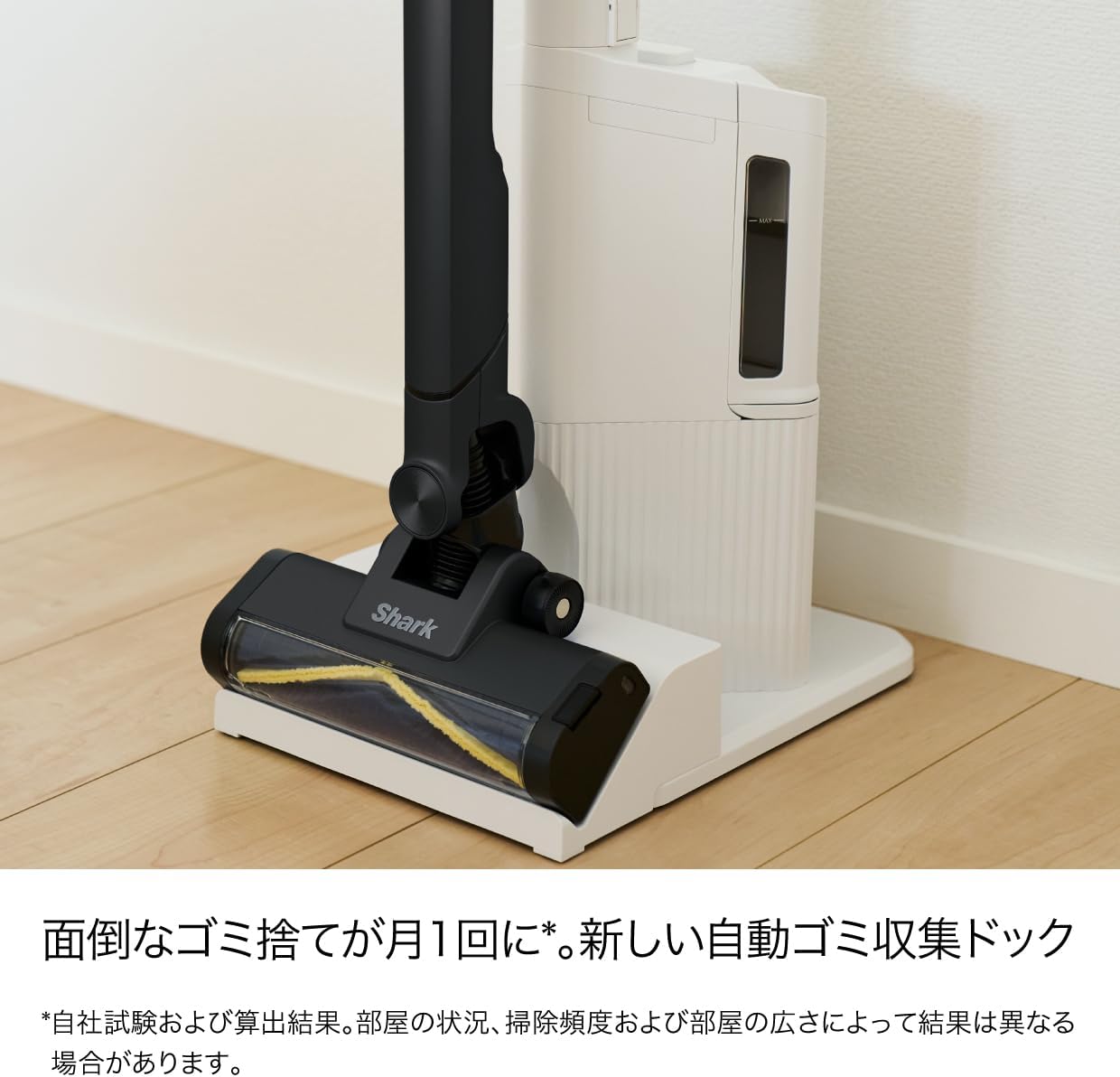
Figure 2: Vacuum cleaner docked in the automatic dust collection station.
5. 사용 설명서
5.1 전원 켜기/끄기
Press the power button on the handle to turn the vacuum on or off. The vacuum will start in its default cleaning mode.
5.2 360 Intelligent Nozzle for All-Direction Cleaning
The unique 360 Intelligent Nozzle is designed to capture debris from all directions – front, back, left, and right. This reduces cleaning time and ensures thorough dirt removal.

Figure 3: The 360 Intelligent Nozzle effectively cleans from multiple directions.
5.3 Smart iQ Technology (iQ, Floor, and Edge Sensors)
The vacuum features Smart iQ Technology, which uses three sensors to optimize cleaning performance:
- iQ Sensor: Detects the amount of debris and automatically adjusts suction power. The iQ indicator lights on the handheld unit change color (green for low, yellow for medium, red for high) to visualize debris levels.
- 바닥 센서 : Detects the floor type (e.g., hard floor, carpet) and automatically adjusts the brush roll speed for optimal cleaning.
- Edge Sensor: Detects walls and edges, increasing suction power by up to 2.5 times to thoroughly clean along baseboards and in corners.

Figure 4: iQ Sensor and indicator lights.

Figure 5: Floor Sensor adjusting to carpet.

Figure 6: Edge Sensor in action.
5.4 핸드헬드 모드 및 첨부 파일 사용
The main vacuum unit can be detached from the extension wand to function as a powerful handheld cleaner. Simply press the release button to detach. Attach the desired accessory for specific cleaning tasks:
- 미니 모터헤드: Ideal for cleaning upholstery, pet hair, and small carpets.
- Brush Crevice Tool: Perfect for tight spaces, corners, and dusting delicate surfaces.
- 멀티 노즐: Versatile tool for various surfaces and quick clean-ups.

Figure 7: Handheld mode and included accessories.
5.5 Blue LED Headlight
The floor nozzle is equipped with a blue LED headlight that illuminates dust and debris on the floor, making it easier to spot and clean even in dimly lit areas.
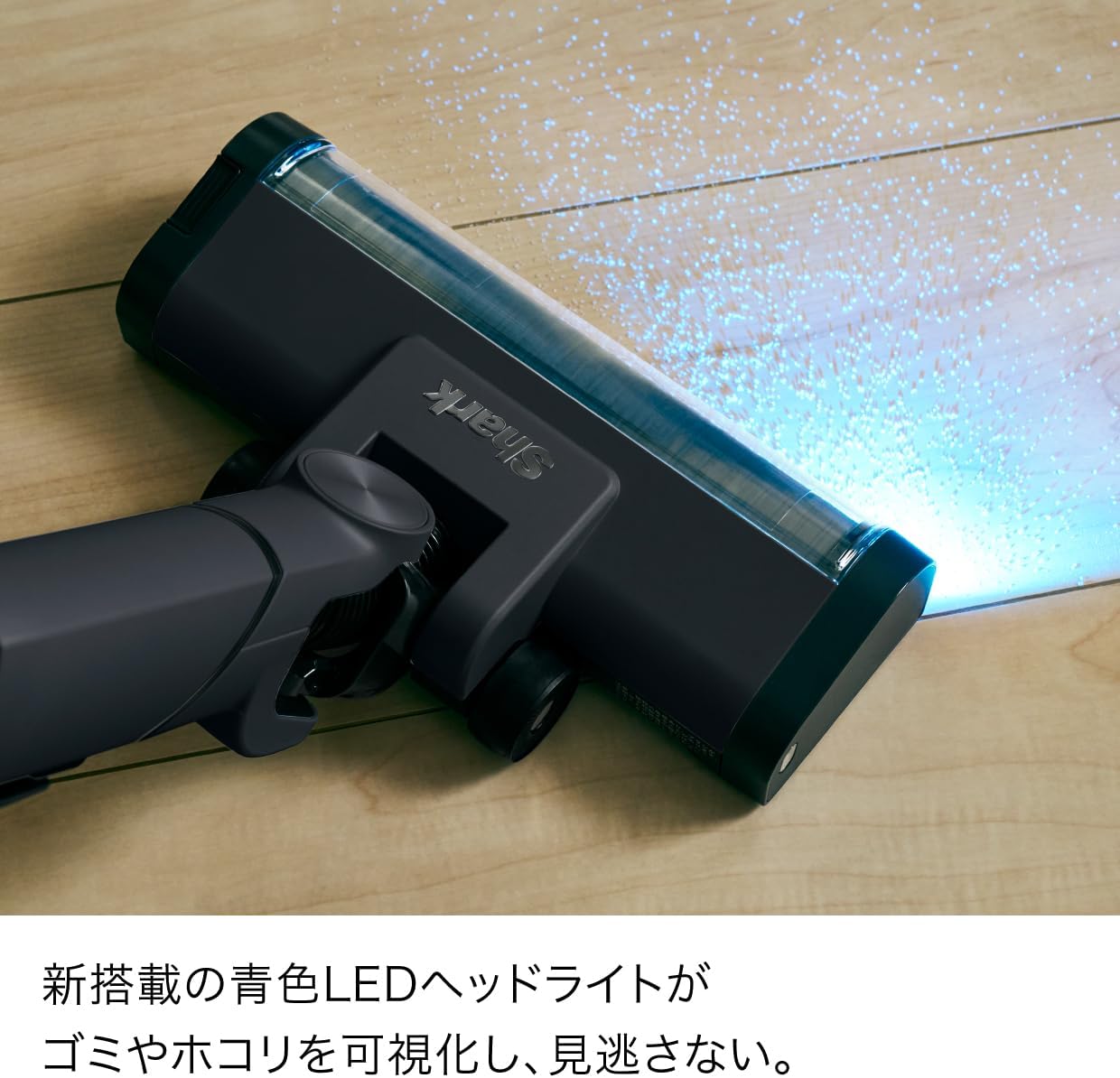
Figure 8: Blue LED Headlight illuminating debris.
6. 유지관리
6.1 자동 집진
When the vacuum is placed on the automatic dust collection dock, it will automatically transfer collected debris from the vacuum's dust cup to the dock's larger dust bag. This reduces the frequency of manual dust disposal to approximately once a month, depending on usage and environment.

Figure 9: Automatic dust collection mechanism.
6.2 Emptying the Handheld Dust Cup (Manual)
If not using the automatic dock, or for quick emptying of the handheld unit, press the dust cup release button to open the bottom flap and empty debris directly into a trash bin.

Figure 10: One-touch manual dust disposal.
6.3 Cleaning the Brush Roll and Dust Cup
Both the brush roll and the dust cup are easily removable and washable. Regularly clean these components to maintain optimal suction and performance.
- To remove the brush roll, locate the release tab on the side of the floor nozzle and slide it to unlock. Lift out the brush roll.
- To remove the dust cup, press the release button on the main unit and detach it.
- Rinse the brush roll and dust cup with water. Ensure they are completely dry before reassembling.

Figure 11: Washable dust cup and brush roll for easy maintenance.
6.4 Hair Tangle-Free Technology
The brush roll is designed with hair tangle-free technology to prevent hair from wrapping around it, simplifying maintenance.

Figure 12: Hair tangle-free brush roll.
7. 문제 해결
| 문제 | 가능한 원인 | 해결책 |
|---|---|---|
| 진공청소기가 켜지지 않습니다 | 배터리가 충전되지 않았습니다. | 배터리를 완전히 충전하십시오. |
| 흡입력 상실 | 먼지통이 가득 찼거나 필터가 막혔습니다. | 먼지통을 비우고 필터를 청소해 주세요. |
| 브러시 롤이 회전하지 않습니다 | 브러시 롤에 장애물이 있습니다. | Remove any tangled hair or debris from the brush roll. |
| 자동 집진 장치가 작동하지 않습니다. | Dock dust bag is full or vacuum not properly seated. | Replace the dock dust bag. Ensure the vacuum is correctly placed on the dock. |
8. 사양
| 특징 | 세부 사항 |
|---|---|
| 상표 | 상어 |
| 모델 번호 | LC701JBKNC |
| 색상 | 따뜻한 검정색 |
| 폼 팩터 | 똑바로 |
| 제품 크기(L x W x H) | 28 x 26.2 x 106cm |
| 충전 시간 | 3.5시간 |
| 원산지 | 중국 |
| 제조업체 | 샤크닌자 |
9. 보증 및 지원
For warranty information and customer support, please refer to the warranty card included in your product packaging or visit the official Shark web사이트. 구매 증빙 자료로 구매 영수증을 보관하세요.