
1. 서론
Thank you for choosing the Temtop W100 Lite Professional Weather Station. This device provides real-time monitoring of indoor and outdoor temperature and humidity, atmospheric pressure, weather forecasts, moon phases, and includes an alarm clock function. This manual will guide you through the setup, operation, and maintenance of your weather station to ensure optimal performance.
2. 패키지 내용
상자를 푼 후 패키지 내용물을 확인하세요.
- 기상 관측소 본체
- 실외 센서
- 전원 어댑터
- 사용자 설명서

Image: Contents of the Temtop W100 Lite package, showing the main weather station unit, the outdoor sensor, and the power adapter.
3. 제품 오버view
Familiarize yourself with the main components and display features of your Temtop W100 Lite Weather Station.
3.1 Main Unit Display

이미지: 앞면 view of the Temtop W100 Lite Weather Station, displaying various weather parameters and time information.
The main unit features a clear color display that shows the following information:
- 실외 온도 및 습도
- 실내 온도 및 습도
- Weather Forecast (Sunny, Partially Sunny, Cloudy, Rainy, Snowy)
- 시간과 날짜
- 달의 위상
- 기압
- Comfort Level Indicator (Wet, Comfort, Dry)
- Sunrise and Sunset Times (for selected city)
3.2 Main Unit Buttons and Outdoor Sensor

이미지: 상세 view of the weather station display with labels indicating each data field.
이미지: 후면 view of the weather station, highlighting the battery compartment, power input, and control buttons.
The main unit features several control buttons on the back for settings adjustment:
- 설정 버튼: Enters/confirms settings.
- UP/CH Button: Adjusts values upwards, changes channels.
- DOWN/MEM Button: Adjusts values downwards, accesses min/max memory.
- ALERT Button: 온도 알림을 설정합니다.
- 알람 버튼: Sets alarm time.
- CITY Button: Selects city for sunrise/sunset times.
The outdoor sensor transmits temperature and humidity data wirelessly to the main unit.
4. 설정
4.1 장치 전원 공급
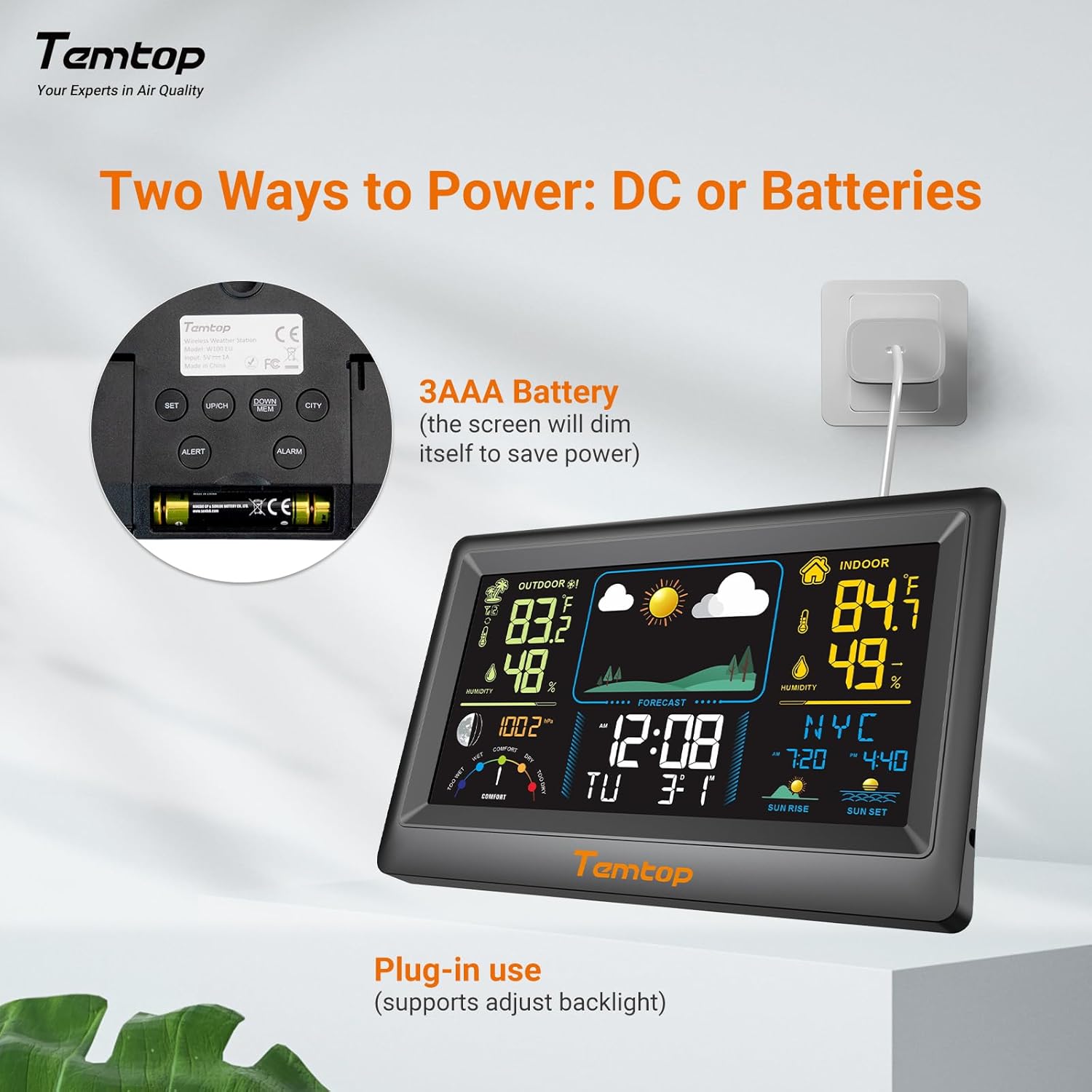
The weather station can be powered by either the included AC adapter or 3x AAA batteries (not included for the main unit, but included for the outdoor sensor). For continuous backlight and optimal performance, AC power is recommended.
- 메인 유닛: Insert the AC adapter into the power port on the back of the unit and plug it into a wall outlet. Alternatively, insert 3x AAA batteries into the battery compartment.
- 실외 센서: Insert 2x AAA batteries into the outdoor sensor's battery compartment.

이미지: 전ample of digital displays, illustrating the clear readouts of temperature and humidity.

Image: Illustration of power modes, showing the weather station connected via AC adapter and the battery compartment. AC mode allows adjustable backlight, while battery mode conserves power by dimming the display.
4.2 실외 센서 배치
Place the outdoor sensor in a shaded area, protected from direct sunlight and rain, to ensure accurate temperature and humidity readings. The sensor has a wireless range of up to 100 meters (328 feet) in an open, unobstructed area.

Image: Diagram showing the wireless range of the outdoor sensor from the main unit, suitable for gardens, terraces, or rooftops.
4.3 Initial Settings (Time, Date, City)
Follow these steps to set the correct time, date, and city for accurate sunrise/sunset times:
- 를 누르고 계세요 세트 button to enter setting mode. The hour field will begin to flash.
- 사용하세요 UP/CH 그리고 다운/멤 버튼으로 시간을 조정합니다.
- 누르다 세트 to confirm the hour and move to the next item (minute, year, month, day). Repeat the adjustment and confirmation process for each.
- After setting the date, briefly press the 도시 button. The city code will flash.
- 사용하세요 UP/CH button to scroll through the list of cities until you find your location.
- 마지막으로 누르세요 세트 to confirm your city selection. The sunrise, sunset times, and date will now be accurately displayed.
Video: This video demonstrates how to set the time, date, and city on your Temtop W100 Lite Weather Station to ensure accurate display of local sunrise and sunset times.
5. 운영
5.1 디스플레이 해석
The main display is divided into several sections for easy reading:
- 야외 섹션: Shows current outdoor temperature and humidity, and temperature trend.
- 실내 섹션: Displays current indoor temperature and humidity, and temperature trend.
- 일기 예보: Icons indicate the predicted weather for the next 12 hours (Sunny, Partially Sunny, Cloudy, Rainy, Snowy).
- 시간 및 날짜 : 현재 시간, 요일, 날짜.
- 문 페이즈: 현재 달의 모양을 표시합니다.
- 기압: Shows current barometric pressure and its trend.
- 편안함 수준: A gauge indicating indoor comfort levels (Wet, Comfort, Dry).
- 일출 일몰: Displays the local sunrise and sunset times for the selected city.

Image: Visual representation of the five weather forecast modes and moon phases displayed on the weather station.
5.2 온도 단위 선택
To switch between Celsius (°C) and Fahrenheit (°F), briefly press the UP/CH button during normal display mode.
5.3 Min/Max Temperature and Humidity Records
The weather station automatically records the minimum and maximum temperature and humidity values over a 24-hour period. Briefly press the 다운/멤 버튼을 view these records. Press again to cycle through min/max indoor and outdoor values.
5.4 알람 설정
The device supports both time alarms and temperature alerts.
- 시간 알람: 를 누르세요 경보 알람 설정 모드로 들어가려면 버튼을 사용하세요. UP/CH 그리고 다운/멤 to adjust the alarm time, and 경보 to confirm. The snooze function can be activated by pressing any button (except ALARM) when the alarm sounds.
- 온도 경고: 를 누르세요 알리다 button to set high/low temperature alerts for indoor or outdoor readings. Use UP/CH 그리고 다운/멤 to set the desired temperature thresholds.
6. 유지관리
- 디스플레이와 c를 청소하세요asing는 부드러운 d로 발음합니다.amp 천. 연마성 세척제나 용매를 사용하지 마십시오.
- Replace batteries in the outdoor sensor when the low battery indicator appears on the main unit.
- 본체를 직사광선, 극한의 온도 또는 습기에 노출시키지 마십시오.
7. 문제 해결
| 문제 | 가능한 원인 | 해결책 |
|---|---|---|
| 본체에 디스플레이가 없습니다. | 전원이 없거나 배터리가 부족합니다. | Ensure AC adapter is properly connected or replace batteries. |
| Outdoor readings are inaccurate or not displayed. | Sensor out of range, interference, or low sensor batteries. | Move sensor closer to main unit, reduce obstructions, or replace sensor batteries. |
| 일기예보가 틀린 것 같습니다. | The forecast is based on atmospheric pressure changes and is an estimation. | Allow time for the station to calibrate (up to 24 hours). It provides a general trend, not a precise forecast. |
8. 사양
| 특징 | 세부 사항 |
|---|---|
| 상표 | 템탑 |
| 모델 | EU-W100-Lite |
| 전원 | Battery (Main Unit: 3x AAA, Sensor: 2x AAA) / AC Adapter |
| 특별 기능 | Customizable Alarms, Wireless Connectivity |
| 연결 기술 | 무선 전화 |
| 색상 | 검은색 |
| 센서 기술 | 무선 전화 |
| Operating Temperature (Upper) | 섭씨 40도 |
| 디스플레이 유형 | 컬러 디스플레이 |
| 품목 무게 | 100그램 |
9. 보증 및 지원
Temtop products are designed for reliability and performance. For warranty information, technical support, or service inquiries, please refer to the warranty card included in your package or visit the official Temtop web사이트. 구매 증빙 자료로 구매 영수증을 보관하세요.