
1. 이상view
The HTRC 40 AMP Smart Battery Charger is a versatile and fully automatic charging and maintenance device designed for a wide range of 6V, 12V, and 24V batteries. It supports various battery types including LiFePo4, Lithium, and Lead-Acid (AGM, Calcium, GEL, MF, EFB, SLA, VRLA, WET). This unit functions as a battery charger, maintainer, trickle charger, and features a pulse repair function to optimize battery life. Its intelligent design includes automatic voltage identification, adjustable charging currents, and multiple safety protections, all displayed on a large, easy-to-read LCD screen. The portable design with a foldable handle and integrated cable storage makes it convenient for use with cars, motorcycles, boats, and lawn mowers.

Image: The HTRC 40 AMP Smart Battery Charger connected to different battery types, illustrating its wide compatibility.
2. 제품 특징
- 폭넓은 배터리 호환성: Supports 6V, 12V, and 24V LiFePo4, Lithium, and Lead-Acid batteries (AGM, Calcium, GEL, MF, EFB, SLA, VRLA, WET).
- 다기능성: Operates as a battery charger, maintainer, trickle charger, and pulse repair charger.
- 자동 볼륨tage 감지: Automatically identifies the battery's voltage (6V, 12V, or 24V) upon connection.
- 충전 전류 조절 가능: Offers three current modes:
- Low Current Mode: 6V 2A, 12V 3A, 24V 5A
- Medium Current Mode: 6V 5A, 12V 15A, 24V 8A
- High Current Mode: 6V 10A, 12V 40A, 24V 16A
- 9-에스tage 자동 충전: Optimizes battery power precisely and gently, including battery detection, desulfurization, soft start, bulk charging, absorption, trickle charging, battery test, recondition, float & maintenance, and small current charging.
- 펄스 복구 기능: Helps to repair and activate idle, old, or slightly sulfated lead-acid batteries, extending their lifespan. Note: This function cannot revive completely dead batteries or fully restore severely damaged ones.
- 원버튼 작동: Simple interface for selecting charging modes.
- 온도 보상: Automatically adjusts charging power based on ambient temperature, entering 'Summer Mode' above 36°C and 'Winter Mode' below 8°C to prevent over-charging or under-charging.
- 대형 LCD 화면: Displays real-time information including voltage, current, battery power percentage, 그리고 온도.
- 휴대성 있는 디자인: Features a foldable handle and integrated clips for power cord storage, enhancing portability and organization.

Image: The charger's display indicating the three selectable current modes for charging.

그림: 9-s를 설명하는 다이어그램tage smart charging process, optimizing battery health.
3. 설정 및 작동
3.1 초기 설정
- Ensure the charger is placed on a stable, dry surface away from flammable materials.
- Verify that the battery terminals are clean and free from corrosion.
3.2 배터리 연결하기
- 연결하다 빨간색 양(+) clamp 배터리의 양극(+) 단자에 연결하세요.
- 연결하다 검은색 음(-) clamp 배터리의 음극(-) 단자에 연결합니다.
- Ensure a secure connection for both clamps.

Image: The HTRC charger's clamps correctly connected to a car battery's terminals.
3.3 Starting the Charging Process
- Plug the charger's AC power cord into a standard 100-240V AC outlet.
- 충전기가 자동으로 배터리 용량을 감지합니다.tage and display it on the LCD screen.
- Press the 'MODE' button to cycle through the available charging modes (Low, Medium, High, Repair) until the desired mode is selected. The charger will automatically begin charging in the selected mode.
- Monitor the charging progress on the LCD screen, which displays voltage, current, battery percentage, 그리고 온도.
- The charger will automatically stop charging once the battery is fully charged and switch to maintenance mode.
Video: This video demonstrates the key features and operation of the HTRC 40 AMP Smart Battery Charger, including its multi-voltage compatibility, charging modes, and safety protections.
4. 충전 모드
The HTRC Smart Battery Charger offers various charging modes to suit different battery conditions and charging needs:
- 저전류 모드: Ideal for smaller batteries or for a slower, gentler charge. (6V 2A, 12V 3A, 24V 5A)
- Medium Current Mode: A balanced charging speed for general use. (6V 5A, 12V 15A, 24V 8A)
- High Current Mode: For faster charging of larger batteries. (6V 10A, 12V 40A, 24V 16A)
- Repair Mode (PUL): Activates a pulse repair function to help desulfate and recondition old or idle lead-acid batteries. This mode can improve battery performance and extend life but cannot repair severely damaged or dead batteries.
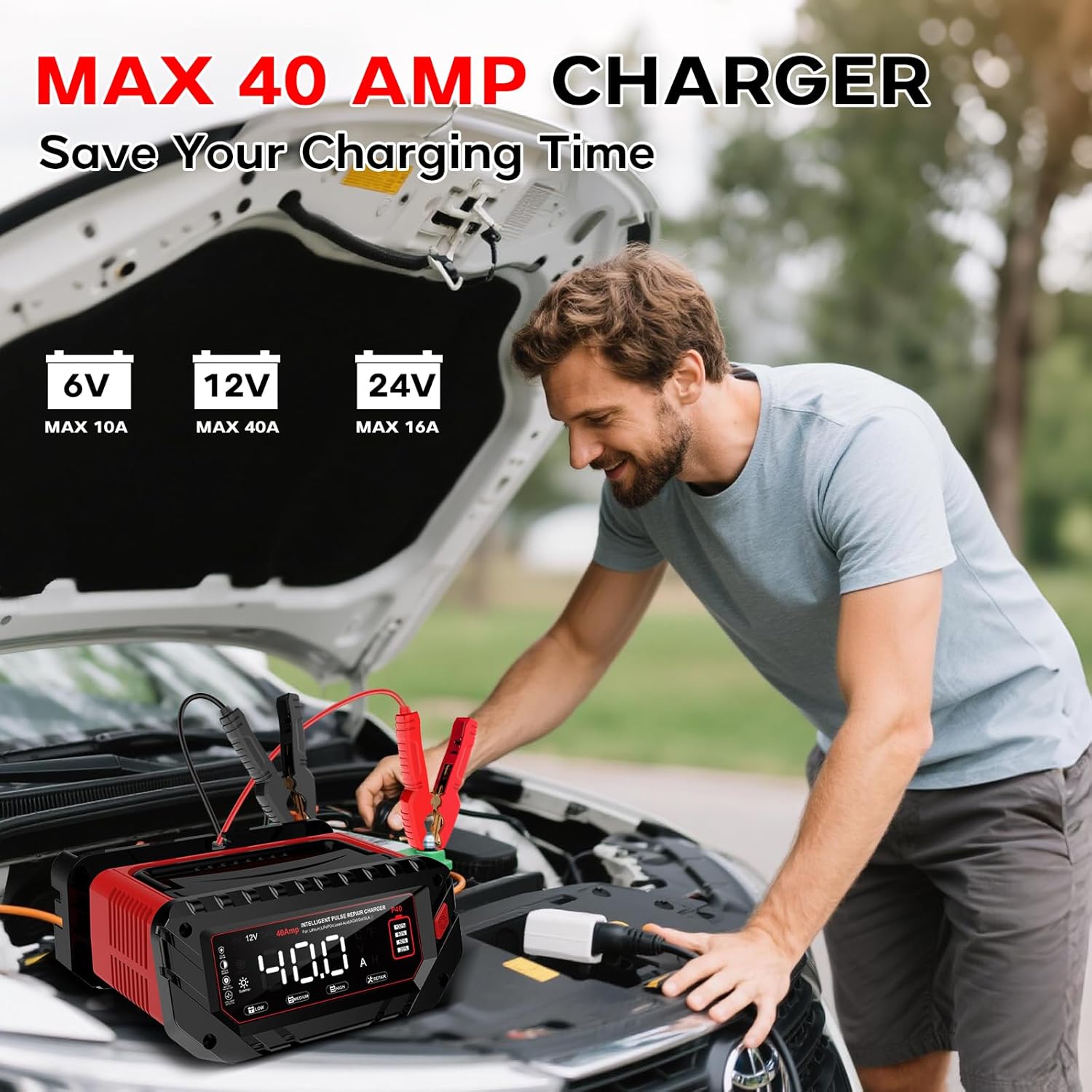
Image: The charger's LCD screen displaying various charging modes and battery status indicators.

Image: The charger in 'PUL' (Pulse Repair) mode, indicating its battery reconditioning capability.
5. 안전 기능
The HTRC Smart Battery Charger is equipped with multiple protection mechanisms to ensure safe operation for both the user and the battery:
- 과충전 보호 : 과도한 충전으로 인한 배터리 손상을 방지합니다.
- 과전류 보호: Safeguards against drawing too much current.
- 과열 보호: A built-in cooling fan and temperature sensors prevent the unit from overheating.
- 역 극성 보호 : Prevents damage if the battery clamps are connected incorrectly. The charger will not operate until connections are correct.
- 단락 보호: 단락 발생 시 자동으로 전원이 차단됩니다.
- Sparks Free Contact: 연결 시 스파크 발생을 방지하도록 설계되었습니다.
- 언더볼tage 보호: Protects against charging a battery that is too low.
- 오버볼tage 보호: 과도한 볼륨으로부터 보호합니다tag전자 입력.
- 내화성 소재: The charger's shell is constructed from fire-resistant materials.

Image: Icons representing the various safety features of the HTRC battery charger.
6. 유지관리
To ensure optimal performance and longevity of your HTRC Smart Battery Charger, follow these maintenance guidelines:
- 청소: Regularly wipe the charger's exterior with a dry, soft cloth. Do not use harsh chemicals or abrasive cleaners.
- 케이블 검사: Periodically check the power cord and battery clamp손상, 마모 또는 부식 흔적이 있는지 확인하십시오. 필요한 경우 교체하십시오.
- 저장: When not in use, store the charger in a cool, dry place, away from direct sunlight and moisture. Utilize the integrated cable and clamp storage features for neatness.
- 통풍: Ensure the cooling fan vents are clear of obstructions during operation to prevent overheating.
7. 문제 해결
If you encounter issues with your HTRC Smart Battery Charger, consider the following common troubleshooting steps:
- 충전기가 켜지지 않음:
- AC 전원 코드가 작동하는 콘센트에 제대로 꽂혀 있는지 확인하십시오.
- 배터리 cl을 확인하십시오.amps are correctly and securely connected to the battery terminals (positive to positive, negative to negative).
- 충전이 시작되지 않음:
- 배터리 용량 확인tage is within the charger's supported range (6V, 12V, 24V).
- If the battery is severely discharged, the charger may not detect it. Try the 'Repair' mode for lead-acid batteries, but note it cannot revive dead batteries.
- Check for any error codes on the LCD screen and refer to the manual for their meaning (if specific codes are provided, which they are not in the JSON).
- 느린 충전:
- Ensure you have selected the appropriate current mode (Low, Medium, High) for your battery size and desired charging speed.
- Extreme temperatures can affect charging speed; the charger adjusts automatically, but very cold conditions may slow the process.
- 과열:
- Ensure the charger's ventilation openings are not blocked.
- Move the charger to a cooler environment if operating in high ambient temperatures.
이러한 단계를 거쳐도 문제가 해결되지 않으면 고객 지원팀에 문의하세요.
8. 사양
| 특징 | 사양 |
|---|---|
| 상표 | HTRC |
| 모델 번호 | SQ40AN |
| 제품 치수 | 8.2인치 깊이 x 9.8인치 너비 x 5.1인치 높이 |
| 현재 평가 | 40 Amps(최대) |
| 적용 가능한 배터리 볼륨tage | 6V / 12V / 24V |
| 커넥터 유형 | Standard battery clamps/alligator clips |
| 교류 입력 | 100-240V 50/60Hz |
| 부하가 있는 입력 전원 | 최대 480W |
| Output Current (Low) | 6V 2A, 12V 3A, 24V 5A |
| Output Current (Medium) | 6V 5A, 12V 15A, 24V 8A |
| Output Current (High) | 6V 10A, 12V 40A, 24V 16A |
9. 보증 및 지원
9.1 보증 정보
This HTRC Smart Battery Charger comes with a 2년 보증 구매일로부터. 보증 청구를 위해 구매 증빙을 보관하세요.
9.2 고객 지원
For any questions, technical assistance, or warranty inquiries, please contact HTRC customer support. Contact details can typically be found on the product packaging or the official HTRC web대지.