
1. 서론
블랙 제품 사용 설명서에 오신 것을 환영합니다.view Active 12 Pro Rugged Tablet. This device is engineered for durability and high performance, featuring a powerful processor, a large battery, an integrated projector, and a camping light. This manual provides essential information on setting up, operating, maintaining, and troubleshooting your tablet to ensure optimal performance and longevity.
2. 안전 정보
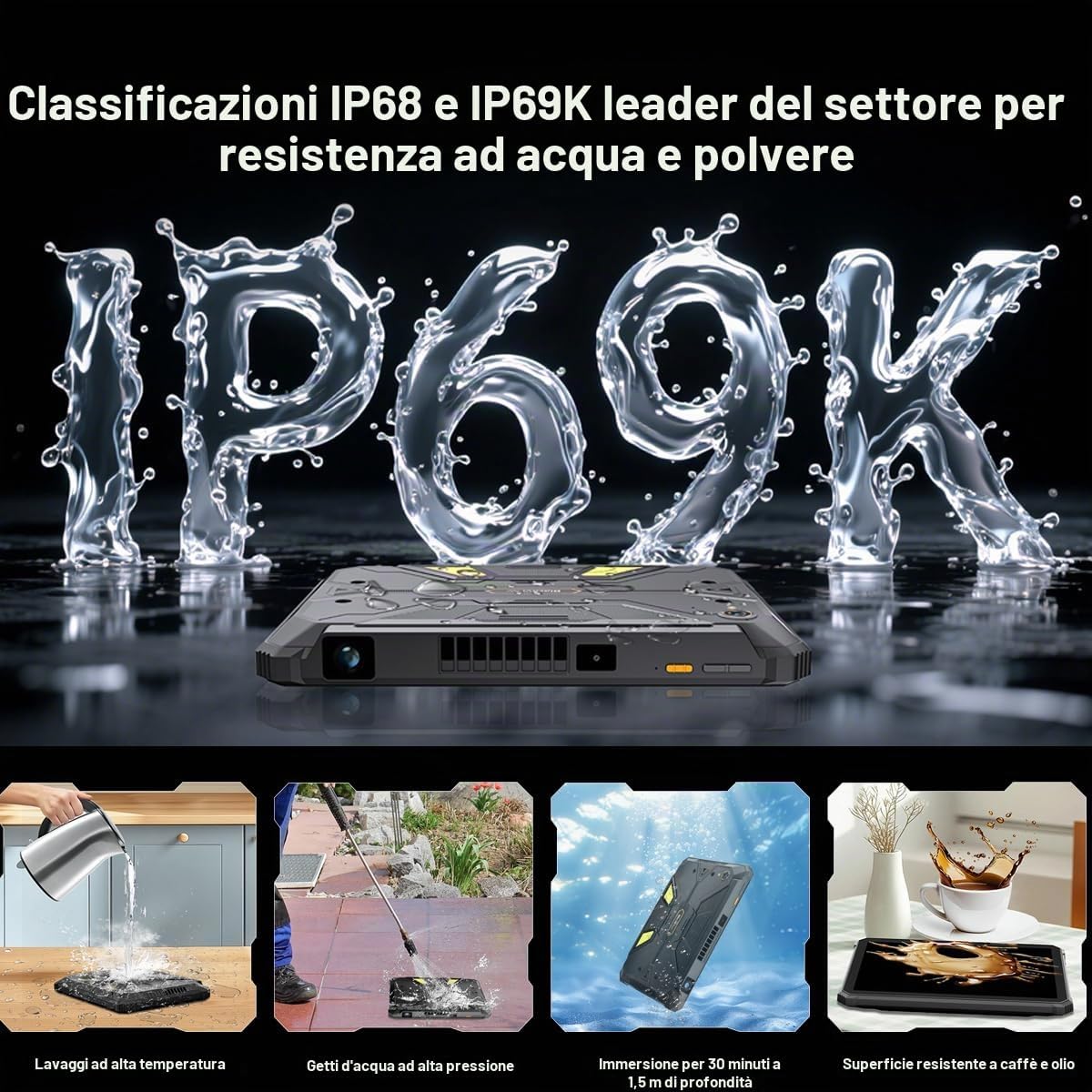
- 방수 및 방진 기능: The Active 12 Pro is IP68/IP69K rated for water and dust resistance. Ensure all ports are securely closed before exposing the device to water or dust. Do not intentionally submerge the device beyond specified limits (1.5 meters for 30 minutes).
- 배터리 안전: Do not attempt to replace the battery yourself. Use only Blackview-approved chargers and cables. Avoid exposing the device to extreme temperatures or direct sunlight for prolonged periods.
- 작동 온도: 기기 손상을 방지하려면 권장 온도 범위 내에서 작동하십시오.
- 청소: 부드러운 d를 사용하세요amp 천으로 기기를 닦으세요. 강한 화학 물질이나 연마재는 사용하지 마세요.
- 처분: 해당 지역 규정에 따라 장치와 배터리를 책임감 있게 폐기하세요.
3. 설정
3.1 초기 충전
처음 사용하기 전에 Black을 완전히 충전하십시오.view Active 12 Pro using the provided 120W super-fast charger. The device features a 30000mAh battery, offering extended usage times.
3.2 SIM 및 SD 카드 설치
The tablet supports Dual SIM 5G and external SD card expansion up to 3TB. Locate the SIM/SD card tray on the side of the device. Use the provided tool to open the tray, insert your SIM card(s) and/or SD card, and close the tray securely to maintain water and dust resistance.
3.3 전원 켜기/끄기
- 전원을 켜려면: 전원 버튼을 검은색 화면이 나타날 때까지 길게 누르세요.view 로고가 나타납니다.
- 전원을 끄려면: 전원 버튼을 길게 누른 다음 화면에 나타나는 옵션에서 '전원 끄기'를 선택하세요.
- 재시작하기 위해: 전원 버튼을 길게 누른 다음 옵션에서 '다시 시작'을 선택합니다.
3.4 안드로이드 15 초기 설정
Upon first power-on, follow the on-screen instructions to complete the initial setup of Android 15. This includes selecting your language, connecting to Wi-Fi, setting up your Google account, and configuring security features.
4. 장치 작동
4.1 디스플레이 및 탐색
The Active 12 Pro features an 11-inch FHD+ IPS display with a 90Hz refresh rate for smooth visuals. Navigate the Android 15 interface using touch gestures. Swipe, tap, and pinch to interact with apps and content.

Image: The 11-inch FHD+ IPS display offers true-to-life clarity with 207 PPI and a 90Hz refresh rate.
4.2 Integrated Projector
Your tablet includes a 1080P projector capable of projecting a 120-inch image. To activate the projector, locate the dedicated projector button or access it through the quick settings panel. Adjust focus using the autofocus feature or manual controls. Keystone correction (auto/manual, ±20° vertical, ±60° horizontal) allows for optimal image alignment on various surfaces.

Image: The 120-inch colossal projection allows for a large viewing experience, suitable for outdoor movie nights or presentations.
4.3씨amp잉 라이트
The tablet features a super-bright 400 lumen camping light with 303 individual LED lights. It offers multiple modes:
- 고정 조명: 지속적인 조명을 제공합니다.
- 구조 요청 모드: Emits an SOS signal for emergencies.
- 빠른 깜박임: Produces intense flashes of light.
Control the light via a dedicated button or through the device's software interface. The light also offers 3-level adjustable brightness and a custom timer setting.

Image: The 400 lumen camping light provides wide-angle illumination, ideal for outdoor activities.
4.4 카메라 기능
Capture high-quality photos and videos with the 108MP AI main camera (Samsung HM6 sensor) and the 50MP AI front camera (Samsung JN1 sensor). The camera features AI enhancements for improved image quality, 0.01s autofocus, and 2K UHD 1440p video recording.
이미지: 상세 view of the 108MP main camera and 50MP front camera specifications.
4.5 연결성
The Active 12 Pro supports various connectivity options:
- 5G 네트워크: 고속 모바일 데이터를 위해.
- 와이파이: Supports 802.11ac and 802.11ax standards for fast wireless internet.
- 블루투스: 무선 액세서리를 연결합니다.
- NFC : 비접촉식 결제와 빠른 페어링을 위해.
- GPS: Integrated with BeiDou, Glonass, Galileo, and GPS for accurate navigation.
4.6 배터리 관리
The 30000mAh battery provides extensive usage. Monitor battery levels through the status bar. Utilize the 120W super-fast charging for quick power replenishment. Expected usage times include 6.75 hours of continuous projection, 20 hours of gaming, and 112 days of standby.

Image: Visual representation of the 30000mAh battery and its estimated usage durations for various activities.
5. 유지관리
5.1 장치 청소
Regularly clean your tablet to maintain its appearance and functionality. Use a soft, lint-free cloth. For stubborn dirt, slightly dampen the cloth with water. Avoid spraying cleaners directly onto the device or using abrasive materials.
5.2 방수 및 방진
While the Active 12 Pro is rugged and IP68/IP69K rated, proper care is essential. Always ensure all port covers and the SIM/SD card tray are fully sealed before exposing the device to water, dust, or high-pressure jets. After exposure to water, dry the device thoroughly before charging or opening any ports.

Image: Illustrations demonstrating the IP68 and IP69K ratings, including resistance to high-temperature washing, high-pressure water jets, submersion, and spills.
5.3 소프트웨어 업데이트
Keep your tablet's software updated to ensure optimal performance, security, and access to new features. You can check for updates in the device settings under 'System' or 'About tablet'.
5.4 스토리지 관리
The tablet comes with 1TB of internal storage, expandable up to 3TB with an external SD card. Regularly manage your storage by deleting unnecessary files, uninstalling unused apps, and transferring large media file클라우드 스토리지나 외장 드라이브에 저장하세요.
6. 문제 해결
블랙 제품 사용 중 문제가 발생하면view Active 12 Pro, refer to the following common solutions:
- 장치 전원이 켜지지 않음: 배터리가 충전되어 있는지 확인하십시오. 충전기를 연결하고 몇 분 정도 기다린 후 다시 전원을 켜보세요. 반응이 없으면 전원 버튼을 10~15초 동안 길게 눌러 보세요.
- 화면 응답 없음: Restart the device. If the issue persists, perform a force restart by holding the power button for an extended period.
- Connectivity Issues (Wi-Fi/5G): Toggle Wi-Fi or mobile data off and on. Restart your router for Wi-Fi issues. Check your SIM card insertion for 5G problems.
- Projector Not Working: Ensure the projector lens is clean and unobstructed. Check projector settings for focus and keystone correction. Verify that the tablet's battery level is sufficient for projection.
- 카메라 문제: Ensure the camera lenses are clean. Restart the camera app or the device. Check app permissions for the camera.
- 느린 성능: Close unused apps running in the background. Clear cache data. Consider uninstalling rarely used applications.
- 공장 초기화 : As a last resort, if software issues persist, you may perform a factory reset. This will erase all data on your device, so ensure you back up important information first. Go to Settings > System > Reset options > Erase all data (factory reset).
7. 사양
| 특징 | 사양 |
|---|---|
| 모델명 | 액티브 12 프로 |
| 운영 체제 | 안드로이드 15 |
| 프로세서 | MediaTek Dimensity 7300 (Octa-core, 2.5GHz) |
| 숫양 | 48GB (실물 16GB + 가상 32GB) |
| 내부 저장소 | 1TB |
| 확장 가능한 스토리지 | SD 카드를 통해 최대 3TB까지 저장 가능 |
| 표시하다 | 11-inch FHD+ IPS LCD (1920x1200), 90Hz Refresh Rate |
| 배터리 용량 | 30000mAh |
| 충전 중 | 120W 초고속 충전 |
| 후방 카메라 | 108MP AI (Samsung HM6 sensor) |
| 전면 카메라 | 50MP AI (Samsung JN1 sensor) |
| 비디오 해상도 | 2K UHD 1440p |
| 연결성 | 5G, Wi-Fi (802.11ac, 802.11ax), Bluetooth, NFC, GPS (BeiDou, Glonass, Galileo) |
| 견고함 | IP68/IP69K |
| 특별 기능 | Integrated 1080P 120" Autofocus Projector, 400lm Camp잉 랜턴 |
8. 보증 정보
블랙view Active 12 Pro comes with a Limited Warranty. For detailed information regarding the terms and conditions of your warranty, including coverage period and service procedures, please refer to the official Blackview web사이트 또는 제품에 포함된 보증서를 확인하세요. 보증 청구를 위해 구매 증빙 자료를 보관하세요.
9. 지원
For further assistance, frequently asked questions, or to contact customer support, please visit the official Blackview website. You can typically find support resources, driver downloads, and contact information in the 'Support' or 'Contact Us' sections of their web대지.
공식 블랙view Web대지: www.블랙view.hk (참고: URL may vary by region. Refer to your product packaging for the most accurate regional web대지.)


