
소개
This instruction manual provides detailed guidance for the assembly, operation, and maintenance of your BEISHI Arc-Shaped Art Mobile TV Stand. Please read this manual thoroughly before beginning assembly or use to ensure safe and correct operation.
안전 정보
- Always secure the TV stand to the wall using the provided safety straps to prevent tip-over.
- 최대 중량 한도를 초과하지 마십시오. 220파운드(100kg) 텔레비전용으로.
- 조립 및 사용 시 날카로운 모서리에 주의하십시오.
- Ensure all screws and connections are tightened securely before placing a TV on the stand.
- 어린이와 애완동물을 집회 장소에 가까이 두지 마십시오.
패키지 내용
조립을 시작하기 전에 모든 구성품이 있는지 확인하십시오. 누락되거나 손상된 부품이 있는 경우 고객 지원팀에 문의하십시오.
- TV Stand Components (Carbon Steel Frame, Wooden Shelves)
- Installation Accessories (Screws, bolts, washers, tools)
- 사용 설명서
명세서
| 특징 | 세부 사항 |
|---|---|
| 장착 유형 | 플로어 마운트 |
| 이동 유형 | Rotate (with wheels) |
| 재료 | Carbon Steel, Wood |
| 색상 | 검은색 |
| 품목 무게 | 40파운드(약 18.1kg) |
| TV 크기 호환성 | Most 50-100 Inch TVs |
| 최대 중량 용량 | 220파운드(100kg) |
| VESA 호환성 | From 100x100mm (4"x4") to 900x600mm (24"x35") |
| 선반 | 2-Tier Wooden Shelves |
| 높이 조정 | Adjustable TV mounting height (Min 48.6" to Max 56.5") |

Figure 1: Product Dimensions and VESA Compatibility
설정 및 조립
The BEISHI Arc-Shaped Art Mobile TV Stand is designed for easy assembly. Please follow the step-by-step instructions and diagrams provided in the separate installation guide included in your package. Ensure you have all the necessary tools and components before starting.
주요 조립 단계:
- 모든 구성품을 풀어서 부품 목록과 비교해보세요.
- Attach the base and casters to the main support frame.
- Assemble the two-tier wooden shelves and secure them to the frame.
- Install the TV mounting brackets onto the main support frame.
- Attach the TV to the mounting brackets, ensuring VESA compatibility and secure fastening.
- TV 높이를 원하는 높이로 조절하세요. view잉 수준.
- Utilize the cable management features to organize wires.
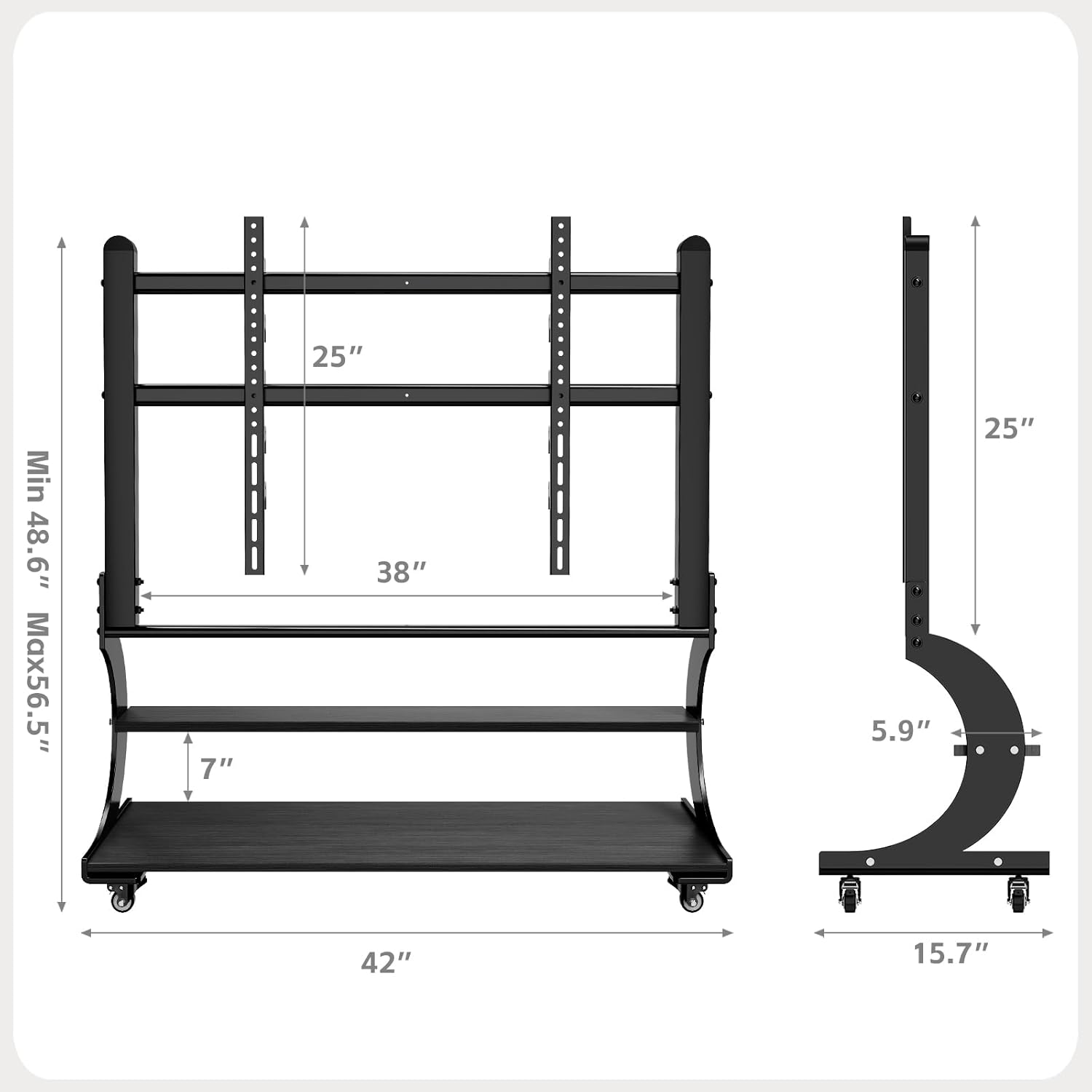
그림 2: 조립 완료view 도표

Figure 3: Sturdy Load Capacity of 220 lbs
작동 지침
TV 스탠드 옮기기:
The mobile TV stand is equipped with wheels for easy relocation. To move the stand, ensure the TV is securely mounted and any cables are managed to prevent snagging. Unlock the caster wheels if they are locked, then gently push the stand to its desired location. Lock the wheels once the stand is in position to prevent accidental movement.

Figure 4: Mobile Caster Wheels
TV 높이 조절하기:
The TV mounting brackets allow for height adjustment. Refer to your assembly guide for specific instructions on how to safely adjust the TV's vertical position. Always ensure the TV is balanced and securely fastened after any adjustments.
Utilizing Storage Shelves:
The two-tier wooden shelves provide ample space for media devices such as DVD players, gaming consoles (PS4, PS5, Xbox, Switch), soundbars, and other accessories. Distribute weight evenly on the shelves and do not exceed their individual weight capacity.

Figure 5: Two-Tier Wooden Storage Shelves
유지
- 청소: 부드럽고 마른 천으로 스탠드를 닦아주세요. 잘 지워지지 않는 얼룩은 약간 거친 천을 사용하세요.amp 천과 순한 세제로 닦아낸 후 즉시 말리세요. 연마성 세제나 용제는 사용하지 마세요.
- 검사: 모든 나사와 볼트가 단단히 조여져 있는지 정기적으로 점검하세요. 필요하면 다시 조이세요.
- 캐스터 관리: Keep the caster wheels free of debris to ensure smooth movement.
문제 해결
Problem: TV stand is unstable or wobbles.
- 해결책: Ensure all assembly screws are fully tightened. Verify that the TV is centered and within the specified weight limit. Check if the floor surface is even.
Problem: Difficulty moving the stand.
- 해결책: Check if the caster wheels are locked. Clear any obstructions or debris from the wheels. Ensure the stand is not overloaded.
Problem: TV does not fit the mounting brackets.
- 해결책: Verify your TV's VESA pattern against the stand's compatibility (100x100mm to 900x600mm). Ensure your TV size is within the 50-100 inch range.
보증 및 지원
보증 정보:
This BEISHI TV stand comes with a 1개월 보증 구매일로부터 제조상의 결함에 대한 보증을 제공합니다. 보증 청구를 위해 구매 증빙 서류를 보관해 주세요.
고객 지원:
For any questions, missing parts, or technical assistance, please contact BEISHI customer support through the retailer where you purchased the product or visit the official BEISHI web연락처 정보 사이트.