
CINMOORE CM-C2LU
CINMOORE 더미 카메라 사용 설명서
Model: CM-C2LU
브랜드: 신무어
1. 서론
Thank you for choosing the CINMOORE Dummy Camera. This indoor security camera is designed to provide reliable surveillance and peace of mind for your home or office. Featuring advanced AI detection, two-way audio, and clear night vision, it offers comprehensive monitoring capabilities. This manual will guide you through the setup, operation, and maintenance of your device.

이미지: 앞면 view of the CINMOORE Dummy Camera, a white, spherical camera with a dark lens and a blue indicator light, featuring the CINMOORE logo at its base.
2. 포함 사항
모든 품목이 들어 있는지 확인하려면 패키지 내용물을 확인하세요.
- CINMOORE Security Camera × 1
- Mounting Bracket Base × 1
- 전원 어댑터 × 1
- Data Cable × 1
- Screw Anchors × 1
- 사용 설명서 × 1
3. 설정
The CINMOORE Dummy Camera offers flexible installation options for various indoor environments.
3.1 장착 옵션
The camera can be installed using the following methods:
- 천장 마운트: Ideal for wide-angle coverage from above.
- 탁상용 마운트: Simple placement on any flat surface.
- 벽걸이 : Secure installation on a vertical surface.
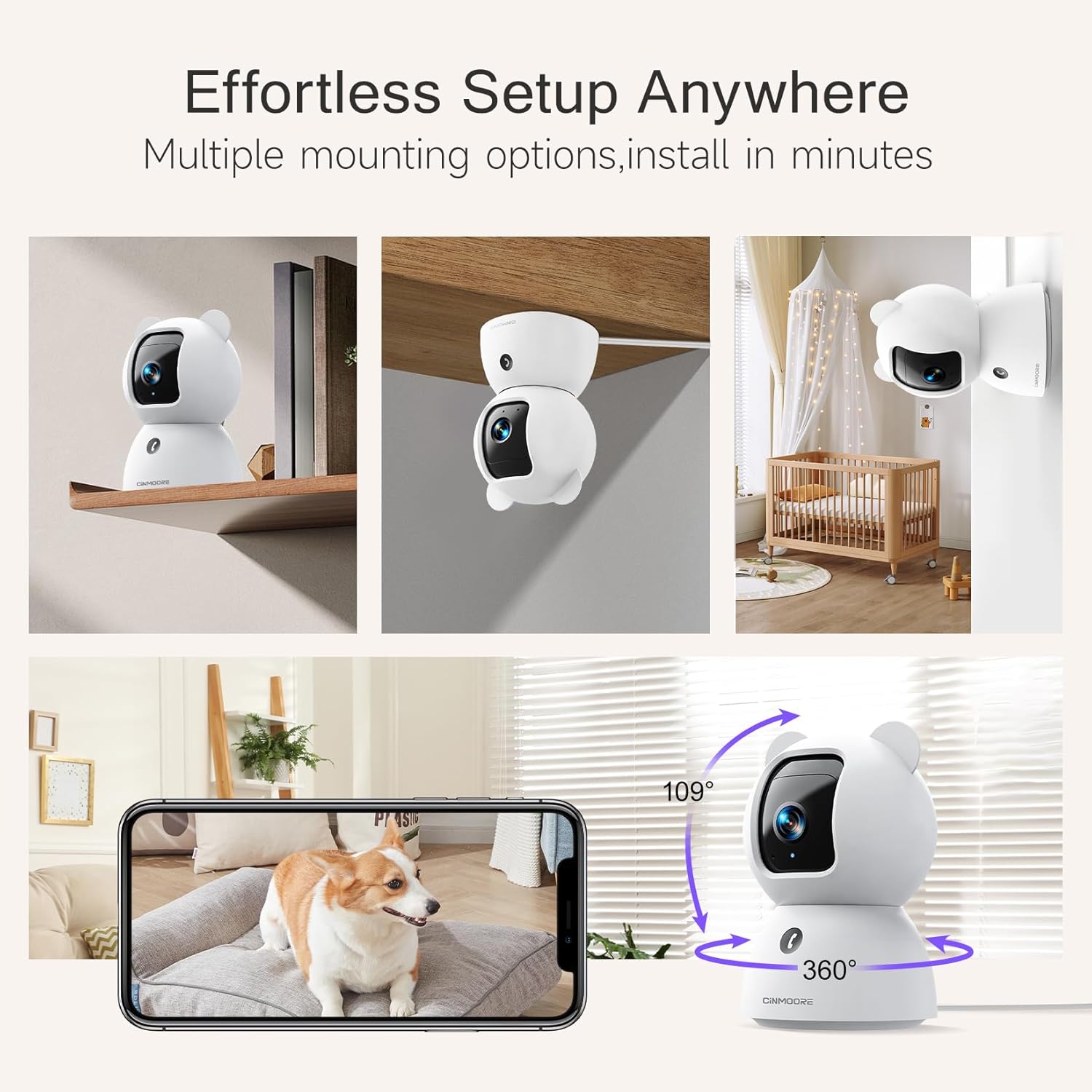
Image: A collage showing the CINMOORE Dummy Camera mounted in various positions: on a shelf, inverted on a ceiling, and on a wall, demonstrating its versatile installation options.
3.2 초기 설정 단계
- 전원 켜기: Connect the camera to the power adapter using the provided data cable and plug it into a power outlet.
- 앱 다운로드 : Download the official CINMOORE app from your smartphone's app store (iOS/Android).
- 계정 등록: 앱을 열고 새 계정을 등록하거나 이미 계정이 있다면 로그인하세요.
- 장치 추가: 앱 내 안내에 따라 새 카메라를 추가하세요. 일반적으로 카메라의 QR 코드를 스캔하거나 카메라의 임시 Wi-Fi 핫스팟에 연결하는 과정이 포함됩니다.
- Wi-Fi 연결: Connect the camera to your home Wi-Fi network (2.4GHz recommended).
- 놓기: 원하는 위치에 카메라를 설치하고, 카메라가 잘 보이는지 확인하십시오. view 모니터링하려는 영역의
4. 사용 설명서
4.1 비디오 품질 및 View잉
The camera captures video in 2.5K resolution, providing clear and detailed images. You can view 라이브 피드와 녹화된 음식tage through the CINMOORE app.

Image: A side-by-side comparison demonstrating the superior clarity of 2.5K resolution (left, showing a baby) versus 2K resolution (right, showing a puppy).
4.2 Pan & Tilt (PTZ) Functionality
The camera features PTZ (Pan, Tilt, Zoom) technology, allowing for 360-degree coverage. You can remotely control the camera's viewing angle through the app to monitor different areas of a room.

Image: The CINMOORE Dummy Camera surrounded by icons representing its features: Ultra HD 2.5K, Sound/Crying Alerts, Smart Night Vision, Encrypted Local Storage (up to 256GB), Secure Cloud Storage, Full Duplex Audio, Human/Pet Tracking, One-Touch Call, and Pan & Tilt, emphasizing its 360-degree protection.
4.3 양방향 오디오
Utilize the full-duplex two-way audio feature to communicate with people or pets in the camera's vicinity. This allows for natural, real-time conversations.

Image: A scene depicting a person speaking through a smartphone to a dog via the CINMOORE Dummy Camera, illustrating the two-way audio feature with speech bubbles.
4.4 야간 투시경
The camera is equipped with clear IR night vision, providing 2.5K clarity even in low-light or complete darkness, with a range of up to 33 feet.

이미지: 사람 viewing a black-and-white night vision feed from the CINMOORE Dummy Camera on their smartphone, showing a baby and a dog in a crib, demonstrating clear IR night vision in a dark room.
4.5 AI Alerts and Detection
The camera supports various AI-powered detection features without monthly fees, including:
- 동작 감지: Alerts you to general movement.
- 사람 감지: 구체적으로 사람 형상을 식별합니다.
- 애완동물 감지: Recognizes pet activity.
- 울음소리 감지: Notifies you of baby crying sounds.

Image: Two children playing near the CINMOORE Dummy Camera, with icons below representing its AI detection capabilities: Person, Pet, Motion, and Crying, highlighting its no-monthly-fee AI alerts.
4.6 저장 옵션
The camera offers flexible and secure storage solutions:
- SD 카드 저장: Supports local storage via an SD card (not included), expandable up to 512GB. Ensure "SD Card Encryption" is enabled in the app for secure view주고받음.
- 클라우드 스토리지: Offers AWS Cloud Storage with a 30-day free trial, providing bank-level encrypted storage for your recordings.

Image: A diagram showing the CINMOORE Dummy Camera with callouts for its storage features: SD card slot (expandable up to 512GB), Reset Button, and AWS Cloud Storage (30-day free trial), emphasizing encrypted and secure flexible storage.
5. 유지관리
To ensure optimal performance and longevity of your CINMOORE Dummy Camera, follow these maintenance guidelines:
- 청소: 부드럽고 마른 천으로 카메라 렌즈와 본체를 부드럽게 닦으세요. 강한 화학 물질이나 연마재는 사용하지 마세요.
- 놓기: 카메라를 직사광선, 극한 온도, 높은 습도를 피해 안정적인 장소에 두세요.
- 펌웨어 업데이트: Regularly check for and install firmware updates through the CINMOORE app to ensure your camera has the latest features and security enhancements.
- 전원 공급 장치: 카메라와 함께 제공된 정품 전원 어댑터만 사용하십시오.
6. 문제 해결
If you encounter issues with your CINMOORE Dummy Camera, refer to the following common troubleshooting steps:
- 카메라 오프라인: Check your Wi-Fi connection and ensure the camera is within range of your router. Restart the camera by unplugging and re-plugging the power adapter.
- 낮은 비디오 품질: Ensure the lens is clean and free from dust. Check your internet speed; a stable connection is crucial for high-resolution streaming.
- 오디오 없음: Verify that the microphone and speaker settings are enabled in the app. Ensure there are no obstructions blocking the microphone or speaker on the camera.
- Detection Not Working: Check the detection sensitivity settings in the app. Ensure the camera's view 시야가 트여 있고 막힌 곳이 없습니다.
- 앱에 연결할 수 없습니다: Ensure you have the latest version of the CINMOORE app. Try resetting the camera (using the reset button, if available) and re-adding it to the app.
For further assistance, please contact CINMOORE customer support.
7. 사양
| 모델명 | 보안 실내 캠 |
| 품목 모델 번호 | CM-C2LU |
| 상표 | 신무어 |
| 연결 기술 | 유선, Wi-Fi |
| 비디오 캡처 해상도 | 2.5K |
| 실내/실외 사용 | 실내 |
| 특별 기능 | 2 Way Audio, Cry Detection, HD Resolution, PTZ Technology |
| 나이트 비전 범위 | 33 피트 |
| 장착 유형 | Ceiling Mount / Tabletop Mount / Wall Mount |
| 재료 | 아크릴로니트릴 부타디엔 스티렌(ABS) |
| 품목 치수 L x W x H | 7.6 x 7.6 x 11.4 센티미터 |
| 품목 무게 | 340g |
| 방수 레벨 | 방수복 |
| 추천 용도 | Baby Monitoring, Pet Monitoring, Indoor Home Security, Office Surveillance |
8. 보증 및 지원
보증: The CINMOORE Dummy Camera comes with a 1-year warranty from the date of purchase. Please retain your proof of purchase for warranty claims.
지원하다: For technical support, troubleshooting assistance, or warranty inquiries, please visit the official CINMOORE website or contact their customer service team. Refer to the product packaging or the CINMOORE app for specific contact details.
Ask a question about this manual
Ask about setup, troubleshooting, compatibility, parts, safety, or missing instructions. Manuals+ will review the question and use this page’s manual context to help answer it.