
소개
Welcome to the world of robotics with your new Xtrem Bots Bionic Robot! This interactive robot is designed to provide an engaging and educational experience, allowing users to explore basic programming concepts and remote control operation. With its versatile movement modes, LED lights, and robotic sounds, the Bionic Robot offers hours of interactive fun.

Image: The Xtrem Bots Bionic Robot in white and green, standing next to its white remote control.
패키지 내용
- 1 x Xtrem Bots Bionic Robot (Model XT3803418)
- 1 x 원격 제어
- 사용 설명서(본 문서)
설정
1. 배터리 설치
The Xtrem Bots Bionic Robot requires 2 AA batteries (included) for operation.
- 로봇 뒤쪽에서 배터리 칸을 찾으세요.
- 작은 드라이버(별도 구매)를 사용하여 배터리함 덮개를 여세요.
- AA 배터리 2개를 올바른 극성(+/-)에 맞춰 넣으세요.
- 배터리실 커버를 교체하고 나사로 고정합니다.
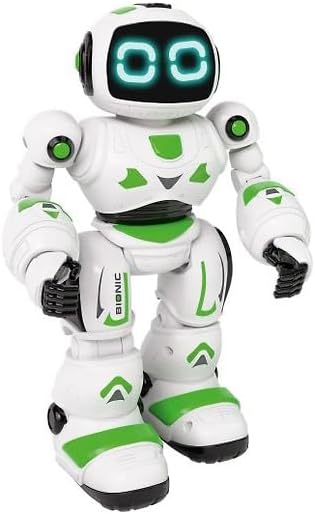
이미지: 앞면 view of the Xtrem Bots Bionic Robot, showing its design.
2. 전원 켜기/끄기
- To power on the robot, locate the power switch on its back and slide it to the "ON" position.
- To power off the robot, slide the power switch to the "OFF" position.
- Ensure the remote control also has batteries installed and is powered on to establish a connection.
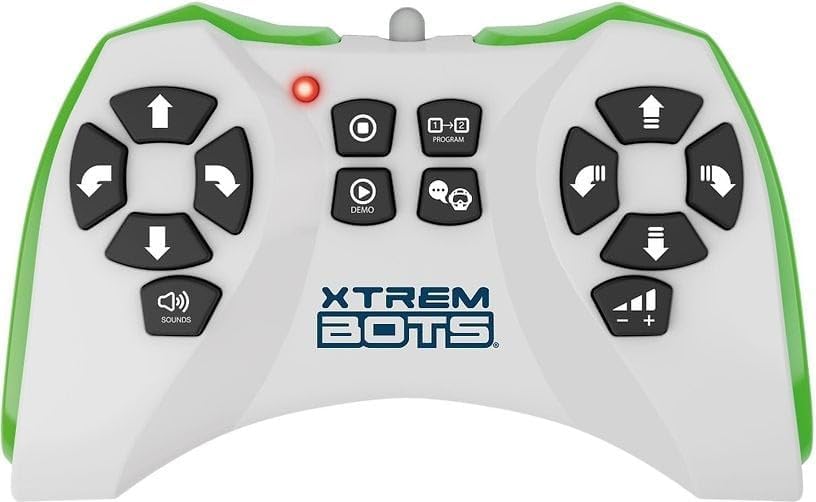
Image: The remote control for the Xtrem Bots Bionic Robot, showing various buttons for movement and functions.
작동 지침
원격 제어 기능
The remote control allows you to command your Bionic Robot with various actions. Familiarize yourself with the buttons and their corresponding functions:
- 이동 제어: Use the directional buttons to make the robot move forward, backward, turn left, and turn right.
- 슬라이드 모드: The robot can perform sliding movements.
- 도보 모드: The robot can perform walking movements.
- 프로그램 작성: Utilize the programming function to create sequences of up to 20 different actions.
- LED 조명: The robot's eyes feature LED lights that illuminate during operation.
- Robotic Sound: The robot produces various robotic sounds.
프로그래밍 함수
To program a sequence of actions:
- Press the "Program" button on the remote control.
- Input your desired sequence of movements and actions (up to 20 steps).
- Press the "Program" button again to execute the programmed sequence.
Video: Demonstration of a remote control robot's programmable functions, including movement, sounds, and gesture sensing.
유지
- 청소: Wipe the robot and remote control with a dry, soft cloth. Do not use water or cleaning solutions.
- 저장: Store the robot and remote control in a cool, dry place away from direct sunlight when not in use. Remove batteries if storing for extended periods.
- 배터리 관리 : 항상 권장되는 종류의 새 배터리를 사용하십시오. 오래된 배터리와 새 배터리를 혼용하거나 종류가 다른 배터리를 사용하지 마십시오.
문제 해결
| 문제 | 가능한 원인 | 해결책 |
|---|---|---|
| 로봇이 응답하지 않습니다. | Batteries are low or incorrectly installed. Remote control is off or out of range. | Check and replace batteries in both robot and remote. Ensure remote is within operating range. Power cycle both devices. |
| 로봇이 불규칙적으로 움직입니다. | Interference from other electronic devices. Low battery power. | Move to an area with less electronic interference. Replace batteries. |
| Programming sequence is incorrect. | Incorrect button presses during programming. | Clear the current program and re-enter the sequence carefully. |
명세서
| 특징 | 세부 사항 |
|---|---|
| 모델 번호 | 엑스티3803418 |
| 상표 | Xtrem Bots |
| 치수 | 30 x 20 x 15cm |
| 무게 | 500g |
| 재료 | 플라스틱 |
| 색상 | 녹색 |
| 배터리 유형 | 2 x AA 배터리(포함) |
| 조립이 필요합니다 | 아니요 |
| 특별 기능 | LED Lights, Robotic Sound, Programmable (up to 20 functions), Walk and Slide Movement Modes |
| 교육목표 | Introduce children to programming concepts and provide an educational, fun experience. |
안전 정보
- 작은 부품으로 인해 3세 미만의 어린이에게는 적합하지 않습니다.
- 플레이하는 동안 성인 감독이 권장됩니다.
- Do not operate near stairs, water, or other hazards.
- 로봇이나 리모컨을 개조하거나 분해하려고 시도하지 마십시오.
- 현지 규정에 따라 배터리를 책임감 있게 폐기하세요.
보증 및 지원
For warranty information or technical support, please refer to the contact details provided on the product packaging or visit the official Xtrem Bots web대지.