
1. 서론
구매해주셔서 감사합니다asing the Surge Wireless Pro Controller. This controller is designed for multi-platform compatibility, offering an enhanced gaming experience across various devices. Please read this manual carefully before use to ensure proper operation and to maximize your gaming enjoyment.
주요 특징:
- Multi-Platform Compatibility: Nintendo Switch/Switch 2 (Note: No C Button/Audio Port support for Switch 2), Windows PC, Steam Deck, Android, and iOS devices.
- Hall Effect Thumb Sticks & Triggers: Provides precise control and reduces the likelihood of stick drift.
- Turbo Functionality: Offers three adjustable turbo levels for rapid-fire control.
- Vibration Feedback: Four adjustable vibration levels for customizable haptic feedback.
- Motion Controls: Supports motion sensing in compatible games.
- Console Wake Up: Ability to wake the Nintendo Switch console from sleep mode (Nintendo Switch only).
- Rechargeable Battery: Built-in 600mAh Li-polymer battery provides up to 10 hours of play.
- USB-C Charging: Includes a 1-meter USB-C charging cable.
2. 패키지 내용
- 1 x Surge Wireless Pro Controller
- 1 x USB-C 충전 케이블(1미터)
- 1 x 사용 설명서
3. 컨트롤러 레이아웃
Familiarize yourself with the buttons and features of your Surge Wireless Pro Controller.
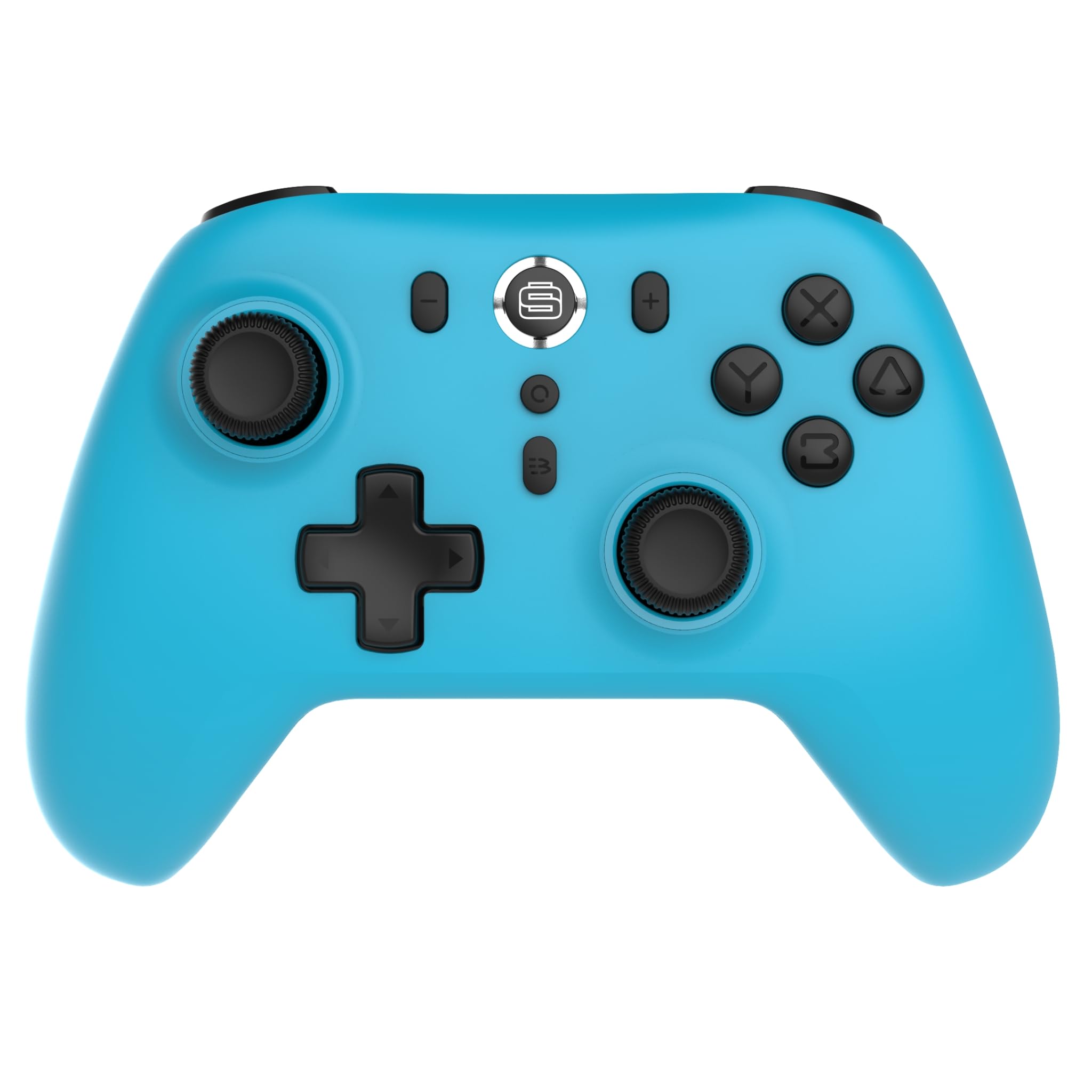
앞쪽 view of the Surge Wireless Pro Controller, showing the D-pad, left and right analog sticks, A/B/X/Y buttons, Home button, Capture button, Plus and Minus buttons, and the Surge logo button.

뒤쪽에 view of the Surge Wireless Pro Controller, showing the textured grips and the charging port.
4. 설정 및 페어링
The Surge Wireless Pro Controller supports multiple connection methods depending on your device.

This image displays the various platforms compatible with the Surge Wireless Pro Controller, including Nintendo Switch, Nintendo Switch 2, Windows PC, Android, and iOS.
4.1. Pairing with Nintendo Switch / Switch 2
- 홈 메뉴에서 컨트롤러 > 그립/오더 변경.
- 컨트롤러에서 버튼을 길게 누르세요. 홈 버튼 for 3-5 seconds until the indicator lights begin to flash rapidly.
- 페어링이 완료되면 컨트롤러의 표시등이 계속 켜져 있습니다.
- To wake the console from sleep mode, press the 홈 버튼 컨트롤러에서.
4.2. Pairing with Windows PC
- PC에서 Bluetooth가 활성화되어 있는지 확인하세요.
- 이동하다 블루투스 및 기타 장치 설정 귀하의 PC에서.
- 선택하다 Bluetooth 또는 기타 장치 추가 > 블루투스.
- 컨트롤러에서 버튼을 길게 누르세요. 홈 버튼 for 3-5 seconds until the indicator lights begin to flash rapidly.
- Select the controller from the list of available devices on your PC.
- 페어링이 완료되면 컨트롤러의 표시등이 계속 켜져 있습니다.
4.3. Pairing with Android / iOS Devices
- Android 또는 iOS 장치에서 Bluetooth를 활성화합니다.
- Go to the Bluetooth settings menu on your device.
- 컨트롤러에서 버튼을 길게 누르세요. 홈 버튼 for 3-5 seconds until the indicator lights begin to flash rapidly.
- 사용 가능한 장치 목록에서 컨트롤러를 선택하세요.
- 페어링이 완료되면 컨트롤러의 표시등이 계속 켜져 있습니다.
5. 작동 특징
5.1. Hall Effect Thumb Sticks & Triggers
The controller is equipped with Hall Effect technology for its thumb sticks and triggers. This technology uses magnets and electrical conductors to detect position, providing enhanced precision and significantly reducing the risk of stick drift over time compared to traditional potentiometers.

This image highlights the Hall Effect thumbsticks and triggers, emphasizing their role in providing precise inputs and preventing stick drift.
5.2. 터보 기능
The Turbo function allows for rapid, repeated input of a button press. This controller features 3 adjustable turbo levels.
- 터보를 활성화하려면: 를 누르고 계세요 터보 버튼, then press the desired action button (A/B/X/Y, L1/R1, L2/R2, D-pad directions). The button will now rapidly repeat its input when held.
- 터보 속도를 조정하려면: With Turbo active on a button, press and hold the 터보 버튼 그리고 이동하다 오른쪽 아날로그 스틱을 위아래로 움직이세요. to cycle through the 3 speed levels.
- 터보 기능을 비활성화하려면: 를 누르고 계세요 터보 버튼그런 다음 동일한 동작 버튼을 다시 누르십시오.
5.3. 진동 피드백
The controller provides haptic feedback through vibration. You can choose from 4 vibration levels.
- To adjust Vibration level: 를 누르고 계세요 진동 버튼 (if present, or a designated button combination, refer to specific button mapping if available) and move the 왼쪽 아날로그 스틱을 위 또는 아래로 움직이세요. to cycle through the 4 levels (Off, Low, Medium, High).
5.4. 모션 제어
The controller supports motion controls for compatible games, particularly on Nintendo Switch/Switch 2. This allows for intuitive gameplay where physical movement of the controller translates into in-game actions.

This image visually represents the controller's advanced features, including Turbo Function, Motion Controls, and Rumble Vibration, enhancing the gaming experience.
6. 충전
The controller is equipped with a built-in 600mAh Li-polymer battery, providing up to 10 hours of gameplay on a single charge.

This image shows the controller being held, emphasizing its internal rechargeable battery for extended play sessions.
- Connect the included USB-C charging cable to the controller's USB-C port.
- Connect the other end of the cable to a USB power source (e.g., console, PC, USB wall adapter).
- The indicator lights on the controller will show charging status (e.g., blinking while charging, solid when fully charged).
- 일반적으로 완전 충전에는 약 2~3시간이 걸립니다.
7. 유지관리
컨트롤러의 수명 연장 및 최적 성능을 보장하려면 다음 유지 관리 지침을 따르십시오.
- 청소: 부드럽고 마른 천을 사용하여 컨트롤러를 닦으세요. 잘 지워지지 않는 오염의 경우, 가볍게 두드리세요.amp천에 물을 묻혀 닦으세요. 강한 화학 물질이나 연마성 세제는 사용하지 마세요.
- 저장: 컨트롤러는 직사광선과 극한의 온도를 피해 서늘하고 건조한 곳에 보관하세요.
- 낙하 방지: 컨트롤러를 떨어뜨리거나 충격을 가하지 마십시오. 내부 구성 요소가 손상될 수 있습니다.
- 액체 노출: 컨트롤러를 물이나 다른 액체에 노출시키지 마세요.
8. 문제 해결
If you encounter issues with your Surge Wireless Pro Controller, please refer to the following common solutions:
| 문제 | 해결책 |
|---|---|
| 컨트롤러가 켜지지 않습니다. | 컨트롤러가 충전되어 있는지 확인하세요. USB-C 케이블을 사용하여 전원에 연결하세요. |
| 컨트롤러가 페어링되지 않습니다. | Ensure the controller is in pairing mode (indicator lights flashing rapidly). Check that Bluetooth is enabled on your device. Try restarting both the controller and the device. |
| 입력 지연 또는 연결 끊김. | Ensure the controller is within range of the device. Reduce interference from other wireless devices. Ensure the controller is fully charged. |
| 버튼이나 스틱이 반응하지 않습니다. | Try resetting the controller (if a reset button is available, typically a small pinhole on the back). Ensure no debris is obstructing the buttons. |
| 진동이 작동하지 않습니다. | Check the vibration settings on the controller and in the game. Ensure the vibration level is not set to 'Off'. |
9. 사양
| 특징 | 세부 사항 |
|---|---|
| 모델 번호 | SG60095 |
| 배터리 유형 | 1 Nonstandard Battery (Li-polymer, 600mAh) |
| 배터리 수명 | 최대 10시간(대략) |
| 충전 포트 | USB-C |
| 치수 | 20.5 x 14 x 6.6cm |
| 무게 | 320g |
| 원산지 | 중국 |
10. 보증 및 지원
For warranty information and customer support, please refer to the documentation included with your purchase or visit the official Surge web사이트. 보증 청구를 위해 구매 증빙 자료를 보관하세요.


