
소개
Thank you for choosing the hizpo Android 14 9-inch Car Radio. This manual provides essential information for the proper installation, operation, and maintenance of your new car multimedia system. Please read these instructions carefully before use to ensure optimal performance and safety.
설정 및 설치
1. 패키지 내용
설치를 시작하기 전에 모든 구성 요소가 있는지 확인하세요.
- 9-inch Touch Screen Unit
- Custom Frame for Citroen C2 C3
- 전원 케이블 하네스
- RCA 케이블
- USB 케이블
- GPS 안테나
- External Microphone (optional/included)
- CANBUS Decoder (if applicable for steering wheel controls)
- 기타 필요한 액세서리
2. 차량 호환성
This car radio is designed for Citroen C2 and C3 models manufactured between 2001 and 2010. Please confirm your vehicle's center console matches the compatible configurations shown below before installation.

이미지: 전amples of compatible Citroen C2 and C3 dashboards (2001-2010) where the car radio can be installed. Green checkmarks indicate compatible layouts, while red crosses indicate incompatible ones.
3. 설치 단계
Installation is generally straightforward, but professional installation is recommended if you are unfamiliar with car electronics. Ensure the vehicle's battery is disconnected before starting.
- 기존 라디오를 제거하세요: Carefully remove the existing car radio and any surrounding trim. For some Citroen C3 models, it may be necessary to remove the small storage compartment below the original 1DIN radio to properly fit the new 9-inch screen.
- 배선 하네스 연결: Connect the provided power cable harness, RCA cables, USB cables, and GPS antenna to the corresponding ports on the new hizpo unit. Ensure all connections are secure.
- CANBUS 연결: If your vehicle supports steering wheel controls, connect the CANBUS decoder (if included) to integrate these functions.
- 테스트 연결: Before fully mounting, temporarily reconnect the battery and test the unit's basic functions (power on, sound, touch screen response).
- 장치 장착: Secure the new car radio unit into the dashboard opening using the custom frame. Ensure it is firmly in place.
- 재조립: 탈거했던 장식 부품을 다시 설치하십시오.
작동 지침
1. 기본 동작
The unit features a 9-inch capacitive touchscreen with Android 14 OS. Navigate through menus and applications by touching and swiping on the screen. The system is powered by a 4-core processor with 2GB RAM and 64GB internal storage, providing a smooth user experience.

Image: A hand interacting with the 9-inch capacitive touch screen, demonstrating its multi-touch capabilities and responsive interface.
2. Wireless CarPlay / Android Auto / MirrorLink
The car radio supports wireless Apple CarPlay and both wireless and wired Android Auto, along with MirrorLink functionality. Connect your smartphone via Wi-Fi, Bluetooth, or USB cable to access phone features directly on the car radio screen.
- CarPlay/Android Auto: Enjoy online navigation, make calls, send/receive messages, and listen to music/podcasts while focusing on driving.
- 연결: For wireless CarPlay/Android Auto, connect via Bluetooth and Wi-Fi. For wired Android Auto, use a USB cable.

Image: The Apple CarPlay interface displayed on the car radio screen, showing various app icons like Phone, Music, and Maps.
3. GPS 내비게이션
The unit features an integrated GPS module for accurate and fast map tracking, even without an internet connection. It supports 2D/3D map views and allows music playback during navigation (dual zone function).
- 오프라인 지도: Supports offline map data for navigation without an internet connection.
- 온라인 탐색: Compatible with various online navigation applications when connected to the internet.

Image: The car radio screen displaying a GPS navigation map with route guidance and current speed information.
4. 멀티미디어 기능
The car radio supports a wide range of multimedia formats for music and video playback. It includes a 30-band EQ DSP for sound customization and surround sound effects.
- 음악 형식: MP3, WMA, AAC, RM, FLAC, etc.
- 비디오 형식: MPEG-1/2/4, H264, H263, VC1, RMVB, DivX, Sorenson Spark, VP8, AVS Stream, etc.
- 그림 형식 : JPG/BMP/JPEG/GIF/PNG.

Image: The car radio screen displaying a video playback, demonstrating its multimedia capabilities.
5. 블루투스 연결
Connect your phone via Bluetooth for hands-free calling and audio streaming. The built-in microphone ensures clear voice capture, and car speakers provide clear audio for calls.

Image: The car radio screen showing a music player interface, with a smartphone connected via Bluetooth for audio streaming.
6. 스티어링 휠 제어(SWC)
The unit supports steering wheel controls, allowing you to change music tracks, adjust volume, and manage calls directly from your steering wheel for safer driving.
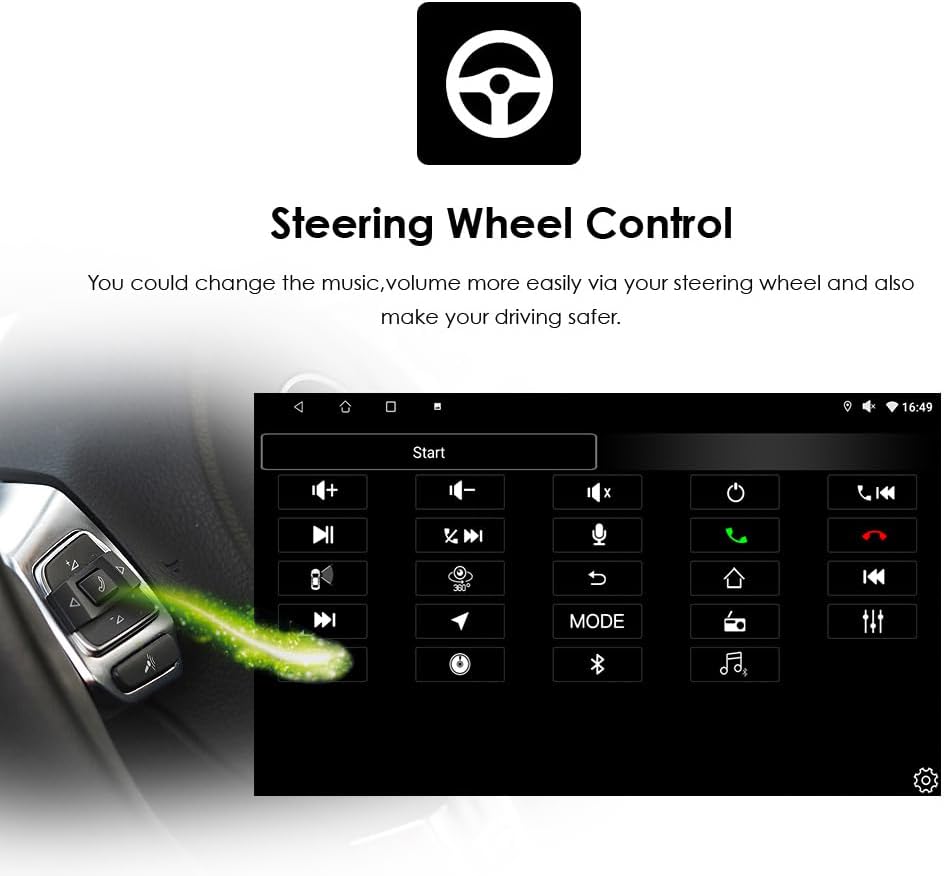
Image: The car radio screen displaying the steering wheel control configuration interface, with a visual representation of a steering wheel control button.
7. 기타 특징
- 분할 화면: 화면에서 내비게이션과 음악 재생 등 두 개의 애플리케이션을 동시에 실행합니다.
- WLAN/4G: Connect to Wi-Fi via your phone's hotspot to access the internet, download apps from Google Play, and browse online.
- AM/FM Radio with RDS: Enjoy radio broadcasts with clear reception and RDS (Radio Data System) support.
- 후방 카메라 지원: The unit is prepared for connection to a backup camera (not included), displaying the view on the screen when reverse gear is engaged.
유지
To ensure the longevity and optimal performance of your hizpo car radio, follow these maintenance guidelines:
- 화면 청소: Use a soft, lint-free cloth to gently wipe the touchscreen. Avoid abrasive cleaners or solvents that could damage the screen.
- 소프트웨어 업데이트: 시스템이 효율적으로 작동하고 최신 기능과 보안 패치를 갖추도록 정기적으로 소프트웨어 업데이트를 확인하고 설치하십시오.
- 극한의 온도를 피하세요: 제품을 극심한 고온이나 저온에 노출시키지 마십시오. 전자 부품에 손상을 줄 수 있습니다.
- 케이블 연결: 모든 케이블이 단단히 연결되어 있는지 확인하세요. 연결이 느슨하면 간헐적으로 문제가 발생할 수 있습니다.
문제 해결
자동차 라디오에 문제가 발생하면 다음의 일반적인 문제와 해결 방법을 참조하세요.
| 문제 | 가능한 원인 | 해결책 |
|---|---|---|
| 장치의 전원이 켜지지 않음 | 전원 연결이 느슨하거나, 퓨즈가 끊어졌거나, 배선이 잘못되었습니다. | Check power cable connections. Inspect vehicle's fuse box and the unit's fuse. Verify wiring diagram. |
| 소리가 나지 않습니다 | Volume too low, mute activated, incorrect speaker wiring, faulty RCA connections. | Increase volume. Check mute settings. Verify speaker and RCA cable connections. |
| 스티어링 휠 컨트롤이 작동하지 않습니다 | CANBUS not connected or configured, incompatible vehicle, initial setup issue. | Ensure CANBUS decoder is correctly installed and configured in settings. Contact support if issues persist after initial setup. |
| Touchscreen unresponsive or inaccurate | 소프트웨어 오류, 화면 보정 필요, 물리적 손상. | 기기를 재시작하십시오. 설정에서 화면 보정 옵션을 확인하십시오. 물리적 손상이 있는 경우 고객 지원팀에 문의하십시오. |
| GPS 신호가 손실되었거나 부정확함 | GPS antenna not properly installed or obstructed, software issue. | GPS 안테나가 방해받지 않는 깨끗한 위치에 장착되었는지 확인하십시오. view 하늘에서. 내비게이션 앱 또는 기기를 재시작하세요. |
| 블루투스 연결 문제 | Bluetooth off, pairing mode not active, interference. | Ensure Bluetooth is enabled on both the unit and your phone. Put the unit in pairing mode. Delete previous pairings and try again. |
이러한 해결 방법을 시도한 후에도 문제가 지속되면 고객 지원팀에 문의하여 추가 지원을 받으세요.
명세서
| 특징 | 세부 사항 |
|---|---|
| 상표 | hizpo |
| 모델명 | hizpo Android 14 Car Radio |
| 운영 체제 | 안드로이드 14 |
| 화면 크기 | 9 인치 |
| 화면 유형 | Capacitive Touch Screen (FHD 1024*600) |
| 프로세서 | 4코어 CPU |
| 메모리(RAM) | 2GB |
| 저장 장치(ROM) | 64GB |
| 연결성 | USB, Bluetooth, WLAN (Wi-Fi), SD Card Slot |
| 특별 기능 | Wireless Apple CarPlay, Wireless/Wired Android Auto, MirrorLink, Offline Maps, AM/FM Radio, RDS, DSP (30-band EQ), GPS, Steering Wheel Control (SWC), Backup Camera Support |
| Supported Navigation | GPS (supports online and offline maps) |
| 포함된 구성 요소 | Screen, Frame, Power Cable, RCA Cable, USB Cable, etc. |
| 제어 방법 | 터치스크린 |
| 배터리 포함 | 아니요 |
보증 정보
Your hizpo car radio comes with a 1-year free parts warranty, covering manufacturing defects. This warranty does not cover artificial damage.
Additionally, we offer free returns and exchanges for any unsatisfactory purchase within 30 days of receipt.

Image: Hizpo's commitment to customer satisfaction, highlighting 30-day refund, 1-year warranty, and attentive after-sales services.
고객 지원
For any questions, technical assistance, or warranty claims, please contact our customer support team. We provide pre-sales and after-sales technical support to ensure your satisfaction.
연락처 정보:
- 파는 사람: i-Stereo EU
- Please refer to your purchase platform for direct contact methods (e.g., 'Contact Seller' option on Amazon).
Our team is dedicated to providing attentive after-sales services and is backed by a professional production team with over 10 years of experience in car audio innovation.