

1. 서론
The PGST Smart WiFi Security Alarm System provides comprehensive protection for your home or office. This system integrates WiFi and GSM connectivity, allowing for remote control and notifications via a smartphone application, SMS, or calls. It includes a 1080p 360° camera, motion sensors, door/window sensors, and supports voice control through Amazon Alexa and Google Assistant.
This manual will guide you through the installation, operation, and maintenance of your security system to ensure optimal performance and reliability.
2. 패키지 내용
아래 나열된 모든 품목이 패키지에 포함되어 있는지 확인하세요.
- 1 x Alarm Base Unit
- 4 x Door Sensors (with battery)
- 2 x Wireless PIR Detectors (with battery)
- 2 x Remote Controls (with battery)
- RFID 2개 Tags
- 1 x 360° Camera
- 1 x Wired Siren (120DB)
- 1 x 사용자 설명서
- 1 x Charger (USB Type-C)
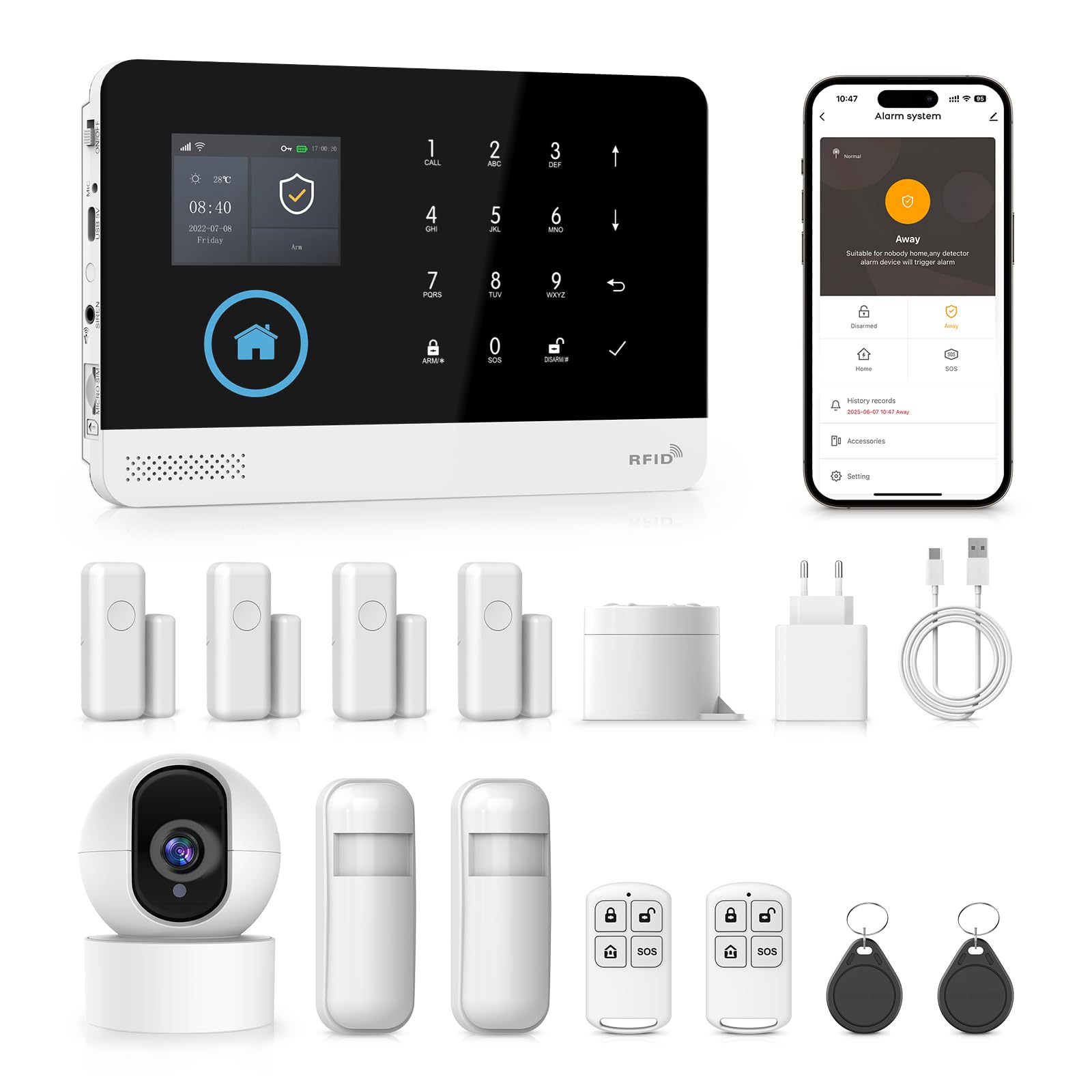
이미지: 이상view of the PGST Smart Security System kit, showing the alarm panel, camera, sensors, and accessories.
3. 사양
| 특징 | 사양 |
|---|---|
| 입력 Voltage | DC 5V(USB Type-C) |
| 작동 전류 | <250mA |
| 알람 전류 | <650mA |
| Wireless RF Frequency | 433.92 MHz (ASK modulation) |
| 인코딩 형식 | 1527/2262 (receive), 1527 or 2262 (transmit) |
| GSM 지원 | 2G |
| WiFi 표준 | IEEE802.11b/g/n (2.4 GHz, 5G not supported) |
| 백업 배터리 | 3.7V/1000mAh Lithium Polymer |
| 작동 온도 | -10℃ ~ 55℃ (14°F ~ 131°F) |
| 상대 습도 | <80 % (비 응축) |
| 제품 치수 | 185 x 125 x 14.7 mm (Length x Height x Thickness) |
| 무게 | 600g |

이미지: 앞면과 측면 view of the alarm panel, highlighting the 2.4 TFT display and physical dimensions.
4. 설정
4.1 초기 전원 켜기
- Connect the alarm base unit to a power source using the provided USB Type-C charger.
- The unit will power on automatically. The TFT display will illuminate.
4.2 SIM Card Installation (Optional for GSM Functionality)
- Locate the SIM card slot on the side of the alarm base unit.
- Insert a 2G compatible SIM card into the slot, ensuring correct orientation.
- The system will detect the SIM card and display network status on the screen.
4.3 앱 설치 및 WiFi 연결
- Download the companion application (e.g., Tuya Smart App) from your smartphone's app store (iOS or Android).
- 계정에 등록하거나 로그인하십시오.
- On the alarm base unit, navigate to the WiFi settings.
- Follow the in-app instructions to add a new device. This typically involves selecting your 2.4 GHz WiFi network and entering the password.
- The alarm unit will connect to your WiFi network. A confirmation message will appear on the display and in the app.
4.4 Adding Sensors and Camera
The system supports up to 99 wireless sensors and 3 wired zones.
- 문/창 센서: Mount the two parts of the sensor on a door or window frame, ensuring they are aligned and within 1 cm of each other when closed. Pair them with the alarm unit via the app or panel settings.
- PIR 동작 감지기: Install PIR detectors in areas where motion detection is desired, such as hallways or living rooms. Ensure they have a clear line of sight. Pair them with the alarm unit.
- 360도 카메라: Connect the camera to power. Follow the camera's specific instructions to connect it to your WiFi network and link it to your security system app.

Image: Diagram illustrating a home layout with various PGST security components installed, including the alarm host, door sensors, motion sensors, and an IP camera, demonstrating easy DIY installation.
5. 사용 설명서
5.1 시스템 무장 및 무장 해제
- 경보 패널을 통해: Use the keypad to enter your security code and press the 'Arm' or 'Disarm' button.
- 원격 제어를 통해: Press the 'Arm' button (often a closed padlock icon) to arm the system, or the 'Disarm' button (open padlock icon) to disarm.
- 모바일 앱을 통해: Open the app and tap the 'Arm' or 'Disarm' icon.
- 예정된 무장/무장 해제 시간: Set custom schedules through the app for automatic arming and disarming at specific times.
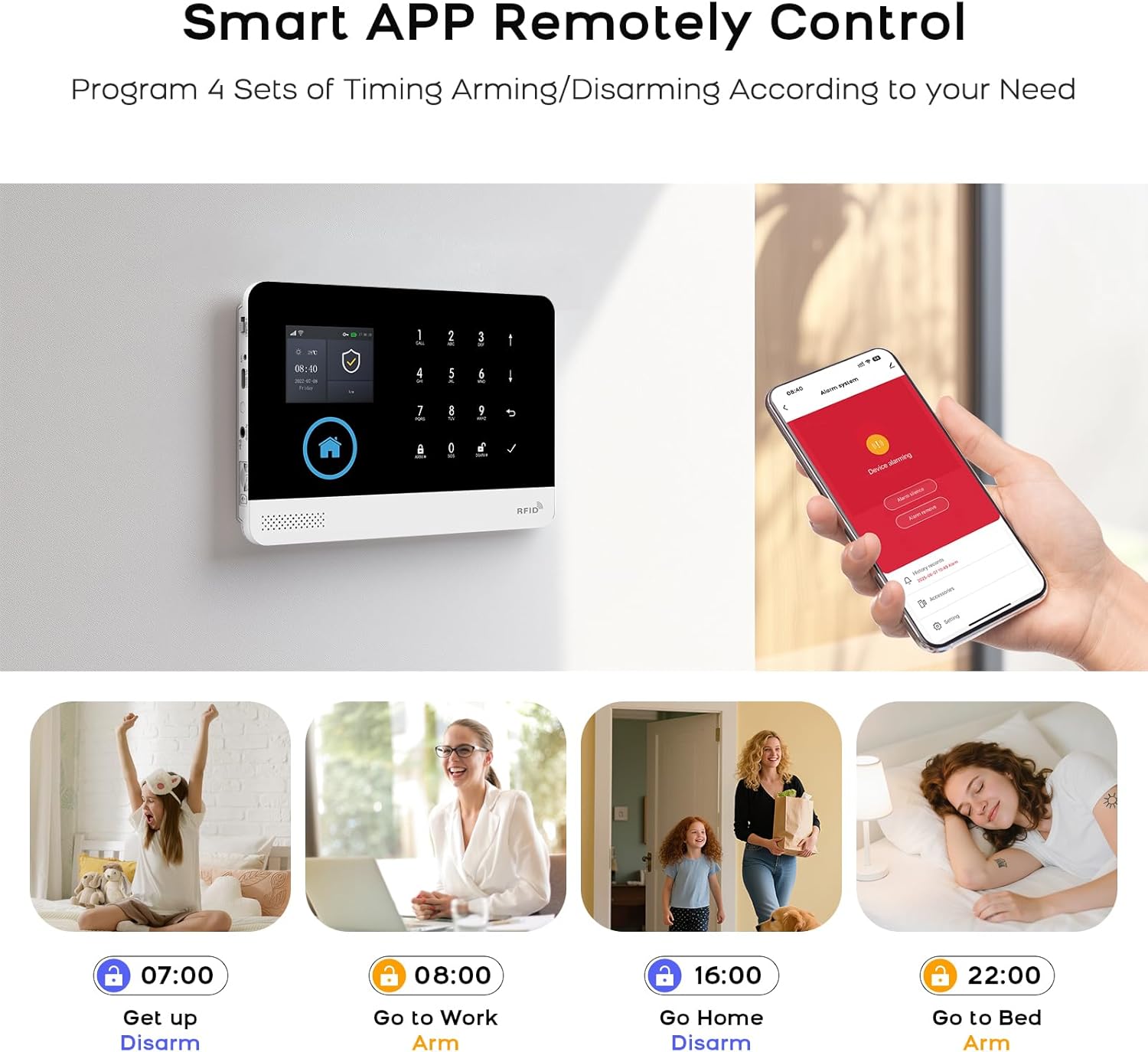
Image: Illustration of the mobile app interface for remote control, showing options for arming and disarming the system, along with examples of scheduled operations.
5.2 양방향 음성 인터콤
The alarm base unit supports two-way voice communication. When an alarm is triggered or a call is initiated, you can speak and listen through the unit.
- 전화 걸기: Use the dialing buttons on the panel or the app to initiate a call.
- 전화 받기: Answer incoming calls directly from the panel or through the app.

Image: Depiction of the two-way voice intercom feature, showing a child interacting with the alarm panel and an adult responding via a smartphone, illustrating remote communication.
5.3 음성 제어 통합
이 시스템은 아마존 알렉사 및 구글 어시스턴트와 호환되어 편리한 음성 명령을 지원합니다.
- Enable the PGST skill/action in your Alexa or Google Home app.
- Link your PGST account.
- Use commands such as "Alexa, arm my home" or "Hey Google, disarm the security system."
Image: Scene showing a user interacting with the alarm system using voice commands through an Amazon Alexa device, demonstrating smart home integration.
5.4 카메라 작동
The 1080p 360° camera provides live video feed and recording capabilities.
- 살다 View: Access the camera's live feed through the mobile app at any time.
- 동작 감지: 카메라는 움직임을 감지하여 휴대폰으로 알림을 보낼 수 있습니다.
- 양방향 오디오 : 카메라에 내장된 마이크와 스피커를 사용하여 카메라를 통해 소통하세요.
- 적외선 나이트 비전: 카메라는 저조도 환경에서 자동으로 야간 투시 모드로 전환됩니다.
- 비디오 재생: Review 기록된 footage. 앱을 통해서요.

Image: A 360-degree home security WiFi camera on a table, with icons illustrating its features: 1080p resolution, motion detection, 2-way audio, video replay, infrared night vision, and app control.
6. 유지관리
6.1 Battery Replacement for Sensors
The system will notify you via the app or panel display when sensor batteries are low.
- Identify the sensor with a low battery warning.
- 센서 c를 조심스럽게 여세요asing.
- Replace the old battery with a new one of the same type (e.g., CR2032 for door sensors, AA for PIR detectors).
- C를 닫으세요asing securely. The system should automatically recognize the new battery.
Image: Visual representation of low battery warnings for wireless sensors (PIR and door sensor), and how these alerts are displayed on the alarm host and mobile app.
6.2 청소
Wipe the alarm base unit, camera, and sensors with a soft, dry cloth. Avoid using abrasive cleaners or solvents that could damage the devices.
7. 문제 해결
- 시스템이 Wi-Fi에 연결되지 않습니다. Ensure your WiFi network is 2.4 GHz. Check your WiFi password and router signal strength. Restart the alarm unit and your router.
- 센서가 경보를 울리지 않음: Verify that sensors are correctly paired and have fresh batteries. Check their placement to ensure proper detection range and alignment.
- GSM 신호 없음: Ensure the 2G SIM card is correctly inserted and active. Check for network coverage in your area.
- 앱 알림을 받지 못했습니다: Check your phone's notification settings for the app. Ensure the app has background data access and is not restricted by power-saving modes.
- 음성 제어가 작동하지 않습니다: Confirm that the PGST skill/action is enabled and linked in your smart assistant app (Alexa/Google Home). Ensure your voice commands are clear and match the supported phrases.
8. 보증 및 지원
PGST products are designed for reliability and performance. For specific warranty details, please refer to the warranty card included in your product packaging or visit the official PGST website. If you encounter any issues or require technical assistance, please contact PGST customer support through the contact information provided on our web웹사이트 또는 모바일 애플리케이션 내에서.