
1. 서론
Welcome to the MEGAWHEELS Electric Scooter Model A1C user manual. This document provides essential information for the safe operation, assembly, maintenance, and troubleshooting of your new electric scooter. Please read this manual thoroughly before your first ride to ensure optimal performance and safety.
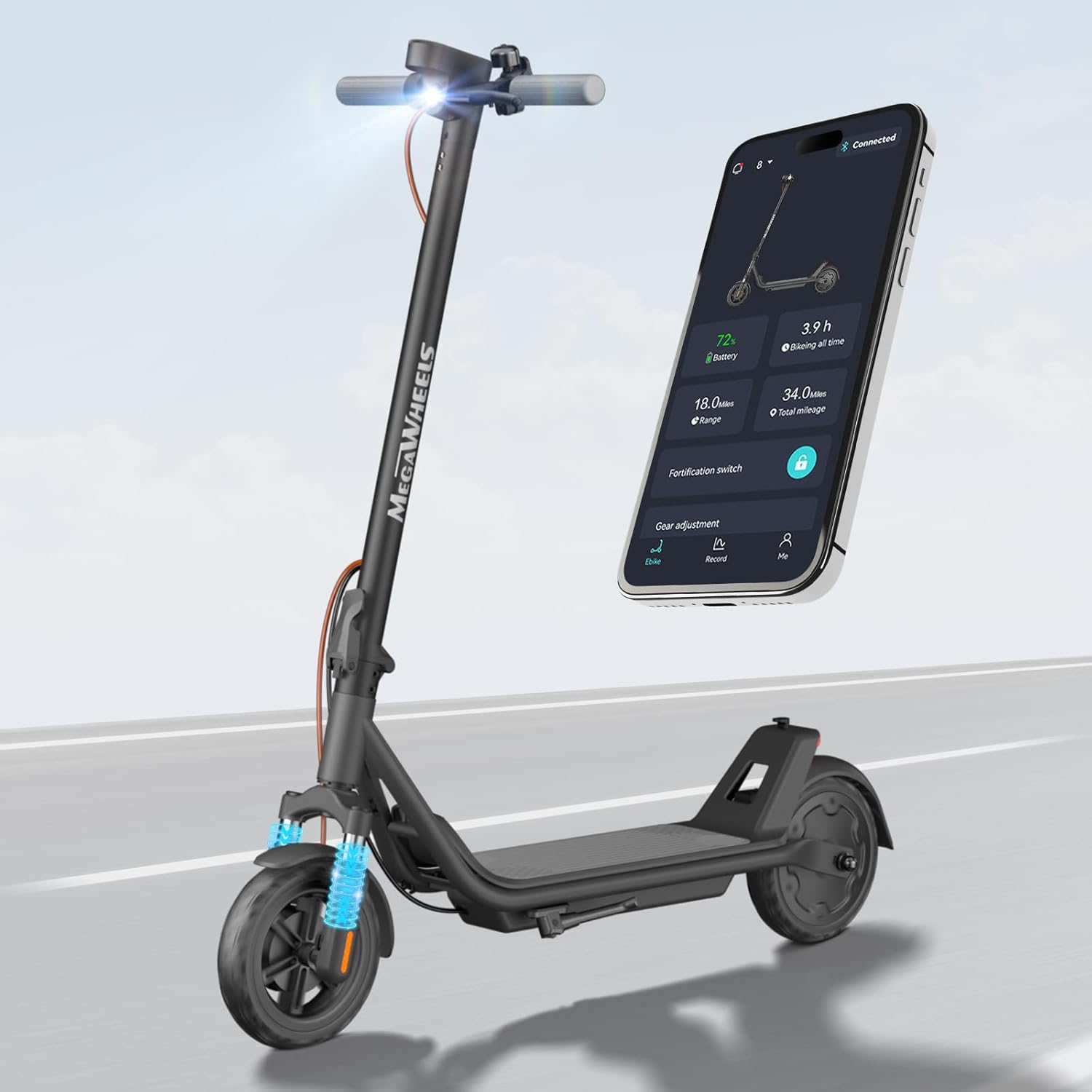
Image 1.1: The MEGAWHEELS Electric Scooter Model A1C, showcasing its sleek design and integrated smart app connectivity.
2. 안전 정보
Your safety is paramount. Operating an electric scooter carries inherent risks. Adhere to all local laws and regulations regarding electric scooter use. Always wear a helmet and appropriate safety gear.
2.1 일반 안전 지침
- 인증된 헬멧과 보호 장비(무릎 보호대, 팔꿈치 보호대)를 항상 착용하십시오.
- 알코올이나 약물의 영향을 받은 상태에서는 주행하지 마십시오.
- Observe all traffic laws, signs, and regulations.
- 다른 차량과 보행자로부터 안전한 거리를 유지하세요.
- 악천후(비, 눈, 얼음) 또는 미끄러운 노면에서는 주행을 피하십시오.
- Ensure both brakes are functioning correctly before each ride.
- The maximum weight limit for this scooter is 220파운드(100kg). Exceeding this limit can compromise safety and performance.
- Recommended age range for riders is adult.
2.2 배터리 안전
- 스쿠터와 함께 제공된 정품 충전기만 사용하세요.
- 장시간 동안 스쿠터를 충전하면서 자리를 비우지 마십시오.
- 배터리를 극한의 온도나 직사광선에 노출시키지 마십시오.
- If the battery is damaged or leaking, do not use the scooter and contact support immediately.
3. 설치 및 초기 조립
The MEGAWHEELS Electric Scooter Model A1C is largely pre-assembled. Follow these steps to complete the setup:
- 언박싱: 스쿠터와 모든 구성품을 포장에서 조심스럽게 꺼내세요.
- 핸들바 부착물: Unfold the handlebar stem and secure it in the upright position. Ensure the locking mechanism is fully engaged. Attach the handlebars to the stem, aligning any cables and tightening all screws firmly.
- 초기 청구 : 처음 주행하기 전에 스쿠터 배터리를 완전히 충전하십시오. 자세한 내용은 '충전' 섹션을 참조하십시오.
- 주행 전 점검: Inspect the tires, brakes, and all fasteners to ensure they are secure and in good working order.
4. 사용 설명서
4.1 전원 켜기/끄기
스쿠터를 켜려면 디스플레이의 전원 버튼을 길게 누르세요. 전원을 끄려면 디스플레이가 꺼질 때까지 전원 버튼을 다시 길게 누르세요.
4.2 스쿠터 타기
- 한쪽 발을 갑판 위에 단단히 올려놓고 다른 발로 밀어내어 초기 추진력을 얻으세요.
- 일단 움직이기 시작하면 가속 레버를 부드럽게 눌러 모터를 작동시키십시오.
- 두 번째 발을 데크에 올려놓으세요.
- To slow down or stop, release the accelerator and apply the brakes.
4.3 속도 설정
The scooter features multiple speed settings, allowing you to adjust your ride according to conditions and preference. The available speeds are approximately 3 MPH, 9 MPH, and 15 MPH. These can typically be adjusted via the display or the companion app.

Image 4.1: The 300W brushless DC motor and speed settings (4, 10, 15 MPH) for the MEGAWHEELS Electric Scooter.
4.4 브레이크 시스템
The scooter is equipped with a dual braking system for enhanced safety:
- 전륜 드럼 브레이크: Controlled by a lever on the handlebar.
- Rear Electronic Brake: Provides additional stopping power.
Always apply brakes smoothly to avoid sudden stops, especially at higher speeds.

Image 4.2: The scooter's dual brake system, featuring a front drum brake and a rear electronic brake for reliable stopping.
4.5 조명 시스템
The scooter features an automatic headlight and rear light. These lights are designed to turn on automatically in low-light conditions, improving visibility during nighttime rides.
4.6 폴딩 메커니즘
The scooter incorporates a 3-second folding design for easy storage and portability. To fold, locate the folding latch on the stem, release it, and fold the stem down until it locks into place. To unfold, reverse the process, ensuring the stem is securely locked upright before riding.

Image 4.3: The 3-second folding design of the MEGAWHEELS Electric Scooter, showing its folded and expanded dimensions and weight.
5. 스마트 앱 제어
Enhance your riding experience with the dedicated companion app. The app connects to your scooter via Bluetooth and offers several features:
- 전자 자물쇠: 스쿠터를 원격으로 안전하게 보호하세요.
- 실시간 진단: Monitor battery level, speed, and mileage.
- 속도 조정 : Customize speed settings (3/9/15 MPH).
- 헤드라이트 제어: Turn the headlight on/off.
Download the app from your device's app store and follow the in-app instructions for pairing.

Image 5.1: The scooter's smart app support, illustrating Bluetooth connectivity, digital lock, 3-speed adjustment, and battery level display.
6. 충전
To charge your MEGAWHEELS Electric Scooter:
- 스쿠터의 전원이 꺼져 있는지 확인하세요.
- 스쿠터 프레임에 있는 충전 포트를 찾으세요. 보통 고무 덮개로 덮여 있습니다.
- 충전기를 충전 포트에 연결한 다음 충전기를 일반 벽면 콘센트에 꽂으세요.
- 충전기의 충전 표시등은 일반적으로 충전 중에는 빨간색으로 표시되고, 완전히 충전되면 녹색으로 바뀝니다.
- 완전 충전에는 약 4-8시간.
- Once fully charged, disconnect the charger from the outlet and then from the scooter. Close the charging port cover to protect it from dust and moisture.

Image 6.1: Battery specifications, including 11 miles range, 7.5 Ah battery capacity, and 4-8 hours charging time.
7. 유지관리
정기적인 유지관리는 스쿠터의 수명과 안전한 작동을 보장합니다.
- 청소: 광고로 스쿠터를 닦으세요amp 천으로 닦으세요. 고압의 물을 사용하거나 스쿠터를 물에 담그지 마세요.
- 타이어: The scooter is equipped with 8.5-inch solid tires, which require minimal maintenance and eliminate puncture worries. Regularly inspect them for wear and tear.
- 브레이크: Periodically check the brake levers and cables for proper tension and function. Ensure the brakes respond effectively.
- 패스너: Regularly check all screws and bolts to ensure they are tight. Loose fasteners can affect stability and safety.
- 저장: Store the scooter in a cool, dry place away from direct sunlight and extreme temperatures. If storing for an extended period, ensure the battery is charged to about 50-70% and recharge it every 30-60 days to prevent deep discharge.

Image 7.1: The front dual suspension system, contributing to an enhanced smooth ride.
8. 문제 해결
스쿠터에 문제가 발생하면 다음의 일반적인 문제와 해결 방법을 참조하세요.
| 문제 | 가능한 원인 | 해결책 |
|---|---|---|
| 스쿠터 전원이 켜지지 않습니다 | 배터리 부족; 연결 불량 | Charge the battery fully; Check all visible connections. |
| 모터가 작동하지 않음 | Scooter not pushed off; Faulty accelerator | Ensure you push off to gain initial speed; Contact support if accelerator is unresponsive. |
| 브레이크가 약해요 | 브레이크 케이블이 느슨함; 브레이크 패드가 마모됨 | Adjust brake cable tension; Inspect and replace brake pads if necessary. |
| 앱이 연결되지 않습니다 | 블루투스 꺼짐; 앱이 업데이트되지 않음 | Ensure Bluetooth is enabled on your phone; Update the app to the latest version. |
이러한 해결 방법을 시도한 후에도 문제가 지속되면 고객 지원팀에 문의하세요.
9. 사양
Key technical specifications for the MEGAWHEELS Electric Scooter Model A1C:
| 특징 | 사양 |
|---|---|
| 상표 | 메가 휠 |
| 모델명 | 에이1씨 |
| 모터 파워 | 300W (rated) / 600W (peak) |
| 최대 속도 | 15.5mph(25km/h) |
| 최대 거리 범위 | 11마일(17.7km) |
| 배터리 용량 | 7.5 아 |
| 충전 시간 | 4-8시간 |
| 중량 제한 | 220파운드(100kg) |
| 제품 치수(확장) | 43인치 길이 x 17인치 너비 x 45인치 높이(109cm x 43cm x 114cm) |
| 휠 크기 | 8.5인치 (솔리드 타이어) |
| 서스펜션 유형 | 프런트 서스펜션 |
| 브레이크 스타일 | Front Drum Braking + Rear Electronic Braking |
| 특별 기능 | Digital Display, Dual Braking System, Foldable, Lockable (via App) |
| 인증 | UL2272, FCC, RoHS |
10. 보증 및 지원
The MEGAWHEELS Electric Scooter Model A1C comes with a 1년 한정 보증 구매일로부터. 본 보증은 정상적인 사용 중 발생한 제조상의 결함에 적용됩니다. 보증 청구를 위해 구매 증빙 서류를 보관해 주십시오.
For technical assistance, warranty inquiries, or any other support needs, please contact MEGAWHEELS customer service. We offer 24/7 technical assistance and have US maintenance locations to help resolve issues quickly.
연락처 정보: Refer to the official MEGAWHEELS web최신 연락처 정보는 웹사이트 또는 구매 서류를 참조하십시오.