
1. 서론
Thank you for choosing the THOMSON WS902DUO Cosy Bookshelf Speakers. These active stereo speakers deliver a powerful 150W audio experience with deep bass from two 10 cm woofers. They offer versatile connectivity options including Bluetooth 5.3, Optical, HDMI (ARC), RCA, and USB playback. The included remote control and side panel adjustments provide precise control over your audio. Please read this manual carefully before use to ensure proper operation and to maximize your listening experience.

Image 1.1: THOMSON WS902DUO Bookshelf Speakers in a living space, showcasing their elegant wood finish.
2. 중요 안전 지침
- Read these instructions thoroughly before operating the product.
- 이 지침을 향후 참고용으로 보관하세요.
- 제품과 사용 설명서에 있는 모든 경고에 주의하십시오.
- 모든 지시를 따르세요.
- 이 기기를 물 근처에서 사용하지 마십시오.
- 마른 천으로만 닦으십시오.
- 환기구를 막지 마십시오. 제조업체의 지침에 따라 설치하십시오.
- 라디에이터, 난방 조절기, 스토브 또는 기타 장치(다음을 포함)와 같은 열원 근처에 설치하지 마십시오. amp열을 생성하는 발전기.
- 극성 또는 접지형 플러그의 안전 목적을 저버리지 마십시오. 극성 플러그에는 두 개의 날이 있으며, 하나는 다른 하나보다 넓습니다. 접지형 플러그에는 두 개의 날과 세 번째 접지 갈래가 있습니다. 넓은 날 또는 세 번째 갈래는 안전을 위해 제공됩니다. 제공된 플러그가 콘센트에 맞지 않으면 전기 기술자에게 문의하여 오래된 콘센트를 교체하십시오.
- 전원 코드가 밟히거나 끼지 않도록 보호하세요. 특히 플러그, 편의용 콘센트 및 기기에서 나오는 부분은 보호하세요.
- 제조사가 지정한 부속품/액세서리만 사용하세요.
- 제조업체에서 지정하거나 장비와 함께 판매한 카트, 스탠드, 삼각대, 브래킷 또는 테이블과 함께만 사용하십시오. 카트를 사용하는 경우 카트/장비 조합을 이동할 때 넘어져 부상을 입지 않도록 주의하십시오.
- 번개 폭풍 시 또는 장기간 사용하지 않을 때는 기기의 플러그를 뽑아두세요.
- 모든 서비스는 자격을 갖춘 서비스 담당자에게 의뢰하십시오. 전원 코드나 플러그가 손상되었거나, 액체가 쏟아졌거나, 물체가 기기에 떨어졌거나, 기기가 비나 습기에 노출되었거나, 정상적으로 작동하지 않거나, 떨어졌을 때와 같이 기기가 어떤 식으로든 손상된 경우 서비스가 필요합니다.
3. 패키지 내용
아래 나열된 모든 품목이 패키지에 포함되어 있는지 확인하세요.
- THOMSON WS902DUO Bookshelf Speakers (2 units)
- 원격 제어
- 전원 케이블
- 스피커 연결 케이블
- 3.5mm Jack to RCA Adapter Cable
- 사용 설명서 (본 문서)

Image 3.1: Packaging of the THOMSON WS902DUO Bookshelf Speakers.
4. 제품 오버view
4.1. Side Control Panel (Active Speaker)
The active speaker features a side control panel for easy access to essential functions.

Image 4.1: Side control panel.
- 베이스 컨트롤: 저주파 출력을 조절합니다.
- 트레블 컨트롤: 고주파 출력을 조절합니다.
- 볼륨 조절: 전반적인 사운드 볼륨을 조절합니다.
- 전원 스위치: 스피커를 켜거나 끕니다.
- LED 표시등: Shows the current status or selected input.
4.2. Rear Panel (Active Speaker)
The rear panel of the active speaker provides all necessary input and output connections.
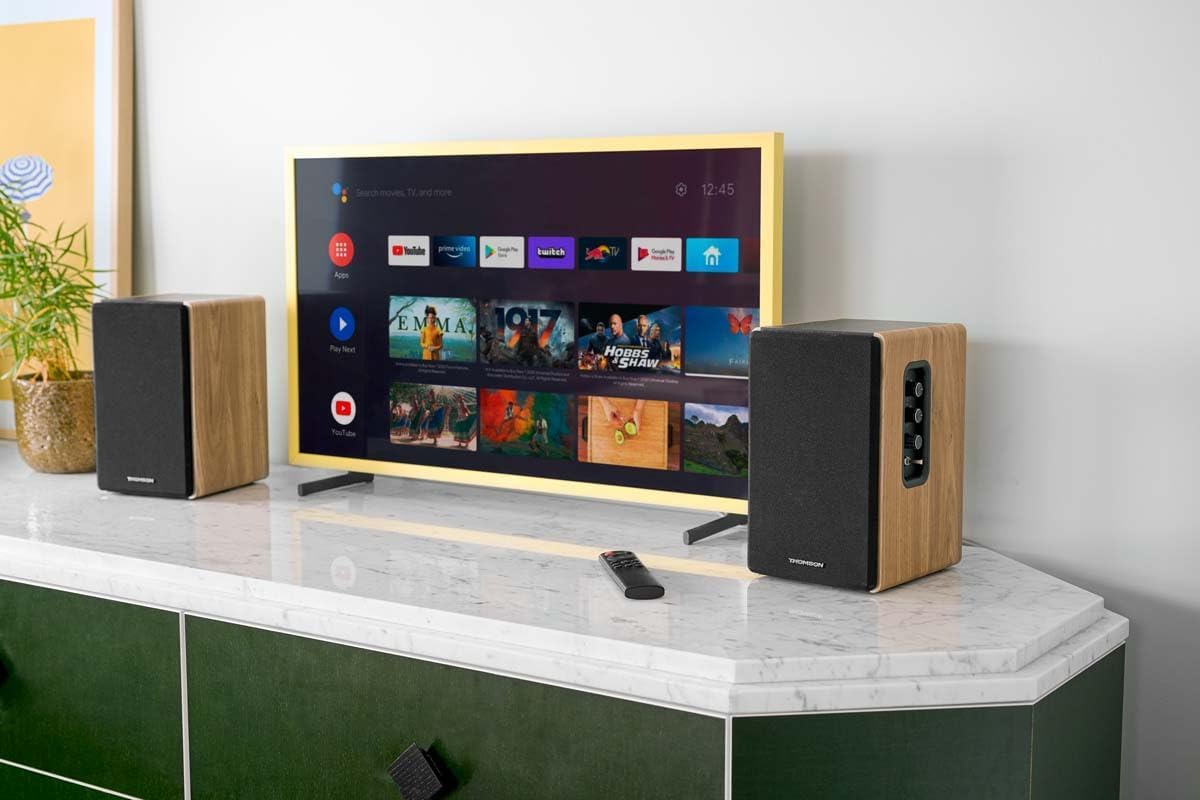
그림 4.2: 후면 패널 연결부.
- 광학 입력: For connecting digital audio sources like TVs, game consoles, or Blu-ray players.
- 보조 입력(RCA): For connecting analog audio sources such as turntables, CD players, or PCs. A 3.5mm jack adapter is provided.
- TV Audio (HDMI ARC): For connecting to a TV's HDMI ARC port, allowing TV remote control of the speaker volume.
- USB 재생: MP3 재생을 위해 files USB 플래시 드라이브에서 직접.
- 서브 아웃: For connecting an external active subwoofer for enhanced bass.
- 스피커 출력: 패시브 스피커에 연결합니다.
- 전원 입력: 주 전원 공급 장치에 연결합니다.
4.3. 원격 제어
The remote control provides convenient access to all speaker functions from a distance.

Image 4.3: Remote control.
- 전원 버튼: 스피커를 켜거나 끕니다.
- 음소거 버튼: 소리를 음소거/음소거 해제합니다.
- 볼륨 +/- : 볼륨 레벨을 조절합니다.
- Playback Controls (Play/Pause, Skip): USB 재생용.
- Source Selection Buttons (OPT, BT, ARC, USB, LINE): 오디오 입력 소스를 선택합니다.
- EQ Mode Buttons (MOVIE, MUSIC, DIALOG): Selects preset equalization modes.
5. 설정
5.1. 스피커 배치
Place the speakers on a stable, flat surface such as a bookshelf, desk, or speaker stands. For optimal stereo imaging, position the speakers equidistant from your listening position and at ear level. Ensure there is adequate space around the speakers for ventilation.
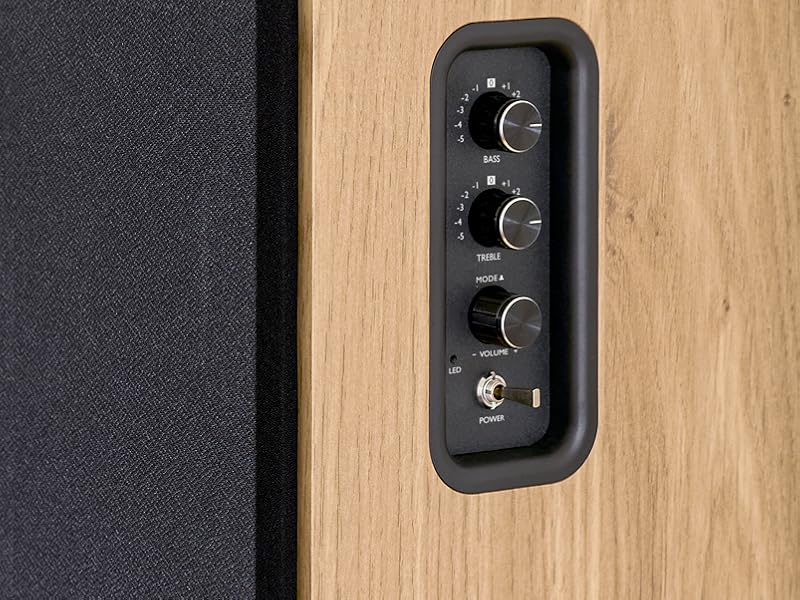
Image 5.1: Recommended speaker placement on a desk.
5.2. 스피커 연결
- Identify the active speaker (with controls and inputs) and the passive speaker.
- Connect the included speaker cable from the speaker output terminals on the active speaker to the input terminals on the passive speaker. Ensure correct polarity (+ to + and - to -).
5.3. 오디오 소스 연결
Connect your desired audio sources to the active speaker using the appropriate cables.
- 광학 입력: Use an optical cable to connect your TV, game console, or Blu-ray player to the OPTICAL IN port.
- HDMI(ARC) 입력: Use an HDMI cable to connect your TV's HDMI ARC port to the TV AUDIO (HDMI) port on the speaker. This allows your TV remote to control the speaker volume.
- RCA(AUX) 입력: Use an RCA cable (or the provided 3.5mm jack to RCA adapter) to connect devices like a turntable, CD player, or PC to the AUX IN (RCA) ports.
- USB 입력 : MP3가 포함된 USB 플래시 드라이브 삽입 files into the USB PLAY port.

Image 5.2: Speakers connected to a television via HDMI ARC.
5.4. 블루투스 페어링
- 스피커의 전원이 켜져 있는지 확인하세요.
- Press the 'BT' button on the remote control or the side panel to select Bluetooth input. The LED indicator will flash, indicating pairing mode.
- 스마트폰, 태블릿 또는 컴퓨터에서 Bluetooth를 활성화하고 사용 가능한 기기를 검색하세요.
- Select "THOMSON WS902DUO" from the list of devices.
- 페어링이 완료되면 LED 표시등이 깜빡임을 멈추고 계속 켜져 있습니다. 이제 무선으로 오디오를 스트리밍할 수 있습니다.
5.5. 서브우퍼 연결 (선택 사항)
If you wish to enhance bass further, connect an active subwoofer to the 'Sub Out' port on the rear panel of the active speaker using an RCA cable.
6. 사용 설명서
6.1. 전원 켜기/끄기
Use the power switch on the side control panel or the power button on the remote control to turn the speakers on or off.
6.2. 소스 선택
Press the corresponding source button on the remote control (OPT, BT, ARC, USB, LINE) to switch between connected audio inputs. The LED indicator will change to reflect the selected source.
6.3. 볼륨 조절
Adjust the volume using the 'Volume' knob on the side control panel or the 'VOL+/-' buttons on the remote control.
6.4. 오디오 조정
Fine-tune the sound to your preference:
- 저음/고음: Use the 'Bass' and 'Treble' knobs on the side control panel to adjust the low and high frequencies.
- EQ 모드: Press the 'MOVIE', 'MUSIC', or 'DIALOG' buttons on the remote control to select preset equalization settings optimized for different content types.
6.5. USB 재생
When a USB flash drive with MP3 files is inserted and USB source is selected, the speakers will automatically begin playing. Use the playback control buttons on the remote control (Play/Pause, Skip) to manage your music.
6.6. 블루투스 작동
After successful pairing (see Section 5.4), you can stream audio from your Bluetooth device. Use your device's controls or the speaker's remote control for playback and volume adjustments.
7. 유지관리
적절한 유지관리는 스피커의 수명과 성능을 보장합니다.
- 청소: Wipe the speaker surfaces with a soft, dry cloth. Do not use liquid cleaners or abrasive materials.
- 통풍: 과열을 방지하려면 환기구가 막히지 않았는지 확인하세요.
- 저장: 스피커를 장기간 보관할 경우 전원 콘센트에서 플러그를 뽑고 서늘하고 건조한 곳에 보관하십시오.
- 습기를 피하세요: Keep the speakers away from water and high humidity.
8. 문제 해결
문제가 발생하면 다음 문제 해결 가이드를 참조하세요.
| 문제 | 가능한 원인 | 해결책 |
|---|---|---|
| 전원이 없습니다 | Power cable not connected; Power switch off; Wall outlet not working. | Ensure power cable is securely connected. Turn on the power switch. Test the wall outlet with another device. |
| 소리가 나지 않습니다 | Incorrect input source selected; Volume too low; Mute function active; Audio cable not connected properly. | Select the correct input source. Increase volume. Press Mute button on remote. Check all audio cable connections. |
| 블루투스 페어링 실패 | Speakers not in pairing mode; Device too far; Bluetooth disabled on source device. | Ensure speakers are in Bluetooth pairing mode (flashing LED). Move device closer to speakers. Enable Bluetooth on your source device. |
| USB 재생이 작동하지 않습니다 | USB drive not formatted correctly; Files not MP3; USB drive not inserted properly. | Ensure USB drive is FAT32 formatted. Verify files are in MP3 format. Re-insert USB drive firmly. |
| 음향 왜곡 | Volume too high; Source audio quality poor; Bass/Treble settings too extreme. | Lower the volume. Test with a different audio source. Adjust Bass and Treble controls. |
9. 사양
| 특징 | 사양 |
|---|---|
| 상표 | 톰슨 |
| 모델 번호 | WS902DUO |
| 최대 스피커 출력 전력 | 150 와트 |
| 주파수 응답 | 60Hz |
| 연결 기술 | Bluetooth, HDMI (ARC), Optical, RCA, USB |
| 블루투스 버전 | 5.3 |
| 오디오 출력 모드 | 스테레오(2.0 채널) |
| 입력 Voltage | 230볼트(AC) |
| 장착 유형 | 선반 마운트 |
| 스피커 유형 | Multimedia Bookshelf |
| 특별 기능 | Stereo Pairing, USB Port, Sub-Out, Remote Control, EQ Modes |
| 추천 용도 | Smartphone, Tablet, PC, TV, Game Console, DVD Player, Turntable |
| 색상 | 천연 목재 마감 |
| 제어 방법 | 리모컨, 측면 패널 조절 손잡이 |
| 우퍼 크기 | 10 센티미터 |
| 치수(높이 x 너비 x 깊이) | 28 cm x 24 cm x 47 cm (approximate, per speaker) |
| 무게 | 5048 Grams (total for pair) |
| 항목 수 | 2 |
| 원산지 | 중국 |
10. 보증 정보
This THOMSON WS902DUO product comes with a 1년 한정 보증 구매일로부터 적용됩니다. 본 보증은 정상적인 사용 조건에서 발생하는 제조상의 결함 및 하자에 한해 적용됩니다. 단, 오용, 사고, 무단 개조 또는 일반적인 마모로 인한 손상은 보증 대상에서 제외됩니다. 보증 청구를 위해 구매 증빙 자료를 보관해 주십시오.
11. 고객 지원
For technical assistance, warranty claims, or any questions regarding your THOMSON WS902DUO speakers, please contact your retailer or visit the official THOMSON support website. Please have your model number (WS902DUO) and proof of purchase ready when contacting support.
온라인 지원: www.thomsonconsumer.com (지역별 지원 연락처를 확인하세요)