
1. 서론
This manual provides detailed instructions for the installation, operation, and maintenance of your Backnets Round Digital Display Shower Valve. Please read this manual thoroughly before installation and use to ensure proper function and longevity of the product. This shower valve features a digital temperature display and is designed for concealed installation within a wall.
2. 안전 정보
Always adhere to local plumbing codes and regulations during installation. If you are unsure about any part of the installation process, consult a qualified plumber. Ensure the main water supply is turned off before beginning any work. Wear appropriate personal protective equipment, such as safety glasses and gloves.
- Turn off the main water supply before installation or maintenance.
- Do not overtighten connections, as this may damage the valve or pipes.
- 모든 연결 부분이 방수 처리되어 누수가 발생하지 않도록 하세요.
- 제품이 얼지 않도록 보호하십시오.
3. 패키지 내용
패키지에는 다음이 포함됩니다.
- 1x Backnets Round Digital Display Shower Valve (Single Function, Matte Black)
4. 제품 오버view 및 기능
The Backnets Round Digital Display Shower Valve is designed to provide precise temperature control and a modern aesthetic for your bathroom. Key features include:
- 표준 커넥터: Equipped with standard 3/4-inch pipe inlet and 1/2-inch pipe outlet, suitable for most plumbing systems. Features US standard NPT threads for easy integration.
- LED 온도 디스플레이: An integrated LED screen displays the water temperature. This display is powered by hydroelectric energy, requiring no batteries.
- 정확한 제어: The rotary knob allows for accurate temperature adjustment.
- 내구성 있는 구조: Made from high-quality brass with a multi-layer electroplating stainless steel panel, ensuring longevity and resistance to corrosion.
- 은폐형 설치: Designed for in-wall installation, providing a clean and minimalist look.

그림 1: 전면 view of the Backnets Round Digital Display Shower Valve, showing the matte black finish and digital temperature display.
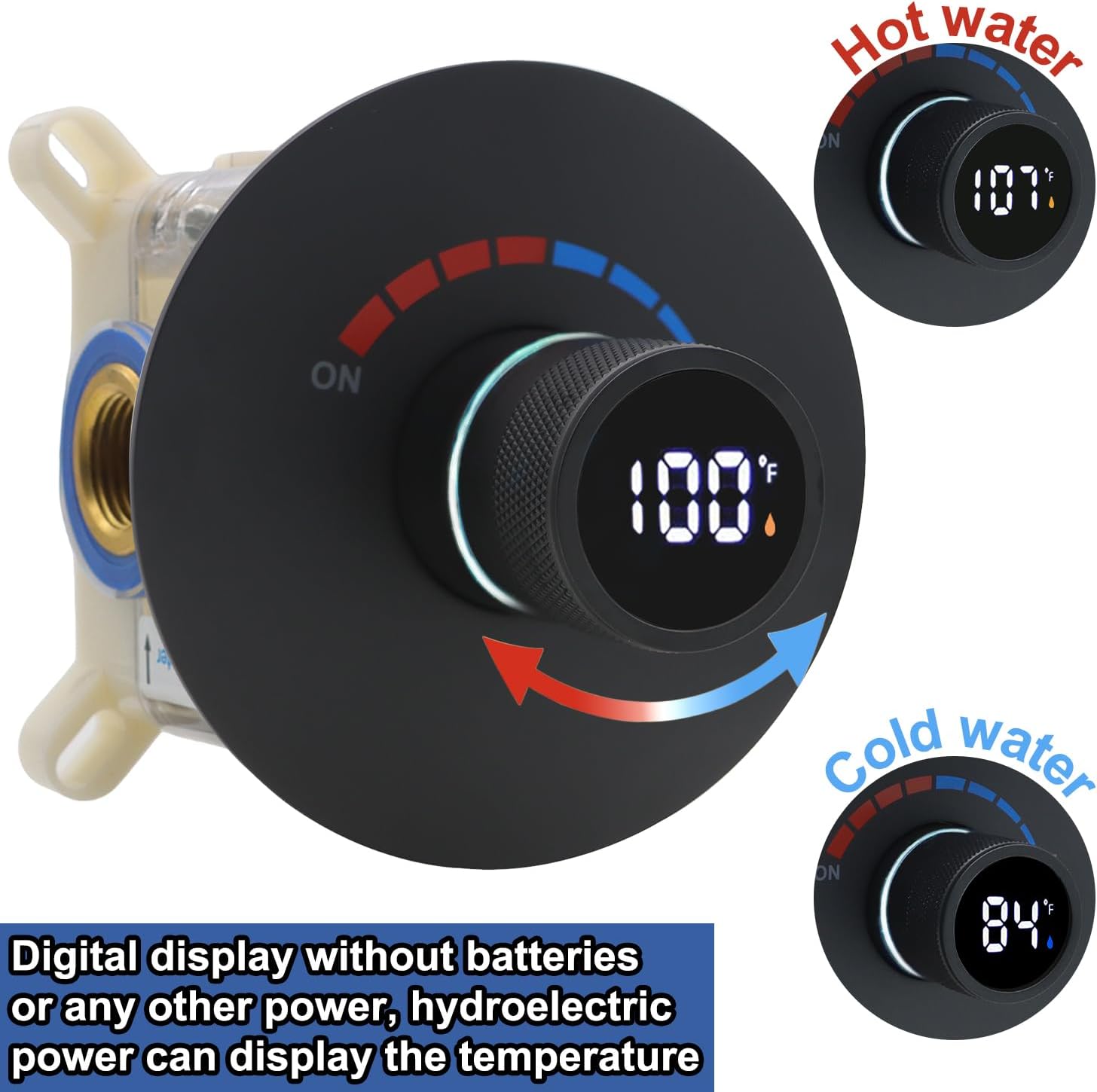
Figure 2: Illustration of the digital display indicating water temperature for both hot and cold water, powered by hydroelectric energy.
5. 설정 및 설치
The shower valve is designed for concealed installation. Follow these steps carefully:
- 설치 영역 준비: Ensure the wall cavity is appropriately sized for the valve body. The valve is designed for concealed installation.
- Connect Water Inlets: Connect the 3/4-inch hot water inlet (marked 'Hot') and cold water inlet (marked 'Cold') to your plumbing system. Ensure secure, watertight connections using US standard NPT threads.
- Connect Water Outlet: Connect the 1/2-inch water outlet to your shower head or other single function shower accessory.
- 밸브를 고정하세요: Mount the valve securely within the wall cavity according to the manufacturer's guidelines.
- 압력 테스트: After installation, it is crucial to perform a pressure test. Block all outlets of the shower valve and adjust the water pressure to 10 kg (1 MPa) for testing. Carefully check all water pipe connections and the interior of the shower valve for any signs of leakage.

Figure 3: Illustration detailing the important pressure test procedure after shower valve installation.
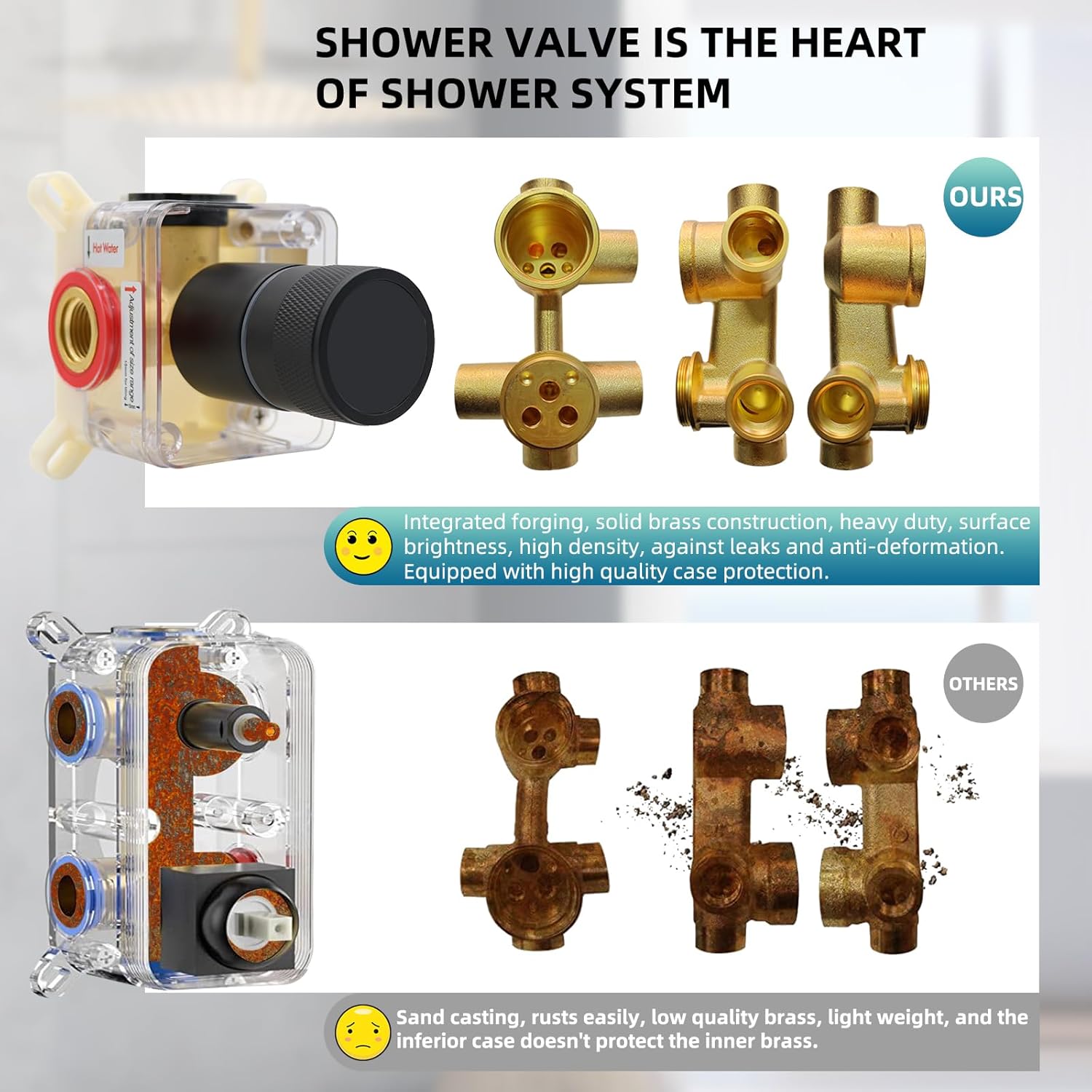
Figure 4: Comparison highlighting the integrated forging and solid brass construction of the Backnets shower valve for durability and leak prevention.
6. 사용 설명서
The Backnets Digital Display Shower Valve offers straightforward operation for controlling water flow and temperature.
- 켜기/끄기: Rotate the main knob to the 'ON' position to start water flow. Rotate to 'OFF' to stop.
- 온도 조절: Rotate the knob to adjust the water temperature. The digital display will show the current temperature in real-time. The display is powered by the water flow itself, so no batteries are needed.
- 온도 표시기: The temperature indicator light around the knob will typically display blue for temperatures ≤ 100°F and orange for temperatures > 100°F, providing a visual cue for water warmth.
중요 참고 사항:
This single-function valve is designed to connect to only one shower product (e.g., a single shower head) at a time. It is not intended for simultaneous operation of multiple shower outlets.

Figure 5: Diagram illustrating the shower mixer valve control, showing ON/OFF, hot/cold indicators, and the temperature display with color-coded temperature ranges.

그림 6: example of the shower valve installed in a bathroom, demonstrating its integrated appearance.
7. 유지관리
정기적인 청소와 관리는 샤워 밸브의 외관과 기능을 유지하는 데 도움이 됩니다.
- 청소: Clean the surface of the valve regularly with a soft, damp cloth. Avoid abrasive cleaners, harsh chemicals, or scouring pads, as these can damage the matte black finish and electroplating.
- 광물 매장지: In areas with hard water, mineral deposits may accumulate. Use a mild descaling solution specifically designed for bathroom fixtures, applied with a soft cloth, and rinse thoroughly.
- 점검: 연결 부위 주변에 누수 흔적이 있는지 주기적으로 점검하십시오. 누수가 발견되면 즉시 조치하여 물 피해를 예방하십시오.
8. 문제 해결
If you encounter issues with your shower valve, refer to the following common problems and solutions:
| 문제 | 가능한 원인 | 해결책 |
|---|---|---|
| 디지털 디스플레이 없음 | Insufficient water flow to power the hydroelectric generator. | Ensure adequate water pressure and flow. Check for blockages in the water lines. |
| 부정확한 온도 측정 | Sensor malfunction or extreme water temperature fluctuations. | Verify water supply temperatures. If the issue persists, contact customer support. |
| 연결부에서 물이 새는 경우 | 연결 부분이 느슨하거나 씰이 손상되었습니다. | Turn off water supply. Carefully tighten connections. Inspect and replace seals if necessary. |
| 온도 조절이 어려움 | Mineral buildup or internal mechanism issue. | Clean the valve exterior. If internal, contact customer support. |
9. 사양
| 기인하다 | 사양 |
|---|---|
| 모델 | B0FJRTCHFQ |
| 상표 | 백넷 |
| 유형 | Round Digital Display Shower Valve |
| 기능 | 단일 기능 |
| 색상 | 매트블랙 |
| 재료 | 놋쇠 |
| 입구 파이프 크기 | 3/4 인치 |
| Outlet Pipe Size | 1/2 인치 |
| 제품 크기(L x W x H) | 8 x 6 x 6 인치 |
| 품목 무게 | 2.9파운드 |
| 필요한 배터리 | No (Hydroelectric power for display) |

Figure 7: Detailed dimensions of the Backnets Round Digital Display Shower Valve.
10. 보증 및 지원
Backnets is committed to serving all customers with their bathing needs. For any questions, concerns, or support regarding your Backnets Round Digital Display Shower Valve, please refer to your purchase documentation or contact Backnets customer service through the retailer where the product was purchased.