
허브VIEW 벨 J7
허브VIEW Bell J7 2K Wireless Video Doorbell Camera with Chime User Manual
Model: Bell J7
1. 서론
This manual provides detailed instructions for the installation, operation, and maintenance of your MUBVIEW Bell J7 2K Wireless Video Doorbell Camera with Chime. Please read this manual thoroughly before using the product to ensure proper function and safety. This device is designed to enhance your home security with advanced features like 2K video, motion detection, and two-way audio.
2. 상자 안에 무엇이 들어있나요?
설치를 진행하기 전에 모든 구성 요소가 있는지 확인하세요.
- Camera Doorbell x1
- 차임 x1
- 사용 설명서 x1
- 충전 케이블 x1
- 배터리 x3
- Other Accessories (screws, anchors, screwdriver)

Image: Contents of the MUBVIEW Bell J7 package, including the doorbell, chime, and installation tools.
3. 제품 오버view
Familiarize yourself with the main parts of your video doorbell and chime:
도어벨 카메라
- 2K Camera Lens: 고해상도 비디오를 촬영합니다.
- PIR 모션 센서 : 인간의 움직임을 감지합니다.
- 마이크로폰: 양방향 오디오 통신을 위해.
- 스피커: 양방향 음성 통신 및 사이렌용.
- 초인종 버튼: 알림음을 활성화하고 알림을 보냅니다.
- Micro USB-C Port: 내부 배터리를 충전합니다.
- 재설정 버튼: 기기를 재설정합니다.
- 마이크로 SD 카드 슬롯: For local video storage (up to 128GB, card not included).
- Anti-Theft Button: Triggers an alarm if the doorbell is removed from its mount.
무선 차임
- 스피커: 초인종 소리가 납니다.
- 볼륨 조절: 차임벨 소리를 조절합니다.
- 톤 선택기: Changes chime melody.
- 전원: 배터리로 구동되므로 배치가 유연합니다.

이미지: 앞면 view of the MUBVIEW Bell J7 doorbell and chime.
4. 설정
Follow these steps to set up your MUBVIEW Bell J7 doorbell camera:
4.1 초인종 충전하기
- Before first use, fully charge the doorbell camera using the provided USB charging cable.
- The charging port is located on the side of the doorbell, protected by a rubber flap.
- A full charge can last up to 180 days, depending on usage.
4.2 앱 설치 및 Wi-Fi 연결
- 다운로드 클라우드엣지 or 허브VIEW 스마트폰의 앱 스토어(애플 앱 스토어 또는 구글 플레이 스토어)에서 앱을 다운로드하세요.
- 새 계정을 등록하거나 이미 계정이 있는 경우 로그인하세요.
- 스마트폰이 다음에 연결되어 있는지 확인하세요. 2.4GHz Wi-Fi 네트워크. The doorbell is not compatible with 5GHz Wi-Fi.
- In the app, select "Add Device" and choose "Smart Video Doorbell".
- Follow the on-screen prompts to connect the doorbell to your Wi-Fi network. This typically involves scanning a QR code displayed on your phone with the doorbell camera.
- 연결되면 기기 이름을 지정하고 설정을 완료할 수 있습니다.
4.3 초인종 설치
The doorbell can be mounted using screws or strong adhesive tape (not included for all mounting types).
- Attach the mounting bracket to your desired location on the wall or door frame. Ensure it is at an appropriate height for optimal view주고받음.
- Secure the bracket using the provided screws and anchors.
- Slide the doorbell camera into the mounting bracket until it clicks securely into place.
- For added security, a small screw can be inserted from the bottom of the bracket into the doorbell to prevent easy removal.

Image: Installation of the MUBVIEW Bell J7 doorbell camera onto its mounting bracket.
5. 사용 설명서
5.1 라이브 View 및 양방향 오디오
- MUB 열기VIEW app to access the live video feed from your doorbell camera.
- 앱에서 마이크 아이콘을 사용하여 양방향 오디오를 활성화하고 문 앞에 있는 방문객과 대화하세요.
- The voice changer feature can be activated for added privacy and security.

Image: Demonstrating two-way audio and voice message functionality via the app.
5.2 동작 감지 및 알림
- The doorbell features advanced PIR motion and human detection to minimize false alarms.
- When motion is detected, you will receive instant push notifications on your smartphone.
- Adjust motion detection sensitivity and set custom motion zones within the app to suit your environment.

Image: Smartphone notification for human detection from the doorbell camera.
5.3 야간 투시경
- The doorbell camera automatically switches to IR night vision in low-light conditions.
- Enhanced night vision provides clear images up to 33 feet.
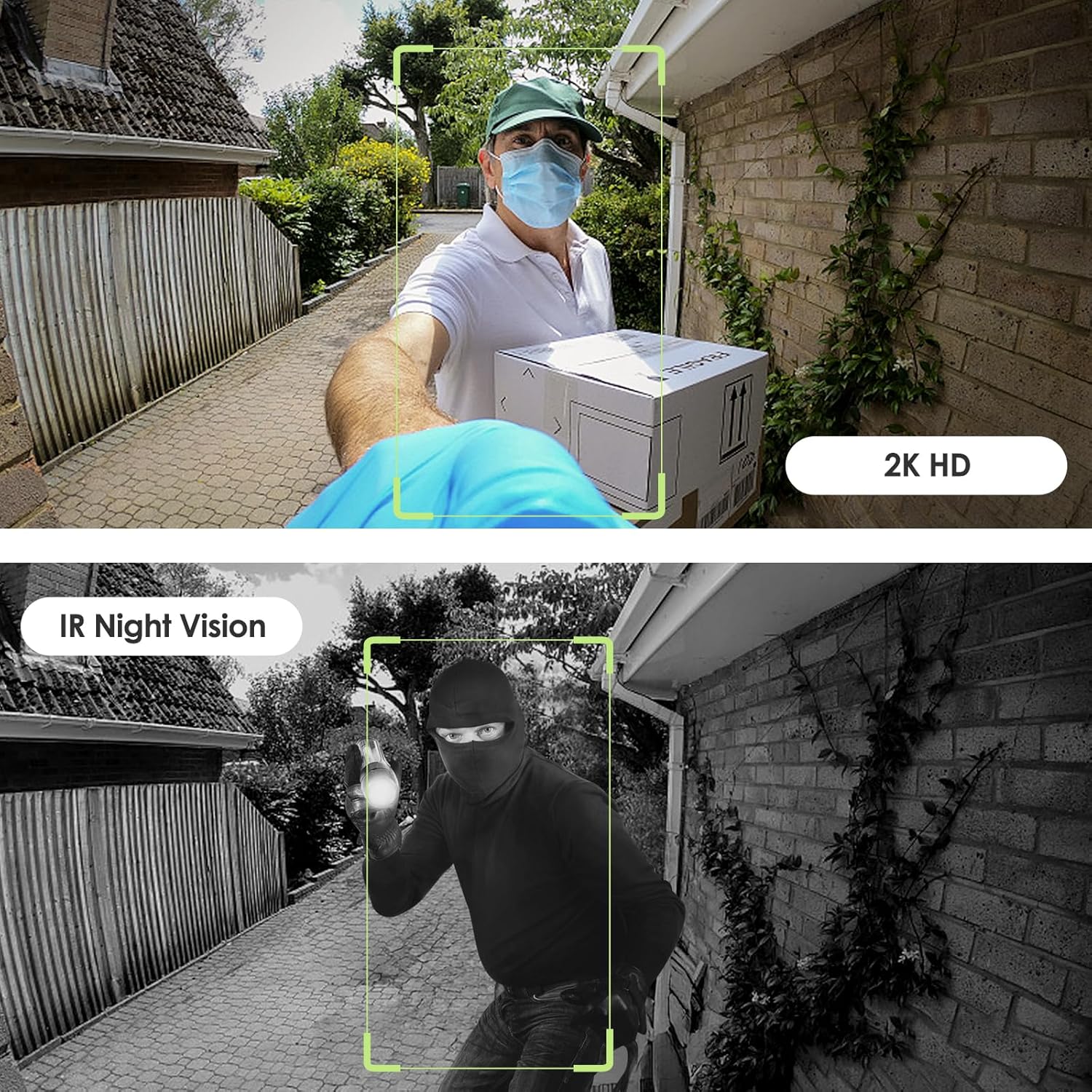
Image: Day and night vision capabilities of the MUBVIEW Bell J7 doorbell.
5.4 비디오 저장
- 마이크로 SD 카드 : Insert a micro SD card (up to 128GB, not included) into the designated slot for local storage of recorded footage.
- 클라우드 스토리지: Enjoy 7-day free cloud loop storage. Optional premium cloud storage plans are available for extended storage and features.

Image: Multiple storage options: local Micro SD card and cloud service.
6. 특징
- 2K 풀 HD 해상도: 선명하고 자세한 영상을 제공합니다.
- 145° 광각 렌즈: 광범위한 제공 view 당신의 집 문앞까지.
- 배터리 전원 : Ensures easy, wire-free installation.
- 2.4GHz Wi-Fi 연결: Stable and reliable wireless connection.
- IP65 내후성: Built to withstand various outdoor conditions (rain, heat, hail, sun, dust).
- 도난 방지 알람: Siren sounds if the doorbell is tamp로 이루어짐.
- 음성 변환기: Enhances privacy during two-way audio.
- Pre-Recorded Voice Messages: Respond quickly with custom messages.
- 가족 공유: Supports up to 15 online users and 20 user accounts.
- 호환성: Alexa 및 Google Assistant와 함께 작동합니다.

이미지: 이상view of MUBVIEW Bell J7 features.
7. 유지관리
7.1 배터리 충전
The doorbell is powered by rechargeable batteries. Monitor the battery level through the app and recharge as needed. The battery life can extend up to 180 days on a single charge, depending on activity and settings.
7.2 청소
카메라 렌즈와 초인종 외부를 부드러운 천으로 닦으세요.amp 먼지와 이물질을 제거할 때는 천을 사용하십시오. 기기가 손상될 수 있으므로 강한 화학 약품이나 연마제를 사용하지 마십시오.
7.3 내후성
더 머브VIEW Bell J7 is IP65 weather-resistant, designed to endure various outdoor conditions. However, extreme weather conditions may still impact performance or battery life.

Image: IP65 Weather Resistance of the MUBVIEW Bell J7 doorbell.
8. 문제 해결
| 문제 | 가능한 해결책 |
|---|---|
| 도어벨이 Wi-Fi에 연결되지 않습니다 | Ensure your Wi-Fi is 2.4GHz. Move the doorbell closer to your router during setup. Reset the doorbell and try again. |
| 잦은 오작동 동작 경보 | Adjust the motion detection sensitivity in the app. Set custom motion zones to exclude busy areas or moving foliage. |
| 비디오 품질이 좋지 않음 | Check your Wi-Fi signal strength in the app. Ensure the camera lens is clean and free from obstructions. |
| 배터리 수명이 짧음 | Reduce motion detection sensitivity or frequency of live view access. Ensure the doorbell is fully charged. |
| Anti-theft alarm not working | Ensure the anti-theft feature is enabled in the app settings. Check if the doorbell is properly seated in its mounting bracket, activating the tamp어 버튼. |
9. 사양
- 모델 이름: 벨 J7
- 비디오 캡처 해상도: 2K
- 연결 기술 : 무선(2.4GHz Wi-Fi)
- 전원: Battery Powered (3 A batteries included)
- 실내/실외 사용: 집 밖의
- 방수 수준: IP65 방수
- 특별 기능: 2-Way Audio, Built-In Light, HD Resolution, Image Sensor, Motion Sensor, Voice Changer, Anti-Theft Alarm
- 호환 장치: Smartphone (via CloudEdge/MUBVIEW 앱)
- 제품 크기: 1.37 x 5.27 x 2.2 인치
- 품목 무게: 15.4 온스
10. 보증 및 지원
허브VIEW is committed to providing quality products and customer satisfaction. For any inquiries or support needs, please refer to the following:
- 고객 서비스: Available via Call Service (9AM-5PM EST) and Online Email.
- 보고: 30-day Amazon return policy applies.
- 보호 계획: 2년 및 3년 보증 플랜을 선택적으로 구매하실 수 있습니다.
For detailed contact information, please visit the official MUBVIEW web해당 웹사이트를 방문하거나 제품 포장에 제공된 연락처 정보를 참조하십시오.

Image: MUBVIEW Customer Service details.
Ask a question about this manual
Ask about setup, troubleshooting, compatibility, parts, safety, or missing instructions. Manuals+ will review the question and use this page’s manual context to help answer it.