
1. 서론
This manual provides essential information for the safe and efficient operation of your PETLIBRO Automatic Pet Feeder with Camera. This device is designed to automate pet feeding schedules, monitor your pet, and facilitate two-way communication, ensuring your pet receives meals on time and you stay connected.
The feeder features a 1080P HD camera with night vision, 5G WiFi connectivity, two-way audio, and a stainless steel slow-feed bowl to promote healthier eating habits.

Figure 1: PETLIBRO Automatic Pet Feeder with Camera
2. 제품 구성품
패키지에 모든 구성 요소가 들어 있는지 확인하세요.
- 1 x PETLIBRO Automatic Camera Feeder
- 1 x Stainless Steel Slow Food Bowl
- 1 x 전원 어댑터
- 1 x Desiccant Bag (pre-installed or separate)
- 1 x 사용자 설명서
3. 설정 가이드
3.1 포장 풀기 및 배치
- 포장에서 모든 구성 요소를 조심스럽게 제거합니다.
- Place the feeder on a flat, stable surface in a dry area, away from direct sunlight or heat sources.
- 전원 콘센트에 쉽게 접근할 수 있는지 확인하십시오.
3.2 전원 연결
- 전원 어댑터를 급식기에 연결하고 벽면 콘센트에 꽂으세요.
- 전원을 위해tage protection, install 3 D-cell batteries (not included) in the battery compartment at the bottom of the feeder.
3.3 앱 다운로드 및 Wi-Fi 연결
- 다운로드 PETLIBRO App 스마트폰 앱 스토어(iOS 또는 Android)에서 다운로드하세요.
- Create an account and follow the in-app instructions to add your feeder. The feeder supports both 2.4GHz and 5GHz WiFi networks.
- Ensure your phone is connected to the same WiFi network you intend to connect the feeder to during setup.
3.4 식량 탱크 채우기
- 음식 탱크의 뚜껑을 엽니다.
- Pour dry pet food into the tank. The feeder has a 5L capacity.
- Ensure the desiccant bag is placed in its compartment to keep food fresh. Replace the desiccant bag every 15-30 days.
- 음식의 신선도를 유지하려면 뚜껑을 꼭 닫으세요.
3.5 Attaching the Slow Food Bowl
- Place the stainless steel slow food bowl into the designated slot at the base of the feeder. Ensure it is seated correctly.

Figure 2: Stainless Steel Slow Food Bowl
4. 사용 설명서
4.1 식사 일정 계획하기
- Use the PETLIBRO App to set up to 10 meals per day.
- Adjust portion sizes from 1 to 50 portions per meal, according to your pet's dietary needs.
- The app allows for flexible scheduling and monitoring of feeding history.
4.2 수동 급지
- Press the manual feed button on the feeder or use the app's "Feed Now" function to dispense a single portion instantly.
4.3 Camera Features and Monitoring
The built-in 1080P HD camera allows you to monitor your pet's mealtime in real-time.
- 실시간 Viewing: Access the live camera feed through the PETLIBRO App.
- 야간 투시경: The camera automatically switches to night vision in low-light conditions, providing clear monitoring even at night.
- 자동 캡처: Feeding moments are automatically recorded and stored for playback within the app.
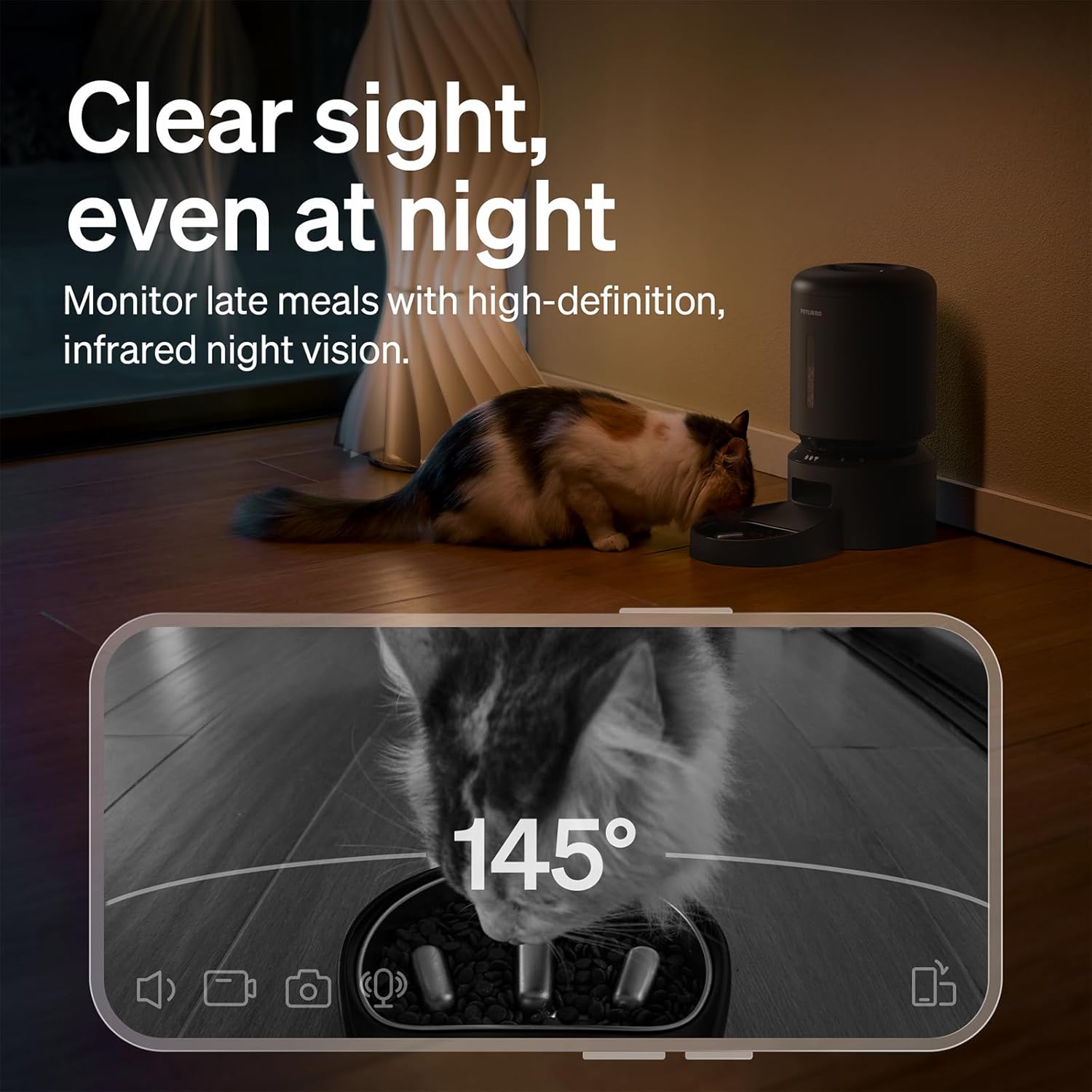
Figure 3: Night Vision Monitoring
4.4 Two-Way Audio Interaction
- Use the two-way audio feature in the app to speak to your pet remotely.
- You can also record a personalized 10-second meal call that plays during scheduled feeding times.
4.5 알림 및 경고
The PETLIBRO App provides instant alerts to keep you informed:
- Low Food Level: Receive alerts when the food tank is running low, prompting you to refill.
- Food Jams: The anti-blockage system detects and alerts you to any food dispensing issues.
- 동작 및 소리 감지: Get notifications for detected motion or sound around the feeder.

Figure 4: Real-time Notifications
4.6 Slow Feeding Benefits
The integrated stainless steel slow-feed bowl is designed with ridges to reduce eating speed by up to 2 times. This helps prevent choking, bloating, and indigestion, supporting better digestion for pets that eat too fast.

Figure 5: Slow Feeding in Action
4.7 비디오 데모
Watch this short video to see the PETLIBRO Automatic Pet Feeder in operation, demonstrating its food dispensing capabilities.
Video 1: PETLIBRO Automatic Dog Feeder with Slow Bowl, 1080P HD (6 seconds)
5. 유지관리
5.1 Cleaning the Slow Food Bowl
- 스테인리스 스틸 그릇은 분리가 가능하며 식기 세척기에 넣어 쉽게 세척할 수 있습니다.
- Wash regularly to maintain hygiene and prevent bacterial growth.
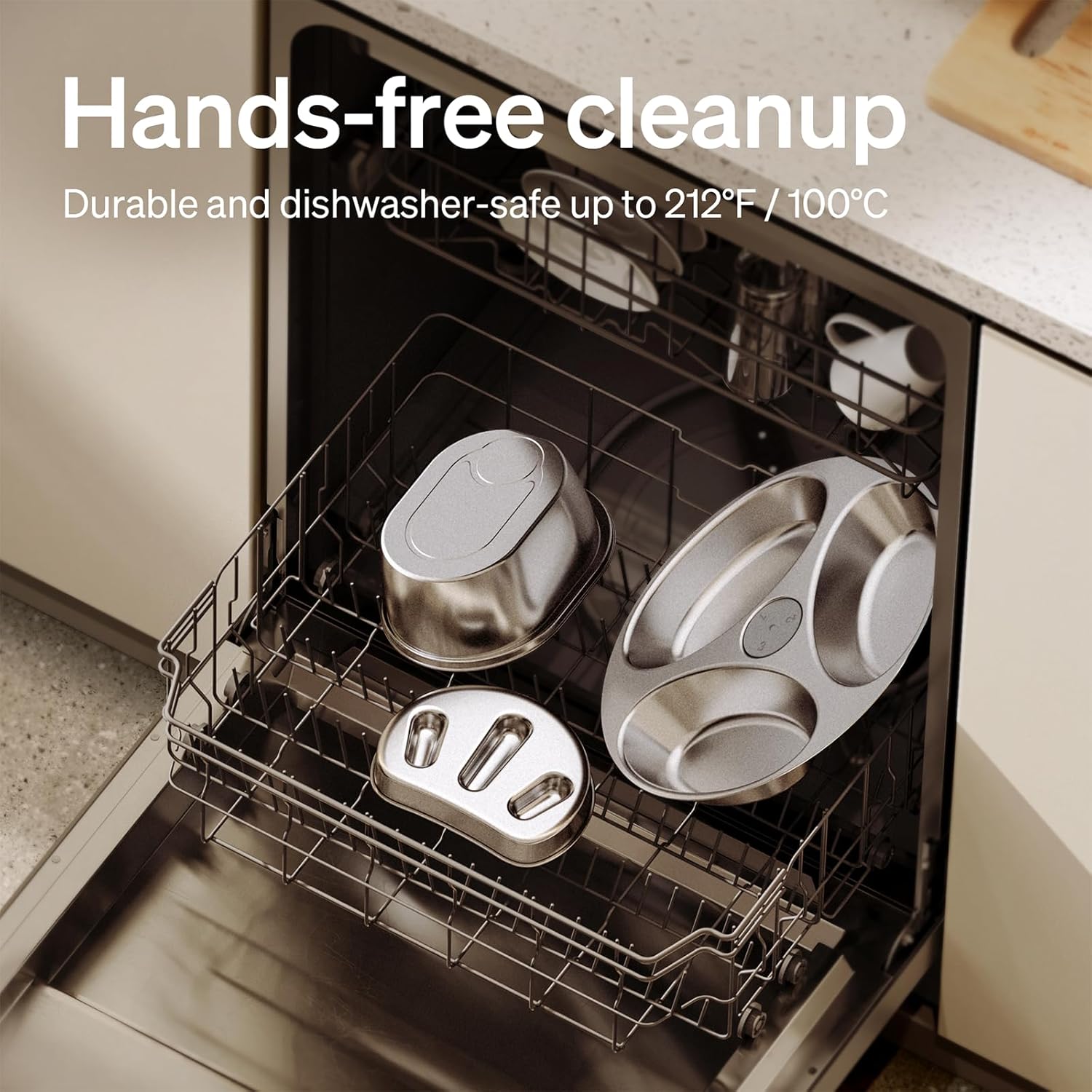
그림 6: 식기세척기 사용 가능 부품
5.2 Cleaning the Food Tank and Dispenser
- Wipe the interior of the food tank with a damp cloth. Ensure it is completely dry before refilling.
- Clean the food dispensing outlet regularly to prevent blockages.
5.3 제습제 백 교체
- Replace the desiccant bag in the lid compartment every 15-30 days to ensure food freshness.
6. 문제 해결
| 문제 | 가능한 원인 | 해결책 |
|---|---|---|
| Feeder not powering on | Power adapter disconnected; no battery backup; batteries depleted. | Check power connection; install fresh D-cell batteries. |
| 음식이 나오지 않아요 | Food tank empty; food jam; dispenser blocked. | Refill food tank; clear any food blockages in the dispenser; clean the outlet. |
| 와이파이 연결 실패 | Incorrect WiFi password; feeder too far from router; incompatible WiFi band. | Verify password; move feeder closer to router; ensure 2.4GHz or 5GHz network is used. |
| 카메라가 작동하지 않습니다 | App permissions; network issue. | Check app camera permissions; ensure stable WiFi connection. |
| 알림이 수신되지 않았습니다. | App notification settings; phone settings. | Enable notifications in the PETLIBRO App and your phone's settings. |
If issues persist, please contact PETLIBRO customer support.
7. 사양
- 모델 번호: PLAF203-SB
- 제품 크기: 12.99인치 길이 x 7.48인치 너비 x 13.78인치 높이
- 품목 무게: 3.8 파운드
- 용량: 5리터
- 재료: 스테인리스 스틸(사료통), 플라스틱(사료 공급기 본체)
- 연결 기술 : WiFi (2.4GHz & 5GHz)
- 전원: Corded Electric, Battery Backup (3 x D-cell batteries, not included)
- 카메라: 1080p HD (야간 투시 기능 포함)
- 특별 기능: Two-Way Audio, Slow Food Bowl, App Control, Motion/Sound Detection, Low Food Alerts
- 표적 종: 고양이, 개, 소형 동물
8. 보증 및 지원
Your PETLIBRO Automatic Pet Feeder with Camera comes with a 24개월 보증 구매일로부터. 본 보증은 정상적인 사용 중 발생한 제조상의 결함 및 고장에 적용됩니다.
For warranty claims, technical support, or any questions regarding your product, please visit the official PETLIBRO web사이트에서 확인하거나 고객 서비스에 직접 문의하세요. 구매 증빙 자료로 구매 영수증을 보관하세요.
온라인 지원: www.petlibro.com/support