
소개
This user manual provides detailed instructions for setting up, operating, and maintaining your FIFINE AmpliGame H13BP Wired USB Gaming Headset. Please read this manual thoroughly before using the product to ensure optimal performance and longevity.
상자 안에 무엇이 들어있나요?
- 피파인 AmpliGame H13BP Gaming Headset
- 분리형 마이크
- 사용자 설명서

이미지: 더 피파인 AmpliGame H13BP headset, its detachable microphone, and the user manual as packaged.
제품 끝view
피파인 AmpliGame H13BP headset features a robust design with comfortable earcups and an adjustable headband for extended gaming sessions. It includes a versatile USB control box for easy audio management.
주요 구성 요소:
- 헤드셋 : Equipped with 50mm dynamic drivers for clear audio across all frequencies.
- 분리형 마이크: Features noise-canceling technology for clear communication.
- USB 제어 박스: In-line controls for volume, mic mute, 7.1 surround sound, EQ modes, and game/chat balance.
- RGB 조명: Customizable RGB effects on the earcups.
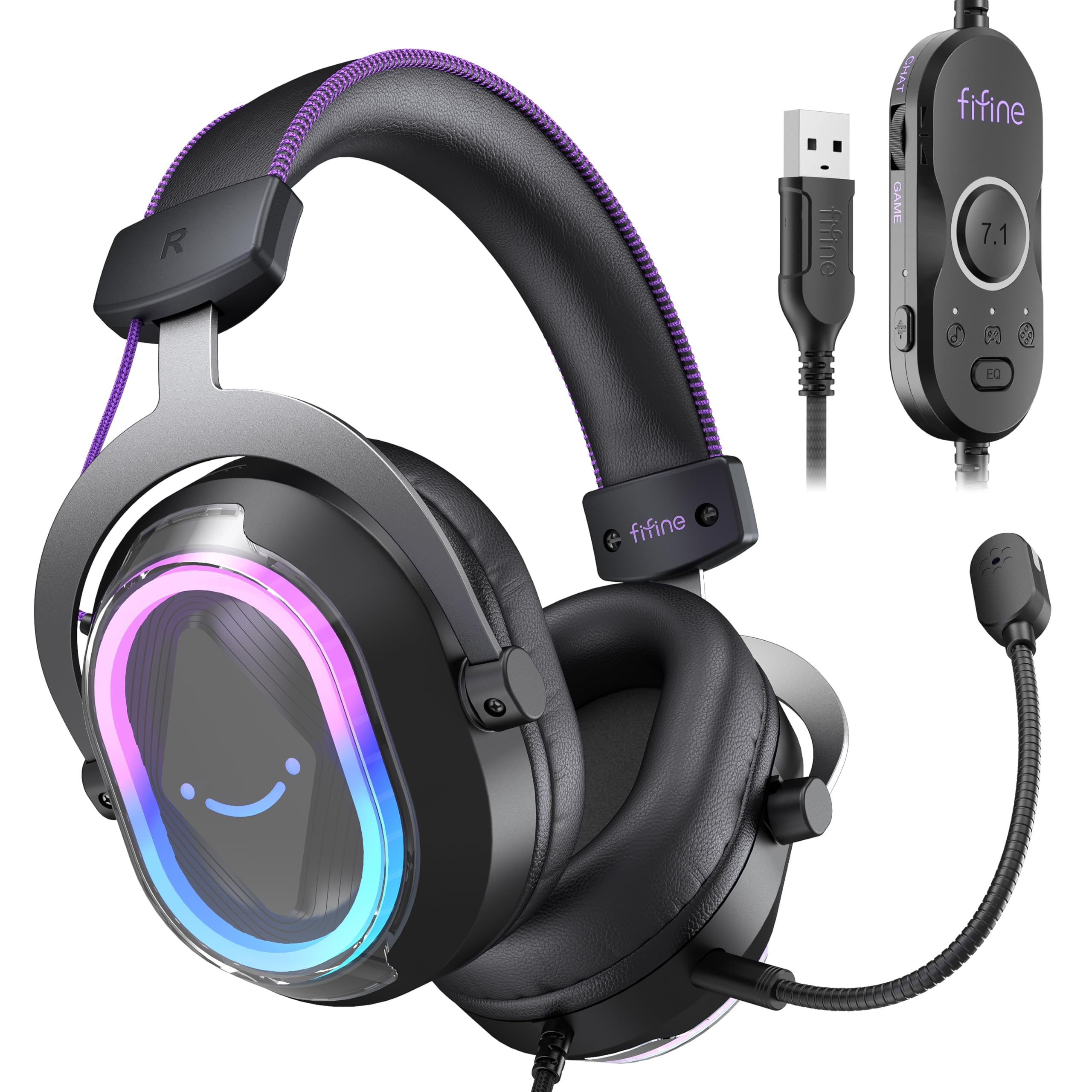
이미지: 자세한 view FIFINE의 AmpliGame H13BP Gaming Headset.

Image: Close-up diagram of the USB Control Box with labeled functions.
설정
- 헤드셋 연결: Plug the USB-A connector of the headset into an available USB port on your PC, Mac, PS5, or PS4. No additional software is required for basic functionality.
- 마이크 부착: Insert the detachable microphone into the designated port on the left earcup until it clicks into place.
- 핏 조절: Adjust the headband and earcup positions for a comfortable and secure fit. The protein skin ear pads and memory foam cushions are designed for long-term comfort.

Image: Headset connected to various compatible devices.
작동 지침
USB Control Box Functions:
- 헤드셋 볼륨 조절: Use the volume wheel on the side of the control box to adjust the overall headset volume.
- 마이크 음소거: Press the mic mute button on the control box to toggle the microphone on/off. The mic indicator light on the microphone will glow red when muted.
- 게임/채팅 밸런스: Use the dedicated slider on the control box to prioritize game audio or chat audio. Slide towards 'CHAT' to increase chat volume relative to game volume, or towards 'GAME' to increase game volume.
- 7.1 서라운드 사운드: Press the 7.1 button on the control box to activate or deactivate 7.1 virtual surround sound.
- EQ 모드: Press the EQ button to cycle through four pre-set equalizer modes: Default (Balanced Audio), Music (Clear Vocal), Game (Powerful Bass), and Movie (Dynamic Enhancement). Long press the EQ button to return to default mode.

Image: Demonstrating the game/chat balancing feature.

이미지: 이상view of the different EQ modes available.
RGB 조명 제어:
- RGB 모드 변경: Press the dedicated button on the earcup to cycle through 11 different RGB lighting modes.
- RGB 켜기/끄기: Long press the RGB button to turn the lighting on or off.

Image: Headset displaying various RGB lighting effects.
마이크 기능
The detachable microphone is designed for clear voice pickup and features noise-canceling capabilities to reduce background distractions, ensuring your teammates hear you clearly.

Image: The microphone with its noise-canceling indicator.
편안함과 내구성
The H13BP headset is built for comfort during long gaming sessions. It features protein skin ear pads and soft memory foam cushions that conform to your ears. The adjustable headband ensures a snug fit for various head sizes. The durable construction includes metal and plastic components, and the braided cable enhances longevity.

Image: Close-up of the headset's comfortable earcups and adjustable headband.
명세서
| 특징 | 세부 사항 |
|---|---|
| 상표 | 피파인 |
| 모델 번호 | H13BP |
| 연결 기술 | 유선(USB-A) |
| 귀 위치 | 귀 위 |
| 오디오 드라이버 크기 | 50 밀리미터 |
| 오디오 드라이버 유형 | 동적 드라이버 |
| 주파수 범위 | 20Hz - 20,000Hz |
| 임피던스 | 32옴 |
| 소음 제어 | 패시브 노이즈 캔슬링 |
| 추가 기능 | 7.1 Surround Sound, Noise Canceling Mic, RGB Lighting |
| 호환 장치 | PC, Mac, PS5/PS4 (Not compatible with Xbox) |
| 케이블 특징 | Braided material cable (7.55ft) |
| 제어 유형 | Volume Control, Mic Mute, EQ Modes, 7.1 On/Off, Game/Chat Balance |
| 재료 | 가죽, 금속, 플라스틱 |
문제 해결
소리가 나지 않거나 마이크가 작동하지 않습니다.
- 연결 확인: USB-A 커넥터가 포트에 완전히 삽입되었는지 확인하세요.
- 음소거 상태 확인: Check the mic mute button on the control box and the mic indicator light. Ensure the headset volume is not at minimum.
- 시스템 설정: Confirm that the FIFINE H13BP headset is selected as the default audio input and output device in your computer's or console's sound settings.
- 호환성: Remember that the headset is not compatible with Xbox consoles.
RGB 조명이 작동하지 않음:
- 연결 확인: 헤드셋이 USB를 통해 올바르게 연결되었는지 확인하세요.
- Toggle RGB: Long press the RGB button on the earcup to ensure the lighting is not simply turned off.
보증 및 지원
For warranty information and detailed support, please refer to the official FIFINE website or contact their customer service. FIFINE offers product specialists assistance and free technical support for their products.
You can visit the FIFINE Store for more information: FIFINE 스토어 아마존에서 만나보세요
공식 제품 영상
FIFINE H13 USB Gaming Headset Review
비디오: 포괄적인 재view of the FIFINE H13 USB Gaming Headset, demonstrating its features and performance.
Testing This Colorful Headset Immersive High-Quality Sound!
Video: A demonstration of the headset's immersive sound quality and vibrant RGB lighting.