
1. 제품 오버view
The Vormooi V15 is a compact and portable digital voice recorder designed for high-quality audio capture in various environments, including lectures, meetings, and classes. It features a large internal storage capacity and advanced noise reduction technology.
주요 특징:
- Massive 64GB built-in memory: Stores up to 750 hours of voice recordings in WAV and MP3 formats.
- 컴팩트하고 휴대하기 편리한 디자인: 울트라 슬림 프로file (0.25 x 1.3 x 2.2 inches) and lightweight (0.7 ounces) for maximum portability.
- 오래 지속되는 충전식 배터리: Provides extended recording sessions.
- AI 노이즈 감소: Equipped with an intelligent 2155P AI chip for enhanced noise cancellation and pure recording.
- 음성 활성화 녹음(VAR): Intelligently skips silent passages to save memory and time.
- 간단한 조작: One-button recording and saving.
- 보편적 인 호환성 : Connects via USB Type-C to Windows and macOS computers.

Image: Key features of the Vormooi V15 recorder, including its recording capacity, memory, and battery life.
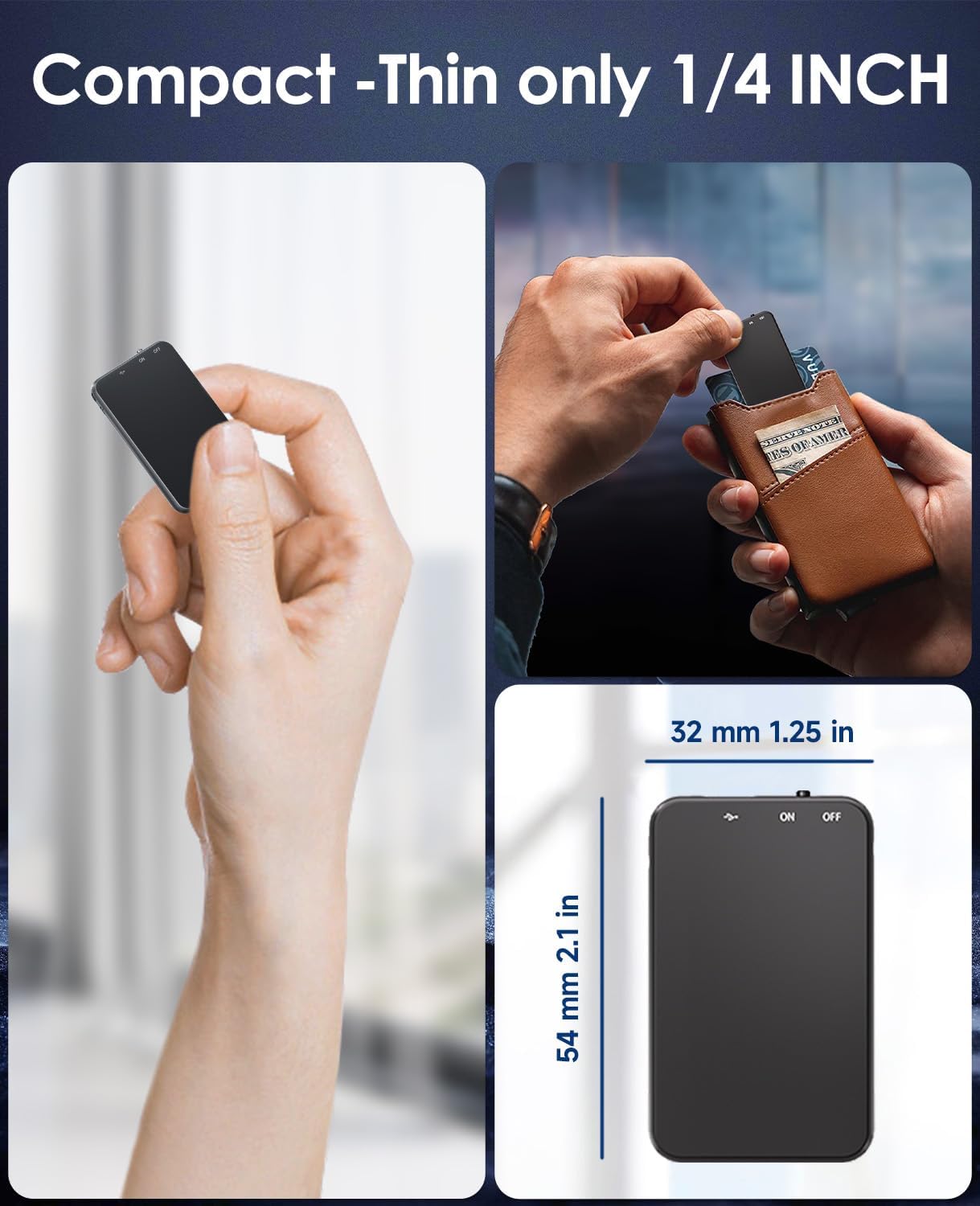
Image: Demonstrates the compact and thin design of the Vormooi V15, showing its small dimensions and portability.

Image: Illustrates the advanced AI noise cancellation technology and supported recording formats (MP3, WAV) of the V15 recorder.
2. 패키지 내용
패키지를 열 때 모든 품목이 들어 있고 상태가 양호한지 확인하세요.
- 1 x Vormooi V15 Digital Voice Recorder
- USB 타입 C 케이블 1개 (충전 및 데이터 전송용)
- 1 x 사용자 매뉴얼(이 문서)
3. 설정
3.1 장치 충전
Before first use, fully charge the Vormooi V15 recorder. Connect the included USB Type-C cable to the recorder's Type-C port and the other end to a USB power adapter (not included) or a computer's USB port. The indicator light will show charging status.
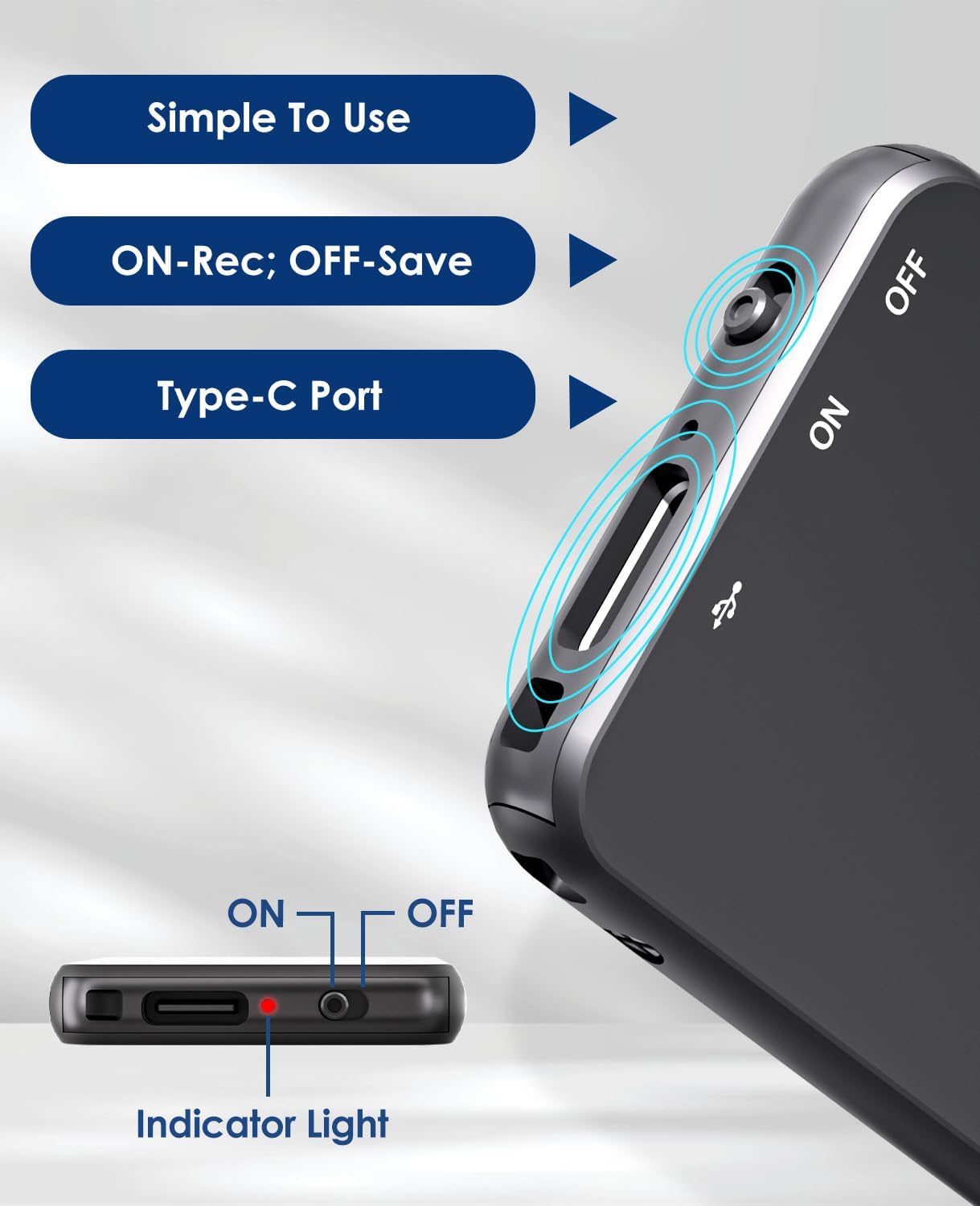
Image: Details of the recorder's side, highlighting the ON/OFF switch, Type-C port, and indicator light for simple operation.
3.2 전원 켜기/끄기
To power on the device, slide the ON/OFF switch to the "ON" position. To power off, slide it to the "OFF" position. The indicator light will briefly illuminate.
4. 사용 설명서
4.1 오디오 녹음
To start recording, simply slide the ON/OFF switch to the "ON" position. The device will automatically begin recording. The indicator light may flash or change color to indicate recording status. To stop recording and save the file스위치를 "OFF" 위치로 밀어주세요.
4.2 Voice-Activated Recording (VAR)
The V15 features a voice-activated recording function. When enabled, the recorder will automatically pause recording during periods of silence and resume when sound is detected, optimizing memory usage. The sensitivity of the voice activation can be adjusted (though specific instructions for adjustment are not provided in the product images, it's a common feature).

Image: Depicts the Voice-Activated Recording (VAR) feature, illustrating how it saves memory by skipping silent blanks and showing different sensitivity levels.
4.3 전송 Files를 컴퓨터로
Connect the Vormooi V15 to your computer using the provided USB Type-C cable. The device will appear as a removable storage device (like a USB drive). You can then drag and drop your recorded audio files (MP3 or WAV format) to your computer. The device is compatible with Windows and macOS operating systems.

Image: Shows the Type-C connection and compatibility with Windows, Mac, and Linux operating systems for easy file 이전.
4.4 재생
While the device supports playback, specific controls for direct playback (e.g., built-in speaker, headphone jack) are not detailed in the provided information. Typically, playback is done by connecting headphones to the device's headphone jack (if available) or by transferring files to a computer and playing them there.
Note: The product specifications mention "Headphones Jack: 1", confirming the presence of a jack for direct playback.
5. 유지관리
- 청소: 부드럽고 마른 천으로 기기를 닦으십시오. 액체 세척제나 용제를 사용하지 마십시오.
- 저장: 녹음기는 직사광선과 극한 온도 변화를 피해 서늘하고 건조한 곳에 보관하십시오.
- 배터리 관리 : 배터리 수명을 연장하려면 배터리를 자주 완전히 방전하지 마십시오. 장시간 사용하지 않더라도 정기적으로 충전하십시오.
- 데이터 백업: 데이터 손실을 방지하려면 중요한 녹음 내용을 정기적으로 컴퓨터에 백업하세요.
6. 문제 해결
- 장치가 켜지지 않음: 배터리가 충전되어 있는지 확인하세요. 전원에 연결한 후 다시 시도해 보세요.
- 녹음할 수 없습니다: Check if the memory is full. Transfer file컴퓨터의 저장 공간을 확보하려면 파일을 삭제하세요.
- 녹음 품질이 좋지 않음: Ensure the microphone is not obstructed. Reduce background noise. Check if AI Noise Reduction is functioning.
- 컴퓨터가 장치를 인식하지 못합니다: Try a different USB port or cable. Ensure the device is powered on. Restart your computer.
- 장치 재설정: If the device becomes unresponsive, locate the small "RESET" hole (often requiring a pin or paperclip) and gently press it to restart the device.

이미지: 앞면과 뒷면 views of the V15, indicating the location of the reset button and overall dimensions.
7. 사양
| 특징 | 세부 사항 |
|---|---|
| 모델 번호 | V15 |
| 저장 용량 | 64GB (XNUMX기가바이트) |
| 기록 용량 | 최대 750시간 |
| 녹음 형식 | WAV, MP3 |
| 제품 치수 | 0.25 x 1.3 x 2.2인치(0.25인치 깊이 x 1.3인치 너비 x 2.2인치 높이) |
| 품목 무게 | 0.705온스(20그램) |
| 배터리 유형 | Lithium-ion (1 A battery included) |
| 배터리 수명 | 40~50시간(대략) |
| 충전 포트 | USB 타입-C |
| 마이크로폰 | 내장형 |
| 헤드폰 잭 | 1 |
| 호환 장치 | Windows/macOS Computer |
| 제조업체 | 보르무이 |
8. 보증 및 지원
For warranty information and technical support, please refer to the documentation included with your purchase or visit the official Vormooi web사이트. 보증 청구를 위해 구매 증빙 자료를 보관하세요.
For further assistance, you may contact Vormooi customer service through their official channels. Details are typically found on the product packaging or the brand's official online presence.
9. 용도
The Vormooi V15 Digital Voice Recorder is intended for personal and professional audio recording purposes, including but not limited to:
- Recording lectures and academic presentations.
- Documenting business meetings and conferences.
- Conducting interviews.
- Capturing personal memos and ideas.

이미지: 전amples of typical usage scenarios for the V15 recorder, such as in classes, interviews, meetings, and for personal notes.