
소개
Thank you for choosing the ROUNY R-T2-SA Smart Air Purifier with Humidifier. This manual provides essential information for the safe and efficient operation, maintenance, and troubleshooting of your new appliance. Please read it thoroughly before use and retain it for future reference.
제품 끝view
The ROUNY R-T2-SA is an advanced 2-in-1 appliance designed to improve your indoor air quality. It combines a powerful 3-stage air purification system with an integrated, fog-free humidification function. Its smart sensing capabilities and user-friendly touch controls make it an ideal solution for various living spaces.

Image: The ROUNY R-T2-SA unit, highlighting its air purification and humidification capabilities.
주요 특징:
- Detachable Humidifier: The humidifier unit can be attached to the air purifier or removed for standalone air purification. Note: The humidifier unit cannot operate independently.
- Smart Air Quality Sensing: High-precision semiconductor smoke sensor automatically detects air quality and adjusts fan speed accordingly in auto mode.
- Color-Coded Air Quality Indicator: Provides real-time air quality feedback via color changes.
- 3-에스tage 여과 시스템: Includes a pre-filter, True HEPA filter, and activated carbon filter for comprehensive air cleaning.
- Fog-Free Humidification: Natural evaporative humidification without mist, preventing white dust and protecting furniture.
- User-Friendly Touch Control: Simple touch panel for power, mode selection, fan speed, and timer settings (1, 4, 8 hours).
- 조용한 작동: Low noise level suitable for bedrooms and offices.
중요 안전 지침
화재, 감전 또는 부상의 위험을 줄이려면 다음 안전 예방 조치를 준수하세요.
- 청소, 유지 보수 또는 사용하지 않을 때는 항상 제품의 전원 플러그를 뽑으십시오.
- 손상된 코드나 플러그로 기기를 작동하지 마세요.
- 전원 코드를 뜨거운 표면에서 멀리 두세요.
- 야외 또는 젖은 표면에서 기기를 사용하지 마십시오.
- 어린이가 감독 없이 제품을 작동시키지 않도록 하십시오.
- 기기가 안정적이고 수평인 표면에 놓여 있는지 확인하십시오.
- 공기 흡입구나 배출구를 막지 마십시오.
- Only use ROUNY genuine replacement filters.
- 제품을 물이나 다른 액체에 담그지 마십시오.
- For humidification, use distilled or demineralized water to prevent mineral buildup.
설정
- 단위 풀기: 포장에서 공기청정기와 모든 부속품을 조심스럽게 꺼내십시오.
- 필터 포장 제거: Open the filter compartment (usually at the bottom or back) and remove the plastic packaging from the HEPA and activated carbon filters. Reinsert the filters securely.
- 단위 위치: Place the air purifier on a firm, level surface. Ensure there is at least 20 cm (8 inches) of space around all sides for optimal air circulation.
- Attach Humidifier (Optional): If using the humidification function, align the humidifier unit with the top of the air purifier and secure it according to the markings. Ensure it clicks into place.
- Fill Humidifier Water Tank: If the humidifier is attached, remove the water tank, fill it with clean, distilled, or demineralized water, and replace it securely.
- 전원 연결: 전원 코드를 적합한 콘센트(240V)에 꽂으세요.
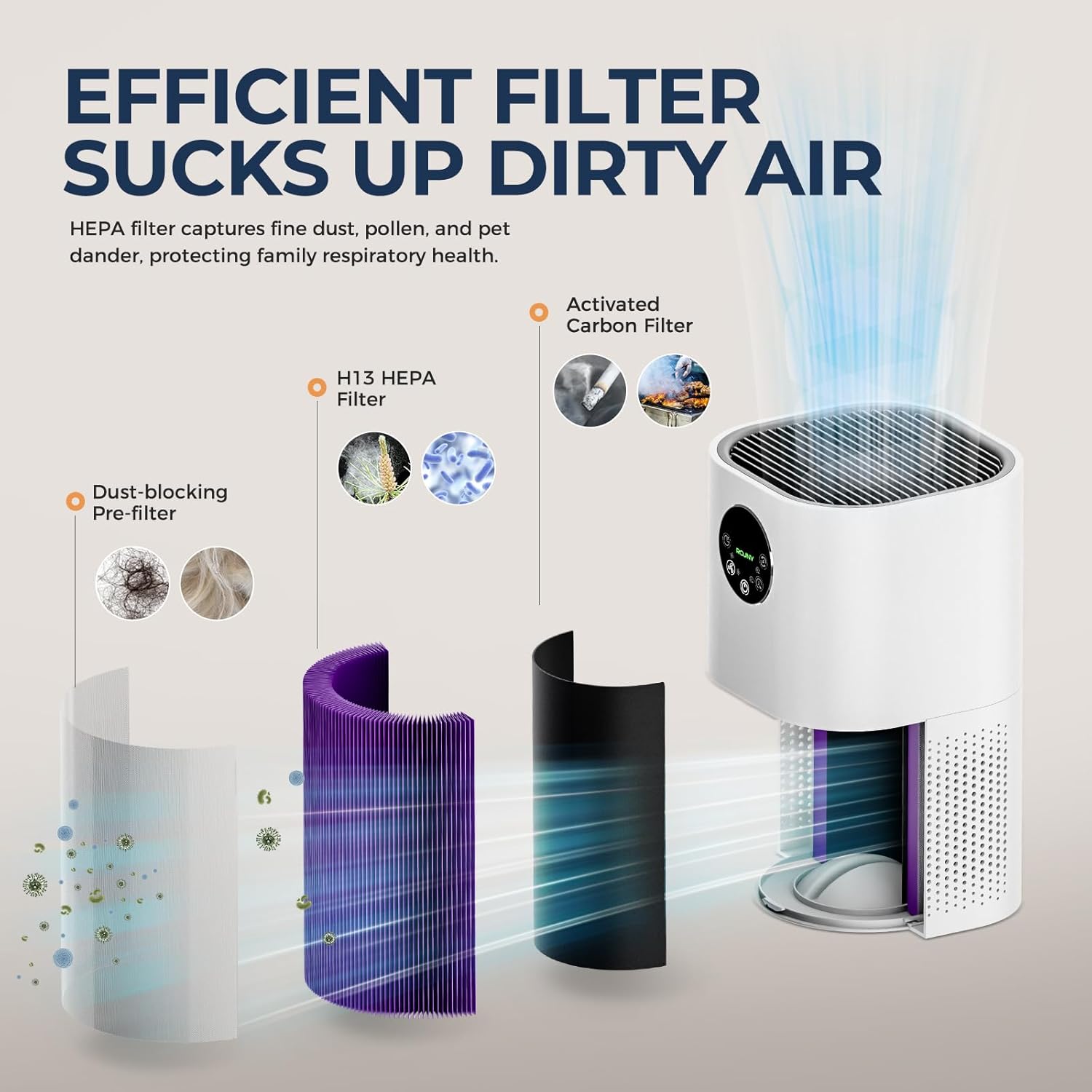
Image: Illustration of the 3-stage filtration system, including the dust-blocking pre-filter, H13 HEPA filter, and activated carbon filter.
작동 지침
The ROUNY R-T2-SA features a touch control panel for easy operation.

이미지: 상세 view of the touch control panel, indicating functions such as Auto mode, Night mode, Fan speed, Power, and Timer.
제어판 기능:
- 전원 버튼 (⏻): 기기를 켜거나 끄려면 누릅니다.
- 자동 모드 버튼(Ⓐ): Activates automatic mode. The unit will detect air quality and adjust fan speed accordingly.
- Night Mode Button (🌙): Sets the unit to operate at the lowest fan speed with dimmed lights for quiet operation during sleep.
- Fan Speed Adjustment Button (💨): Cycles through different fan speed settings (Low, Medium, High).
- 타이머 버튼(⏲): Sets the operating time for 1, 4, or 8 hours. The unit will automatically turn off after the set time.
- Humidifier Button (💧): Activates or deactivates the humidification function. (Only available when the humidifier unit is attached and filled with water).
공기질 표시기 :
The unit features an indicator light that changes color based on detected air quality:
- 녹색: 좋은 공기질
- 노란색 : Moderate Air Quality / Poor Air Quality
- 빨간색: Severe Air Pollution

Image: Visual representation of the smart sensing feature, showing how the indicator light changes color to reflect air quality levels.
유지
정기적인 유지관리를 통해 최적의 성능을 보장하고 공기 청정기의 수명을 연장할 수 있습니다.
필터 교체:
- The filter indicator light will illuminate when it's time to replace the filter.
- The standard filter replacement interval is 3-6 months, depending on usage and air quality.
- 교체하려면:
- 공기 청정기의 플러그를 뽑으세요.
- 필터 칸 덮개를 엽니다.
- 오래된 필터를 제거합니다.
- Insert a new ROUNY genuine replacement filter, ensuring it is correctly oriented.
- 필터 칸 덮개를 닫습니다.
- Plug in the unit and reset the filter indicator (refer to the control panel section for specific reset instructions, if any, or consult the manufacturer's web대지).
필터 청소:
- The pre-filter can be cleaned periodically using a vacuum cleaner to remove large dust particles and pet dander.
- The HEPA and activated carbon filters are not washable and should not be cleaned with water. They must be replaced.
가습기 청소:
- Regularly clean the water tank and humidifier base to prevent mineral buildup and bacterial growth.
- 청소하기 전에 장치의 플러그를 뽑으세요.
- 물통을 분리하고 남은 물을 비웁니다.
- Wipe the inside of the tank and base with a soft cloth. For mineral deposits, use a descaling solution or a mixture of white vinegar and water. Rinse thoroughly.
- 재조립하기 전에 모든 부품이 건조한지 확인하십시오.
문제 해결
| 문제 | 가능한 원인 | 해결책 |
|---|---|---|
| 기기가 켜지지 않습니다. | 플러그가 꽂혀 있지 않음; 전원이 꺼짐tage; power button not pressed. | Ensure unit is securely plugged in. Check power supply. Press the power button. |
| 공기 흐름이 약함. | 필터가 더럽거나 막혔거나, 공기 흡입구/배출구가 막혔습니다. | Clean or replace filters. Ensure no obstructions around the unit. |
| Humidifier not producing mist/humidity. | Water tank empty; humidifier unit not properly attached; mineral buildup. | Refill water tank. Ensure humidifier is correctly installed. Clean humidifier unit. |
| 이상한 소음. | 필터가 헐거워졌거나, 내부에 이물질이 있거나, 제품이 수평면에 놓여 있지 않은 경우. | Check and secure filters. Unplug and inspect for foreign objects. Place on a stable surface. |
| 공기 질 표시기는 항상 빨간색/노란색입니다. | High pollution in the environment; sensor dirty. | Ensure proper ventilation. Clean the air quality sensor (refer to maintenance section for sensor cleaning, if applicable). |
이러한 해결 방법을 시도한 후에도 문제가 지속되면 고객 지원팀에 문의하세요.
명세서

이미지: 상세 제품 매개변수 및 사양.
| 특징 | 세부 사항 |
|---|---|
| 상표 | ROUNY |
| 모델 번호 | R-T2-SA |
| 색상 | 하얀색 |
| 제품 크기(L x W x H) | 27 x 27 x 56cm (약 10.6 x 10.6 x 22인치) |
| 힘 | 24 와트 |
| 권tage | 240 볼트 |
| 재료 | 플라스틱 |
| 자동 차단 | 예 |
| 소음 수준 | 25데시벨 |
| 제어 방법 | 터치 컨트롤 |
| 필터 유형 | 헤파 |
| 적용 가능 지역 | 20~50m² |
| 순중량 | 2.6kg(약 5.73파운드) |
보증 및 지원
For warranty information or technical support, please refer to the warranty card included with your product or visit the official ROUNY web사이트. 보증 청구를 위해 구매 증빙 자료로 구매 영수증을 보관하세요.
연락처 정보: 제품 포장 또는 제조업체의 설명서를 참조하십시오. web최신 고객 서비스 연락처 정보는 사이트에서 확인하세요.
