
1. 서론
The NZXT H2 Flow (CI-H21FB-01) is a compact vertical Mini-ITX PC case designed to maximize airflow and save space while accommodating high-performance components. It features smart cable management, tool-less access, and includes dual top fans and a premium PCIe 5.0 riser cable for a streamlined building experience.
주요 특징:
- Hybrid Glass-and-Mesh Side Panel: Showcases your build while supporting up to a 280 mm radiator for efficient cooling.
- 컴팩트한 디자인: A 20.7 L volume fits most GPUs up to 331 mm, offering high-end power in a small footprint.
- High Airflow Panels: Ultra-fine mesh panels on multiple sides maximize fresh air intake and filter dust, keeping components cooler and cleaner.
- Effortless Building: Tool-less panels, integrated cable routing Velcro straps, and intuitive wire management channels simplify installation.
- Pre-Installed Performance: Includes a premium PCIe 5.0 riser cable for vertical GPU mounting and dual F120Q CV fans for immediate exhaust cooling.
2. 안전 정보
WARNING: Always disconnect power from your PC before performing any installation, maintenance, or troubleshooting. Failure to do so may result in personal injury or damage to components.
- 설치하기 전에 모든 지침을 주의 깊게 읽으십시오.
- 정전기 방지 손목 스트랩을 착용하거나 접지된 금속 물체를 자주 만져 부품의 정전기 방전(ESD) 손상을 방지하십시오.
- Handle components with care. Avoid touching pins or exposed circuitry.
- 작은 부품과 포장재는 어린이의 손이 닿지 않는 곳에 보관하세요.
- 과열을 방지하려면 PC 케이스 주변의 적절한 환기를 확보하세요.
3. 패키지 내용
Verify that all items are present in your NZXT H2 Flow package:
- NZXT H2 Flow Mini-ITX PC Case
- 2 x 120mm F120Q CV Top Fans (pre-installed)
- Premium PCIe 5.0 Riser Cable (pre-installed)
- 액세서리 상자(나사, 케이블 타이 및 기타 소형 부품 포함)
4. 구성 요소 호환성
The NZXT H2 Flow case is designed to accommodate specific component sizes for optimal performance and fit:
- 마더보드: 미니 ITX
- 그래픽 카드(GPU): Up to 331 mm in length
- 라디에이터: Up to 280 mm (for liquid cooling solutions)
- 전원 공급 장치(PSU): SFX/SFXL form factor is recommended for best compatibility and cable management.
- 팬: Includes 2 x 120mm top fans. Additional fan mounting options may be available depending on other component choices.
5. 설정 및 설치
Follow these steps to assemble your PC within the NZXT H2 Flow case. Refer to your individual component manuals for specific installation details.
5.1. 사건 종결view 및 치수
The NZXT H2 Flow is a compact vertical Mini-ITX case. Understanding its dimensions is crucial for planning your build.

5.2. Accessing the Case Interior
The H2 Flow features tool-less panels for easy access to the interior.

5.3. Motherboard and CPU Installation
Install your Mini-ITX motherboard and CPU (with cooler) before placing it into the chassis.
5.4. 전원 공급 장치(PSU) 설치
The case supports SFX/SFXL power supplies. Mount the PSU in its designated area, typically at the bottom of the case.

5.5. 케이블 관리
Utilize the integrated cable routing channels and Velcro straps for a clean and organized interior.
5.6. 그래픽 카드(GPU) 설치
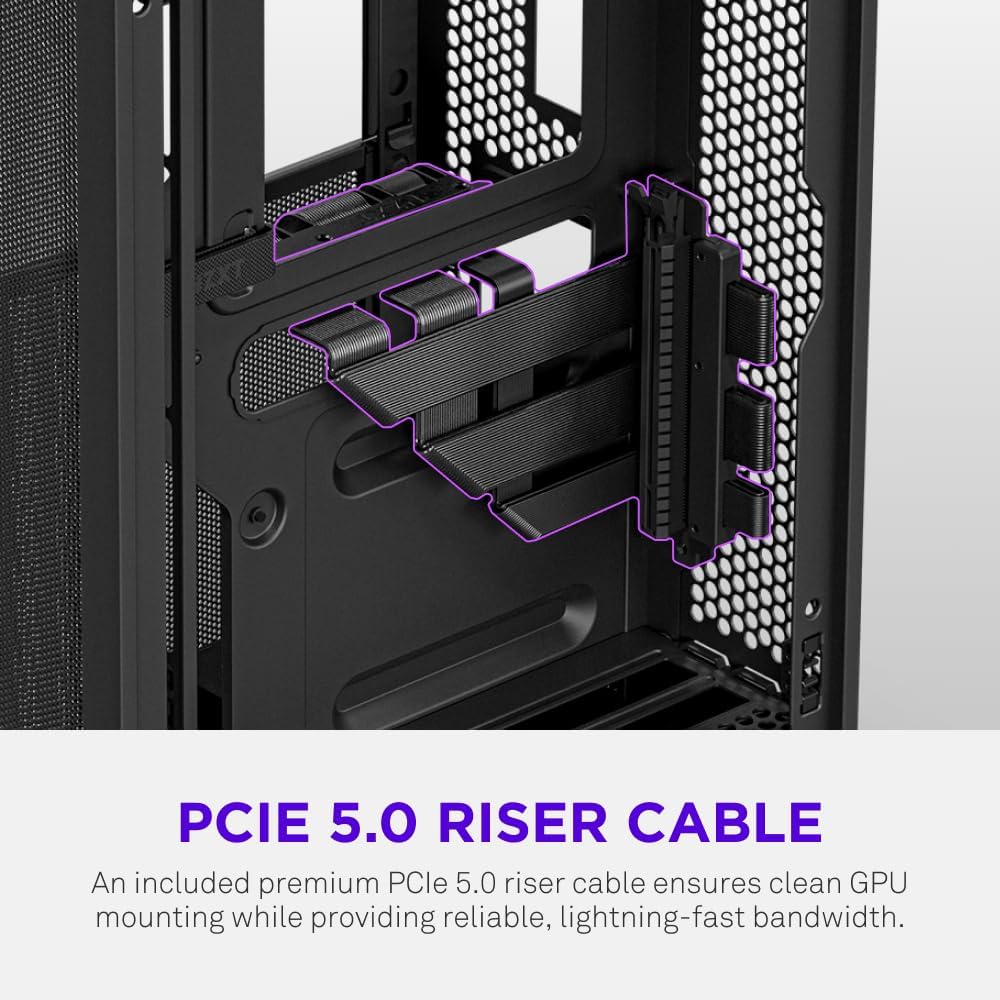
The H2 Flow supports GPUs up to 331 mm in length and includes a premium PCIe 5.0 riser cable for vertical mounting.

5.7. 냉각 시스템
The case comes with two pre-installed 120mm F120Q CV fans at the top for exhaust. It also supports up to a 280mm radiator for liquid cooling.


5.8. 제품 오버view 동영상
이 공식 영상을 시청하여 시각적으로 살펴보세요.view of the NZXT H2 Flow Mini-ITX PC Gaming Case.
6. 사용 설명서
6.1. 전원 켜기/끄기
Press the power button located on the front I/O panel to turn your PC on or off.
6.2. 전면 I/O 포트
전면 I/O 패널을 통해 다음과 같은 기능에 편리하게 접근할 수 있습니다.
- USB 3.0 포트
- USB-C 포트
- Audio Jack (if applicable)
Connect your peripherals such as keyboards, mice, and headsets to these ports.
7. 유지관리
7.1. 먼지 필터 청소
The NZXT H2 Flow features ultra-fine mesh panels that act as dust filters. Regularly clean these panels to maintain optimal airflow and prevent dust buildup inside your PC.
- Gently remove the mesh panels from the case.
- 쌓인 먼지를 제거하려면 압축 공기나 부드러운 브러시를 사용하십시오.
- Reattach the panels securely.
7.2. 일반 청소
부드러운 d를 사용하세요amp 케이스 외부를 닦을 천을 사용하세요. 연마성 세척제나 용제는 사용하지 마세요.
8. 문제 해결
PC 조립 중 문제가 발생하면 다음의 일반적인 문제 해결 단계를 고려해 보세요.
- 전원 없음: 모든 전원 케이블(파워 서플라이-벽면 콘센트, 파워 서플라이-마더보드, CPU, 그래픽 카드)이 단단히 연결되어 있는지 확인하십시오. 파워 서플라이의 전원 스위치가 제대로 작동하는지 확인하십시오.
- 디스플레이 없음: Verify that your monitor is connected to the graphics card (not the motherboard I/O unless using integrated graphics) and that the GPU has proper power connections. Reseat the GPU and RAM.
- 과열: Check fan connections and orientation. Ensure mesh panels are clean and not obstructed. Verify CPU cooler installation and thermal paste application.
- 구성 요소가 감지되지 않았습니다. Reseat the component (GPU, RAM, storage drives). Check power and data connections.
For more complex issues, consult your individual component manuals or NZXT customer support.
9. 사양
| 특징 | 세부 사항 |
|---|---|
| 상표 | NZXT |
| 모델명 | NZXT H2 Flow |
| 케이스 유형 | 미니타워 |
| 마더보드 호환성 | 미니 ITX |
| GPU 길이 지원 | 최대 331mm |
| 라디에이터 지원 | 최대 280mm |
| 포함된 팬 | 2 x 120mm F120Q CV Top Fans |
| Included Riser Cable | Premium PCIe 5.0 |
| 전원 공급 장치 장착 유형 | Bottom Mount (SFX/SFXL recommended) |
| 냉각 방식 | Air, Liquid |
| 색상 | 검은색 |
| 재료 | 유리, 금속 |
| 품목 무게 | 4.55 킬로그램 |
| Total USB 3.0 Ports | 1 |
| Other Special Features | Tool-less Installation, Integrated Cable Management |
10. 보증 및 지원
10.1. 보증 정보
The NZXT H2 Flow Mini-ITX PC Case comes with a 2년 제조업체 보증보증 청구를 위해 구매 증빙 서류를 보관하세요.
10.2. 고객 지원
For technical assistance, troubleshooting, or warranty inquiries, please visit the official NZXT support web사이트 또는 고객 서비스 팀에 문의하십시오.
NZXT Store: 아마존에서 NZXT 스토어를 방문하세요