
CHROX H728 4GB+64GB
CHROX Android 14.0 TV Box User Manual
Model: H728 4GB+64GB
Brand: CHROX
1. 서론
This user manual provides comprehensive instructions for the setup, operation, and maintenance of your CHROX Android 14.0 TV Box. Please read this manual carefully before using the device to ensure optimal performance and safety.

Image: The CHROX Android TV Box and its accompanying remote control. The box is compact and black with a textured top surface, while the remote is sleek and black with clearly labeled buttons for navigation and media control.
2. 패키지 내용
다음 항목에 대한 상자를 체크해 주세요.
- 1 x CHROX Android 14.0 TV Box
- 1 x 리모컨(배터리는 포함되지 않음)
- 1 x HDMI 케이블
- 1 x 전원 어댑터(DC 5V/2A)
- 1 x 사용자 설명서
3. 제품의 특징 및 사양
The CHROX Android 14.0 TV Box is designed to provide a superior media experience with its advanced hardware and software capabilities.
주요 특징:
- 최신 안드로이드 14.0 OS: Offers enhanced compatibility with software, games, and applications, along with an optimized user interface.
- H728 Chipset: Powered by a Quad-core ARM Cortex A53 CPU (RK3528A), providing improved execution speed and professional image processing capabilities.
- 4GB RAM 및 64GB ROM: Ensures better performance and larger storage capacity.
- USB 3.0 연결: 10 times faster than USB 2.0, allowing for quick transfer of large files 및 비디오.
- Dual WiFi 2.4G/5G & Bluetooth 5.0: Equipped with integrated WiFi 6 and Bluetooth 5.0 for stable and convenient wireless connections.
- 이더넷 지원: Compatible with 100/1000M Ethernet for reliable wired network access.
- 4K/8K Decoding Support: Capable of decoding high-resolution video content up to 8K.

이미지: 이상view of the Tanix TX7 Android 14.0 TV Box highlighting its key features including the H728 chipset, HDR10+, Bluetooth 5.4, 8K Ultra HD support, Android 14 OS, and dual-band 2.4G & 5G WiFi.
기술 사양:
| 요소 | 사양 |
|---|---|
| 운영 체제 | 안드로이드 14.0 |
| CPU | H728 Cortex ARM A55 64-bit CPU |
| 그래픽 카드 | G31 MP2 GPU Processor |
| SD램 | 4GB |
| 플래시 스토리지 | 64GB |
| 와이파이 | 2.4G & 5G Dual-band WiFi 6 |
| 블루투스 | 비티 5.0 |
| 이더넷 | Standard 10/100M RJ-45 |
| HDMI 출력 | HDMI 2.0, 8K x 4K @ 60fps Max Resolution Output |
| SPDIF | 디지털 오디오 인터페이스 |
| USB 호스트 | 1 X USB 2.0, 1 X USB 3.0 |
| 비디오 디코더 | H.265 HEVC/MVC, H.264 AVC/MVC, VP9, VP8 |
| Video Coder | H.264/AVC, H.265/HEVC |
| JPEG Decoder | Supports YUV400/411/420/422/440/444, 1920x1080@120fps, MJPEG |
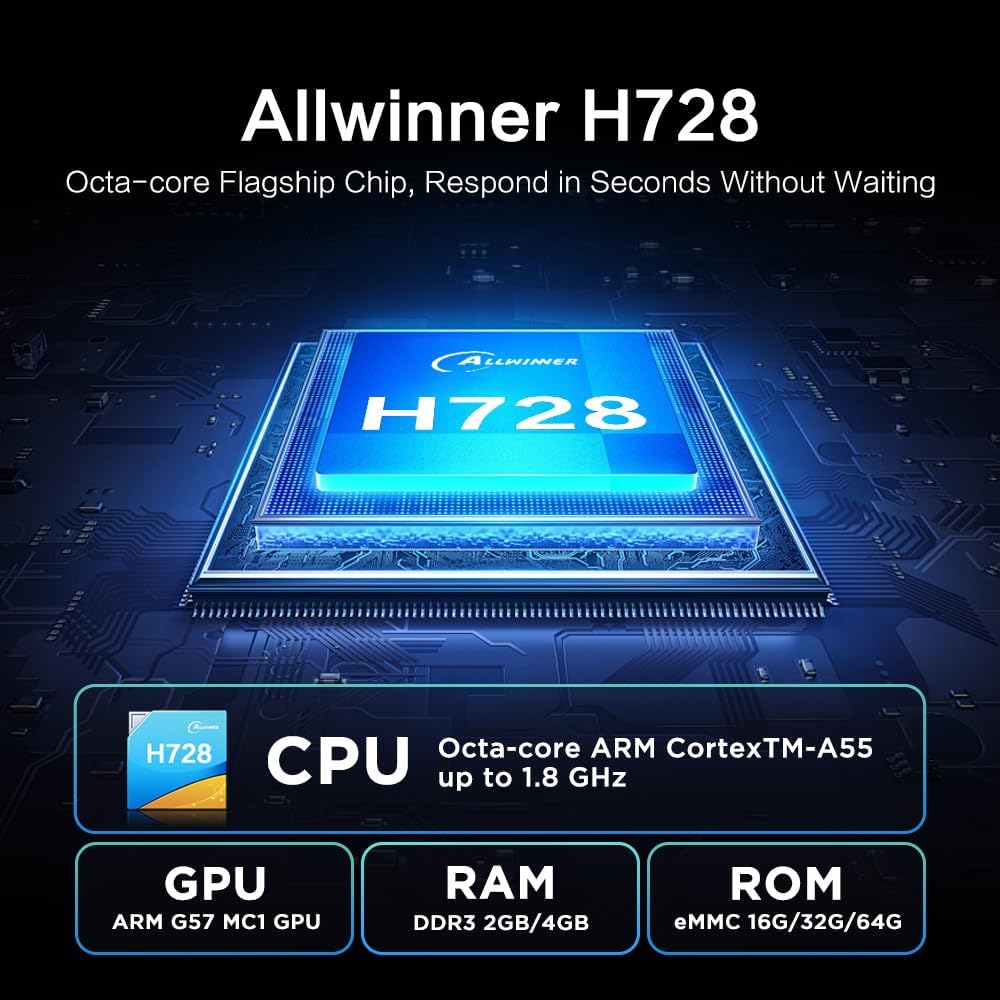
이미지: 상세 view of the Allwinner H728 Octa-core Flagship Chip, showing its CPU (ARM Cortex-A55 up to 1.8 GHz), GPU (ARM G57 MC1), RAM (DDR3 2GB/4GB), and ROM (eMMC 16G/32G/64G) specifications.

Image: Illustration demonstrating the TV Box's support for 8K decoding, comparing resolutions of 1080p, 4K, and 8K on a television screen.
4. 설정 가이드
Follow these steps to set up your CHROX Android TV Box:
- TV에 연결: Connect one end of the provided HDMI cable to the HDMI port (4) on the TV Box and the other end to an HDMI input on your television.
- 전원 연결: Plug the power adapter into the DC 5V/2A port (5) on the TV Box, then plug the adapter into a wall outlet.
- 전원 켜기: TV 박스가 자동으로 켜질 것입니다. 그렇지 않으면 리모컨의 전원 버튼을 누르세요.
- 입력 선택: TV 리모컨을 사용하여 TV에서 올바른 HDMI 입력 소스를 선택하세요.
- 초기 설정 : 화면의 지시에 따라 언어 선택, 네트워크 연결(Wi-Fi 또는 이더넷), Google 계정 로그인 등 초기 설정을 완료하세요.

Image: Diagram illustrating the various connectivity ports on the CHROX Android TV Box, including AV, SPDIF, Ethernet Port, HDMI Output, Power Input, TF Card Slot, and USB ports (USB 2.0 and USB 3.0).
5. 사용 설명서
5.1. 원격 제어 사용
The included remote control allows you to navigate the Android TV Box interface. Insert two AAA batteries (not included) into the remote before use.
- 전원 버튼: 장치를 켜거나 끄거나 대기 모드로 전환합니다.
- 탐색 버튼(위/아래/왼쪽/오른쪽): 커서나 선택 항목을 이동합니다.
- 확인 버튼: 선택을 확인합니다.
- 뒤로가기 버튼: 이전 화면으로 돌아갑니다.
- 홈 버튼: 메인 홈 화면으로 돌아갑니다.
- 볼륨 버튼(+/-): 오디오 볼륨을 조절합니다.
- App Shortcut Buttons (e.g., Netflix, YouTube): Direct access to specified applications.
5.2. 네트워크 연결
온라인 콘텐츠에 접속하려면 TV 박스를 인터넷에 연결하세요.
- 와이파이: Go to Settings > Network & Internet > Wi-Fi. Select your network from the list, enter the password, and connect.
- 이더넷: Connect an Ethernet cable from your router to the Ethernet port (3) on the TV Box. The connection will be established automatically.
5.3. 애플리케이션 설치
구글 플레이 스토어에서 애플리케이션을 다운로드하고 설치할 수 있습니다.
- TV 박스가 인터넷에 연결되어 있는지 확인하십시오.
- From the home screen, open the "Play Store" application.
- 검색 your desired application and select "Install".

Image: Screenshot of the Android 14.0 user interface on a TV screen, showing various app icons including Google Play Store, Netflix, and YouTube, with the TV Box positioned below the screen.
5.4. Multi-Screen Interaction
The TV Box supports casting content from your mobile phone or tablet to the TV screen, allowing you to share videos and photos easily.

Image: Depiction of the multi-screen interaction feature, showing a smartphone mirroring its content (a video game) onto a large TV screen, with the TV Box placed nearby.
6. 문제 해결
문제가 발생할 경우, 다음의 일반적인 문제 및 해결 방법을 참조하십시오.
- 전원 없음:
- 전원 어댑터가 TV 박스와 작동하는 전원 콘센트에 안전하게 연결되어 있는지 확인하세요.
- Check if the power indicator light on the TV Box is on.
- TV에 표시되지 않음:
- Verify the HDMI cable is correctly connected to both the TV Box and the TV.
- TV가 올바른 HDMI 입력 소스로 설정되어 있는지 확인하세요.
- 다른 HDMI 케이블이나 TV의 HDMI 포트를 사용해 보세요.
- Wi-Fi 연결 없음:
- 라우터가 제대로 작동하는지 확인하세요.
- 올바른 Wi-Fi 비밀번호를 입력했는지 확인하세요.
- Try restarting the TV Box and your router.
- Move the TV Box closer to your Wi-Fi router.
- 리모콘이 응답하지 않음:
- 리모컨의 배터리를 확인하고 교체하세요.
- 리모컨과 TV 박스 사이에 장애물이 없는지 확인하세요.
- Point the remote directly at the TV Box's IR receiver.
7. 유지관리
To ensure the longevity and optimal performance of your TV Box, follow these maintenance guidelines:
- 기기를 직사광선, 열원 및 습기를 피해 건조하고 통풍이 잘 되는 곳에 보관하십시오.
- 기기의 통풍구를 막지 마십시오.
- 부드럽고 마른 천으로 기기를 닦으세요. 액체 세척제나 에어로졸은 사용하지 마세요.
- 장치를 떨어뜨리거나 강한 충격을 가하지 마십시오.
- 천둥번개가 칠 때나 장기간 사용하지 않을 때는 전원 어댑터의 플러그를 뽑아 두십시오.
8. 중요한 안전 정보
Please handle the device with care and avoid drops and impacts. Ensure the product is assembled securely before use.

Image: A warning label with text in multiple languages, advising users to handle the product with care, avoid drops and impacts, and assemble it securely before use.
9. 지원
If you have any questions or require further assistance, please contact our customer support. We aim to respond to all inquiries within 24 hours.
For support, please refer to the contact information provided with your purchase or on the official CHROX web대지.
Ask a question about this manual
Ask about setup, troubleshooting, compatibility, parts, safety, or missing instructions. Manuals+ will review the question and use this page’s manual context to help answer it.