
1. 서론
The ATTACK SHARK X820 ULTRA is a high-performance mechanical gaming keyboard designed for a superior typing and gaming experience. It features a compact 75% layout, customizable RGB lighting, a unique TFT display, and versatile connectivity options. This manual provides detailed instructions for setting up, operating, and maintaining your keyboard.
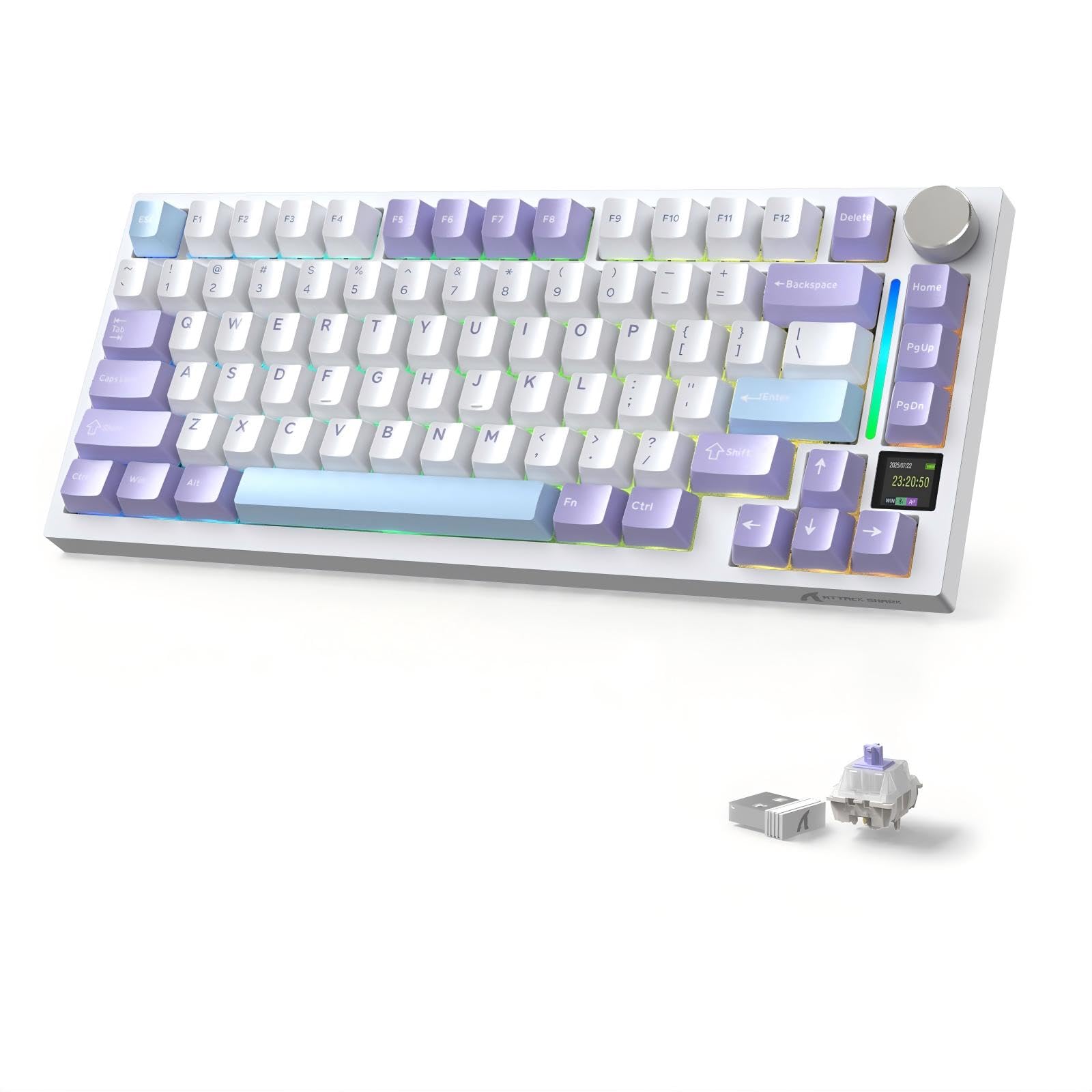
Figure 1: ATTACK SHARK X820 ULTRA Gaming Keyboard (Purple Gift Switch variant)
주요 특징은 다음과 같습니다.
- Unique Customization: Features Japanese-style samurai design PBT keycaps (or other options) and a TFT screen for custom GIF animations.
- 프리미엄 타이핑 경험: Gasket-mounted design with 5-layer sound dampening materials (PORON, IXPE, PET, DEPDM, Silicone) for a smooth, quiet typing experience. Includes 1.2mm single-slot PCB, grooved PC plate, and fine-tuned stabilizers.
- Compact 75% Layout with Multimedia Knob: 80-key layout saves desk space while retaining essential keys. An aluminum volume knob allows intuitive control of volume, media playback, and display settings (Fn+Knob).
- Versatile Connectivity & Performance: Supports 3 connection modes (wired Type-C, Bluetooth, 2.4GHz wireless) with ultra-low latency. Full N-key rollover ensures all key presses are registered accurately. Certified for use in Japan (Radio Law Certification Number: 219-259234).
- 오래 지속되는 배터리: Built-in 4000mAh battery supports extended gaming sessions, even with backlighting. Power-saving design reduces charging frequency. Play and charge simultaneously via the 1.5m Type-C cable.
- Advanced Customization & Compatibility: 16 million color RGB with 19+ dynamic backlight effects. QMK cloud driver and ATTACK SHARK software allow key remapping, macro settings, TFT screen customization, and RGB adjustments. Compatible with Windows, MacOS, Linux. Includes keycap/switch puller and spare switches for immediate customization.
2. 설정
2.1 패키지 내용
시작하기 전에 모든 항목이 있는지 확인하세요.
- ATTACK SHARK X820 ULTRA Gaming Keyboard
- USB Type-C Cable (1.5m, with magnetic ring)
- 키캡 풀러
- 스위치 풀러
- 더스트 커버
- 예비 스위치 (2개)
- 사용자 설명서
2.2 키보드 충전
The keyboard comes with a built-in 4000mAh battery. For optimal performance, fully charge the keyboard before first use.
- 제공된 USB Type-C 케이블을 키보드의 Type-C 포트에 연결합니다.
- 케이블의 다른 쪽 끝을 USB 전원(예: 컴퓨터 USB 포트, USB 벽면 어댑터)에 연결합니다.
- The TFT display will indicate charging status.
2.3 연결 모드
The X820 ULTRA supports three connection modes: Wired (USB Type-C), 2.4GHz Wireless, and Bluetooth.

Figure 2: Tri-mode connectivity for various devices.
2.3.1 유선 연결
- 키보드의 모드 스위치가 '유선'(일반적으로 케이블 아이콘 또는 'USB'로 표시됨)으로 설정되어 있는지 확인하십시오.
- 키보드의 USB Type-C 케이블을 컴퓨터의 USB 포트에 연결하세요.
- 키보드가 자동으로 인식되어 사용할 준비가 됩니다.
2.3.2 2.4GHz 무선 연결
- Locate the 2.4GHz USB receiver (dongle), typically stored in a magnetic compartment on the keyboard's underside.
- USB 수신기를 컴퓨터의 사용 가능한 USB 포트에 연결합니다.
- 키보드의 모드 스위치를 '2.4G'(일반적으로 무선 아이콘으로 표시)로 설정합니다.
- 키보드가 자동으로 연결됩니다. 그렇지 않으면 Fn + 4 페어링을 시작합니다.
2.3.3 블루투스 연결
이 키보드는 최대 3개의 블루투스 장치(BT1, BT2, BT3)를 지원합니다.
- 키보드의 모드 스위치를 'BT'(블루투스 아이콘)로 설정하세요.
- 페어링 모드로 들어가려면 길게 누르세요. Fn + 1 (BT1용) Fn + 2 (BT2의 경우) 또는 Fn + 3 (for BT3) for 3-5 seconds until the indicator light flashes rapidly.
- 기기(컴퓨터, 태블릿, 스마트폰)에서 Bluetooth를 활성화하고 새로운 기기를 검색하세요.
- Select "ATTACK SHARK X820 ULTRA" from the list of available devices to pair.
- 페어링이 완료되면 표시등이 더 이상 깜박이지 않습니다.
- 페어링된 Bluetooth 장치 간에 전환하려면 다음을 누르세요. Fn + 1/2/3 간단히.
3. 사용 설명서
3.1 TFT Smart Display and Multimedia Knob
The X820 ULTRA features a TFT smart display and a multi-functional metal knob for intuitive control.

Figure 3: TFT Display showing various settings and the multimedia knob.
- Default Knob Function: 돌려서 볼륨을 조절하고, 눌러서 음소거/음소거 해제하세요.
- Fn + Knob Press: Switches the knob's function between volume control and TFT display navigation.
- TFT Display Information: Shows date, time, battery level, connection mode, OS, Caps Lock status.
- 사용자 지정 GIF/이미지: Use the ATTACK SHARK driver software to upload custom GIFs or images to the TFT display.
3.2 RGB 백라이트
The keyboard offers 19+ dynamic RGB backlight effects with 16 million colors.

그림 4: 키보드 쇼asing RGB lighting effects.
- Fn + \|: 백라이트 효과를 전환합니다.
- Fn + ]}: 백라이트를 켜거나 끕니다.
- Fn + ↑: 백라이트 밝기를 조정합니다.
- Fn + ←: 백라이트 속도를 조절하세요.
- 에프앤씨: Activate flowing LED strip effect.
3.3 QMK/ATTACK SHARK Driver Software
For advanced customization, use the QMK cloud driver or the dedicated ATTACK SHARK driver software.

Figure 5: ATTACK SHARK driver software interface for customization.
이 소프트웨어를 사용하면 다음과 같은 작업을 수행할 수 있습니다.
- 키를 다시 매핑합니다.
- Set up macros.
- Customize TFT screen content (e.g., upload GIFs).
- Adjust RGB lighting modes and colors.
- 키보드 프로 관리files.
The software is compatible with Windows, MacOS, and Linux. Visit the official ATTACK SHARK website for download links and detailed instructions.
3.4 핫스왑 가능 스위치
The X820 ULTRA features hot-swappable sockets compatible with both 3-pin and 5-pin mechanical switches, allowing you to easily change switches without soldering.

Figure 6: Illustration of hot-swappable switch design.
3.5 인체공학적 디자인
The keyboard is designed with adjustable feet, offering two levels of height adjustment for ergonomic comfort during extended use.
4. 유지관리
4.1 청소
- 부드럽고 마른 천으로 키보드를 정기적으로 닦아주세요.
- 압축 공기 캔을 사용하여 키캡 사이의 먼지와 이물질을 제거합니다.
- For deeper cleaning, use the provided keycap puller to remove keycaps and clean the switches and plate.
- 가혹한 화학물질이나 연마재의 사용은 피하세요.
4.2 스위치 교체
Thanks to the hot-swappable design, you can easily replace switches:
- Using the keycap puller, gently remove the desired keycap.
- Use the switch puller to carefully grip the switch from its top and bottom clips, then pull it straight up to remove it.
- 새 스위치의 핀을 PCB의 구멍에 맞추세요. 핀이 구부러지지 않도록 똑바로 놓으세요.
- 새 스위치를 단단히 딸깍 소리가 날 때까지 살짝 눌러서 제자리에 고정합니다.
- 키캡을 다시 부착하세요.
5. 문제 해결
5.1 연결 문제
- 키보드가 연결되지 않음(2.4GHz/Bluetooth): Ensure the mode switch is set correctly. For 2.4GHz, try replugging the dongle. For Bluetooth, ensure the keyboard is in pairing mode (Fn + 1/2/3 long press) and your device's Bluetooth is on.
- 간헐적 연결: Ensure the keyboard is charged. Move closer to the receiver/device to reduce interference.
5.2 주요 입력 문제
- 키가 응답하지 않음: Check if the keyboard is properly connected and powered on. If a specific key is not working, try replacing its switch (refer to Section 4.2).
- Ghosting/N-key rollover: The keyboard supports full N-key rollover, so this should not be an issue. If it occurs, ensure the keyboard firmware is up to date via the driver software.
5.3 TFT Display Issues
- 잘못된 시간/날짜: The time and date on the TFT display are usually synchronized with the connected computer via the driver software. Ensure the software is running and the keyboard is connected in wired mode for synchronization.
- Display not showing custom GIF: Ensure the GIF was uploaded correctly using the ATTACK SHARK driver software and the keyboard is in the correct display mode.
5.4 RGB 조명 문제
- 백라이트가 작동하지 않습니다: Ensure the backlight is turned on (Fn + ]}). Check brightness settings (Fn + ↑).
- Specific keys not lighting up: This could indicate a faulty LED. Contact support if the issue persists after checking software settings.
6. 사양
| 특징 | 세부 사항 |
|---|---|
| 상표 | 공격상어 |
| 모델 | X820울트라 |
| 키보드 설명 | 기계적 |
| 연결성 | 3-Mode: Bluetooth, 2.4GHz Wireless, USB-C Wired |
| 특별 기능 | Customizable Display Key, Hot-Swappable, 3-Way Connection |
| 색상 | 보라 |
| 스타일 | Purple-Gift Switch |
| 포함된 구성 요소 | USB Cable, Keycap Puller, Switch Puller, Dust Cover, Spare Switches, User Manual |
| 스위치 유형 | Mechanical (Linear) |
| 키보드 레이아웃 | QWERTY(80키) |
| 키캡 재질 | PBT(더블샷) |
| 배터리 용량 | 4000mAh |
| 최소 OS 버전 | 윈도우 10 |
| 호환되는 OS 제품군 | 윈도우, 맥OS, 리눅스 |
| 기원 | 중국 |
| 한국어: | 752010188567 |
7. 보증 및 지원
7.1 보증 정보
This ATTACK SHARK X820 ULTRA Gaming Keyboard comes with a 6개월 보증 from the date of purchase. The warranty covers manufacturing defects and malfunctions under normal use. It does not cover damage caused by misuse, accidents, unauthorized modifications, or normal wear and tear.
보증 청구를 위해 구매 증명서를 보관하십시오.
7.2 고객 지원
If you encounter any issues or have questions regarding your ATTACK SHARK X820 ULTRA Gaming Keyboard, please contact our customer support team. You can usually find contact information on the official ATTACK SHARK web사이트나 소매업체를 통해 구매하세요.
For the latest drivers, firmware updates, and FAQs, please visit the official ATTACK SHARK support page.


