
1. 제품 오버view
The TONGOU SA1 WiFi Smart Current Transformer is designed for energy monitoring in smart home systems. This device allows for real-time tracking of current, voltage, and power consumption. It integrates with Tuya/Smart Life applications for comprehensive data analysis and alarm functions. The SA1 is a window-type current transformer and does not cut off circuits. It requires a 2.4GHz Wi-Fi connection for pairing.

Figure 1: TONGOU SA1 WiFi Smart Current Transformer
2. 구성품 및 치수
Familiarize yourself with the components and dimensions of the SA1 device before installation.
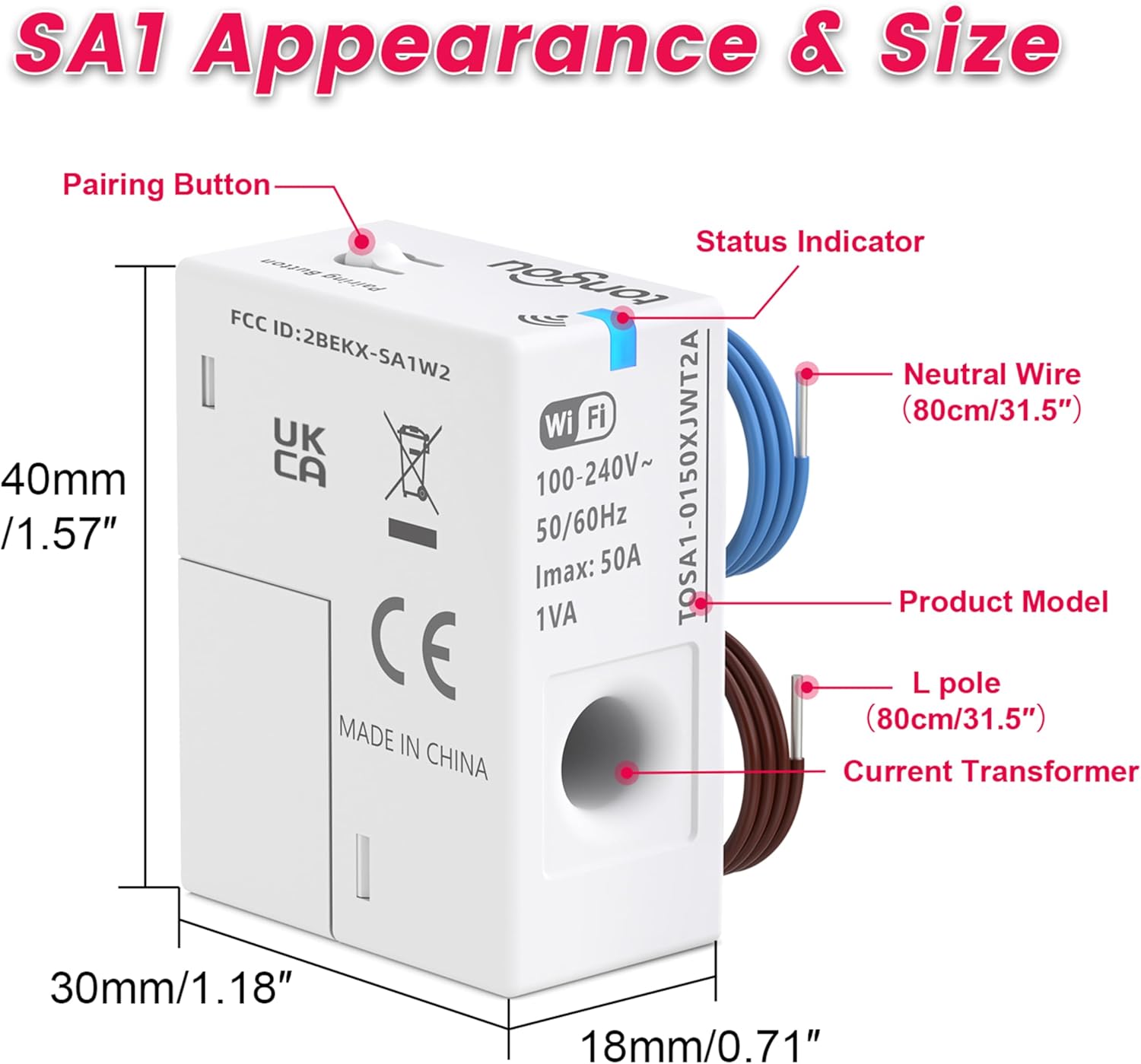
Figure 2: SA1 Component Identification and Dimensions (Pairing Button, Status Indicator, Neutral Wire, L pole, Current Transformer)
- 페어링 버튼 : Used to initiate the device pairing process.
- 상태 표시기: LED light indicating device status (pairing, network loss, successful connection).
- Neutral Wire (80cm/31.5"): Blue wire for neutral connection.
- L pole (80cm/31.5"): Brown wire for live connection.
- 현재 변압기: Sensing hole for collecting energy data from a single circuit.
3. 설치
The SA1 is designed for easy installation and is compatible with most U.S. household circuit panels, including Plug-in and DIN Rail types. Ensure power is off before beginning installation.
3.1 배선 지침
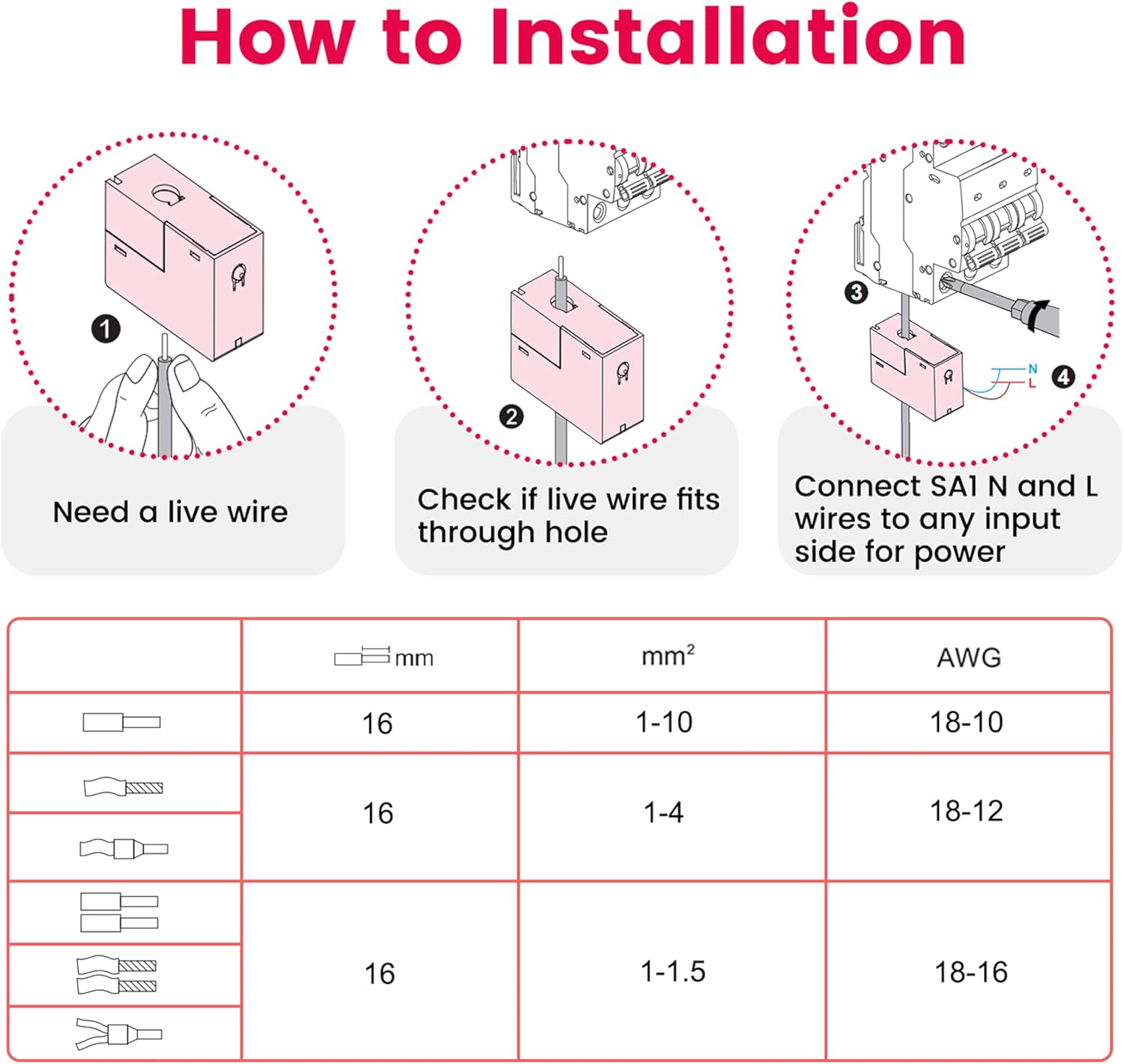
Figure 3: Wiring Steps for SA1
- Prepare Live Wire: Ensure the live wire is ready for connection.
- Check Wire Fit: Verify that the live wire fits through the sensing hole of the current transformer.
- Connect SA1 Wires: Connect the SA1's neutral (N) and live (L) wires to any input side for power.
The SA1 uses its sensing hole to collect energy data from any single circuit within its 31.5-inch range, offering flexible placement without space limitations.
3.2 설치 위치
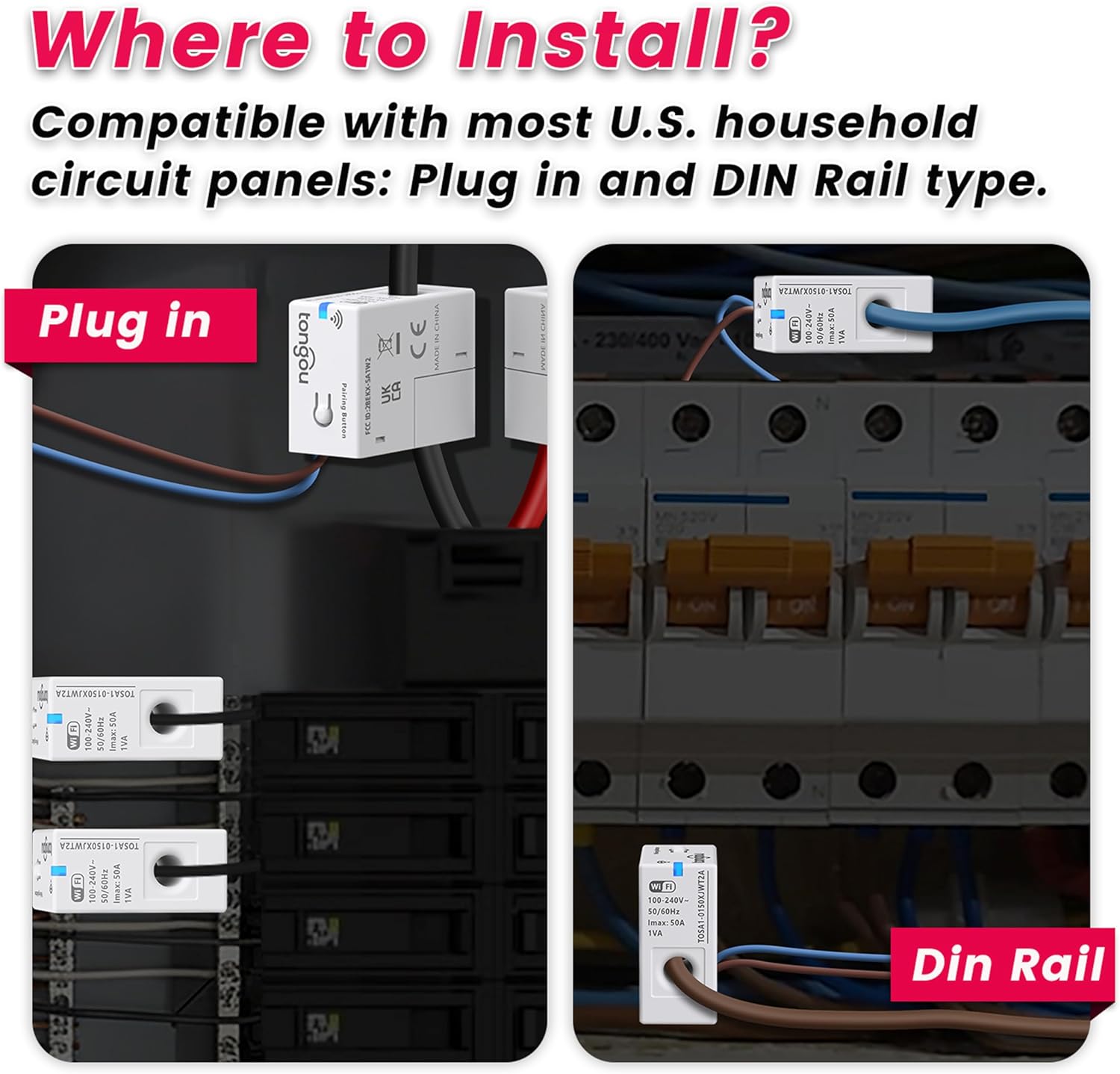
그림 4: 설치 예amples (Plug-in and DIN Rail)
The SA1 can be installed in both Plug-in and DIN Rail type circuit panels. Choose a location that allows for easy access to the circuit you wish to monitor.
3.3 네트워크 구성
After physical installation, configure the device with your Wi-Fi network using the Tuya/Smart Life app. The device only requires a 2.4GHz Wi-Fi frequency band during the pairing process.
Video 1: TONGOU SA1 WiFi Smart CT Installation and Network Configuration Guide
This video demonstrates the step-by-step process for installing the TONGOU SA1 WiFi Smart Current Transformer and configuring it with your network using the mobile application. It covers physical wiring and the app-based pairing procedure.
페어링 모드 표시기:
- The blue indicator light flashing continuously indicates the device is entering pairing mode.
- 페어링 모드로 들어가려면 페어링 버튼을 5초간 길게 누르세요.
- The blue indicator light flashing once every 2 seconds indicates network loss.
- The blue indicator light staying on indicates successful pairing.
- The blue indicator light turning off indicates pairing failure.
4. 사용 설명서
The SA1 provides comprehensive energy monitoring and management through the Tuya/Smart Life application.
4.1 Real-Time Power Tracking

Figure 5: Real-Time Power Tracking in App
- 모니터 전류, 볼륨tage, forward power, forward power consumption, and CPU temperature via the Tuya/Smart Life app.
- The device is designed to measure AC active power only.
- It is not designed to measure reverse electricity. If detected, the app will display the sum of absolute values (forward and reverse electricity).
4.2 Energy Management and Analysis

Figure 6: Energy Management and Analysis Features
- Class 1.0 accuracy ensures reliable monitoring with detailed historical data (view by hour, day, month, or year).
- Track usage trends to optimize electricity consumption.
- Export historical data via email for deeper analysis.
- Clear electricity data with one click in the app.
4.3 Smart Alarms

Figure 7: Multiple Alarm Functions
- Supports customizable alarms for over/undervoltage, overcurrent, overpower, CPU temperature, and balance.
- Receive immediate alarms when thresholds are exceeded, enabling quick response to potential hazards or inefficient usage.
4.4 Prepaid Electricity Management

Figure 8: Prepaid Electricity Management
- Supports prepaid power recharge.
- Real-time current remaining electricity tracking per room and balance alarm.
- Promotes conscious electricity consumption and cost control.
5. 사양
| 특징 | 세부 사항 |
|---|---|
| 제조업체 | Changyou Technology (Zhejiang) Co., Ltd. |
| 부품 번호 | TOSA1-0150XJWT2A-1 |
| 품목 무게 | 1.76 온스 |
| 제품 치수 | 1.18 x 1.57 x 0.71 인치 |
| 품목 모델 번호 | TOSA1-0150XJWT2A-1 |
| 색상 | 하얀색 |
| 포함된 구성 요소 | Device x 1, User Manual x 1 |
| 배터리가 필요하세요? | 아니요 |
| Wi-Fi 주파수 | 2.4GHz (for pairing) |
| 현재 범위 | 1-50A |
| 권tag및 범위 | 100-240VAC |
| 호환성 | Tuya/Smart Life App, 120VAC single phase, 240VAC split phase systems |
6. 문제 해결
- 장치가 페어링되지 않음: Ensure your Wi-Fi network is 2.4GHz. Press and hold the pairing button for 5 seconds until the blue indicator light flashes continuously. Check your Wi-Fi password in the app.
- 앱에 데이터가 없습니다. Verify the device is correctly wired and powered. Check the blue indicator light for network connectivity (should be solid blue). Ensure the current transformer is properly placed around the live wire.
- 잘못된 판독: Confirm the current transformer is installed on the correct live wire and not on a neutral wire or multiple wires.
- 경보기가 작동하지 않습니다: Check alarm settings within the Tuya/Smart Life app to ensure thresholds are configured correctly and notifications are enabled.
- 앱 연결 문제: Ensure your smartphone has a stable internet connection. Restart the app or re-pair the device if necessary.
7. 유지관리
The TONGOU SA1 WiFi Smart Current Transformer requires minimal maintenance. Keep the device clean and free from dust. Ensure all wiring connections remain secure. No user-serviceable parts are inside the device. Do not attempt to open or repair the unit yourself.
8. 보증 및 지원
For warranty information and technical support, please refer to the documentation included with your purchase or contact TONGOU customer service. Keep your purchase receipt for warranty claims.
제조업체: Changyou Technology (Zhejiang) Co., Ltd.