
1. 서론
Thank you for choosing the VLH 32 Inch Portable Smart TV. This device combines a vibrant 1080P Full HD touchscreen with the versatility of Android 15, offering a seamless entertainment and productivity experience. Designed for mobility, its integrated wheels and adjustable display allow you to enjoy content anywhere in your home or outdoors. This manual provides essential information for setup, operation, maintenance, and troubleshooting to ensure optimal performance of your new smart TV.
2. 상자 안에 무엇이 들어있나요?
개봉 시 모든 구성품이 있는지 확인해 주세요.
- VLH 32 inch Portable Smart TV
- 원격 제어
- External Camera (5MP)
- 전원 어댑터
- 사용 설명서 (본 문서)
3. 설치 및 조립
The VLH Portable Smart TV is designed for easy assembly. Follow these steps for initial setup:
- 언박싱: 포장에서 모든 구성 요소를 조심스럽게 제거합니다.
- 스탠드 어셈블리: Attach the screen to the mobile stand. The stand is designed for stability and smooth movement.
- 전원 켜기: Connect the power adapter to the TV and a power outlet. Press the power button to turn on the device.
- 초기 구성: Follow the on-screen prompts to set up your Android 15 operating system, including connecting to Wi-Fi and logging in with your Google account.
- 카메라 부착: The 5MP camera can be attached to the top of the screen via its USB connection.
The stand allows for easy adjustment of the screen's height, tilt, and rotation for optimal view주고받음.

그림 3.1: 후면 view of the VLH Portable Smart TV, highlighting the ports and the adjustable stand connection.
Video 3.1: Demonstrates the adjustable features of the VLH Portable Smart TV, including screen rotation, tilt, and height adjustment, along with a view of the connectivity ports.
4. Features & Controls
4.1 디스플레이 기능
- Ultra-Crisp 1080P FHD Touchscreen: Enjoy stunning visuals on a 32-inch display with vibrant 100% sRGB color accuracy.
- 원활한 성능: Features a 60 Hz refresh rate and 6 milliseconds response time for fluid interaction.

Figure 4.1: The 32-inch Full HD In-cell Touch Screen with 60Hz refresh rate, 100% sRGB, and millisecond response, demonstrating touch and remote control options.
4.2 Mobility & Adjustability
- 360° Mobile Base: Equipped with 5 universal wheels, allowing the stand to roll smoothly between rooms or from indoor to outdoor settings.
- Versatile Screen Adjustment: Easily adjust the display with 90° pivot for portrait or landscape viewing, ±20° tilt, and a 20cm height lift.

Figure 4.2: The Intuitive Touchscreen Portable TV with hidden wheels and a built-in 38400mAh battery, designed for easy movement and use anywhere.
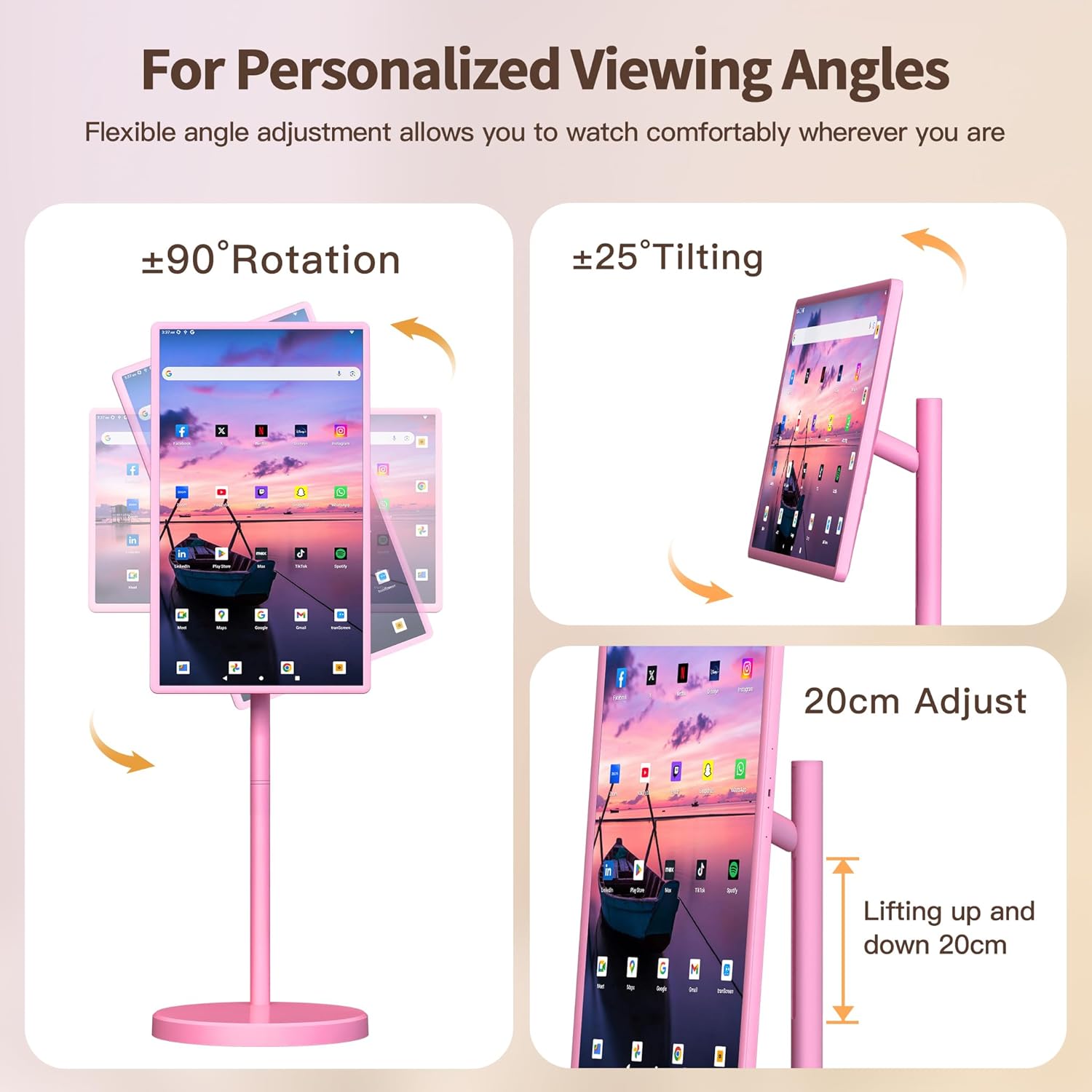
Figure 4.3: Flexible angle adjustment allows you to watch comfortably wherever you are, with options for rotation, tilting, and height adjustment.
4.3 Smart Functionality
- 안드로이드 15 OS: Experience smooth navigation and access to a vast array of apps from the Google Play Store.
- 강력한 하드웨어: Equipped with 8GB RAM and 128GB ROM for lag-free multitasking and amp르 스토리지.
- 5MP 카메라 : Enables crystal-clear video calls and live streaming. Note: Due to Android 15 OS, not all apps are compatible with the camera.

Figure 4.4: Easy access to your favorite apps with Android 15 and 8GB RAM + 128GB ROM for unlimited entertainment.
4.4 제어 옵션
- 10포인트 터치: Interact directly with the screen like a tablet.
- 음성 명령: Use "Hey Google" for hands-free control.
- Precision Remote: Traditional tactile navigation.
- Air Mouse Gestures: Point and click mid-air for sofa control.
4.5 Power & Connectivity
- 38,400mAh 초장시간 배터리 사용: Enjoy 4-6 hours of wireless use on a full charge.
- 연결성: Supports Bluetooth, HDMI, USB Type-C, and Wi-Fi for versatile connections.

Figure 4.5: The VLH Portable Smart TV is battery operated, providing freedom to use it anywhere without being tethered to a power outlet.
5. 사용 설명서
5.1 Navigating Android OS
The TV operates on Android 15. Use the touchscreen, remote, or voice commands to navigate the interface. Swipe left/right to access app drawers, tap icons to open applications, and use the back/home buttons for navigation.
5.2 앱 관리
Access the Google Play Store to download and install your favorite streaming services, games, and productivity apps. Apps can be organized on the home screen for quick access.
5.3 화면 미러링
The TV supports wireless screen mirroring. You can cast content from your smartphone, tablet, or laptop directly onto the screen. Refer to your device's screen mirroring instructions for connection details.
5.4 화상 통화
Utilize the 5MP external camera for video conferencing. Ensure the camera is properly connected via USB. Open your preferred video call application (e.g., Google Meet) and select the external camera as your video input.
Video 5.1: Showcases various usage scenarios of the VLH Portable Smart TV, demonstrating its versatility for entertainment, fitness, and productivity in different environments.
6. 유지관리
6.1 청소
화면을 닦을 때는 부드럽고 보풀 없는 천을 사용하세요. 잘 지워지지 않는 얼룩은 가볍게 두드려 닦아내세요.ampen the cloth with water or a screen-safe cleaning solution. Avoid harsh chemicals or abrasive materials. Wipe the stand and body with a dry or slightly damp 옷감.
6.2 배터리 관리
To prolong battery life, avoid fully discharging the battery frequently. Charge the device when the battery level is low. If storing the TV for an extended period, ensure it is charged to approximately 50% and stored in a cool, dry place.
7. 문제 해결
If you encounter issues with your VLH Portable Smart TV, please refer to the following common problems and solutions:
- 리모콘이 응답하지 않음: Ensure the remote has fresh batteries and is paired correctly. For pairing, refer to the remote's instructions (often involves pressing a specific button combination).
- 시스템 지연 또는 멈춤 현상: Restart the TV. If the issue persists, clear cache for problematic apps or perform a factory reset (Note: this will erase all data).
- 화면이 켜지지 않음: Check if the power adapter is securely connected and if the battery is charged. Try pressing and holding the power button for 10-15 seconds for a hard reset.
- Camera Incompatibility: As noted, some apps may not fully support the 5MP camera due to Android 15 OS. Try alternative video call applications.
추가적인 도움이 필요하시면 고객 서비스 센터로 문의해 주십시오.
8. 사양
| 특징 | 세부 사항 |
|---|---|
| 상표 | VLH |
| 모델 번호 | M01 |
| 화면 크기 | 32 인치 |
| 해결 | FHD 1080p(1920 x 1080 픽셀) |
| 운영 체제 | 안드로이드 15 |
| 숫양 | 8GB |
| 저장 | 128GB 롬 |
| 배터리 용량 | 38,400mAh |
| 카메라 | 5MP Front USB Camera |
| 연결성 | Bluetooth 5, HDMI, USB 2.0, USB Type C, Wi-Fi |
| 새로 고침 빈도 | 60Hz |
| 응답 시간 | 6밀리초 |
| 디스플레이 유형 | LCD (IPS Technology) |
| 색상 영역 | 100% sRGB |
| 특별 기능 | Built-In Speakers, Height Adjustment, Portable, Tilt Adjustment, Touchscreen |
9. 보증 및 지원
Your VLH 32 inch Portable Smart TV comes with a 1년 제품 보증. For any missing parts, installation queries, operational assistance, or other issues, please do not hesitate to contact our friendly customer service team. We are committed to providing a satisfied solution for any problem you may encounter.
고객 서비스: Please refer to the contact information provided with your product packaging or visit the official VLH web지원 사이트입니다.

Figure 9.1: VLH brand philosophy emphasizing innovative, mobile entertainment solutions.