
1. 제품 오버view
The CAMWAY 2X1, 1X2 RCA Switcher is a compact and versatile bi-directional audio selector designed to manage multiple audio sources and outputs. It supports both 3.5mm Aux and RCA L/R stereo audio connections, allowing users to effortlessly switch between devices without constantly plugging and unplugging cables. Featuring a volume control knob and a channel selector, this passive device requires no external power, ensuring pure, lossless sound transmission.

이미지: 앞면 view of the CAMWAY 2X1, 1X2 RCA Switcher, showing the volume and channel selection knobs, and the compact design.
2. 패키지 내용
모든 품목이 패키지에 포함되어 있는지 확인하세요.
- 1x CAMWAY Bi-Directional Audio Switcher
- 1x L/R Stereo RCA Cable
- 1x 사용자 설명서
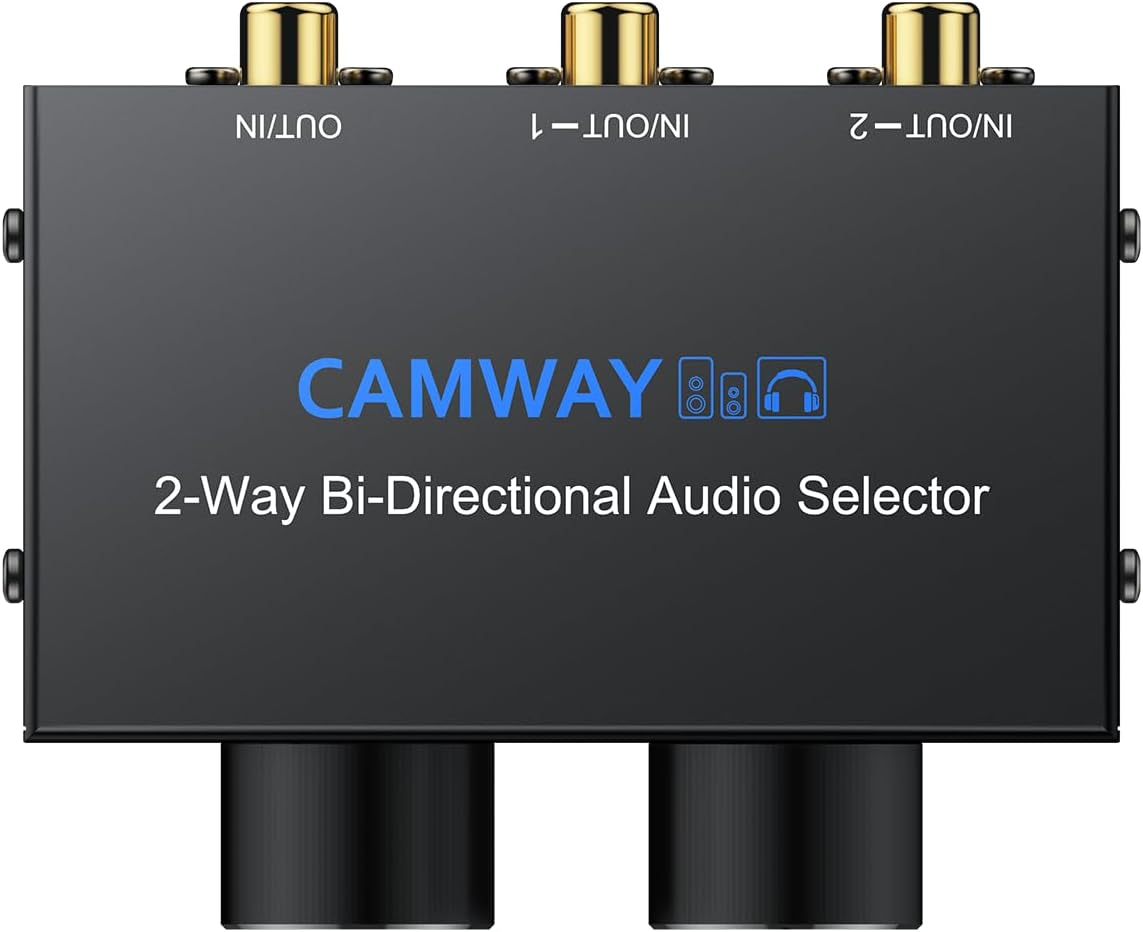
Image: The CAMWAY audio switcher, an RCA L/R stereo cable, and the user manual, as included in the package.
3. 제품 특징
- Bi-Directional Audio Switching: Functions as both a 2-in-1-Out or 1-in-2-Out audio selector.
- 다양한 연결성: Equipped with 3.5mm AUX and RCA L/R interfaces for broad compatibility with various audio devices.
- Synchronous Output: Allows simultaneous output from 3.5mm (e.g., wired headset) and RCA (e.g., speakers) ports on the currently selected channel.
- 볼륨 조절: Integrated knob for precise audio level adjustment.
- 채널 선택: Dedicated knob for selecting between Channel 1, Channel 2, or OFF (Mute).
- 수동 설계: Requires no external power, ensuring pristine, lossless sound without added distortion or signal loss.
- 내구성 있는 구조: Rugged all-metal housing provides longevity and shields against interference.
- 플러그 앤 플레이: Simple to set up and use, allowing effortless switching between devices.
4. 설정 및 설치
The CAMWAY audio switcher offers flexible connectivity for various audio setups. Ensure all devices are powered off before making connections.
4.1. 2-IN-1-OUT Configuration (Two Inputs to One Output)
Connect two audio source devices (e.g., PC, mobile phone, CD player) to the "IN/OUT-1" and "IN/OUT-2" ports using either 3.5mm Aux or RCA L/R cables. Connect your single audio output device (e.g., amplifier, active speaker) to the "OUT/IN" port. Use the channel selection knob to choose which input source is routed to the output.

Image: Illustration of the 2-in-1-out setup, where two audio sources (laptop and turntable) are connected to the switcher, and the output is directed to headphones.
4.2. 1-IN-2-OUT Configuration (One Input to Two Outputs)
Connect your single audio source device (e.g., PC, mobile phone) to the "OUT/IN" port. Connect two audio output devices (e.g., headphones, speakers) to the "IN/OUT-1" and "IN/OUT-2" ports. Use the channel selection knob to choose which output device receives the audio signal.
Image: Illustration of the 1-in-2-out setup, where a single audio source (laptop) is connected to the switcher, and the output can be directed to either speakers or headphones.
4.3. Synchronous Output (3.5mm + RCA)
For any selected channel (1 or 2), the 3.5mm (wired headset) and RCA (speaker) ports can output the same audio simultaneously. This allows you to listen through headphones while also having the sound play through speakers from the same selected source.

이미지: 자세한 view of the CAMWAY audio switcher connected to a laptop, showing how both 3.5mm and RCA outputs can be used concurrently for a single selected channel.
Important Note: The switcher does NOT support multiple channels simultaneous output/input. Only one channel (1 or 2) can be active at a time for input or output selection.
5. 사용 설명서
Operating the CAMWAY audio switcher is straightforward:
- 채널 선택: Use the left knob, labeled "1/2/OFF(Mute)", to select your desired input or output channel. Turn the knob to '1' for Channel 1, '2' for Channel 2, or 'OFF' to mute all audio.
- 볼륨 조절: Use the right knob, labeled "Volume", to adjust the audio output level to your preference.
- 즉시 전환: The mechanical design allows for instant switching between channels without any delay or signal loss.

Image: A close-up of the CAMWAY audio switcher's two main knobs: one for selecting between channels 1, 2, or mute, and the other for volume control.
Video: Official CAMWAY video demonstrating the setup and operation of the RCA L/R and 3.5mm Aux Audio Switcher, showing how to connect devices and switch between channels.
6. 사양
| 특징 | 세부 사항 |
|---|---|
| 모델 번호 | CAM077 |
| 상표 | 캠웨이 |
| 색상 | 검은색 |
| 커넥터 유형 | 3.5mm AUX and L/R RCA |
| 포트 수 | 9 (3x 3.5mm IN/OUT, 6x RCA L/R IN/OUT) |
| 호환 장치 | Speakers, Headphones, Amplifiers, CD Player, Turntable, Computer, Mobile Phone, etc. |
| 품목 무게 | 13.4 온스 |
| 패키지 크기 | 5.47 x 4.13 x 3.07 인치 |
7. 문제 해결
- 사운드 출력 없음:
- 모든 오디오 케이블이 올바른 입력/출력 포트에 제대로 연결되어 있는지 확인하십시오.
- Verify that the channel selection knob is set to either '1' or '2' and not 'OFF'.
- Check the volume level on both the switcher and your connected audio devices.
- Test with different audio cables or devices to rule out faulty components.
- 왜곡된 소리:
- 모든 연결이 견고하고 간섭이 없는지 확인하십시오.
- Reduce the volume on the source device or the switcher to prevent clipping.
- Test with different cables or devices to isolate the source of distortion.
- Cannot Switch Channels:
- Ensure the channel selection knob is fully rotated to the desired position.
- The switcher is mechanical; ensure no physical obstruction prevents the knob from turning.
8. 유지관리
To ensure the longevity and optimal performance of your CAMWAY audio switcher, follow these maintenance guidelines:
- 기기를 깨끗하고 부드럽게 마른 천으로 닦아주세요. 액체 세척제나 연마성 재질의 사용은 피해주세요.
- Store the switcher in a cool, dry place away from direct sunlight, extreme temperatures, and high humidity.
- Handle the device and its connections with care to prevent damage to ports or internal components.
- Avoid placing heavy objects on top of the switcher.
9. 보증 및 지원
The CAMWAY 2X1, 1X2 RCA Switcher comes with a standard manufacturer's warranty. For detailed warranty information, product support, or technical assistance, please refer to the contact information provided in the included user manual or visit the official CAMWAY web대지.
For further assistance, you may also contact CAMWAY customer service through their official channels.