
소개
This manual provides essential information for setting up, operating, maintaining, and troubleshooting your XIAOMI Redmi 15C smartphone. Please read it carefully to ensure proper use and to maximize the device's performance and longevity.
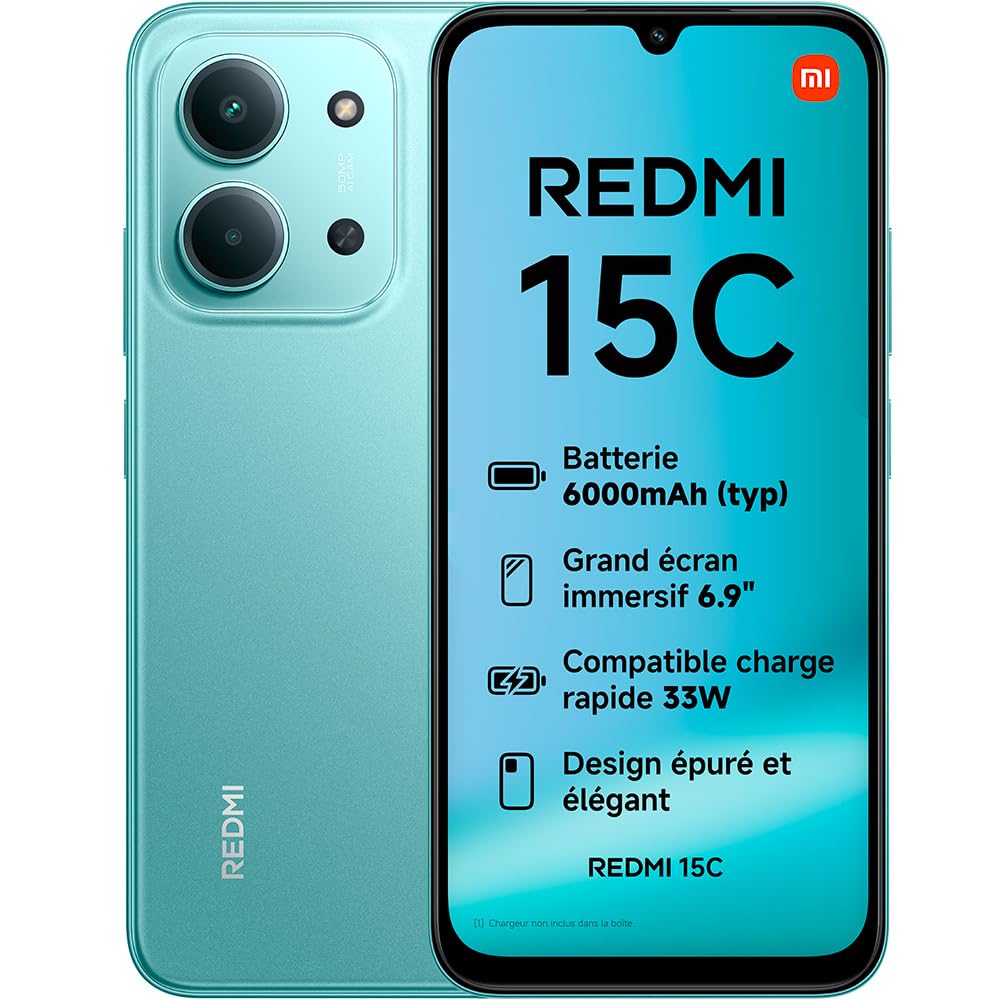
Image: The XIAOMI Redmi 15C smartphone, showcasin세련된 디자인과 대형 디스플레이가 특징입니다.
The Redmi 15C features a long-lasting 6000 mAh battery, an immersive 6.9-inch 120Hz display, and a powerful MediaTek Helio G81-Ultra octa-core processor. It is equipped with a 50 MP AI dual camera system and boasts IP64 dust and water resistance.
설정
1. 상자 안에 무엇이 들어있나요?
- 샤오미 레드미 15C 스마트폰
- USB 케이블(C형)
- SIM 제거 도구
Note: A charger is not included and must be purchased separately.

Image: Illustration of the items included in the Redmi 15C packaging: the smartphone, a USB-C cable, and a SIM ejection tool.
2. SIM 카드 삽입
- 기기 측면에서 SIM 카드 트레이를 찾으세요.
- SIM 카드 분리 도구를 트레이 옆의 작은 구멍에 넣고 트레이가 튀어나올 때까지 세게 누르십시오.
- 나노 SIM 카드의 금색 접촉부가 아래로 향하도록 트레이에 넣으세요. 접촉부가 올바르게 정렬되었는지 확인하세요.
- 트레이를 조심스럽게 슬롯에 다시 밀어 넣어 딸깍 소리가 나면서 제자리에 고정되도록 합니다.
3. 초기 충전 및 전원 켜기
- Connect the USB Type-C cable to your Redmi 15C and to a compatible power adapter (not included).
- Allow the device to charge for at least 30 minutes before first use.
- To power on, press and hold the power button until the XIAOMI logo appears.
장치 작동
디스플레이 및 상호작용
The Redmi 15C features a large 6.9-inch immersive display with an AdaptiveSync refresh rate of up to 120Hz, providing a smooth visual experience for browsing and media consumption. The display also holds TÜV Rheinland certifications for Low Blue Light, Flicker Free, and Circadian Friendly, designed for optimal visual comfort.

Image: The immersive 6.9-inch display of the Redmi 15C, highlighting its visual quality.
성능
Powered by the MediaTek Helio G81-Ultra octa-core processor, the Redmi 15C delivers consistent and fluid performance for daily tasks and extended use. It supports up to 16GB of RAM with memory extension for enhanced multitasking.

Image: A visual representation of the smartphone's RAM, indicating memory extension capabilities.
카메라 시스템
The device features a 50 MP AI dual camera system on the rear, capable of capturing fine details and vibrant colors. The front camera allows for high-quality selfies with a dedicated beauty mode.
- 울트라 HD 모드: Captures exceptionally clear and detailed photos.
- 세로 모드 : Enhances portraits with artistic depth effects.
- Selfie Beauty Mode: Refines selfies for a naturally polished look.

이미지: 자세한 view of the 50 MP AI dual camera system on the back of the Redmi 15C.
배터리 및 충전
Equipped with a 6000 mAh battery, the Redmi 15C offers extended usage, providing up to 2.14 days of battery life, 22 hours of video playback, or 82 hours of music playback. It supports 33W turbo charging, allowing for rapid power replenishment.

Image: The Redmi 15C connected to a charger, displaying the 33W turbo charging status.
The device also supports reverse charging, allowing it to act as a portable power bank for other compatible devices.

Image: The Redmi 15C connected via cable to another smartphone, demonstrating its reverse charging capability.
운영 체제
The Redmi 15C runs on Xiaomi HyperOS 2, offering a fluid user experience and enhanced interconnectivity with other Xiaomi devices. It comes with pre-installed Google applications for immediate functionality.

Image: The logo for Xiaomi HyperOS 2, indicating the device's operating system.
유지
먼지 및 방수 기능
The Redmi 15C features an IP64 rating for dust and water resistance, providing protection against dust ingress and splashes of water. This rating does not imply full waterproofing; avoid submerging the device in water.
일반 관리
- 부드럽고 마른 천으로 기기를 깨끗하게 유지하세요.
- 휴대전화를 극한 온도나 직사광선에 장시간 노출시키지 마십시오.
- 화면 보호 필름으로 화면을 보호하고 보호 케이스를 사용하여 물리적 손상을 방지하세요.
문제 해결
일반적인 문제 및 솔루션
| 문제 | 가능한 해결책 |
|---|---|
| 장치가 켜지지 않음 | 배터리가 충전되어 있는지 확인하세요. 전원 버튼을 최소 10초 동안 길게 누르세요. |
| 화면이 반응하지 않음 | 기기를 재시작하십시오. 반응이 없으면 전원 버튼을 길게 눌러 강제로 재시작하십시오. |
| 배터리 수명이 짧음 | Close background applications, reduce screen brightness, disable unnecessary features like GPS or Bluetooth when not in use. |
| 네트워크 연결 문제 | Check SIM card insertion. Toggle Airplane Mode on and off. Restart the device. Contact your network provider if issues persist. |
| 앱이 충돌하거나 정지됨 | Clear app cache and data. Update the app to the latest version. Restart the device. |
명세서
| 특징 | 세부 사항 |
|---|---|
| 상표 | 샤오미 |
| 모델명 | 레드미 15C |
| 운영 체제 | 하이퍼 OS |
| 숫양 | 4GB(최대 16GB까지 확장 가능) |
| 저장 용량 | 256GB (XNUMX기가바이트) |
| 화면 크기 | 6.9 인치 |
| 디스플레이 해상도 | 1080 x 2400 |
| 새로 고침 빈도 | 120Hz |
| CPU 모델 | 미디어텍 헬리오 G81-울트라 |
| 후면 카메라 해상도 | 50 Megapixels (Dual AI Camera) |
| Front Camera Count | 1 |
| 배터리 용량 | 6000mAh |
| 충전 중 | 33W 고속 충전, 역방향 충전 |
| 방수 레벨 | IP64(방진 및 방수) |
| SIM 카드 슬롯 | Single SIM (Nano) |
| 연결성 | 4G, Bluetooth, LTE, Wi-Fi |
| 생체 인식 보안 | 지문 인식 |
| 헤드폰 잭 | 3.5mm (XNUMXmm) |
보증 및 지원
보증 정보
The XIAOMI Redmi 15C comes with a 2년 제조사 보증보증 청구를 위해 구매 증빙 자료를 보관해 주십시오. 보증은 정상적인 사용 조건 하에서의 제조 결함에 적용됩니다.
예비 부품 가용성
Spare parts for the Redmi 15C are available for a period of 2년 구매일로부터.
고객 지원
For further assistance, technical support, or warranty service, please visit the official XIAOMI support website or contact their customer service directly. Refer to the packaging or official XIAOMI web해당 지역의 연락처 정보는 사이트에서 확인하세요.