
Generic CT211 Dual Lens WiFi Security Camera User Manual
모델: CT211
1. 서론
Welcome to the user manual for your Generic CT211 Dual Lens WiFi Security Camera. This manual provides detailed instructions for the installation, operation, and maintenance of your new security camera. Please read this manual thoroughly before using the product to ensure proper setup and functionality. Keep this manual for future reference.
2. 패키지 내용
설치를 진행하기 전에 아래 나열된 모든 품목이 패키지에 들어 있는지 확인하세요.
- Generic CT211 Dual Lens WiFi Security Camera (2 units)
- 사용 설명서
- 장착 나사
- 전원 케이블

3. 제품 오버view
The Generic CT211 is a versatile dual-lens security camera designed for both indoor and outdoor surveillance. It offers advanced features to enhance your property's security.
주요 특징:
- 2K HD Resolution & 360° Field of View: Provides clear images and comprehensive coverage.
- 듀얼 렌즈 시스템: Features one fixed lens for specific areas and one rotating lens for broader surveillance.
- 동작 추적 : Automatically tracks detected movement.
- Human Detection & Alerts: Identifies human figures and sends real-time notifications to your smartphone.
- 양방향 오디오 : Allows for communication through the camera via a mobile device.
- 풀컬러 야간 투시경: Offers three night vision modes for clear visibility up to 33 feet in low light.
- 유연한 스토리지: Micro SD 카드(최대 128GB)와 클라우드 저장 옵션을 지원합니다.
- 무선 연결 : Built-in Wi-Fi for easy connection to your home network.


3.1 Dual Lens Technology and 360° Coverage
The CT211 camera incorporates a unique dual-lens system. One lens is fixed to monitor a specific, critical area, while the other is a rotating lens that provides a broader, 360-degree field of view. This combination ensures comprehensive surveillance without blind spots.


3.2 스마트 감지 및 양방향 오디오
Equipped with human detection, the camera can distinguish human figures from other moving objects, reducing false alarms. Upon detection, the YiloT app sends instant notifications to your smartphone, including images or video of the activity. The built-in microphone and speaker enable two-way audio communication, allowing you to speak and listen remotely through your mobile device.

3.3 Night Vision Modes and Storage Options
The camera offers three distinct night vision modes: Full-color, Infrared, and Smart Vision. These modes ensure clear and detailed images even in complete darkness, with an effective range of up to 33 feet. For video storage, you can choose between a Micro SD card (up to 128GB, not included) or a secure cloud storage service.
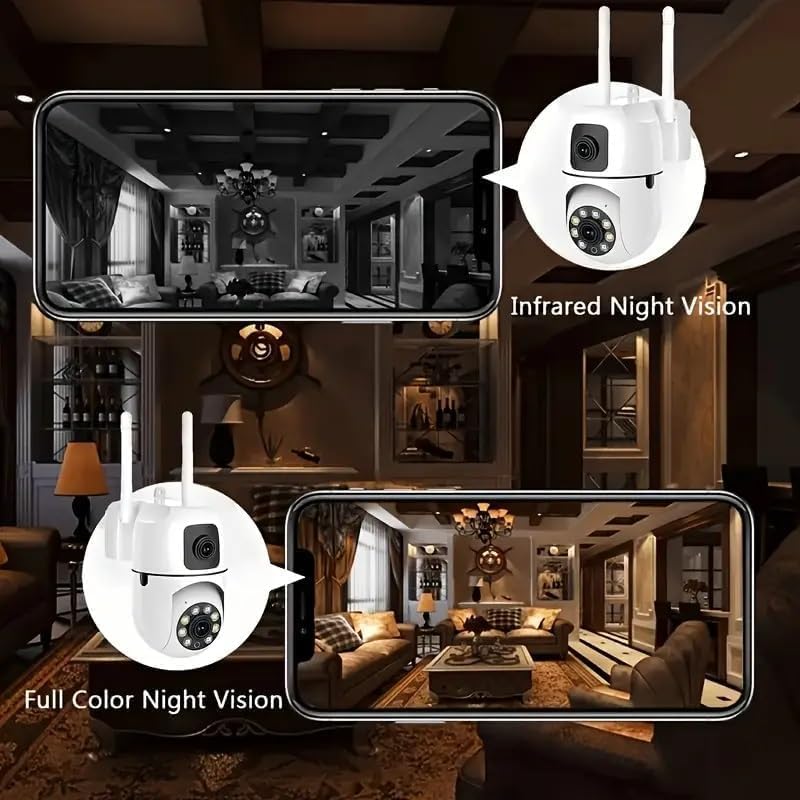
3.4 무선 연결
The CT211 camera features built-in Wi-Fi connectivity, eliminating the need for complex wiring. It supports connection via Wi-Fi, personal hotspot, or an Ethernet cable, providing flexible installation options.
4. 설정 가이드
4.1 언박싱 및 초기 검사
- 포장에서 모든 구성 요소를 조심스럽게 제거합니다.
- Inspect the camera and accessories for any signs of damage.
4.2 앱 설치
- Download the 'YiloT' app from your smartphone's app store (iOS or Android).
- 새 계정을 등록하거나 이미 계정이 있는 경우 로그인하세요.
4.3 카메라 장착
- 설치에 적합한 장소를 선택하고 시야가 확보되도록 하십시오. view 전원 공급 장치에 연결할 수 있어야 합니다. 이 카메라는 벽에 설치하도록 설계되었습니다.
- Use the provided mounting screws to securely attach the camera to the desired surface.
4.4 전원 연결
- 카메라의 전원 입력 포트에 전원 케이블을 연결하십시오.
- Plug the other end of the power cable into a standard electrical outlet. The camera will power on and initiate its startup sequence.
4.5 네트워크 구성
- Open the YiloT app and follow the on-screen instructions to add a new device.
- Select your preferred connection method: Wi-Fi, personal hotspot, or Ethernet cable.
- For Wi-Fi connection, enter your Wi-Fi network name (SSID) and password when prompted.
- 안정적인 연결을 위해 카메라가 Wi-Fi 라우터 범위 내에 있는지 확인하세요.
5. 사용 설명서
5.1 라이브 View 및 원격 제어
Once connected, open the YiloT app to access the live video feed from your camera. You can view both fixed and rotating lens feeds simultaneously or switch between them.

5.2 팬, 틸트, 줌(PTZ)
Use the controls within the YiloT app to remotely adjust the camera's viewing angle. The rotating lens supports 355° pan and 90° tilt movements, allowing you to cover a wide area.
5.3 양방향 오디오 사용
Tap the microphone icon in the app to speak through the camera's speaker. Tap the speaker icon to listen to audio from the camera's vicinity.
5.4 녹음 및 재생
Recordings are automatically saved to your Micro SD card or cloud storage based on your settings. Access recorded footage through the app's playback feature, selecting specific dates and times.
5.5 Managing Alerts and Notifications
Configure alert settings in the YiloT app. You can enable human detection, set sensitivity levels, and choose to receive push notifications to your smartphone when activity is detected.
5.6 Switching Night Vision Modes
Within the app, you can manually switch between Full-color, Infrared, and Smart Vision night modes to optimize visibility based on environmental conditions.
6. 유지관리
6.1 카메라 청소
Periodically clean the camera lens and housing with a soft, dry cloth. Avoid using harsh chemicals or abrasive materials that could damage the lens or finish.
6.2 펌웨어 업데이트
Check the YiloT app regularly for available firmware updates. Keeping your camera's firmware up-to-date ensures optimal performance, security, and access to new features.
6.3 스토리지 관리
마이크로 SD 카드를 사용하는 경우 주기적으로 재설정하십시오.view 저장된 foo를 관리합니다.tage to ensure sufficient space. For cloud storage, monitor your subscription status and storage limits.
7. 문제 해결
- 카메라가 Wi-Fi에 연결되지 않음: Ensure the camera is within range of your router. Verify the Wi-Fi password is correct. Try restarting both the camera and your router.
- 비디오 피드 없음: Check the power connection. Ensure the camera is online in the YiloT app. Restart the camera.
- 이미지 품질이 좋지 않음: Clean the camera lens. Ensure there is adequate lighting. Adjust night vision settings if applicable.
- 동작 감지가 작동하지 않습니다: Check sensitivity settings in the app. Ensure human detection is enabled. Verify the camera's field of view 명확합니다.
- 양방향 오디오 문제: 휴대폰과 앱의 볼륨 설정을 확인하세요. 앱에 마이크 및 스피커 권한이 부여되었는지 확인하세요.
- SD 카드가 녹화되지 않음: Ensure the SD card is properly inserted and formatted. Check the card's capacity and health.
8. 기술 사양
| 특징 | 사양 |
|---|---|
| 모델 번호 | CT211 |
| 실내/실외 사용 | 실내, 실외 |
| 연결 기술 | 무선(Wi-Fi, 블루투스) |
| 전원 | 코드식 전기 |
| 컨트롤러 유형 | YiIoT App |
| 장착 유형 | 벽걸이형 |
| 비디오 캡처 해상도 | 2048p(2K HD) |
| View잉 각도 | 360도 |
| 특별 기능 | 양방향 오디오, HD 해상도, 모션 센서, 야간 투시, PTZ 기술 |
| 저장 옵션 | 마이크로 SD 카드(최대 128GB), 클라우드 스토리지 |
| 제품 크기(L x W x H) | 2.67 x 4.72 x 4.72 인치 |
| 품목 무게 | 1.17파운드 |

9. 보증 및 지원
For warranty information and technical support, please refer to the documentation provided at the time of purchase or contact the seller/manufacturer directly. Keep your purchase receipt as proof of purchase for warranty claims.