
1. 서론
This manual provides detailed instructions for the proper setup, operation, and maintenance of your TOMLOV TriL107 3-Lens Digital Microscope. Please read this manual thoroughly before using the device to ensure optimal performance and longevity. Keep this manual for future reference.
2. 안전 정보
- 현미경을 극한의 온도, 습도 또는 부식성 물질에 노출시키지 마십시오.
- Avoid direct exposure of the lenses to strong light sources, which may damage the sensor.
- 장치를 물과 기타 액체에서 멀리하세요.
- 현미경을 직접 분해하거나 수리하려고 하지 마십시오. 도움이 필요하시면 고객 지원 센터에 문의하십시오.
- 전원 어댑터가 해당 지역의 전원과 호환되는지 확인하십시오.tage.
- Keep out of reach of children unless under adult supervision.
3. 패키지 내용
아래 나열된 모든 품목이 패키지에 포함되어 있는지 확인하세요.
- 7-Inch 3-Lens HDMI Digital Microscope (1 unit)
- 12.6-Inch Adjustable Stand (1 unit)
- 64GB Micro SD Card (1 unit - pre-installed)
- Slides Bottom Light (1 unit)
- 리모콘(1개)
- USB 케이블 (2개)
- HDMI 케이블 (1개)
4. 제품 오버view
The TOMLOV TriL107 features a versatile design with three interchangeable lenses and a high-resolution display for various observation needs.
주요 구성 요소:
- 7인치 IPS 화면: 선명하고 넓은 화각을 제공합니다. view of magnified objects.
- Rotating Lens Barrel: Allows for quick switching between the 1000X, 1500X, and 2500X lenses.
- 초점 손잡이: 선명한 이미지를 위해 초점을 조정합니다.
- 조정 가능한 스탠드: Provides stability and allows for height adjustments, especially useful for whole coin view주고받음.
- 통합 조명 시스템: Includes 12 main LED lights, 2 gooseneck side lights, and a slide bottom light for optimal illumination.
- 제어 버튼: For power, menu navigation, photo/video capture, and zoom.
- 포트: HDMI and USB for external display connectivity.

그림 1: 이상view of the three specialized lenses for diverse observation needs.
5. 설정 지침
5.1 조립
- 상자에서 모든 구성품을 조심스럽게 꺼내세요.
- Attach the microscope unit to the adjustable stand, securing it with the provided knob.
- Connect the gooseneck side lights to the base and position them as needed.
- Place the slide bottom light on the base if required for your observation.
5.2 전원 켜기/끄기
- Connect the microscope to a power source using one of the provided USB cables. The device contains a rechargeable Lithium Ion battery.
- Press and hold the power button on the microscope's display unit to turn it on or off.
5.3 마이크로 SD 카드
The 64GB Micro SD card is pre-installed in the microscope. This card is essential for storing photos and videos. Ensure it is securely in place before operation.
6. 사용 설명서
6.1 렌즈 선택
The TriL107 features a rotating lens barrel for easy switching between the three lenses. Simply rotate the barrel to select the desired magnification lens (1000X, 1500X, or 2500X).
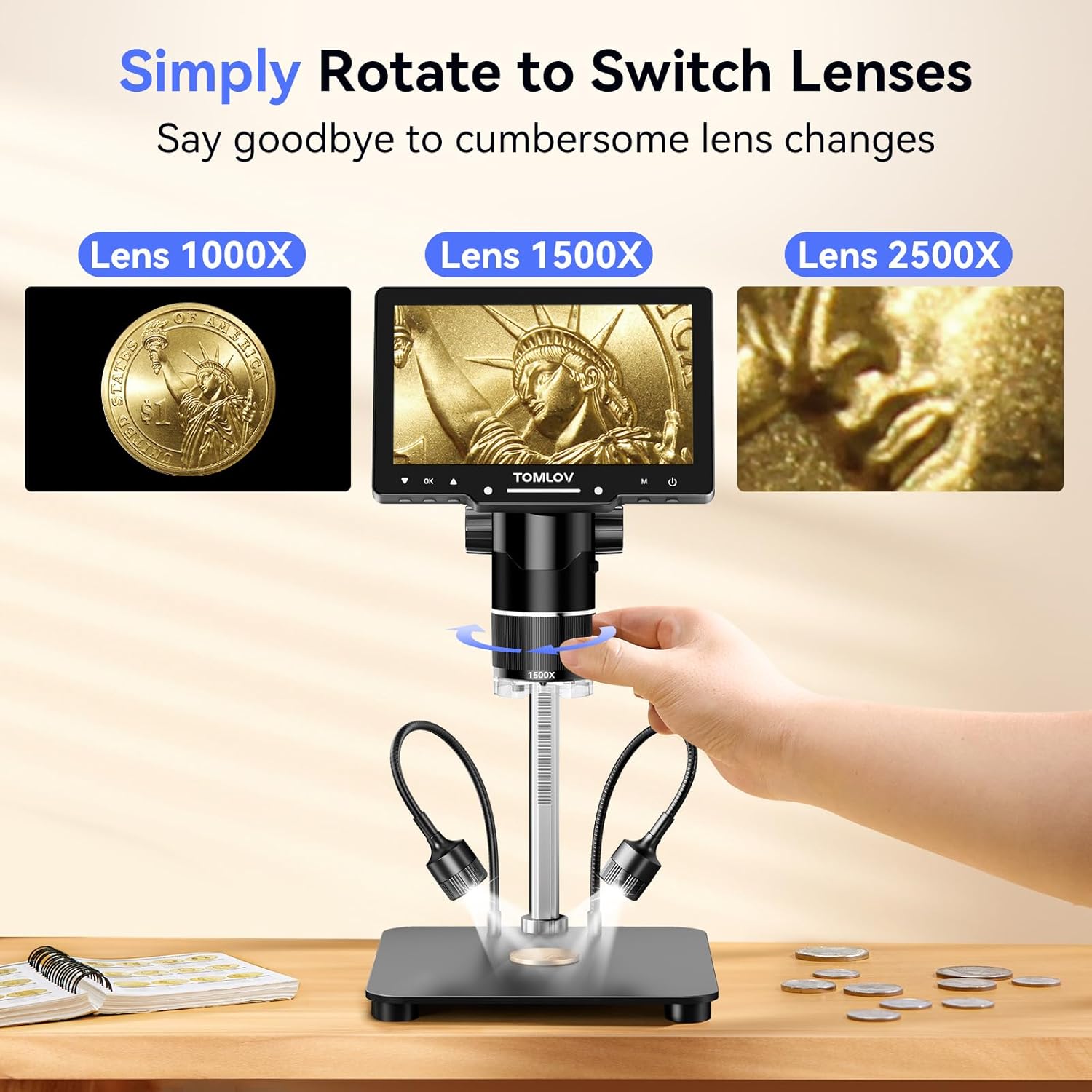
Figure 2: Rotating the lens barrel to select different magnification lenses.
6.2 포커싱
Place the object you wish to observe on the base. Adjust the height of the microscope unit using the stand's adjustment knob, then fine-tune the focus by rotating the focus wheel on the lens barrel until the image on the screen is clear.
Video 1: Demonstrates the focusing process and lens switching for the TOMLOV TriL107 digital microscope.
6.3 Magnification Lenses
- 1000X Lens (2X-1000X): Ideal for observing coins, stamps, and other larger specimens. The adjustable 12.6-inch stand allows for a full view of entire coins.
- 1500X Lens (10X-1500X): Designed for intricate tasks such as PCB soldering and watch repair. Offers a longer working distance and a larger base for a stable workspace.
- 2500X Lens (2000X-2500X): Suitable for observing biological slides and microscopic details. Note: The optimal observation distance for this lens is 3mm-4mm, requiring the lens to be very close to the object for clear images.

Figure 3: Coin observation using the 1000X lens.

Figure 4: Soldering with the 1500X lens.

Figure 5: Biological slide observation with the 2500X lens.
6.4 조명 조정
The microscope features a comprehensive lighting system:
- 12 Built-in LED Lens Lights: Provide direct illumination from around the lens.
- 2 Gooseneck Side Lights: Adjustable lights for angled illumination, reducing shadows.
- Slide Bottom Light: For observing transparent specimens from below.
All lights can be dimmed and charged independently using their respective controls to achieve optimal view조건.

Figure 6: The versatile lighting system of the microscope.
6.5 사진 및 비디오 캡처
The microscope supports one-button photo capture and video recording. Use the dedicated buttons on the display unit or the wireless remote control to initiate these functions. All captured media is saved to the pre-installed 64GB Micro SD card.
6.6 External Display Connection (HDMI & USB)
Connect the microscope to a larger screen (PC or TV) using the provided HDMI or USB cables for real-time viewing and presentations. This allows for collaborative observation and detailed examination on a larger display.

Figure 7: Connecting the microscope to external displays.
6.7 무선 리모콘
The included wireless remote control allows for convenient adjustment of magnification, photo capture, and video recording without touching the microscope. This minimizes screen shaking and sample disturbance, ensuring stable observations.
7. 유지관리
7.1 청소
- 렌즈: Use a soft, lint-free cloth specifically designed for optical surfaces. For stubborn smudges, a small amount of lens cleaning solution can be applied to the cloth (not directly to the lens).
- 화면: Wipe the IPS screen gently with a soft, dry microfiber cloth. Avoid harsh chemicals.
- 몸: 현미경 본체를 깨끗이 닦고 약간 기울여 세워 놓으세요.amp cloth. Ensure no moisture enters any openings.
7.2 보관
When not in use, store the microscope in a clean, dry, and dust-free environment. Use the original packaging or a protective case to prevent damage.
8. 문제 해결
| 문제 | 가능한 원인 | 해결책 |
|---|---|---|
| 화면에 이미지가 없습니다. | Device not powered on; low battery; loose cable connection. | Ensure device is powered on. Charge the battery. Check USB cable connection. |
| 이미지가 흐릿함 | Incorrect focus; incorrect working distance for lens; dirty lens. | Adjust the focus knob. Ensure correct working distance for the selected lens (especially 2500X). Clean the lens. |
| No image on external display | Incorrect cable connection; wrong input selected on TV/PC. | Check HDMI/USB cable connections. Select the correct input source on your TV/PC. |
| Cannot capture photos/videos | SD 카드 용량이 꽉 찼거나 제대로 삽입되지 않았습니다. SD 카드 오류가 발생했습니다. | Check SD card status. Ensure it is inserted correctly. Format the SD card (this will erase all data). |
| 조명이 작동하지 않습니다 | Lights not turned on; low battery for independent lights. | Turn on the lights. Charge the independent gooseneck lights if applicable. |
9. 사양
| 특징 | 세부 사항 |
|---|---|
| 모델명 | TriL107 |
| 표시하다 | 7-inch IPS Screen (178 Degrees Real Angle of View) |
| 확대 | Up to 2500X (2X-1000X, 10X-1500X, 2000X-2500X) |
| 사진 해상도 | 30MP |
| 비디오 해상도 | 2K |
| 조명 시스템 | 12 Built-in LED, 2 Gooseneck Side Lights, Slide Bottom Light |
| 저장 | 64GB Micro SD 카드(포함) |
| 산출 | HDMI, USB |
| 호환 장치 | 노트북, 개인용 컴퓨터, 텔레비전 |
| 스탠드 높이 | 12.6인치 (조절 가능) |
| 기본 치수 | 7 x 8 인치 |
| 재료 | 알루미늄 합금 |
| 색상 | 검은색 |
| 품목 무게 | 3.31파운드(약 1500그램) |
| 배터리 | 1개의 리튬 이온 배터리(포함) |
| 권tage | 5 볼트 |
10. 보증 및 지원
10.1 보증 정보
Your TOMLOV TriL107 Digital Microscope is covered by a manufacturer's warranty. Please refer to the warranty card included in your package or visit the official TOMLOV web자세한 보증 약관은 해당 사이트에서 확인하세요.
10.2 고객 지원
For technical assistance, troubleshooting, or any inquiries regarding your product, please contact TOMLOV customer support. Contact details can typically be found on the TOMLOV web사이트 또는 제품 포장.