
1. 서론
This manual provides comprehensive instructions for the installation, setup, operation, and maintenance of your Ctronics 4K Outdoor Security Camera, model CTIPC-870. This camera is designed for outdoor surveillance, offering high-resolution video, advanced night vision capabilities, intelligent detection features, and flexible connectivity options.
2. 안전 정보
- Ensure the power supply used is compatible with the camera's voltage 요구 사항(12볼트).
- 카메라를 작동 범위를 벗어난 극한 온도에 노출시키지 마십시오.
- 렌즈가 강한 광원에 장시간 직접 노출되지 않도록 하십시오.
- Installation should be performed by qualified personnel if working at heights or with electrical connections.
- 카메라와 그 구성품을 어린이의 손이 닿지 않는 곳에 보관하세요.
- 카메라를 분해하거나 개조하지 마십시오. 그렇게 하면 보증이 무효화됩니다.
3. 패키지 내용
패키지에 모든 품목이 들어 있는지 확인하세요.
- Ctronics 4K Security Camera (CTIPC-870)
- 전원 어댑터
- 장착 나사 및 벽면 플러그
- 네트워크 케이블용 방수 키트
- 사용 설명서 (본 문서)
4. 제품 오버view
The Ctronics CTIPC-870 is a robust outdoor security camera featuring a dome shape and metal construction. It includes a high-resolution lens, infrared LEDs, and spotlights for enhanced night vision. An antenna is present for wireless connectivity.

이미지 4.1: 앞면 view of the Ctronics CTIPC-870 camera, showing the lens, IR LEDs, and spotlights.
5. 설치
The CTIPC-870 camera is designed for easy wall or ceiling mounting. Follow these general steps for installation:
- 위치를 선택하세요: 원하는 조건을 충족하는 적절한 야외 장소를 선택하세요. view각도가 적절하고 Wi-Fi 네트워크 및 전원 공급 장치의 범위 내에 있어야 합니다.
- 설치: Secure the metal mounting plate to the chosen surface using the provided screws and wall plugs. Ensure the surface is strong enough to support the camera's weight (approximately 5.06 pounds).
- 카메라 부착: Hang the camera onto the secured mounting plate.
- 전원 연결: 카메라와 전원 콘센트에 전원 어댑터를 연결하세요.
- 네트워크 케이블 (선택 사항): If using a wired connection, connect an Ethernet cable and use the waterproof kit to protect the connection.
6. 설정
Setting up your Ctronics camera involves connecting it to your network and configuring it via the mobile application.
6.1. 앱 다운로드 및 설치
Download the official "Ctronics Pro" app from your device's app store (iOS App Store or Google Play Store).

Image 6.1: Screenshots of the Ctronics Pro App and HIP2P Client interfaces on mobile and desktop devices.
6.2. Bluetooth Pairing (Quick Setup)
The camera supports quick setup via Bluetooth for initial network configuration.
- 스마트폰에서 Bluetooth가 활성화되어 있는지 확인하세요.
- Open the "Ctronics Pro" app and follow the on-screen prompts to add a new device.
- The app will detect the camera via Bluetooth, allowing for a streamlined Wi-Fi connection process.

Image 6.2: Visual representation of the Bluetooth networking process for quick camera setup.
6.3. Wi-Fi 연결
The camera supports dual-band Wi-Fi (2.4GHz and 5GHz) for flexible and stable connections.
- 2.4GHz 와이파이: Provides better coverage for larger spaces.
- 5GHz 와이파이: Offers higher speed connectivity for smooth performance.

Image 6.3: Diagram illustrating the camera's dual-band Wi-Fi capability (2.4GHz and 5GHz).
7. 사용 설명서
7.1. 4K UHD Resolution and 30x Optical Zoom
The camera captures video in true 4K Ultra HD (3840x2160) resolution. The 30x optical zoom allows for clear magnification of distant objects without loss of detail.

Image 7.1: Comparison showing the clarity of 4K HD surveillance versus 5MP resolution.

이미지 7.2: Example of 30x optical zoom, showing a distant car brought into clear focus.

Image 7.3: Visual demonstration of 30x zoom capabilities, showing progressive magnification from 1x to 30x.
7.2. 팬, 틸트, 줌(PTZ)
The camera offers 355° pan and 90° tilt functionality, providing 360° visual coverage. Control these movements via the Ctronics Pro app.
7.3. 야간 투시 모드
The CTIPC-870 features advanced night vision with two modes:
- 적외선(IR) 야간 투시경: Up to 180 meters in black and white.
- 풀컬러 야간 투시경: Up to 80 meters, providing vivid color footage even in low light conditions, enhanced by 4 convex lenses.

Image 7.4: Close-up of the camera's advanced 5° convex lens design, enhancing night vision performance.

Image 7.5: Visual comparison of 180 meters IR night vision (black and white) and 80 meters full-color night vision.

Image 7.6: Comparison of night vision quality with the Sony IMX415 sensor versus other cameras.
7.4. AI Smart Detection and Auto Tracking
The camera utilizes AI to accurately identify humans, vehicles, and pets, reducing false alarms. When a person is detected, the camera can automatically track the subject with intelligent zoom.
- 발각: Receive real-time alerts for specific events.
- 자동 추적 : The camera follows detected subjects. After tracking, it can return to its original guard position.
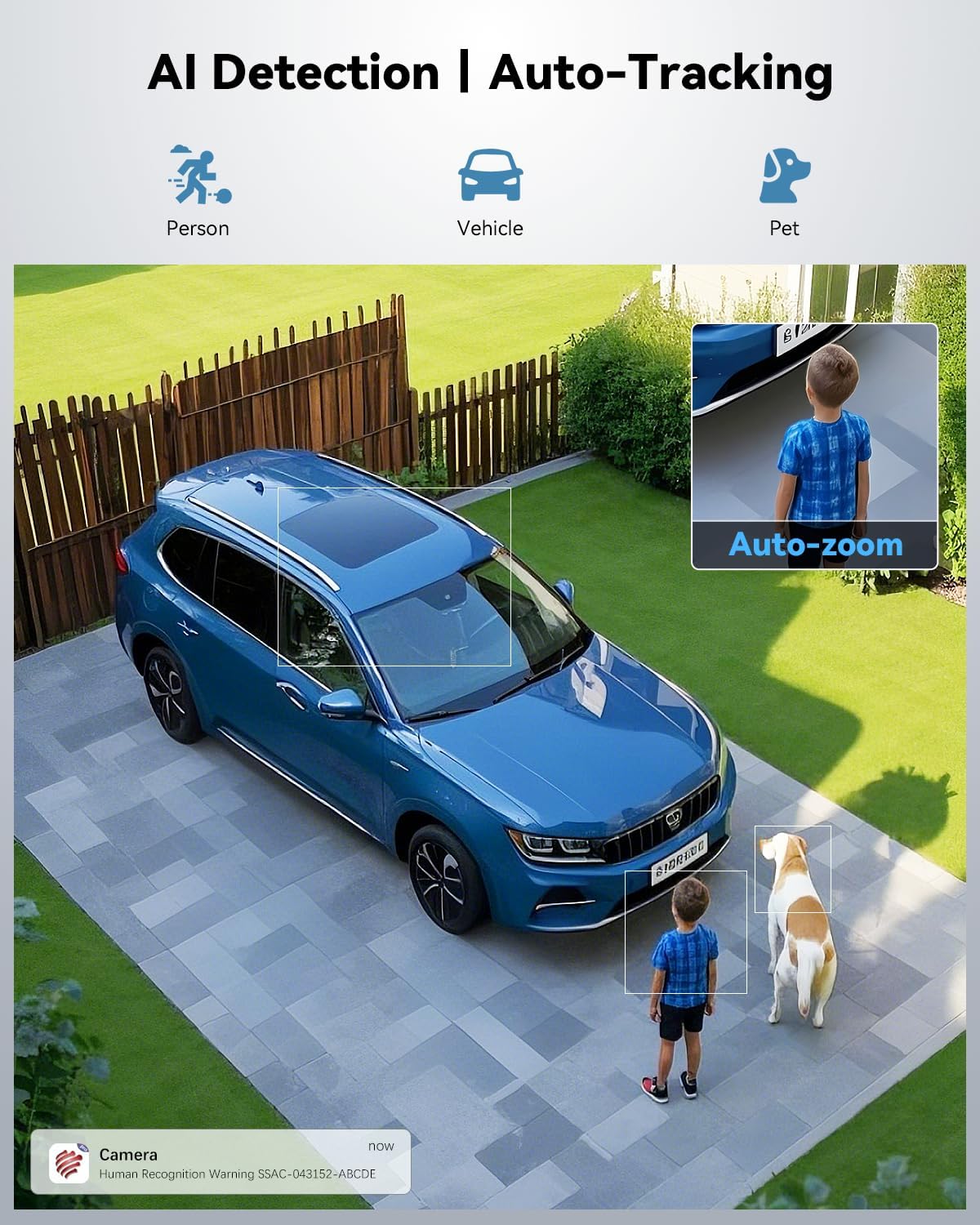
Image 7.7: Illustration of AI detection identifying a person, vehicle, and pet, with an auto-zoom feature on the detected person.

Image 7.8: Demonstration of the camera's auto-tracking capability with automatic zoom on a moving subject.
7.5. Presets and Patrol Lines
Configure up to 60 preset points and 2 patrol lines for automated surveillance of specific areas.

Image 7.9: Diagram showing 60 preset points and 2 patrol lines configured for 360-degree coverage of a property.

Image 7.10: Illustration highlighting the availability of 60 preset points and 2 patrol lines for surveillance.
7.6. 소리 및 빛 경보
When an event is detected, the camera can trigger a custom voice alert, activate a spotlight, and send instant notifications to your app.

Image 7.11: Depiction of the camera's powerful sound and light alert system, including siren, custom alarm sounds, and spotlight activation.

이미지 7.12: 이상view of the camera's warning system, featuring siren, spotlight, and customizable alarm sounds.
7.7. 프라이버시 마스킹
Utilize the privacy masking feature to block out sensitive areas from recording, ensuring privacy in specific zones.

이미지 7.13: Examples of user-defined video masks applied to different areas for effective privacy protection.
7.8. 저장 옵션
이 카메라는 녹화 내용을 위한 유연한 저장 솔루션을 제공합니다.
- MicroSD 카드: 최대 256GB까지 지원합니다(하드웨어는 포함되지 않음).
- 클라우드 스토리지: Secure cloud storage with a 7-day free trial available.
- FTP/NVR: Compatible with FTP servers and Network Video Recorders for continuous 24/7 recording.

이미지 7.14: 이상view of connectivity and storage options, including dual-band WiFi, NVR, TF card slot, and cloud storage.

이미지 7.15: 상세 view of cloud storage options (with 7-day trial) and the camera's support for up to 256GB TF card storage.
8. 유지관리
- 청소: 깨끗한 화질을 유지하려면 부드럽고 마른 천으로 카메라 렌즈를 정기적으로 닦으세요. 독한 화학 약품을 사용하지 마세요.
- 펌웨어 업데이트: Check the Ctronics Pro app periodically for available firmware updates to ensure optimal performance and security.
- 케이블 검사: 전원 및 네트워크 케이블은 마모나 손상 징후가 있는지 정기적으로 점검해야 하며, 특히 옥외 설치의 경우 더욱 중요합니다.
9. 문제 해결
카메라에 문제가 발생하면 다음의 일반적인 해결 방법을 참조하십시오.
- 전원 없음: 전원 어댑터가 카메라와 작동하는 전원 콘센트에 모두 단단히 연결되어 있는지 확인하세요.
- Wi-Fi 연결 없음: Verify your Wi-Fi network is active and the camera is within range. Re-attempt Bluetooth pairing or manual Wi-Fi setup via the app. Ensure you are connecting to the correct 2.4GHz or 5GHz network.
- 이미지 품질이 좋지 않음: 카메라 렌즈를 청소하십시오. 카메라 시야에 장애물이 있는지 확인하십시오. view. Ensure sufficient lighting for optimal night vision performance.
- 잦은 오경보: Adjust the AI detection sensitivity settings in the app. Define specific detection zones or privacy masks to exclude irrelevant areas.
- Auto Tracking Issues: Ensure the camera's PTZ mechanism is not obstructed. Verify that auto-tracking is enabled in the app settings.
- 앱 연결 문제: 스마트폰의 인터넷 연결이 안정적인지 확인하세요. 앱이나 휴대폰을 재시작하세요.
10. 사양
| 특징 | 사양 |
|---|---|
| 모델명 | CTIPC-870 |
| 실내/실외 사용 | 집 밖의 |
| 비디오 캡처 해상도 | 3840x2160(4K UHD) |
| 효과적인 스틸 해상도 | 8 MP |
| 광학 줌 | 30배 |
| 팬 / 틸트 각도 | 355° 팬, 90° 틸트 |
| IR 나이트 비전 범위 | 180 미터 |
| 컬러 야간 투시경 범위 | 80 미터 |
| 연결 프로토콜 | Wi-Fi (Dual-Band 2.4GHz/5GHz), Bluetooth |
| 저장 옵션 | MicroSD (up to 256GB), Cloud, FTP, NVR |
| AI 탐지 | Human, Vehicle, Pet |
| 재료 | 금속 |
| 방수 레벨 | IP66 |
| 전원 | 유선 전기(12볼트, 12와트) |
| 품목 치수(L x W x H) | 7.48 x 5.51 x 11.02 인치 |
| 품목 무게 | 5.06파운드 |
| 한국어: | 798394955586 |
11. 보증 및 지원
Ctronics products are covered by a manufacturer's warranty. For specific warranty details, technical support, or service inquiries, please refer to the official Ctronics web사이트를 방문하거나 고객 지원팀에 직접 문의하세요. 구매 증빙 자료로 구매 영수증을 보관하세요.