
WONLINK WL-AP7202-US
WONLINK AC1200 Outdoor Access Point User Manual
Model: WL-AP7202-US
브랜드: 원링크
1. 제품 오버view
The WONLINK AC1200 Outdoor Access Point is a robust and versatile networking device designed to provide stable and extended Wi-Fi coverage in outdoor environments. Featuring IP66 weatherproofing, dual-band AC1200 speeds, and long-range capabilities, it is ideal for various applications requiring reliable outdoor wireless connectivity.

Figure 1: WONLINK AC1200 Outdoor Access Point
2. 주요 특징
- IP66 All-Weather Outdoor Work: Designed to withstand extreme weather conditions including high winds, sandstorms, and heavy rain, ensuring continuous and reliable Wi-Fi coverage. The IP66 rating and durable ABS housing provide robust protection.
- AC1200 듀얼 밴드 와이파이: Delivers combined wireless speeds of up to 1200Mbps (867 Mbps on 5GHz and 300 Mbps on 2.4GHz). A high-performance triple-chip system ensures stable, high-speed Wi-Fi with seamless roaming, supporting over 120 devices simultaneously.
- 2*5 dBi Long-Range Coverage: Equipped with a dedicated PA module on both 5GHz and 2.4GHz frequencies and two high-gain 5 dBi antennas, extending Wi-Fi coverage up to 650 feet for 360° all-directional coverage.
- Gigabit Port & PoE Support: Features a high-speed Gigabit Ethernet port (WAN*1 & LAN*1) for lag-free wired connections. Supports 802.3 af/at Power over Ethernet (PoE) for flexible installation and reduced cable clutter, enabling single-cable power and data transmission.
- Multiple Installation Modes & Functions: Supports flexible deployment with pole-mount and wall-mount installation options. Operates in four versatile modes: Bridge, AP (Access Point), Router, and Repeater, adapting to various network requirements.

Figure 2: Weatherproof Capabilities
3. 패키지 내용
패키지에 모든 품목이 들어 있는지 확인하세요.
- 1x AC1200 Outdoor WiFi Extender
- 1x Operation Instructions (this manual)
- 1x RJ-45 Network Cable
- 1x POE 전원 어댑터
- 2x Fixing screws + 1x Fixed ties (for mounting)
4. 설정 및 설치
4.1 초기 연결
- 전원 연결: Connect the POE Power Adapter to a power outlet.
- 이더넷 연결: Connect one end of the RJ-45 Network Cable to the "POE" port on the POE Power Adapter and the other end to the "POE WAN" port on the Outdoor WiFi Extender.
- Computer Connection (for initial setup): Connect a second RJ-45 Network Cable from the "LAN" port on the POE Power Adapter to your computer's Ethernet port.
- 입장 Web 인터페이스: 열기 web browser on your computer and enter the default IP address (refer to the included quick start guide or product label for the exact IP, commonly 192.168.1.1 or similar) to access the device's configuration page. Follow the on-screen wizard for initial setup.

Figure 3: PoE Connection and Setup Diagram
4.2 물리적 설치
The device supports both pole-mount and wall-mount installations.
- 극 장착: Use the provided fixed ties to secure the extender to a pole. Ensure the pole is stable and provides a clear line of sight to the desired coverage area.
- 벽면 장착: Use the provided fixing screws to mount the extender securely to a wall. Choose a location that is structurally sound and allows for optimal signal propagation.

그림 4: 유연한 설치 옵션
For optimal performance, ensure minimal obstacles between the access point and the weak signal destination. A recommended signal strength of over 70% is ideal, which can be tested using a smartphone.

Figure 5: Optimal Placement for Signal Strength
5. 작동 모드
The WONLINK AC1200 supports four primary operating modes to suit various networking needs:
- AP(액세스 포인트) 모드: In this mode, the device connects to an existing wired network (e.g., from a router or modem) and broadcasts a wireless signal, allowing wireless devices to connect to the network. It extends the coverage of your existing wired network wirelessly.
- 라우터 모드 : The device acts as a primary router, connecting to an internet source (e.g., a modem) and providing both wired and wireless network access to connected devices. It manages IP addresses and network traffic.
- 리피터 모드: This mode extends the range of an existing wireless network. The device connects wirelessly to an existing Wi-Fi signal and re-broadcasts it, effectively boosting the signal strength and coverage area.
- 브리지 모드: In bridge mode, the device connects two separate wired networks wirelessly, acting as a wireless bridge. This is useful for connecting devices in different locations without running long Ethernet cables.
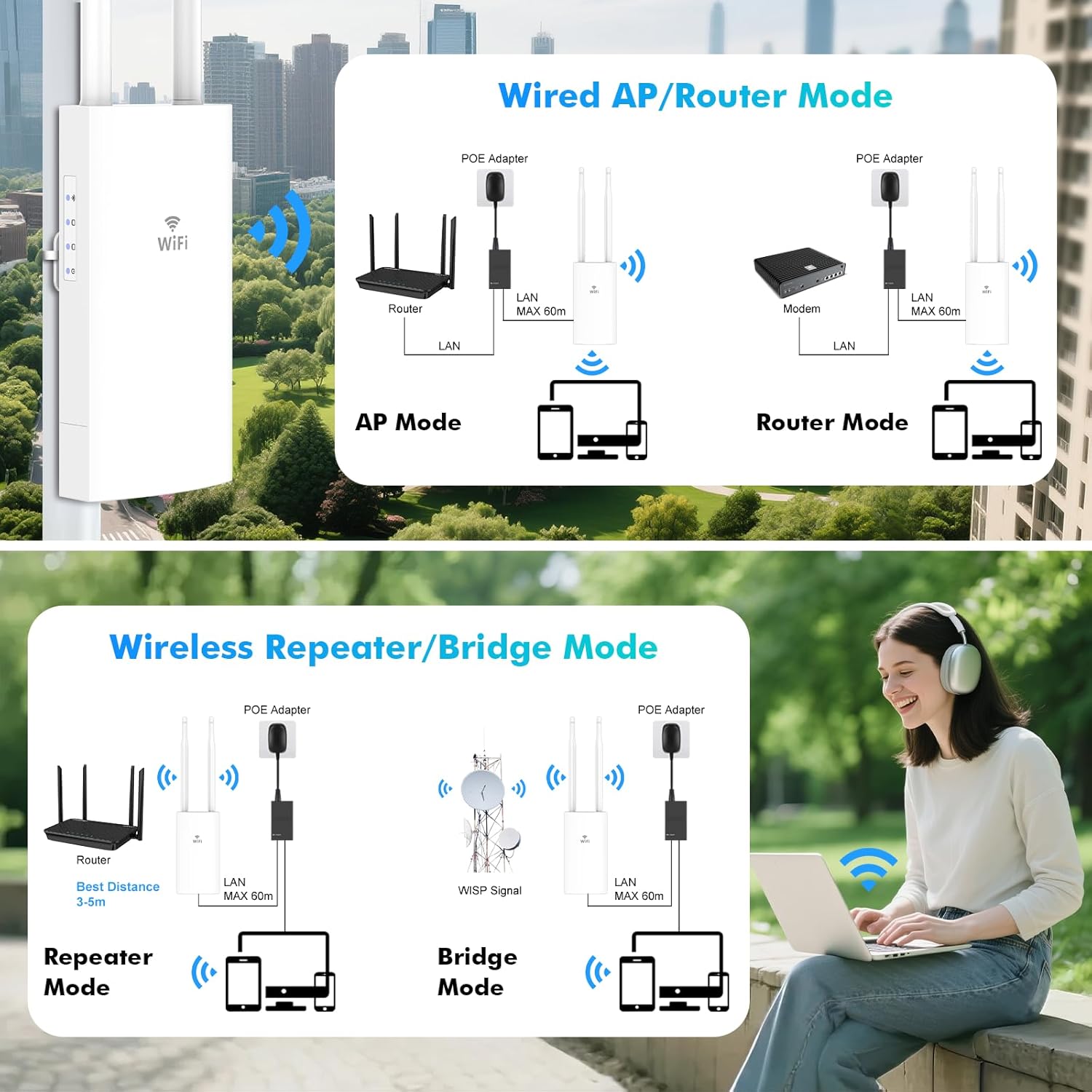
Figure 6: Operating Mode Configurations
6. 유지관리
To ensure optimal performance and longevity of your WONLINK Outdoor Access Point, consider the following maintenance tips:
- 정기 청소: 기기 외부를 주기적으로 부드러운 천으로 닦아주세요.amp cloth to remove dust and dirt. Ensure the device is powered off before cleaning. Do not use harsh chemicals or abrasive cleaners.
- 펌웨어 업데이트: Check the WONLINK official website regularly for firmware updates. Keeping the firmware updated ensures the best performance, security, and compatibility. Follow the instructions provided with the firmware update carefully.
- 케이블 및 연결 검사: Periodically check all cable connections (Ethernet, power) to ensure they are secure and free from damage.
- 환경 점검: While the device is weatherproof, ensure its mounting location remains stable and free from excessive debris buildup that could obstruct ventilation or signal.
7. 문제 해결
| 문제 | 가능한 원인 | 해결책 |
|---|---|---|
| No Wi-Fi signal or weak signal. | Incorrect placement, power issue, or configuration error. |
|
| 에 액세스할 수 없습니다. web 관리 인터페이스. | Incorrect IP address, network configuration, or cable issue. |
|
| Wi-Fi 속도가 느립니다. | Interference, network congestion, or outdated firmware. |
|
8. 제품 사양
| 기인하다 | 세부 사항 |
|---|---|
| 모델 번호 | WL-AP7202-US |
| 상표 | 원링크 |
| 무선 표준 | 802.11ac |
| 주파수 대역 클래스 | 듀얼 밴드(2.4GHz 및 5GHz) |
| 최대 무선 속도 | 1200 Mbps (300 Mbps on 2.4GHz, 867 Mbps on 5GHz) |
| 안테나 | 2 x 5 dBi High-Gain Antennas |
| 포트 | Gigabit Ethernet (WAN*1 & LAN*1) |
| PoE 지원 | 802.3 af/at PoE |
| 비바람에 견디는 등급 | IP66 |
| 특별 기능 | Access Point Mode, Weatherproof, Windproof, Triple-Chip System |
| 추천 용도 | Outdoor WiFi Coverage (Farm, Garden, Garage, Backyard, Mall, Community, Street) |
| 호환 장치 | Laptop, Personal Computer, Smart Television, Smartphone |
| 색상 | 하얀색 |
| 품목 무게 | 1.14파운드 |
| 패키지 크기 | 9.06 x 7.28 x 1.97 인치 |
9. 보증 및 지원
WONLINK provides professional technical support to assist you with any questions or issues regarding your AC1200 Outdoor Access Point.
For after-sales support, please contact us via email:
구체적인 보증 조건은 구매 서류를 참조하십시오.