
1. 서론
Thank you for choosing the roborock Q10 S5 Robot Vacuum and Mop Cleaner. This manual provides essential information for setting up, operating, and maintaining your device to ensure optimal performance and longevity. Please read this manual thoroughly before using the product and keep it for future reference.
2. 안전 정보
To reduce the risk of injury, electric shock, fire, or damage, please observe the following safety precautions:
- 이 기기는 8세 이상의 어린이와 신체적, 감각적 또는 정신적 능력이 저하된 사람이나 경험과 지식이 부족한 사람이 사용할 수 있습니다. 단, 이 경우에도 기기를 안전하게 사용하는 방법에 대한 감독이나 지시를 받고 관련 위험을 이해한 경우에 한합니다.
- 어린이가 이 제품을 가지고 놀지 않도록 감독해야 합니다.
- 어린이가 감독 없이 청소 및 사용자 유지관리를 해서는 안 됩니다.
- Do not use the robot in areas with open flames or fragile objects.
- 충전 도크가 벽에 기대어 평평한 곳에 놓여 있는지 확인하십시오.
- 기기와 함께 제공된 정품 전원 어댑터만 사용하십시오.
- Do not expose the robot to direct sunlight or moisture.
- 청소하기 전에 전원 코드, 작은 물건, 깨지기 쉬운 물건들을 바닥에서 치우세요.
3. 제품 오버view
Familiarize yourself with the components of your roborock Q10 S5 robot vacuum.
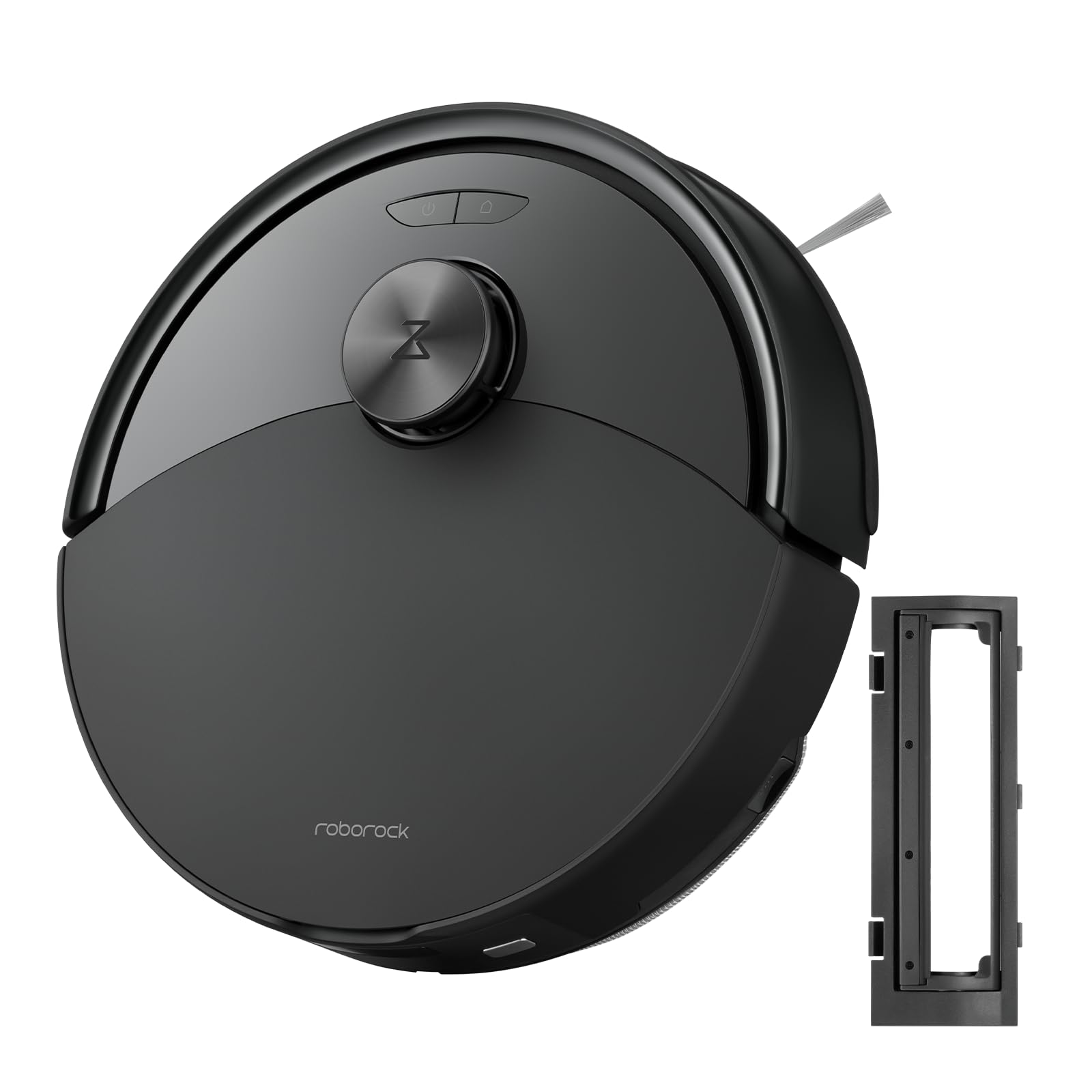
그림 1: The roborock Q10 S5 Robot Vacuum and Mop Cleaner. This image shows the top view of the robot, highlighting its sleek black design and main control buttons.
로봇 구성 요소:
- 상단 덮개: Lifts to reveal the dustbin and Wi-Fi indicator.
- 전원/청소 버튼: Press to start/pause cleaning, hold to turn on/off.
- Dock/Spot Clean Button: Press to send the robot back to the dock, hold for spot cleaning.
- LDS Sensor: 내비게이션 및 지도 제작용입니다.
- 범퍼: 장애물을 감지합니다.
- 사이드 브러시: 가장자리와 모서리의 이물질을 쓸어냅니다.
- 메인 브러시: Collects dirt and debris from floors. Features a floating design for better contact.
- 전방위 휠: For movement.
- 충전 연락처: 충전 도크와 연결됩니다.
- 절벽 센서: 로봇이 계단에서 떨어지는 것을 방지합니다.
- 물탱크 및 걸레 패드: 물걸레질 기능을 위해서입니다.
충전 도크:
- Dock Location Beacon: Helps the robot locate the dock.
- 충전 연락처: 로봇에 전력을 공급합니다.
- 전원 케이블 포트: 전원 어댑터를 연결합니다.
4. 설정
- 로봇 풀기: Carefully remove the robot and all accessories from the packaging. Remove any protective films or shipping materials.
- Install the Side Brush: Press the side brush onto its post until it clicks into place.
- 충전 도크를 놓으세요:
- 충전 도크를 벽에 기대어 단단하고 평평한 표면에 놓으십시오.
- 부두 양쪽에는 최소 0.5미터(1.6피트), 앞쪽에는 1.5미터(4.9피트)의 여유 공간을 확보하십시오.
- 전원 케이블을 충전 도크에 연결하고 벽면 콘센트에 꽂으세요.
- 초기 청구 : Place the robot on the charging dock. The robot will automatically turn on and begin charging. For first-time use, fully charge the robot before operation (approximately 4-6 hours). The power indicator light will breathe white during charging and turn solid white when fully charged.
- 앱 다운로드: 검색 "Roborock" in the App Store or Google Play Store, or scan the QR code on the packaging to download and install the app.
- Wi-Fi에 연결:
- Open the Roborock app and follow the on-screen instructions to add your device.
- 휴대폰이 2.4GHz Wi-Fi 네트워크에 연결되어 있는지 확인하세요.
- 를 누르고 계세요 독 그리고 힘 buttons simultaneously for 3 seconds until you hear the "Resetting Wi-Fi" voice alert.
- 앱의 안내에 따라 연결을 완료하세요.
5. 사용 설명서
청소 시작하기:
- 로봇으로부터: 를 누르세요 힘 button once. The robot will start cleaning.
- 앱에서: Open the Roborock app and tap the "Clean" button.
Pausing/Resuming/Stopping:
- 정지시키다: 로봇의 아무 버튼이나 누르거나 앱에서 "일시 중지"를 탭하세요.
- 재개하다: 를 누르세요 힘 button or tap "Resume" in the app.
- 중지: To stop a cleaning cycle, press the 독 button to send the robot back to the charging dock, or tap "Stop" in the app.
청소 기능:
- 물 탱크 채우기: Open the water tank cover, fill with clean water, and close securely.
- 걸레 패드를 부착하세요: Wet the mop pad and wring it out. Slide it into the mop pad slot until it is securely attached.
- Start Mopping: The robot will automatically detect the mop module and switch to mopping mode. You can adjust water flow levels in the app.
앱 기능:
- 지도 관리: Create and save maps, set no-go zones, virtual walls, and invisible barriers.
- 특정 객실 청소: Choose specific rooms to clean.
- 정기 청소: Set cleaning schedules for different times and days.
- 사용자 지정 청소 모드: 흡입력과 물 유량을 조절하세요.
- 원격 제어: 로봇의 움직임을 수동으로 제어합니다.
6. 유지관리
Regular maintenance ensures your roborock Q10 S5 operates efficiently. Always turn off the robot and unplug the charging dock before performing any maintenance.
Dustbin and Filter (Weekly):
- Lift the top cover of the robot.
- 쓰레기통을 제거하십시오.
- 쓰레기통 덮개를 열고 내용물을 쓰레기통에 비우세요.
- Remove the filter. Tap it gently to remove dust. The filter can be rinsed with water; ensure it is completely dry before reinstallation (allow 24 hours).
- Rinse the dustbin with water if necessary and allow it to dry completely.
- Reinstall the dry filter and dustbin.
Main Brush (Weekly):
- 로봇을 뒤집습니다.
- 탭을 눌러 메인 브러시 덮개를 분리하세요.
- 메인 브러시를 들어 올립니다.
- 청소 도구(제공된 경우)나 가위를 사용하여 브러시 주위에 엉킨 머리카락이나 이물질을 잘라내 제거하세요.
- Reinstall the main brush and cover, ensuring it clicks into place.
Side Brush (Monthly):
- 사이드 브러시를 풀어줍니다.
- 머리카락이나 이물질을 제거하십시오.
- Reattach and tighten the screw.
Sensors and Charging Contacts (Monthly):
- Wipe all sensors (cliff sensors, wall sensor, LDS sensor window) and the charging contacts on both the robot and the dock with a soft, dry cloth.
Mop Pad (After Each Use):
- 물탱크에서 걸레 패드를 제거합니다.
- Rinse thoroughly with water and allow it to air dry completely before next use.
7. 문제 해결
If you encounter issues with your robot, please refer to the following table before contacting support.
| 문제 | 가능한 원인 | 해결책 |
|---|---|---|
| 로봇이 켜지지 않습니다. | 배터리가 부족하거나 충전되지 않았습니다. | 로봇을 충전 도크에 올려놓고 충전이 시작되었는지 확인하세요. |
| 로봇이 Wi-Fi에 연결할 수 없습니다. | 와이파이 비밀번호가 잘못되었거나, 5GHz 네트워크를 사용하고 있거나, 신호가 약한 경우입니다. | Ensure correct 2.4GHz Wi-Fi, reset Wi-Fi on robot, move closer to router. |
| 로봇이 자주 멈춥니다. | Obstacles, tangled cables, or dirty sensors. | Clear floor, clean sensors, use no-go zones in app. |
| 세척 성능이 좋지 않음. | Full dustbin, dirty filter, tangled brushes. | Empty dustbin, clean/replace filter, clean main/side brushes. |
| 로봇이 이상한 소리를 낸다. | Debris in main brush, side brush, or wheels. | Inspect and clean all brushes and wheels for obstructions. |
If the problem persists, please refer to the Roborock app for more detailed error messages or contact customer support.
8. 사양
| 특징 | 세부 사항 |
|---|---|
| 모델 | Q10 S5 |
| 치수 | 약 353 x 350 x 96.5mm(13.9 x 13.8 x 3.8인치) |
| 무게 | 약 3.7kg(8.16파운드) |
| 배터리 | Lithium-Ion (Capacity not specified, typical for robot vacuums) |
| 정격 전력 | Approx. 60W (Typical for robot vacuums) |
| 쓰레기통 용량 | Approx. 470 ml (Typical for robot vacuums) |
| 물탱크 용량 | Approx. 300 ml (Typical for robot vacuums) |
| 흡입력 | Up to 10,000 Pa (HyperForce Suction Power from feature bullets) |
| Wi-Fi 연결 | 2.4GHz |
참고 : 사양은 예고없이 변경 될 수 있습니다.
9. 보증 및 지원
roborock products are manufactured to the highest quality standards. For detailed warranty information, please refer to the warranty card included in your product packaging or visit the official roborock website. For technical support, troubleshooting assistance, or to purchase replacement parts, please contact roborock customer service through the app or their official web대지.
공식적인 Web대지: www.roborock.com