1. 서론
This user manual provides detailed instructions for the Bemi Cognita Tab 6+ E-Reader. Please read this manual carefully before using your device to ensure proper operation and to maximize your reading experience. Keep this manual for future reference.
1.1 패키지 내용
- Bemi Cognita Tab 6+ E-Reader
- USB 충전 케이블
개봉 시 모든 구성품이 있는지, 그리고 양호한 상태인지 확인하십시오.
2. 디바이스 오버view
Familiarize yourself with the physical components of your Bemi Cognita Tab 6+ E-Reader.

그림 2.1: 앞쪽 view of the Bemi Cognita Tab 6+ E-Reader. The device features a 6-inch E-Ink display with the Bemi logo and model name visible. The screen is designed to mimic paper for a comfortable reading experience.

그림 2.2: 앞면과 뒷면 view of the Bemi Cognita Tab 6+ E-Reader. This image highlights the device's thin design and the textured back cover, which provides a secure grip.

그림 2.3: 옆 view of the Bemi Cognita Tab 6+ E-Reader, illustrating the location of the power button and a small LED indicator. This button is used for turning the device on/off and waking it from sleep.
2.1 주요 구성 요소:
- 6-inch E-Ink Touchscreen: Glare-free display for comfortable reading.
- 전원 버튼: 기기의 측면에 전원 켜기/끄기 및 절전/깨우기 버튼이 있습니다.
- USB-C 포트: 충전 및 데이터 전송용입니다.
- MicroSD 카드 슬롯: Expandable storage up to 256GB.
- Side Control Buttons: For page turning and navigation.
- SMARTlight: Adjustable front light for reading in various conditions.
3. 설정
3.1 초기 충전
Before first use, fully charge your Bemi Cognita Tab 6+ E-Reader. Connect the provided USB cable to the device's USB-C port and the other end to a compatible USB power adapter (not included) or a computer's USB port.
- 일반적으로 완전 충전에는 약 2~3시간이 걸립니다.
- 충전 표시등은 충전 상태를 보여줍니다.
3.2 전원 켜기/끄기
- 전원을 켜려면: Press and hold the Power button (refer to Figure 2.3) for a few seconds until the screen activates.
- 전원을 끄려면: Press and hold the Power button until a power-off menu appears, then select "Power Off".
- 잠들기/깨어나기: 전원 버튼을 짧게 누르면 기기가 절전 모드로 전환되거나 다시 켜집니다.
3.3 Wi-Fi 연결
Connecting to Wi-Fi allows you to download books, transfer files, and access online services.
- From the home screen, tap the 설정 상.
- 선택하다 와이파이.
- Wi-Fi 스위치를 전환합니다. On.
- The device will scan for available networks. Select your desired network from the list.
- 메시지가 표시되면 비밀번호를 입력한 다음 탭하세요. 연결하다.
3.4 초기 구성
Upon first power-on, you may be guided through initial setup steps, including language selection and time zone settings. Follow the on-screen prompts.
4. 사용 설명서
4.1 인터페이스 탐색
The Bemi Cognita Tab 6+ features a touch-sensitive E-Ink screen and physical side buttons for navigation.
- 터치 제스처: 탭하여 선택하고, 스와이프하여 스크롤하고, 핀치 줌(지원되는 경우)으로 확대/축소하세요.
- 측면 버튼: Use the physical buttons on the side to turn pages forward or backward during reading.
- G-센서: The device automatically rotates the screen orientation based on how you hold it, accommodating both right and left-handed users.
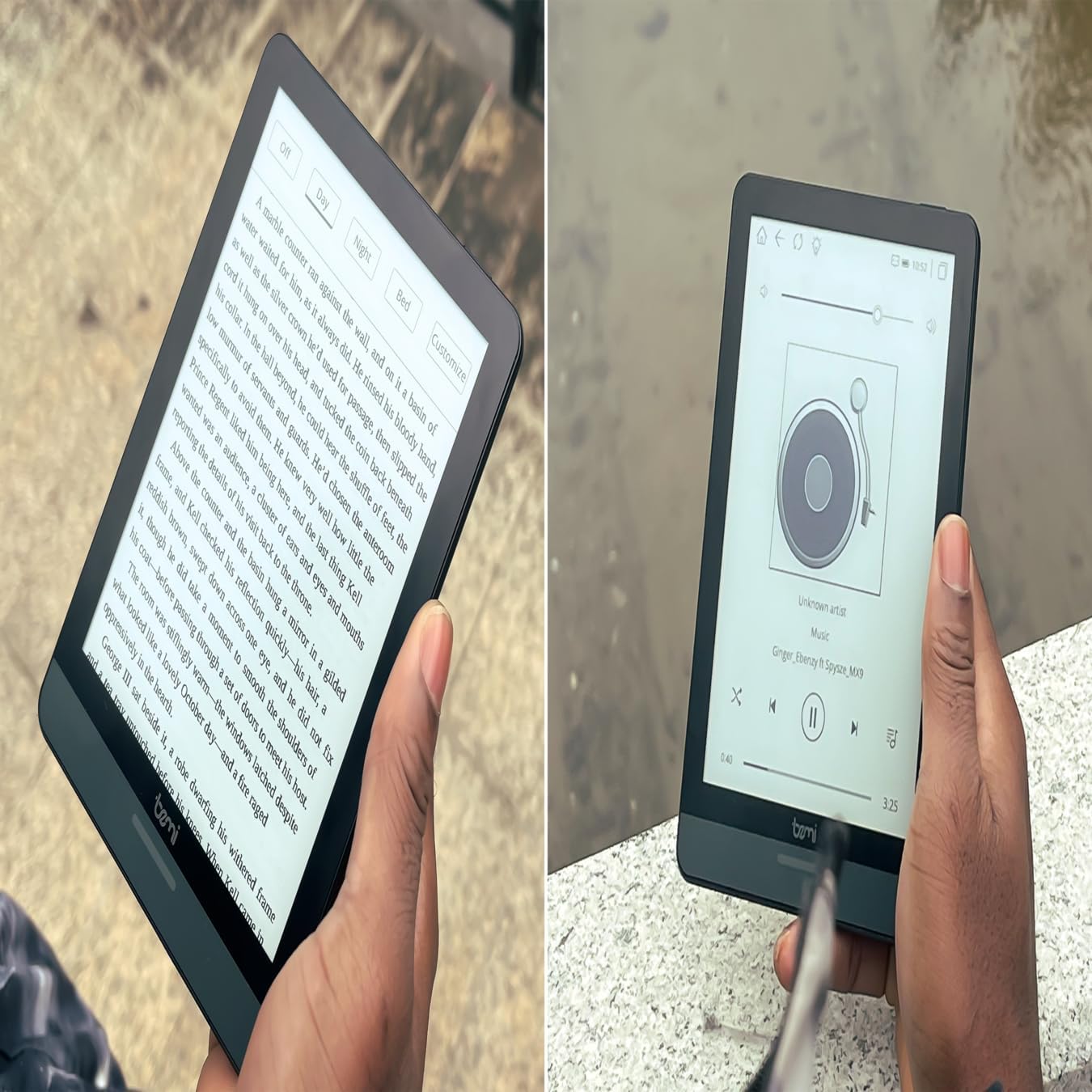
그림 4.1: User holding the Bemi Cognita Tab 6+ E-Reader while reading. The image shows the clear text display on the E-Ink screen, highlighting the device's readability.
4.2 책 읽기
책을 펼쳐서 읽는 것:
- From the home screen, tap on the 도서관 or 서적 상.
- Browse your collection or use the search function to find a book.
- Tap on the book cover to open it.
- Use the touch screen or side buttons to turn pages.
4.3 Adjusting SMARTlight
The SMARTlight feature allows you to adjust both the brightness and color temperature of the screen's front light.
- During reading, tap the center of the screen to bring up the reading menu.
- 찾아보세요 빛 or SMARTlight 상.
- Adjust the sliders for brightness (intensity) and color temperature (warm to cool) to your preference.
4.4 전송 Files
You can transfer e-books and other supported files to your device via Wi-Fi or USB cable.
- Wi-Fi를 통해: If your device supports cloud services or direct Wi-Fi transfer, follow the specific application instructions.
- USB 케이블을 통해:
- Connect your E-Reader to a computer using the provided USB cable.
- The device will appear as a removable storage drive on your computer.
- 원하는 항목을 드래그 앤 드롭하세요 files (e.g., EPUB, PDF, MOBI) into the appropriate folders on the E-Reader (e.g., "Books" folder).
- 케이블을 분리하기 전에 컴퓨터에서 장치를 안전하게 꺼내십시오.
4.5 Using MicroSD Card
To expand storage, insert a microSD card (up to 256GB) into the designated slot.
- microSD 카드의 금색 접촉면이 아래쪽을 향하도록 하여 딸깍 소리가 나면서 제자리에 고정될 때까지 부드럽게 삽입하십시오.
- 제거하려면 카드가 튀어나올 때까지 안쪽으로 살살 밀어주세요.
- Files on the microSD card will be accessible through the device's file manager or library.
5. 유지관리
5.1 장치 청소
- 부드럽고 보푸라기가 없는 천을 사용하여 기기의 화면과 본체를 가볍게 닦으세요.
- 완고한 얼룩의 경우 약간 damp천에 물을 묻히거나 전자제품용으로 특별히 고안된 화면 세정제를 묻힙니다.
- 강한 화학 물질, 연마재 또는 과도한 습기를 사용하지 마십시오.
5.2 배터리 관리
- 배터리 수명을 연장하려면 배터리를 자주 완전히 방전하지 마세요.
- 장기간 사용하지 않을 때는 기기를 서늘하고 건조한 곳에 보관하세요.
- Charge the device regularly, even if not used, to prevent deep discharge.
5.3 보관
When not in use, store your E-Reader in a protective case to prevent scratches and damage to the screen.
6. 문제 해결
If you encounter issues with your Bemi Cognita Tab 6+, refer to the following common solutions:
| 문제 | 해결책 |
|---|---|
| 장치가 켜지지 않습니다. | Ensure the battery is charged. Connect the device to a power source for at least 30 minutes. If it still doesn't turn on, try a hard reset by holding the power button for 10-15 seconds. |
| 화면이 정지되었거나 응답하지 않습니다. | Perform a soft reset by holding the power button for 5-7 seconds until the device restarts. If the issue persists, try a hard reset. |
| Wi-Fi에 연결할 수 없습니다. | Check if Wi-Fi is enabled in settings. Verify the Wi-Fi password. Restart your E-Reader and your Wi-Fi router. Ensure you are within range of the Wi-Fi signal. |
| Books are not appearing in the library. | 확인하십시오 files are in a supported format (e.g., EPUB, PDF). If transferred via USB, ensure they are in the correct folder. Try refreshing the library or restarting the device. |
| 배터리가 빨리 소모됩니다. | Reduce screen brightness. Turn off Wi-Fi and Bluetooth when not in use. Close background applications. Ensure the device is not constantly searching for networks. |
7. 사양
| 특징 | 세부 사항 |
|---|---|
| 모델명 | Bemi Cognita Tab 6+ |
| 화면 크기 | 6 Inches (E-Ink Carta, 1024x758, 212 ppi) |
| 내부 메모리 | 32GB (XNUMX기가바이트) |
| 확장 가능한 스토리지 | MicroSD 카드 슬롯, 최대 256GB |
| 연결성 | 와이파이, 블루투스 |
| 운영 체제 | 안드로이드 8.1 |
| 휴먼 인터페이스 입력 | Touchscreen, Side Control Buttons |
| 특별 기능 | Adjustable SMARTlight, G-Sensor for auto-rotation, Glare-Free & Eye-Friendly E-Ink Display |
| 크기(대략) | 7mm 두께 |
| 포함된 구성 요소 | USB 케이블 |
8. 보증 및 지원
8.1 보증 정보
Your Bemi Cognita Tab 6+ E-Reader comes with a standard manufacturer's warranty. Please refer to the warranty card included in your product packaging or visit the official Bemi web보증 범위 및 기간에 대한 자세한 약관은 해당 사이트를 참조하세요.
보장 범위를 확대할 수 있는 추가 보호 플랜이 제공될 수 있습니다. 자세한 내용은 판매점에 문의하십시오.
8.2 고객 지원
For technical assistance, troubleshooting beyond this manual, or warranty claims, please contact Bemi customer support:
- Web대지: www.bemi-electronics.com
- 이메일: Refer to the Bemi web연락처 이메일 사이트입니다.
- 핸드폰: Refer to the Bemi website for contact phone numbers.
When contacting support, please have your device model (Cognita Tab 6+) and purchase information ready.