
1. 서론
구매해주셔서 감사합니다asing the SODLK T21 40W Portable Bluetooth Speaker. This manual provides essential information for setting up, operating, and maintaining your speaker. Please read it carefully before use to ensure optimal performance and longevity of the product.
2. 제품 특징
- 6D stereo surround sound for an immersive audio experience.
- Strengthened deep bass with 2pcs vibrating diaphragm.
- 4pcs built-in driver unit (2pcs bass driver unit + 2pcs Mids & Tweets) for balanced sound.
- 5Play model: Supports TF card slot, U disk, AUX input, Bluetooth, and TWS connection.
- 2pcs power amplifier for robust audio output.
- Integrated LED light for visual ambiance.
- Inbuilt 3600mAh battery for extended playtime.
- TWS (True Wireless Stereo) function to connect two speakers for amp강화된 스테레오 사운드.
3. 패키지 내용
포장을 풀 때 아래 나열된 모든 품목이 모두 들어 있고 상태가 양호한지 확인하세요.
- SODLK T21 휴대용 블루투스 스피커
- USB Type-C 충전 케이블
- 사용자 설명서

Image: The SODLK T21 Portable Bluetooth Speaker, highlighting its ultra-portable design and key features like IPX7 waterproof rating, BT 5.3, punchy bass, voice assistant, Type-C port, 18 hours playtime, stereo pairing, and hands-free calls.
4. 컨트롤 및 표시기
Familiarize yourself with the speaker's control panel for easy operation:
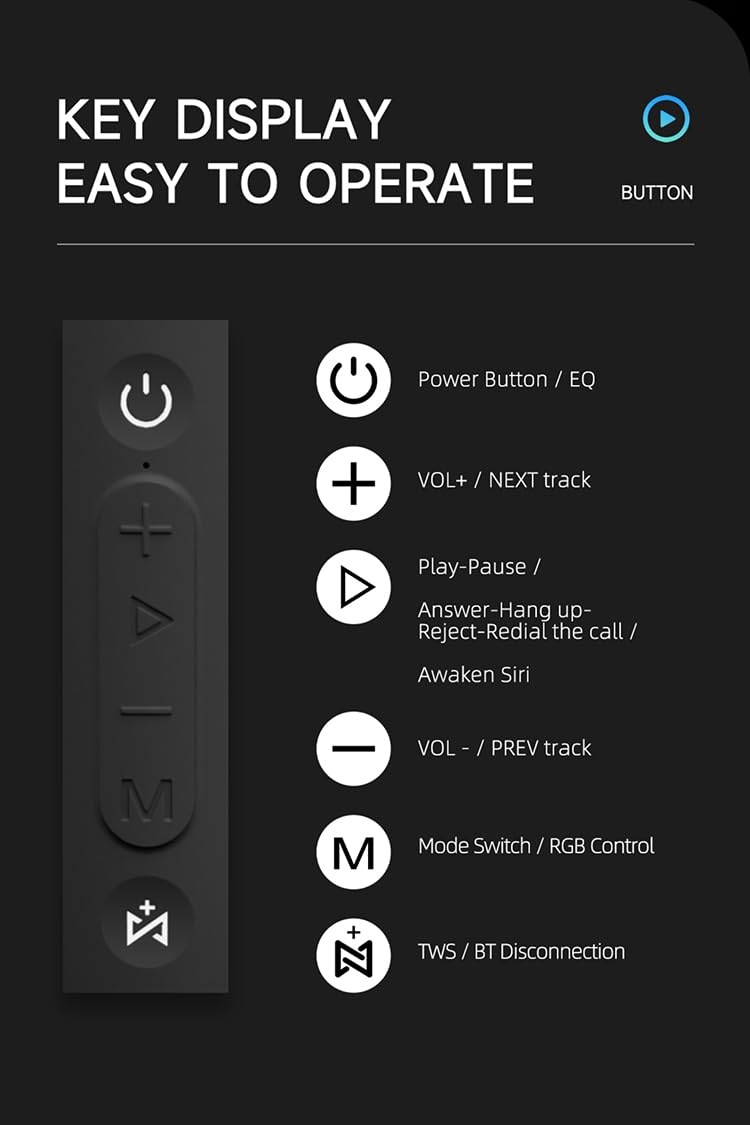
이미지: 자세한 view of the SODLK T21 speaker's control panel, showing buttons for Power/EQ, Volume Up/Next Track, Play/Pause/Answer/Hang Up/Reject/Redial/Awaken Siri, Volume Down/Previous Track, Mode Switch/RGB Control, and TWS/BT Disconnection.
- Power Button / EQ: Press and hold to power on/off. Short press to cycle through EQ modes.
- VOL+ / NEXT track: 짧게 누르면 볼륨이 커지고, 길게 누르면 다음 트랙으로 넘어갑니다.
- Play-Pause / Answer-Hang up-Reject-Redial the call / Awaken Siri: Short press for play/pause. Short press to answer/hang up calls. Long press to reject calls. Double press to redial. Triple press to awaken Siri (or other voice assistant).
- VOL- / PREV track: 짧게 누르면 볼륨이 낮아집니다. 길게 누르면 이전 트랙으로 이동합니다.
- Mode Switch / RGB Control: Short press to switch between input modes (Bluetooth, TF card, U disk, AUX). Long press to control RGB lighting effects.
- TWS / BT Disconnection: Short press to initiate TWS pairing. Long press to disconnect Bluetooth.
5. 설정 및 작동
5.1 스피커 충전
Before first use, fully charge the speaker. Connect the provided USB Type-C cable to the speaker's charging port and the other end to a compatible USB power adapter (5V/1A recommended). The charging time is approximately 3-4 hours.
5.2 전원 켜기/끄기
를 누르고 계세요 전원 버튼 for 2-3 seconds to turn the speaker on or off. An audible prompt will indicate the power status.
5.3 블루투스 페어링
- 스피커를 켜세요. 자동으로 블루투스 페어링 모드로 전환되며, LED 표시등이 깜빡입니다.
- 기기(스마트폰, 태블릿 등)에서 Bluetooth를 활성화하세요.
- 검색 "SODLK T21" in the list of available Bluetooth devices and select it to connect.
- Once connected, the LED light will become solid, and you will hear a confirmation tone.
5.4 TWS(True Wireless Stereo) 페어링
To achieve stereo sound, you can connect two SODLK T21 speakers together:

Image: Two SODLK T21 speakers shown side-by-side with a TWS icon and dashed lines indicating a wireless connection, illustrating the stereo pairing feature.
- Ensure both SODLK T21 speakers are powered on and not connected to any other Bluetooth device.
- 한 스피커(기본 스피커)에서 짧게 누릅니다. TWS 버튼스피커가 TWS 페어링 모드로 들어갑니다.
- 두 스피커는 자동으로 서로 연결됩니다. TWS 페어링이 성공하면 확인음이 울립니다.
- 이제 5.3절에 설명된 대로 블루투스를 통해 기기를 기본 스피커에 연결하세요. 두 스피커에서 스테레오로 오디오가 재생됩니다.
5.5 모드 전환
짧게 누르세요 모드 전환 버튼(M) to cycle through available input modes: Bluetooth, TF Card, U Disk, and AUX. The speaker will announce the current mode.
5.6 RGB 조명 제어
길게 누르세요 모드 전환 버튼(M) to change or turn off the RGB lighting effects.

Image: The SODLK T21 speaker displaying a vibrant rainbow light show, illustrating its 16.8 million color RGB light effect feature.
6. 유지관리
- 부드럽고 마른 천으로 스피커를 닦으세요. 연마성 세제나 용제를 사용하지 마세요.
- 스피커를 극한 온도, 직사광선, 습기에 두지 마세요.
- 스피커를 직접 분해하거나 수리하지 마십시오. 그렇게 하면 보증이 무효화됩니다.
- 장시간 사용하지 않을 때는 스피커를 시원하고 건조한 곳에 보관하세요.
7. 문제 해결
| 문제 | 가능한 원인 | 해결책 |
|---|---|---|
| 스피커가 켜지지 않습니다. | 배터리가 부족합니다. | 스피커를 완전히 충전하세요. |
| 블루투스로 페어링할 수 없습니다. | 스피커가 페어링 모드가 아니거나 이미 다른 기기에 연결되어 있습니다. | Ensure the speaker is in pairing mode (flashing LED). Disconnect from other devices. Restart both speaker and device. |
| 소리가 나지 않습니다. | 볼륨이 너무 작거나, 입력 모드가 잘못되었거나, 기기가 재생되지 않는 경우입니다. | Increase volume on both speaker and device. Check input mode. Ensure audio is playing on the connected device. |
| TWS 페어링이 실패합니다. | 스피커 간 거리가 너무 멀거나 이미 다른 기기에 연결되어 있습니다. | Ensure speakers are within close proximity. Disconnect both speakers from any other Bluetooth devices before initiating TWS pairing. |
8. 사양

Image: The SODLK T21 speaker with its dimensions (232mm height, 100mm width) and a table of specifications including model number, color, BT version, output, waterproof rating, play time, charging time, working distance, input, speaker size, and speaker weight.
| 특징 | 세부 사항 |
|---|---|
| 모델 번호 | T21 |
| 색상 | 검은색 |
| BT 버전 | BT5.3 |
| 산출 | 40와트 |
| 방수복 | IPX7 |
| 플레이 타임 | 최대 18시간 |
| 충전 시간 | 3-4시간 |
| 작업 거리 | 최대 18M |
| 입력 | 5V/1A |
| 스피커 크기 | 232mm * 100mm |
| 스피커 무게 | 1.12kg(XNUMXkg) |
9. 보증 및 지원
The SODLK T21 Portable Bluetooth Speaker comes with a standard manufacturer's warranty. Please refer to the warranty card included in your package for specific terms and conditions. For technical support or service inquiries, please contact your retailer or the SODLK customer service team.